
DOWNLOAD THE APP


Customer Services
Copyright © 2025 Desertcart Holdings Limited
DOWNLOAD THE APP

🔒 Elevate your security game with 4K precision and smart alerts—because your peace of mind deserves the best.
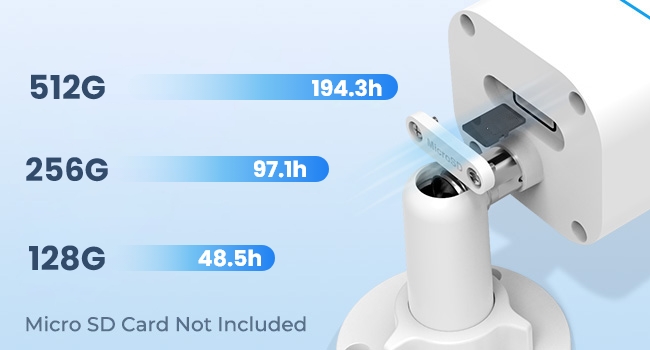
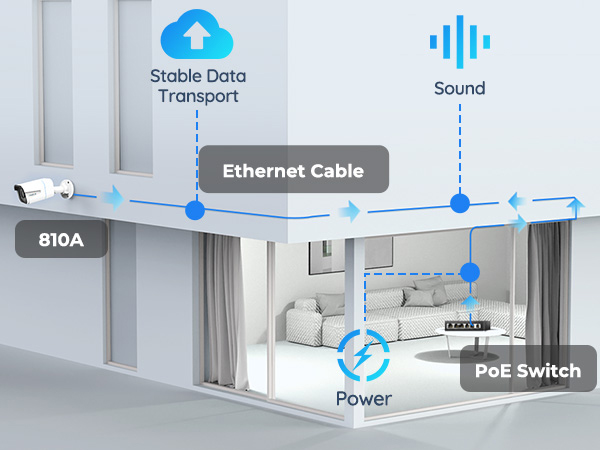
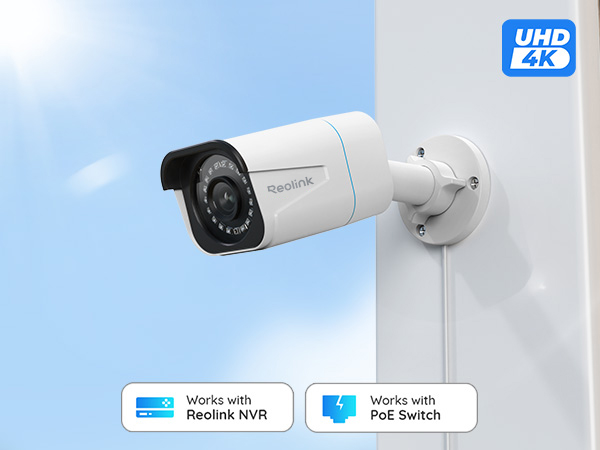
The REOLINK RLC-810A is a professional-grade 4K/8MP PoE wired security camera designed for indoor and outdoor use. Featuring advanced human and vehicle detection, 100ft infrared night vision, and a robust IP67 waterproof rating, it delivers crystal-clear surveillance with minimal false alarms. Its single-cable PoE setup ensures quick, reliable installation, while the Reolink App offers intuitive remote access and smart playback. Compatible with up to 512GB microSD storage, this camera is ideal for millennial professionals seeking high-definition, hassle-free home or office security.




| ASIN | B07K74GWX5 |
| Alert Type | Motion Only |
| Antenna Location | Indoor/Outdoor |
| Are Batteries Required | No |
| Best Sellers Rank | #109 in Bullet Surveillance Cameras |
| Brand | REOLINK |
| Color | White |
| Compatible Devices | Smartphone, tablet |
| Connectivity Protocol | Ethernet |
| Connectivity Technology | Ethernet |
| Control Method | App |
| Controller Type | Android |
| Customer Reviews | 4.4 out of 5 stars 1,592 Reviews |
| Effective Still Resolution | 8 MP |
| Effective Video Resolution | 8 MP |
| Flash Memory Supported Size Maximum | 512 GB |
| Flash Memory Type | Micro SD |
| Form Factor | Bullet |
| Frame Rate | 25fps |
| Indoor Outdoor Usage | Outdoor |
| Indoor/Outdoor Usage | Outdoor |
| Item Dimensions | 4.25 x 4.8 x 7.72 inches |
| Item Weight | 488 Grams |
| Manufacturer | Reolink Digital |
| Model Number | RLC-810A |
| Mount Type | Ceiling Mount |
| Night Vision | Night Color |
| Night Vision Range | 100 Feet |
| Number of Channels | 1 |
| Number of Items | 1 |
| Other Special Features of the Product | Local Recording, Time-Lapse |
| Photo Sensor Resolution | 8 MP |
| Power Source | Corded Electric |
| Recommended Uses For Product | Indoor/Outdoor |
| Room Type | Office |
| Shape | Bullet |
| Special Feature | Local Recording, Time-Lapse |
| Specific Uses For Product | Amateur, Inside; Amateur, Outside; Professional, Surveillance |
| UPC | 725423889727 |
| Unit Count | 1 Count |
| Video Capture Format | MPEG-4 |
| Video Capture Resolution | 4k |
| Viewing Angle | 87 Degrees |
| Voltage | 12 Volts (DC) |
| Waterproof Rating | IP67 |
| Wattage | 12 watts |
| Wireless Technology | Eternet |
S**N
Great camera
I'm using this camera via RTSP with Frigate software, and it's working great. One small drawback is that it only seems to support H.265 (HEVC), and if you would prefer H.264 (less efficient but compatible with more software), I don't think that's an option - or at least I can't figure out how to select that mode. But otherwise it works great - very reliable, great picture quality, decent audio quality (though not as good as the picture quality IMHO), and "just works".
P**T
Compact, good color and sharpness, good value, don't need a power cord as it's PoE
Great little camera so far. This is a good camera for a side yard, better than a dome camera if your side yard is narrow because a bullet camera can swivel to the side and point down the alley or side yard. The color is good, sharpness is good, infrared night vision is good. -- Setup was a snap. I installed an indoor/outdoor PoE switch in the garage so I only needed one hole in the wall to the outside for the Ethernet cable (I used Cat 7). I installed the camera under the roof eaves to protect it (remember to loosen the collar to aim the camera and then tighten it), plugged in the Ethernet cable that goes to the garage PoE switch (which is plugged into an AC outlet), went to my desktop (you can also do it on a phone or iPad), and ran the Reolink software. It scanned and found the camera right away, I gave it a password and a name and now I can see it together with images from cameras on the other side of the house. I didn't need PTZ for the side yard (it's narrow, so it wouldn't help much), so this is the right combination of features for this location. Happy with the purchase and the price was reasonable for the image quality and ease of installation .
G**A
Power over Ethernet Camera
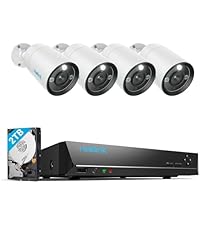
The Reo Link set of cameras are of a good quality and build. The cameras themselves show sharp pictures and take good videos of objects (animals, vehicles, people). The configuration is fairly straight-forward as I have it linked to the Reo Link DVR system. This system is a power over ethernet (POE) solution which works great for me as I have installed the cameras (we have five total) in places where power is not currently run. Motion detection is good though the exclusion capability is a bit harder to master. You can set zones for the camera to focus on and determine the size of the object (again animals, vehicles, or people).
S**K
Looks sharp, day and night
I've tried a variety of cameras where this one now lives, until this camera they've been wireless. While they work most of the time, they disappear with unacceptable frequency. The best solution is wired, and POE is even better. My house is old and wiring changes are a challenge so getting an ethernet drop to where the camera is mounted was a challenge I procrastinated for a long time. Anyway, I have wire to the location where the camera goes. It's POE so getting it onto your network is easy. Outside of the need for network, nothing else has to go there. My switch supplies sufficient POE power so to get it on the network was as simple as plugging it in and letting it boot. Once it pulls an IP address, you'll need to use the Reolink app to set it up. This isn't hard and out of the box can record to an inserted SD card. I chose instead to use my Blue Iris computer to record from it and so you need to dive deeper into the settings to turn on the functions for that purpose. My thoughts on this camera so far are that I'll probably buy more for locations where a POE connection is available.
H**Y
good resolution and vehicle detection AI
I bought this 8 MP ( 4K) and also 5 MP camera. The resolution on this 4K is of course much clearer than th 5MP model ( which isn't too bad either ) All the other features are the same for both models. The following is the review I wrote for the 5 MP and is the same comments. The AI motion detection for vehicles works really well. I haven't adjusted it for people yet . The time lapse feature did not work with the Android Reolink app. I contacted tech support and they were very responsive. They had me try some older versions of app and send in some crash reports from app so their software engineers could evaluate. Ultimately they admitted there is some bug in the app that they will hopefully solve in next version. They said with Iphone app the time lapse works. I found it refreshing that a company actually responds and follows up on something like this. Otherwise the android and windows apps work fine at live viewing, viewing playback from the SD card, changing settings, and doing firmware updates. If you have the Windows app running you can have it save longer motion clips directly to your computer hard drive, take photo snapshots, and live video . I have two of the Reolink cameras and one of them I installed on a remote solar powered cart that views my garden. It is linked over a bridged router . I was surprised that the video quality and playback worked so well considering I used older routers. This remote system I powered with direct plugged in 12v. The other camera I am using POE on the internet cable. It is nice to have both options. I usually leave the infared LEDs off , but when they are on they light up a large area . Construction on this camera is solid and quality. This new version is super simple to set up the angle with just one tightening ring to tighten . But one of the rings on camera was so tight out of box I had to use a channel lock pliers to loosen it up. The other camera was able to be loosened by hand. So all in all good product and excellent support from company.
W**5
Good Upgrade From the 4MP Cameras - Some Smart Home Integration Possible
I used this camera to replace an existing street facing 4MP Reolink Camera. Although I am happy with my 4MP system overall, I wanted something a little bit clearer for this location, particularly at night. The swap was very easy as both cameras have the same mounting plate (holes line up), the same wire connection and the NVR auto-detected the new camera immediately. The 4K camera did not disappoint - both the day and night quality are significantly better and you get a slightly larger field of view. I have attached night time captures from both cameras for comparison. For the reasonable price, I am considering upgrading a few more and re-purposing the the 4MP cams for less critical duties. I did consider the 5MP version, but for only $15 more (at the time I purchased) and no real need to integrate with 3rd party software (more on that below), I thought It was worth going all the way, The motion detection appears similar to the 4MP versions, you have the same options to adjust the sensitivity and detection areas. Since this camera sees a lot of foot and vehicle traffic, I am not utilizing alerts, but the motion events are still helpful to narrow things down when playing back footage. For the advanced users, although there does not appear to be a way to integrate this camera fully with 3rd party apps/software (I believe you can with the 4/5MP versions) - I was able to get the below snapshot URL to work (loads a still snapshot from the camera each time your reload the page). This same URL also works for my 4MP cameras. http://<YOUR NVR'S LOCAL IP ADDRESS>/cgi-bin/api.cgi?cmd=Snap&channel=<CAMERA'S CHANNEL NUMBER ON NVR>&rs=fsj78fjkdf&user=<NVR USER NAME>&password=<NVR PASSWORD> (Replace the <CAPITALIZED TEXT> with your systems info - channel number should start with 0) This URL will only work in a web browser if you are connected to the same network as the the NVR. I am an avid DIYer but not a networking expert - im sure there is way to use port forwarding or some other method to accomplish this from outside your network, but that it outside my wheelhouse. With that said, I was able to add this camera to my Vera Edge home automation hub as a "Generic IP Camera using the above URL which does allow me to access the snapshots through the Vera interface and Imperihome locally or remotely. This also opens up the ability to add snapshots from the camera to notifications/scenes or have it auto-reload a new snapshot a set interval on a tablet based dashboard like Imperihome or SmartTiles. I did not test it on SmartThings or any other hub, but if it worked on Vera, I assume its possible on others as well. Long story short don't dismiss it completely if you only need partial smart home integration - the snapshot functionality can be very useful for door bell/door lock notifications or other connected system triggers beyond the native Reolink motion based alerts.
J**M
Impressive products and software
REOLINK rocks! I upgraded to reolink 5mp and 8mp IP cameras and 2 NVRs, from an older and un-named "another brand". Reolink's ease of use, functionality, setup is continuously proving itself as a fantastic value for the money. The picture quality is awesome, the motion detection is Ai assisted and fantastic. The connectivity, options and storage capacity are second to none in my opinion. I had a problem with 1 of my 7 cameras, after a bit of on line trouble shooting it was shipped out/replaced very quickly. I am totally impressed and grateful for REOlink, their products and support.
A**C
No call, no show 0/5; does not work on older NVRs
We purchased an NVR years ago and one of these cameras that was compatible. Somewhere in the last several years, they must have updated the cameras to where new ones are no longer compatible with our NVR. Tried contacting the manufacturer and it said their phone lines were down. So, I contacted Amazon, who sent a request for them to reach out to me within 48, which also did not happen as of 72 hours later. We liked the system and the first cameras. Pretty sad the company even didn't bother to call me.
Trustpilot
1 month ago
2 months ago