We remain fully operational. Our teams are working around the clock to ensure your deliveries continue safely.

DOWNLOAD THE APP


Customer Services
Copyright © 2025 Desertcart Holdings Limited
DOWNLOAD THE APP
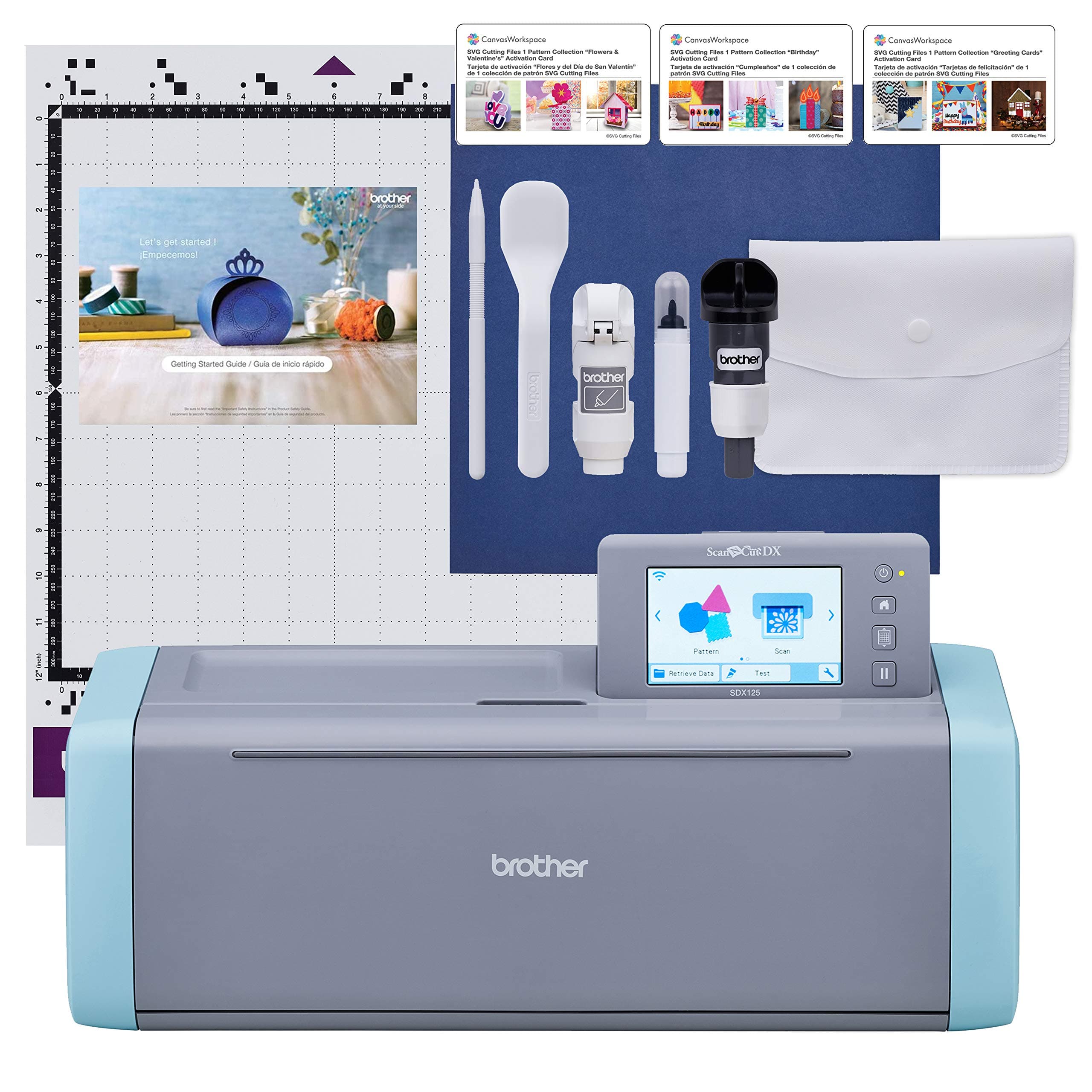
✂️ Scan. Design. Cut. Create your masterpiece effortlessly!
The Brother ScanNCut SDX125E is a versatile electronic cutting machine featuring a unique built-in 600 DPI scanner, an intuitive 5" touchscreen, and smart auto blade technology that cuts materials up to 3mm thick. With 682 preloaded designs and wireless/USB connectivity, it empowers professionals and hobbyists alike to create custom stickers, vinyl art, greeting cards, and more with precision and ease—all backed by a 1-year warranty and responsive customer support.


| ASIN | B07QRB25T4 |
| Active Surface Area | 144 square inches |
| Best Sellers Rank | #23,780 in Arts, Crafts & Sewing ( See Top 100 in Arts, Crafts & Sewing ) #21 in Scrapbooking Die-Cut Machines |
| Brand | Brother |
| Brand Name | Brother |
| Color | Titanium/Aqua |
| Customer Reviews | 4.3 out of 5 stars 1,294 Reviews |
| Global Trade Identification Number | 00012502656036 |
| Included Components | See Bullets for included accessories |
| Item Dimensions D x W x H | 8.4"D x 20.9"W x 6.8"H |
| Item Height | 6.8 inches |
| Item Type Name | Cutting Machine with Scanner |
| Item Weight | 16 ounces |
| Manufacturer | Brother International Corp |
| Material | Vinyl |
| Material Type | Vinyl |
| Operation Mode | Automatic |
| Print media | Unknown |
| Product Dimensions | 8.4"D x 20.9"W x 6.8"H |
| UPC | 012502656036 |
| Unit Count | 1.0 Count |
| Warranty Description | 1 year limited |
K**T
Awesome
I love this machine. It cuts great. It is quick. It scans good. I took regular printer paper that I had a bow pattern printed on it and put it in the machine to scan and cut. I attached a picture of the end result. The other picture is their beginning project with a flower drawn on it. The instructions leave a little to be desired but once you get the hang of it, it is pretty easy. You can modify things right on the screen on the machine. I have not hooked it up to the internet yet. It comes with a few activation cards for special patterns for free. If you never want to connect to the internet, you can scan whatever you want and it will cut it. It you do want to connect to the internet, you get their software that will convert SVG files to the brother files and you can create your own masterpieces. It does cut into the mat a little but not through it. It cuts clean. If you use good paper or printer paper even, it cuts nice and clean. I can't speak for the person who bought WalMart paper. I do not go there. I contacted customer service multiple times and they get back to you pretty quick by email. I didn't try to call but there is a number. I also tried contacting another brand's customer service and Brother has by far better service. The mat can be finicky sometimes but it works fine. I bought several accessories for this and the only one I might return is the punch kit. I don't see much of a need for it. This punches holes fine. I can't believe all the accessories there are but they all have a good purpose. The fabric blade is just a little better than the regular blade for fabric so if you want a fantastic result, they have you covered. If you want an average result, use the regular blade. I am extremely happy with this machine. I have been warned the software is basic but if I can make my own designs on professional software and save it to the Brother software to use in the machine, it doesn't really matter if it is powerful or not. I have not used the software yet though so don't take my word on how basic it is. Check out YouTube to see for yourself. It doesn't look bad from what I have seen. Their customer service said they can accurately cut 2mm objects. When it accidentally scanned and cut words, I saw that she was right. It cuts fine details.
J**A
YESSSSSS!!!!!!!!!!!!
THIS!!! 🙌 I have a Cricut, a Silhouette Cameo 5 and now this!! This is THE most user friendly, easy to use. I didn’t even need to read the directions. The touch screen has pictures and I was able to read it and figure out what I was needing. This scans whatever you want to cut and just cuts it. Put it on the mat, scan n cut just as advertised. The only thing I will say that another reviewer pointed out was that if you have lettering without a border it will not read the letters and cut correctly. There is a way around that though but not by using the machine. I made templates to cover my design that has letters on the outside and just taped them over top of my design and it read it and cut it. Also the mat is very sticky which is good but it was peeling the back of my sheets off so I had to tape another sheet to the back and then put it on the mat and tape it to the mat for reinforcement. This doesn’t take long and it’s worth it. I was able to trouble shoot and figure out a way around any issues easily unlike my Cricut and Silhouette which troubleshooting can take hours sometimes. This is by far my favorite craft product to date! It works great, it does so much and it’s soooo easy to use. Finally a product easy out of the box!!! Thank you Brother I think I’m in love!
Y**N
Great machine for crafting
I’m very happy with the Brother ScanNCut SDX125E. It cuts accurately and the built-in scanner is very convenient—no computer needed. It works great with vinyl, paper, and cardstock. There is a small learning curve at first, but once you get used to it, it’s easy to use. Highly recommended for beginners and small businesses!
K**R
Awesome, good utility, easy to use, reliable
I upgraded from a Silhouette Cameo 5 after it had issues with drifting cuts. With 100 different fixes people recommended and none of them working to fix my issue, a large order of stickers needing to be processed, and no time to mess around, I bought the Brother Scan and Cut. Here's my experience this far: The Good 1. Setup. Setup was fast and simple, instructions were clear and not having to rely on a bluetooth connection to a PC was a nice step up from my previous machine 2. Scan and cut. Going from printed sticker paper to cut-out sticker has never been easier for me. Not having to make a file to send to my machine has made my quality of life in sticker making so much better. The scan and cut function has two color settings: black and white and color. For images that dont scan well on black and white, the color setting usually detects them properly. 3. Accuracy. I've been using this machine for about 2 months now and I've created thousands of stickers with it. The scanning and cutting on this machine is extremely precise as far as my experience goes. I have not had a single sticker come out poorly cut due to machine errors. Any errors i've had are errors in my sticker sheet layouts. Sticker borders are always consistently cut and very clean 4. Ease of use. I was able to use this machine pretty much right out of the box. Settings are very intuitive and the built-in screen allows you to see how your cut lines are affected as you change your settings. You are also able to delete cut lines that machine has scanned in for you. (An example for why this is useful could be if 5 of your 6 designs scan in properly, the 6th design cuts can be deleted, 5 good designs cut, and the 6th rescanned for a proper cut.) This has saved me so much time. I no longer need to switch between my computer and my machine and my computer again and my machine again. I can do all the work at my machine. 5. AUTO-BLADE. The brother doesn't require you to tell it what material you are cutting and how thick it is, it detects the thickness itself. I can cut thin paper to thick cardstock on this thing. Seriously, I cannot stress how much work/time this machine has saved me. 6. Quiet. It's very quiet, I almost don't even notice it unless I'm actively watching it. 7. FAST. It's extremely fast, blink and you will miss it, truly. The Bad? 1. Sticky Mats. I've never been a fan of sticky mats. They wear out too quickly, they require maintenance, and they are consumable. The brother requires you to use a sticky mat. The one thing Silhouette did right that I wish brother scan and cut had was an electrostatic mat. I never had an issues with the electrostatic mat that I have with the sticky mats, being loss of function after use. You can only revitalise the same mat so many times 2. Multiple scans. If you scan pages with a surplus of images on them, chances are you will get 1 or 2 images that dont scan properly, it's just how it is. I don't think this is too big of a deal because those designs can be excluded for the first round of cuts and rescanned after. 3. Stickers with words. The brother scan and cut DOES NOT group any words or letters with an image unless it is touching it. This can make certain sticker designs impossible to cut with the scan and cut feature. If there is a way to do this, I haven't found it yet. You will have to do these types of edits in the pattern function (ie make a file) which defeats the use of the scan and cut. Overall, it's easy to setup, easy to use, very accurate, very fast, very quiet, and a pleasure to own. For anyone looking to work with paper crafts, this is a must own machine!
V**C
First ever 1 star review.
I own a small shop where I sell stickers. As demand grows, I looked for options to 'cut' down on the cutting times and after seeing a few comments on Reddit, this item was mentioned a few times. The only device that can scan your stickers? Where do I sign up? Here is my experience with this product. Pros: • It does scan fairly well. • Next day delivery was nice and it came undamaged. Cons: • While this might work well for simple stickers, if you are only using the scan option and not the canvas website it can't easily handle making cut lines for complex and multi colored stickers. I ended up having to send the scan to the canvas website and manually making my own cut lines, which significantly increased the time it took to cut and made the whole point of ordering this scanning machine pointless. • The cuts were always off and no amount of trouble shooting, tests, and any other of the recommended trouble shooting options given on YT, Brother's website, and Google fixed that. • It's slow when it comes to adding the cut borders after scanning. So if you have to fiddle with adding or removing colors, you have to wait for it to re-add those borders which adds to the overall time it takes to get to something else that doesn't work properly with this machine. • The machine only accepts Brother approved mats, the mat that comes with it is much to sticky for regular vinyl sticker paper. It didn't accept the second over priced mat I bought from Brother themselves. So there's that. Conclusion: Maybe I just received a faulty machine, but with the sheer amount of problems I've run into trying to use this ScanNCut, I can't imagine that it's simply a faulty machine. The only thing it did well was scan, but everything else was pretty abysmal. To the point where just cutting them manually would have been quicker. Not to mention the waste of materials that went into figuring out all the things that don't work properly with this machine. If you're looking for something to speed up and automate your cutting times, this isn't it. All you will get is an overpriced machine that doesn't work and plenty of options for overpriced accessories that also may or may not work. I will absolutely be returning this and looking for something else.
R**L
Con faltantes pero una gran experiencia
Buenos días, recién pudimos configurar la máquina ayer, porque lamentablemente nos llegó sin el tapete de corte, solo venía en la caja el tapete de escaneo, también faltaron las tarjetas para habilitar el contenido extra que debería venir también en la caja, sobre el material para pruebas que viene con el producto para probarlo con distintos materiales, sólo vinieron dos vinilos, fuera de ésos detalles finalmente pudimos ponerlo a prueba y nos gustó mucho, una muy buena experiencia de trabajo, con una interfaz lo suficientemente intuitiva como para poder llegar al corte o escaneo que se necesita para distintas tareas, ahora sólo nos queda seguir aprendiendo para poder sacarle el mayor partido a una máquina que por lo práctica que es, lamentamos no conocerla antes!
F**O
I am in love.
This is my first electronic cutting machine. I work with fiber and textiles, and up to now I've been happy with my old school Accucut Grande Mark II die cutter. It's a beast, cutting through multiple layers of quilting cotton with no problem, but boy do those dies get expensive (and restrictive). And it's heavy. Anyway, I started getting curious about some quilting techniques that I'd been seeing art quilters do with their electronic cutting machines. Most seem to be using the Janome Artistic Edge, Silhouette Cameo, or a ScanNCut. The Brother came up the most, though there were a plethora of noted shortcomings. Brother had put out some duds, accessories were costly and not cost effective, the learning curve was high... I was a bit discouraged after reading reviews and doing research. Luckily I found some wonderful YouTube videos (check out Julie Fei-Fan Balzer!!) of the machine in use on many different media and watched off and on for a week or so. I was sold. I am so glad I took the plunge. I have been using the SDX 125e for about three days now, and I am impressed. I have been cutting small, relatively intricate appliques with quilting cotton that would have taken forever to cut by hand. I've cut templates out of cardstock to help with my layout process. I'm looking forward to embossing some thank you and business cards when my universal pen holder arrives, and I will probably cut some new stamps with my business logo soon to. There are so many things that I've had to outsource that I can now do for myself with the help of this awesome little machine. I'm sure there are other amazing cutting machines out there (I might try out a Cricut Maker once this machine pays itself off), but the benefits of having a scanner really pushed this one to the head of the pack for me. I've conserved so much fabric already with this feature, scanned some stamped images -- who knows what I'll try next. The cool thing is that I won't have to rely on the designs that come with the machine or anyone else's. If I can freehand it or stamp it, I can work it. The cons that have been noted in some other reviews don't put me off at all, or are not really problems anymore. (1) No, it doesn't come with a physical manual, but I found the online manual to be sufficient. It's like our smartphones these days - they don't come with anything more than a quick start guide despite costing hundreds of dollars, either. I suppose I can see how someone might be put off by it, companies charging us more for less... (2) Yeah, there's a clear order of operation necessary for some processes to work correctly. Isn't that how most machines work though??? And actually, now that I think about it, that qualm from may have been addressed by Brother in the new version of the 125, because my machine works just fine with a blade inserted before it's powered on. Hmmm.... (3) I have had no problem locating accessories on Amazon, Allbrands, and a few other sewing suppliers' websites. That problem must have worked itself out also. I will admit that they are not cheap though, and I have not been at this long enough to say whether I think they will be worth it in the long run. If you're on the fence, yes - there is most certainly a learning curve with the machine. But, there are many resources out there to help. I wouldn't trade it for anything at this point, however - I am in love.
1**1
Highly Recommend
Can’t say enough good things about this machine. Loving using it. So far I’ve only used it to cut out patterns on patterned paper. No more fussy cutting for me!
Trustpilot
2 weeks ago
2 months ago