
DOWNLOAD THE APP


Customer Services
Copyright © 2025 Desertcart Holdings Limited
DOWNLOAD THE APP

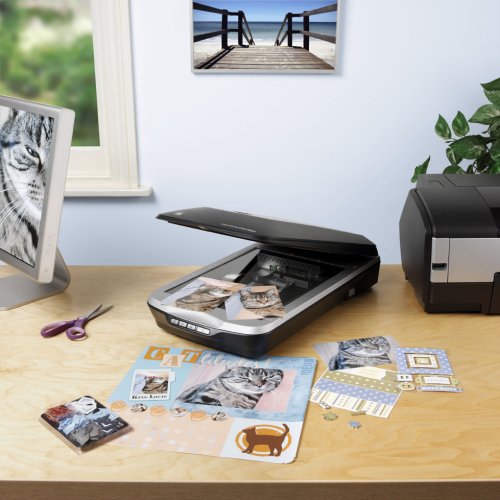

📸 Capture every detail, relive every moment—digitize your legacy like a pro!
The Epson Perfection V500 Photo Scanner delivers professional-grade 4800 x 9600 dpi resolution with 48-bit color depth, perfect for scanning photos, negatives, and 3D objects. Featuring an automatic 35mm film loader and a versatile flatbed design with a 180° lid, it offers effortless, high-quality digitization with one-touch operation. Ideal for preserving memories with vivid, true-to-life color and exceptional detail.
| ASIN | B000VYYSEE |
| Best Sellers Rank | #146,157 in Office Products ( See Top 100 in Office Products ) #13 in Flatbed Scanners |
| Customer Reviews | 4.1 4.1 out of 5 stars (167) |
| Date First Available | October 9, 2007 |
| Is Discontinued By Manufacturer | No |
| Item Weight | 8.8 pounds |
| Item model number | B11B189031 |
| Manufacturer | Epson® |
| Product Dimensions | 18.7 x 10.71 x 4.45 inches |
C**A
Flawless Operation
I used this scanner to scan approximately 1,000 photos over the course of about 2 weeks. It scanned without incident. The colors of the photos were cleaned up by the scanner and software. I bought this on clearance for $19 at a retailer, brand new in the box. I scanned all the photos and gave USB thumb drives to my family. A monumental task scanning all the photos, but well worth it to have them in digital format for emailing and such.
S**X
Epson V500 really makes the grade.
So far, I've really enjoyed working with the scanner - it's so much quicker than the scanners I've been used to. I haven't tried the negative or slide scanner yet but plan to when I get the time. I believe it was worth the cost and the wait.
D**N
Slide Conversion Project
I purchased this scanner to use on a very large 35mm slide conversion project. I had 6,000 slides to convert to digital format! The project took me over 4 months to complete while I fit it in between other work. During the entire time, the scanner worked like a champ!! It worked flawlessly and I was very pleased with it. All 6,000 slides have been converted as of today. I can't say enough good things about this scanner's durability, accuracy and quality. I'm very pleased with it and can strongly recommend it to anyone who wants a good scanner to convert slides to digital format.
M**N
Great
My mother in law gave me this for Christmas and I love it. It was so easy to set up and use. I am now obsessed scanning. As a former model before digital cameras were around, we used to have to develop and print only the best pic. I am now scanning my slides and negatives and loving the results. I will get to my personal photo albums next. It will be great to finally get rid of the huge box of albums I have. I will back it all up on CD's and carry that when I move!
A**R
Don't buy from this vendor
I received the package on time and in good order. I had realized that I made an error with my order, so I repackaged it and returned it to the seller. I had to finally contact them to ask about my refund. There was some confusion about where it was returned, though I had a return receipt and gave them that information. They promised to take care of it, but they have not done so. They received the package on July 17th. I have e-mailed them repeatedly, but they do not respond.
J**R
Great, while it lasted.
The Epson Perfection V500 exceeded my expectations for a film scanner. I bought it to occasionally scan 35mm and 120 film. I'll use the reflective scan option to scan contact sheets and prints as well. I've owned the unit for one year and seven months and all of the sudden I'm getting a red line down the middle of the glass. Honestly, I would be surprised if I have 50 scans on the thing. Luckily the red line is out of the area where I scan film, but now it's useless for reflective scans because of the location of the line. I miss the days of buying new computer hardware because you wanted to upgrade, not because you needed to replace.
S**N
Doesn't scan slides .
Will not recognize or scan slides. Followed directions in manual, on several websites, and various forums. Tried all the different modes, especially Professional....nothing. Nothing works. It just scans a copy of four slides sitting in the slide holder, but does not scan them individually.
B**K
loved at first, now useless
I loved this at first, but now I cannot use it. It started creating a vertical red line two inches from the left on my scanned images. If I scan anything, I have to make sure that what I'm scanning will fit on one side or the other of where the red line will show up. Epson has NO customer service--not even an 800#. I've found out that there's really nothing I can do but buy a new one. I'm going to go with Canon this time and hope for the best. Otherwise, it really did a great job before all this happened.
P**R
I bought the Epson Perfection V500 Photo Scanner to scan a large quantity of old slides and colour negatives. I originally looked at scanners dedicated to slides and negatives but read the reviews here for this flatbed scanner and went for it. I'm very pleased with the scanner itself, after having scanned nearly 400 slides over a few days and uploaded them to Flickr. The scan speed is not really an issue once you get going because you can alternate scanning with processing and uploading in batches of four. There is no point scanning at more than 2400dpi in my opinion as there is only so much information you can recover from a 35mm slide or negative. So this scanner does the job with results that are plenty sharp enough for an image 4000 pixels wide. I don't bother with any adjustments during the scanning process as it's much better to do this in Adobe Elements 9 that comes with the scanner. My only complaint is the software interface EPSON Scan, supplied. Each time you Preview you lose any adjustment settings you might have made (and saved) as the program reverts to Unsharp Mask after the Preview (actually intended to sharpen). If you are not careful you find that all your scans are made to this default setting regardless of any other settings made prior to Preview. Apart from that, the clunky software works well enough. The first V500 I bought from Amazon came with dust particles on the underside of the scanner glass so I sent it back (free) for a refund and bought another - this same scanner. Refund was done promptly by Amazon. It is perhaps worth knowing that the scanner glass can easily be removed for cleaning underneath but probably best left until the warranty has expired, as the manual states this should not be removed. All in all I am very pleased. Good product and good service from Amazon.
E**S
I bought this unit, after checking widely on similar products, in order to begin the mammoth task of scanning my 1000+ slides collection (and some prints). So far I have successfully scanned something over 200 of them, with almost no problem. I have discovered that some manufacturers slide mounts are easier to scan than others; Kodachrome present no problems at all, also GAF (don't know who they are!) but Agfachrome can be a problem since the scanner "reads" any light appearing on its sensor as part of the scan. Because these slides are plastic framed (and so both sides are clipped together) it is occasionally possible for light to penetrate through the "clips". The result is that the scan includes the frame, not just the picture. I have yet to discover a foolproof method of correcting this; sometimes simply removing and replacing the slide cures it, sometimes turning the slide through 90 degrees has the same effect (the EpsonScan software allows the image to be rotated in Preview so that the scan is the right way round.) The supplied software works without problem - I was initially concerned since I already have an Epson Multifunction Printer installed that the two software installations might conflict; they do not. I have yet to need/use the supplied Scan and Stitch software (for larger documents.) One other thing that I have yet to fully "resolve" is how to remove the scanned slides from the unit without being in danger of touching the scanner glass! To scan slides a supplied frame is placed in the designated position and the four slides which can be scanned at a time are placed in it. Once the scan is complete the only way I have so far discovered to "safely" remove the slides is to slide the frame to the right hand edge of the plate, remove the frame so leaving the slides on the plate and then edge the slides carefully off the right hand edge until I can pick them up without leaving marks on the scanner glass. I suspect I will decide in the not too distant future that a pair of cotton gloves, or similar, might be a good idea! In terms of the quality of the scans, because I put the resulting images as slide shows on DVD or BD (Blu-ray) I have found that, for me, the trade-off between file size and image quality is best served for slides at 1200dpi for DVD, 2400dpi for BD, I always use the Professional Mode because this enables a visual preview of the scan. "Digital ICE", though it does slow down the scan time (typically 8 - 10 minutes for a set of 4 slides) greatly improves the outcome; "Color Restoration" is also invaluable, especially on older slides (some of mine date back to the 1970s) and sometimes "Backlight Correction". (The latter defaults to "Medium" settings; that seems perfectly adequate for almost all images.) I have not needed to use the "Grain Reduction" facility so cannot comment on this. Of the very few prints I have so far scanned 300dpi seems perfectly acceptable. All in all I am extremely pleased with this unit and would thoroughly recommend it.
M**E
Purchased to scan a collection of old photos, some 35mm negatives, and a whole bunch of 35mm transparencies. In all honesty I expected it to be very good at the photos and acceptable for the negatives and slides. I was wrong, whilst the photos were perfect, I was stunned at the quality of the slide (and negative) scanning, especially given that it is not a 'proper' slide scanner. You know the score, 'master of all trades', 'jack of none'. Well, in my humble opinion it did a fab job with slides.....and for the money, a bargain. Was also amazed how good colour slides from the early 60's looked, they looked like they were taken yesterday (unlike some of the photos). One other feature that I noticed was scanning multiple photos (I tried to scan four photos to crop up later in the supplied Photoshop Elements 9), is, that as long as they are separated by a small amount of space the scanner identifies the separate photos and creates multiple images (brilliant). I could scan 4 photos at a time and it created 4 images, priceless. ;-) Also the negative scanner can scan up to 2 strips of 5 at a time, for slides it is 4 at a time. In short a great product and well worth the circa 150 notes. So, whats wrong with it....? Nothing, it just takes a few minutes to set it up, and make sure you don't use the 'digital ice' for photos, as it caused a few issues, but worked perfectly with slides though. I assume you are not supposed to use 'ice' with photos? "DIGITAL ICE is also supported on Reflective media (e.g. photos), with the exception of the Perfection 4490 and ***V500*** models which are equipped with DIGITAL ICE Lite, suitable for scanning film and slides only - these models cannot be used to scan Reflective media with DIGITAL ICE. As an alternative you can use the Dust Removal feature for Reflective media." So, do not use 'ice' on photos then..... ;-) Well worth 5 stars......
O**N
Received the V500 3 days after ordering. I've had this scanner one day but wanted to share my experience quickly to all those Mac Pro (Early 2009) users who use Snow Leopard. I read numerous reviews for the Canon and HP scanners of this price range and finally selected the V500 because of its reported better quality scanning and ability to better handle multiple photo scans. Now, I have not had time to test the full functionality or quality of slide or negative scanning. With photo reflective scans it does a fine job at high speed tested over different setting and in auto mode. Online manual looked good and I like the way it allows me to control where scans are located on the computer THE DOWN SIDE and the reason I only give the V500 4 stars is the lack of good setting up documentation, and I don't really believe a product should be judged on its initial setup documentation. I suggest users DO NOT use the V500 CD-ROM if you are a Snow Leopard or Windows 7 user. There is a piece of loose paper (A5 size) included in the box that refers to these operating systems WEB SUPPORT Sites but Does Not tell you to go to these sites BEFORE installing from the CD ROM. I initially used the CD ROM and then looked at the support sites - WRONG - I had to uninstall all the software and reinstall using the Web Site procedures. THESE INSTALLATION INSTRUCTIONS WERE EASY to follow and allows you to install the Scanner drivers without the Epson printer drivers (this took an age from the CD). It was so simple, Epson should be more explicit about the use of that little bit of paper. I read the one star reviews that referred to the buttons not working on the scanner. THIS happens because the CD ROM was used and is not always compatible to the operating system. AS I found out too my cost in time. STILL An Excellent Scanner - I hope this review avoids potential buyers falling into the same trap I did.
P**D
You could be forgiven for not realising just how many flatbed scanners still exist, for the rise of all-in-one printers with scanning features are increasingly popular. They're also affordable and very convenient for customers on a small budget that care about desk space. But what happens when you rediscover old film negatives, slides or photographs that aren't compatible with many budget products? There are plenty of dedicated film scanners on the market, but unless you're willing to spend ridiculous amounts of money on a single purpose, the amateur (or semi-professional) photographer is better served with a flatbed that also includes film capabilities. This way you're killing two birds with one stone, and certainly at a great price point too. Part of the reason I got the V500 was to actually convert a huge collection of Kodachrome slides into digital images, and to also digitise my 35mm after it's been processed. Cut long story short, the product has exceeded my expectations. This product comes packaged with the V500, a nice long USB cable (which I'm very grateful for, as I place the scanner far away from my computer), two adapters for film scanning, an AC power cable and brick, manuals and CD-ROMs. I should point out here that the Epson CD-ROM is practically unnecessary, because it contains the original drivers and software from its 2007 release. You should instead go on to the Epson support website and download everything from there, so that it is up-to-date and compatible with your computer. After installation, you're free to plug the scanner into your computer and turn it on for the first time. Bundled with the CD-ROM is a free copy of Adobe Photoshop Elements, which I imagine will be an absolute treat for users who are only just entering this territory. Although I already own the full version of Photoshop, Elements is a very good package for beginners and the differences aren't actually that drastic, so you're saving more money. With the scanner set-up, converting your photos, images or documents to digital files is amazingly simple. This is largely due to the buttons on the front of the device, which instantly open the required application on your computer. It even has the ability to scan documents and convert them to a PDF in one click; perfect for ditching paper copies of important text. The device also has tabs that lock the scanning elements in place, protecting them during movement or transport. But in terms of practicality, this is a decent sized machine that looks slick and operates very cooly even after a couple of hours scanning. The large 'hump' on the top cover encloses the film scanner, and this whole unit can be lifted off the scanner bed if you wish. This adjustment also allows you to place thick documents (such as books) on the scanner bed whilst the lid lays flat. Epson Scan is a pretty basic piece of software, but this is fine as most of your 'tidy up' work will be done in Photoshop anyway. Scanning slides is as simple as placing the plastic mount onto your scanner bed, placing the slides into the mount, and then putting the lid down. In Professional Mode, you can alter the resolution of the final image, the colour depth and much more. A general rule however might be that the more you tinker, the further away you go from the original image. Don't be fooled by the notion of "more is better" when scanning film. Once you get to 3200dpi, the scan becomes almost indistinguishable from higher resolutions unless you zoom in many, many times over (to a size that outgrows any home TV!), and of course, the file size can become monstrous. It's very important to do some testing and explore what works best for your slides or film before going straight into the deep end, as I found out myself through trial and error that 3200dpi is the perfect balance between definition and size. Another good idea is to place your original scans (around 60mb each at 3200dpi) on an external HDD or USB drive for archiving, as you can then simply open the file in Photoshop and save it as a much smaller JPEG file on your PC. This way, you have a final file to share around easily and to place into a photo managing application. So what are the final results like? This is the grey area: film photography isn't very forgiving. With perfect exposure, lighting and focusing, you can achieve some absolutely stunning scans of 40-year old film, and I don't say that lightly. My family's Kodachrome slides from the 1980's haven't faded one bit, and most have some of the most radiant colours that I've ever seen in a photograph, with white-white's and amazing shadow detail. In contrast (excuse the pun), the limitations of darker exposures, poor focusing or dusty lenses suddenly become more apparent after a scan, and can cause real problems. These can really hamper what may have otherwise been a nice subject for the photo, and so bring into action Epson's 'Digital ICE' mode. Due to the additional time required during the scan and the slightly waxier affect of the image, this is something to be used sparingly. As for 35mm negatives, a lot depends on how new or old the film is. As a test, I scanned both Ilford B&W film and Kodak's Portra; the latter of which being designed for optimal scan performance. There is almost no comparison - the former reveals coarser grain (which is no fault of the film), whereas the latter can be comparable to a DSLR image, it is that clear. With some adjustments, even the harshest grain can be somewhat managed however. So, don't expect miracles straight after scanning slides or negatives. Have a play with the settings, but most importantly of all, do some research based on your film type. Take your time and enjoy it! Standard flat-bed scanning is even simpler, and produces very faithful results. There is obviously some motor noise when in operation during flatbed and film modes, but I can't imagine these would become annoying after time as it's not that loud. You can always play some music... On a final note, I have yet to achieve TWAIN compatibility with this scanner in Photoshop CS6 (on an iMac). I have read elsewhere that this may be due to a 32/64bit conflict, but if anyone has some info to contribute then drop a line in the comments. Is the V500 a worthwhile purchase when there are cheaper scanners out there? Absolutely - it should be looked on as an investment. You may think it's easy to exaggerate the importance of revisiting old photographs, but don't underestimate their value. As well as being important documents of your family's history, they also say a lot about our social history too; some of the most prevalent details in these photographs are the things away from the subject, such as buildings, technology, cars... (Speaking of which, there should actually be a health warning. My old man spent 86% of the view time talking about a Ford Cortina he saw in Cornwall, and then an hour later, I was being lectured on a pair of denim shorts that he owned in the 70's). The V500 itself is a very popular device, and although I read around before making the purchase, I had used it at a small film studio during several months for archival work. It is incredibly reliable, robust, and perhaps best of all, incredibly simple to operate. As far as I'm concerned, it's a no brainer purchase.
Trustpilot
1 day ago
1 month ago