
DOWNLOAD THE APP


Customer Services
Copyright © 2025 Desertcart Holdings Limited
DOWNLOAD THE APP
🎧 Upgrade your drive with classic Apple vibes and factory-perfect sound!
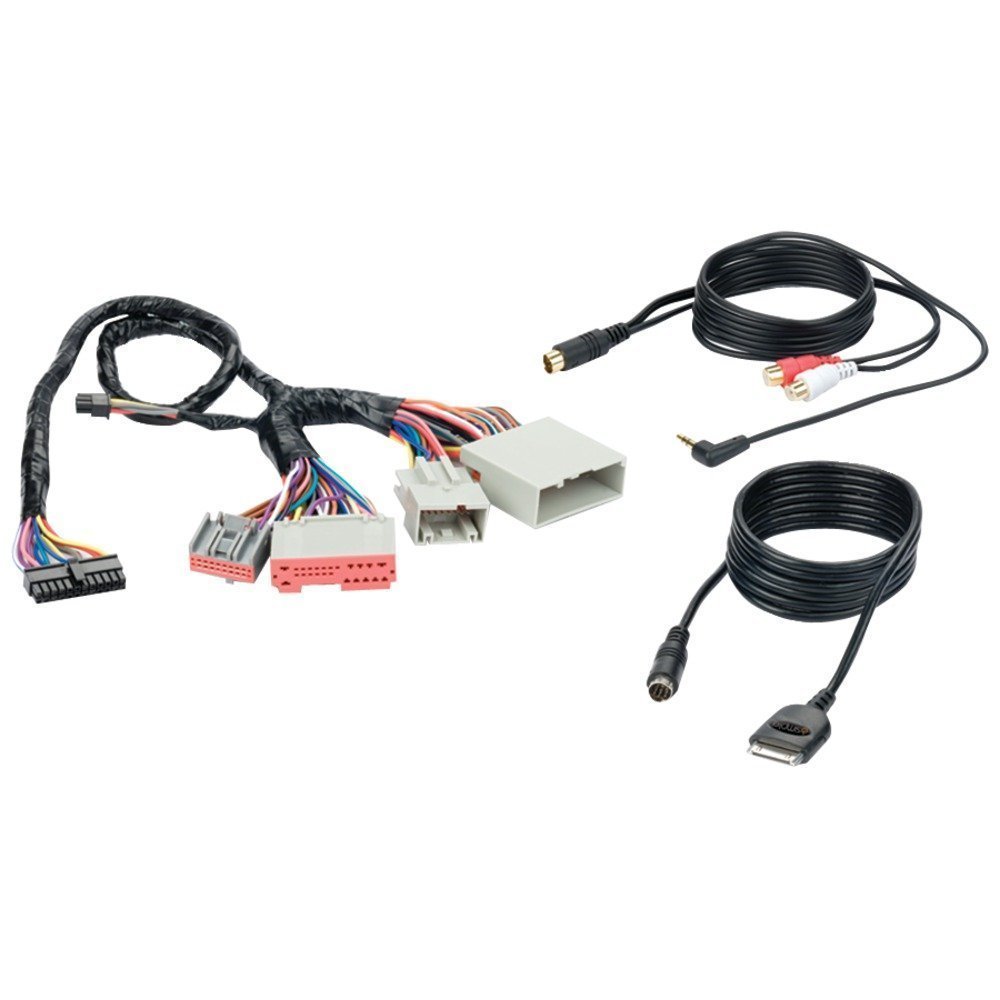
The iSimple ISFD571 Gateway Audio Input Interface Kit offers seamless integration for Ford, Lincoln, Mercury, and Mazda factory radios, supporting iPod, iPhone, and iPad devices with 30-pin connectors. Featuring full radio text display, a 3.5mm auxiliary input, and a plug-and-play harness, it delivers an effortless upgrade to your vehicle’s audio system.
R**A
Works great in Explorer
This product took about 2 hours for me to install myself. I have a 2006 Ford Explorer. I probably spent about an hour trying to decide where to mount the control box. I ended up using velcro (the box is light) and stuck it behind the dash on the drivers side. It is easy for me to access by removing only one panel. I will say that I looked on youtube at other similar products because I was able to watch videos to see how the dash panels were removed so I could access and remove my factory radio. That made installation much easier.The harness was easy to connect and fit tight so it should not come loose. The Ipod cable and mp3/rca cords were thick and plenty long.The instructions assume that you will be connecting the control box to an Ipod and an HD Radio. The dip switches are all set from the factory to handle the Ipod and HD Radio connections (all 4 switches in the up position). However I was going to connect the Ipod cable and also use the MP3/RCA cable (not the HD Radio). I ended up having to look online on the pac-audio.com site to figure out which way to set the dip switches (switch 1,3,4 up and switch 2 down) in order to make everything work.We use the Ipod cable with an Iphone 3G an Iphone 3GS and an Ipod Touch 4th gen and it works well. You can use either the radio or the Ipod/Iphone itself to control the Ipod music (but not both at the same time, it's either one choice for control or the other). This setting is controlled by pressing the Aux button on the radio to cycle thru the choices. Using the radio buttons to control will lock the Ipod part of the device and show "Ipod Accessory" on the Ipod/Iphone and show "Ipod Control" on the radio text first and then it will start displaying the current song title on the radio text. You can control all parts of the Ipod using the car radio controls. You also retain full control of the rest of the Ipod/Iphone functions so you can use the map function or if you get a phone call, the music fades and you can answer it.Using the Ipod/Iphone itself to control the music will show "Auxillary 1" on the radio text (and will NOT show the songs scrolling). We did find that on our car radio you can still use the up/down tuner buttons to skip songs on the Ipod. If you have your Ipod/Iphone set right it will also stay lit (since it is charging at the same time) to display the song info as it normally would.We like using the Ipod/Iphone to control the music since it is easier to navigate the Ipod manually vs using the buttons on the car radio (although the buttons on the car radio work fine, you just have to get used to them).We can also use the MP3/RCA cable to connect another device whether it be an Sirius Receiver, Ipod, MP3 player, etc and the radio will display "Auxillary 2".The sound out of this unit is perfect. I have no static while using the Ipod or AM/FM or CD portions fo the radio.
D**1
Two Stars
Failed within the first six months.
A**.
Works OK w/ 2006 Lincoln Zephyr (w/ Nav) - Some Design Annoyances Though
I bought this to add Bluetooth (module sold separately) in my 2006 Lincoln Zephyr with THX navigation. I first tried the all-in-one GROM Audio device with zero luck, and after lots of frustration, I was able to get this to reliably work in my car. This product only ships w/ an iPod interface (I used bluetooth instead... reasons below) and a 1/8" audio input (so you can plug it into the headphone jack of your phone).This device also ships w/ its own harness unlike the GROM. W/ the grom, I had to attach a wire to the auxiliary power of the radio which was kind of a pain and felt "hacky". But as soon as I had this attached, the "SR" button on my nav screen showed up and I was off to the races.=============THE BAD:=============- Cheaply constructed. Literally the cheapest, most fragile plastic I've ever seen.- This device is enclosed with no mounting bracket. Saldly, mine just sits loosely in the glovebox. They should have included clips / screws / industrial double-sided tape to mount this within the dash.- Bluetooth module is sold separately. It'd be a neater/cleaner install if this gateway already had bluetooth enabled in the same enclosure.- The iPod cable they ship with is the old cable. THIS WILL NOT WORK WITH AN IPHONE 5/5S unless you use just the 1/8" earphone jack or buy the bluetooth module. I ended up buying the bluetooth module.- Doesn't appear to be anyway to upgrade or "flash" this device if iSimple releases an update. GROM offered user-updatable firmware.=============THE GOOD:=============- Mostly works as described (except for the ARTIST / TITLE information not showing).- The 1/8" cable is a little short. It was BARELY long enough to run from my glovebox --> under the center console --> into armrest --> to iPod. I get MAYBE a foot out of the glovebox. You could fix this by just buying an 1/8" female-to-male extension cable.- Really easy to install.- Ships with it's own/new harness so you don't have to do any soldering/splicing.- Good sound quality (playback through stereo).- Reliably shows my "SR" button on my nav screen.- Allows me to keep my existing THX touchscreen nav system.- Fair price point.
Trustpilot
2 weeks ago
1 day ago