We remain fully operational. Our teams are working around the clock to ensure your deliveries continue safely.

DOWNLOAD THE APP


Customer Services
Copyright © 2025 Desertcart Holdings Limited
DOWNLOAD THE APP

🎯 Dominate every click with precision, power, and style.
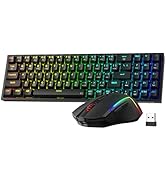
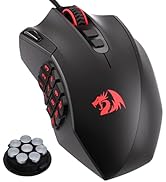
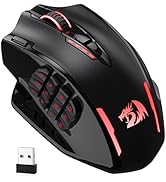
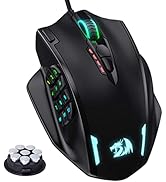
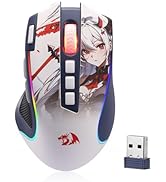
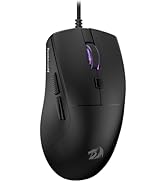
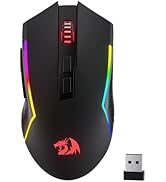
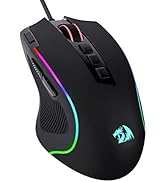
The Redragon M913 is a versatile MMO gaming mouse featuring dual wireless/wired modes, a high-precision 16,000 DPI Pixart 3335 sensor with 1ms latency, and 16 programmable buttons. Its ergonomic design suits large hands, while a robust 1000mAh battery supports up to 80 hours of use. Customizable RGB lighting and software-driven keybinding make it ideal for gamers and professionals seeking efficiency and comfort.







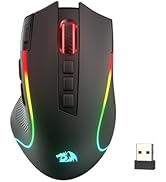
| ASIN | B088B3ZM76 |
| Best Sellers Rank | 148 in PC & Video Games ( See Top 100 in PC & Video Games ) 8 in PC Gaming Mice |
| Guaranteed software updates until | unknown |
| Item model number | M913 |
| Manufacturer | Redragon |
| Product Dimensions | 17.5 x 11.5 x 0.1 cm; 132 g |
C**S
Great entry point for MMO mice
Quite heavy even without weights installed but if you prefer a heavier mouse then it's great. Solid build and side buttons are easy to identify and have a satisfying click to them, the rows are angles against eachother vertically to identify them easier which I like. Mouse is responsive and works straight out the box but you may need to use their software to map each button to the F keys Overall this is a great entry level mouse that doesn't sacrifice quality and at the price point it just can't be beaten.
A**R
Very versatile while tailored to specific needs
It took me weeks of searching to find something that has all the features I wanted: Mouse for large hands: Absolutely! Tried the logitech and razer ones supposedly for large hands and by and large, no they're not. If you want to palm grip without your thumb/fingers/wrist pinkie rubbing against your surface, this is the one. It's not stupidly big but lets say ages 12+. Works on uneven/upright/"clear" surfaces: Yes again. The only surface it won't work on is clear polished glass. Translucent/frosted glass/plastic works. Also works on carpets, sofas, walls, envelopes, cardboard, sheets. And I do mean, it works properly, not just "functions". Again, this worked better than the logitech and razer ones i'd tried. Wide/ergonomic grip: If you've seen the ergonomic and full palm mice available on the market you know that they're very niche and can be very expensive. This one is the best of both and none of the other big names have something in this middle ground, and Redragon even have a few this kind of shape. No competition. Wired/Wireless/Built-in battery/USB-C/Use While Charging/Decent battery life: Yes to everything. You'd be surprised that those are a difficult combination to find, but it is. Extra buttons: It genuinely has all of those buttons and they're all programmable with the software. The software is fine and easy to use, and easy to find so i'm not sure why there are 2 reviews on here that say otherwise. It's an "MMO" mouse technically, but you can also programs it to use all your keyboard functions (Alt-Tab, Ctrl-Esc, etc.) as well as functions in CAD, Photoshop, Premiere, etc., and even multimedia functions (Vol +, Vol -). Buttons 1-3 are right at the tip of your thumb in a normal grip, so are easily naturally usable. 4-6 also, as the buttons are angled they are easy to find. Buttons 7-12 take a bit more effort with your thumb to get to. Better for rarer used functions (Alt-F4, Ctrl-Alt-Del, etc.) (A sideways scroll wheel would have prevented me from even considering a MX master 3). LED option: If you love LED "gamer" lighting effects, then you can go crazy with this in the software if you want. Having the option to turn this is rarer than you'd expect, but it's there and despite the marketing making it appear like a typical "gamer" mouse, with the LEDs turned off it is still a plausible and respectable office/home friendly looking mouse. Other things: Scroll wheel works great and is barely audible. Proper quality sensor and sensitivity in line with the competition. Decent click switches on the main mouse buttons, and membrane on the side buttons is fine (no crossover clicks).No gaudy or overbearing branding, just a small grey dragon on the black version. You definitely could use this for all types of gaming, but probably not for E-sports FPS just because its got a wide base and it's on the heavier side of "gaming mice". Some apparent issues with click pads on certain batches but top notch customer support direct with Redragon and it is fast, efficient, and customer focused, seriously. (No, I've never worked for the company or received any gifts or funds for writing this). TLDR: A mouse for big hands with such a wide array of features that there's nothing else on the market to even compare it to.
D**S
A Wireless Gaming Mouse That Will Make You Feel Like an Elite
I bought this wireless gaming mouse to improve my performance and comfort in MMO games. I was looking for a mouse that had a lot of buttons, a good battery life, and a reliable wireless connection. I chose the Redragon M913 Impact Elite Wireless Gaming Mouse because it had good ratings and a reasonable price. Here are some of the pros and cons of this mouse: One of the pros of this mouse is that it has 16 programmable buttons, including 12 side buttons that are easy to access and customize. You can assign different functions, macros, or shortcuts to each button using the Redragon software or other compatible software from your game or system. This gives you a lot of flexibility and control over your gameplay. Another pro of this mouse is that it has a long battery life and a low-consumption mode. The mouse comes with a 1000mAh rechargeable battery that can last up to 45 hours with RGB lighting on or up to 80 hours with RGB lighting off. You can also switch to eco mode by pressing the DPI button for three seconds, which reduces the usage of backlit and extends the battery life even more. A third pro of this mouse is that it has a fast and stable wireless connection with low latency. The mouse uses a 2.4GHz wireless nano receiver that plugs into your PC or laptop’s USB port. The wireless click latency is only around 1ms, which is very impressive for a wireless mouse. You can also use the mouse wired with its detachable USB-C cable if you prefer. One of the cons of this mouse is that it is quite heavy and bulky compared to other gaming mice. The mouse weighs 171g without any weights added, which might be too much for some people who prefer lighter mice or have smaller hands. The mouse is also quite large, measuring 123mm long, 92mm wide, and 42mm tall. Another con of this mouse is that it might not be compatible with some older motherboards or BIOS versions, as it requires support for USB-C ports and XMP profiles. You might need to update your BIOS or tweak some settings manually to get the best performance out of this mouse. A third con of this mouse is that it might not work well with some games or software that do not support multiple buttons or customisation options. You might have some issues mapping all the buttons or getting them recognised by your game or system. Overall, I think this is a wireless gaming mouse that will make you feel like an elite if you play MMO games or need a lot of buttons on your mouse. It’s not the lightest or the most compatible option out there, but it’s definitely one of the most versatile and reliable ones. (Sorry if this was a bit geeky) >.< If this product was helpful, please press the helpful button below!
H**H
Great price and great value MMO mouse. Almost perfect for my needs, but could use an M4/M5 button.
Nicely weighted mouse and great sensitivity. The cover for the wire is a bit flimsy. My Razr Naga is braided and the wire feels much sturdier and more protected. I use the mouse of FFXIV and WoW, so the triple click button isn't much use to me, unless I were to macro it - I can't seem to bind it to any keys in FFXIV, which is a shame. I dislike that there isn't another mouse button - both my Razr and my Logitech had mouse button 4 and 5 that I could assign for autorun and mounting. This only has M3, meaning I have to use a modifier for either mount or autorun, which is a bit of an irritation after having these options for 15 years. However, the mouse is responsive, and I love that I have a nice range of buttons. I do not use the numbers on the keyboard at all, and haven't for 15 years, so this is absolutely perfect. The range of lighting options is a bit wild and needed calming down, but it looks very nice and feels quite ergonomic in my hand. Overall great value and a great price.
F**Z
I very rarely post reviews on products but I have to for this one. I'm a big MMO player, so I've been looking for a good MMO mouse for years. I've tried everything from Razer Naga (3 of them lol), Corsair Scimitar and Steel Series, and they all ended up failing pretty quickly. Battery wasn't the best, connectivity was crap with a lot of them, and the buttons would degrade after a while. Also I couldn't find a good white MMO mouse to fit my setup. I decided to give this one a go, didn't have high hopes and it's ended up being the best purchased I've ever made on Amazon. I haven't had one connectivity issue with this mouse since I bought it nearly a year ago, no button issues, its comfortable in the hand and looks good. I did start off using the RGB, but the battery life really degrades tbh, so I turned off the RGB and I can last a whole month without having to charge it. I honestly can't recommend this enough.
M**O
Sono al secondo acquisto e mi trovo benissimo. Non è un mouse da proplayer ma è un mouse robusto e i tasti laterali sono comodissimi permettendoti di selezionare armi o cambiare gadget utilizzando il pollice. Il software permette di creare macro e autoclick personalizzando anche i ms tra un click e l'altro. Utilizzabile sia con il cavo telato allegato che wireless.
P**N
- the mouse size is good i have pretty big hands and it feels it suits most someone with medium handsize (18cm is my handlength) i sometimes tend to not be fully on the mouse cause of its size beeing not perfect for my hand - scroll button can be either clicked or pushed to the left all buttons are easy to reach and click - for the side buttons if you plan on playing a game like egoshooter the button tend to use a tiny bit to much force and might end up screwing your aiming. the button 4,5,6 on the mouse are hard to press cause of the way they are aligned, but you will always know where you are on the sidekeys - the side buttons buttons are aligned from top down view like this \ 1-3 id prefer it if it would be more like \ / 4-6 hard to reach these \ \ 7-9 \ / 10-12 \ - no software included you need to download it, looks a bit complicated but it isn't that hard once you found out how it works, all keys can be rebound to anything on your keyboard, i dont have other extensions to try if you could align on them as well. there are no basic mouse commands you need to do that with the software (example: mousekey 4 and 5) - the placement for the small and ring-finger would be nice if there is a bit more material at the front and not so far behind cause i sometimes rest those fingers because of that on the mat. - did i mention you can change the glow on the mouse however you like to any color in the software if you like that. can only recommend it
I**F
Before you buy, know that you can assign the Auto-Fire key to a "Shift" key assigning secondary functions to side buttons, allowing you to have at least 25 functional keys in total which is amazing, especially in playing MMO Games. It's flexible programming-wise to function, good when using office programs where you assign shortcuts to side buttons, seriously, it's an amazing mouse. As for the downside, it's big and weighs a little which could turn off some people but I like it that way cause I wouldn't say I like small mouses. It takes some time to get used to which can take up to a month depending on usage but once you get the hang of it, all capabilities are unlocked that it become a core part of your life.
N**X
First impressions, comparing this to my old UtechSmart VENUS Pro (which I had for 2-3 years before the battery started dying) and the Razer Naga Pro. I had initially bought a much more expensive Razer Naga Pro, but found the buttons way too easy to push accidentally, and the mouse overall uncomfortable in the hand. I can safely say that for those with wide hands: this is the MMO mouse for you. The Redragon and the Utech are almost identical (probably from the same factory), however the Redragon is a bit bigger and wider, with a proper thumb rest, and a pinky rest as well. The buttons are a bit easier to push than the Utech, but still hard enough to push that you're not really gonna be accidentally pressing them too often. The software is very similar to the Utech with all the exact same features and the same lack of brightness control for the rainbow RGB mode (tho there is brightness control for all static modes). The main thing I don't like compared to the Utech software is that you can't see what all the buttons are assigned to at once, just one by one. When I was setting the buttons, occasionally one would bug out and disable itself or assign to the wrong button, so not being able to see them all at once meant I didn't realise this for a while sometimes. Overall tho, it gets the job done. Definitely not as nice as other software such as Razer, but you can't expect that at this price point, and you do get the advantage of it being less system heavy because it doesn't need to run in the background. The mouse feels nice in the hand, and while both it and the Naga Pro have a plasticy finish (compared to the Utech which is more texturised), the Redragon feels much nicer in the hand to me. And cooler too! The Naga's material always felt warm, which is just kinda bleh in hot climates such as Australia. Both the thumb/button side, and the finger rests have a glossy finish, which I would prefer not to be there at all, but it is comfortable. The Utech had a small glossy finish area under the palm and I never ran into too many issues with scratching, fingerprints, etc, so hoping for the same here. The Redragon, despite apparently being lighter than the Utech, tends not to glide as easily as far as I can tell depending on the surface. It glides easier on a desk surface or a more slippery mousepad, but a mousepad that's less slippery will lead to it moving more slowly, and strain your wrist a bit more. Increasing the DPI does help make up for this a bit. For Linux users (and Mac too? Don't think the software is on there), you can expect this to work perfectly across all your systems once configured in Windows, as everything is stored onboard in the mouse, just like the Utech. Including the mouse's second profile, which can be accessed by clicking the profile button on the bottom of the mouse. RGB will work, you just won't be able to change it. But there isn't a ton of RGB options anyway so I usually just leave it on rainbow. I had lots of success using my Utech with my Steam Deck, and given that this Redragon mouse is practically the same mouse with small differences, I fully expect to have the same experience here. Will update if that is not the case! It's really amazing the bang for buck you can get with these Chinese mice vs the big name brands. There just isn't any competition for wireless MMO mice atm in my eyes, which is such a shame because there's some awesome wired ones, and most MMOs that will benefit from this style of mouse don't really need the low latency of wires. Also, if there are any FFXIV players reading who're thinking about trying out an MMO mouse, just do it! It's so worth it!
Trustpilot
1 month ago
5 days ago