We remain fully operational. Our teams are working around the clock to ensure your deliveries continue safely.

DOWNLOAD THE APP


Customer Services
Copyright © 2025 Desertcart Holdings Limited
DOWNLOAD THE APP


🎮 Dominate your game with the Odyssey G7 — where speed meets stunning visuals!
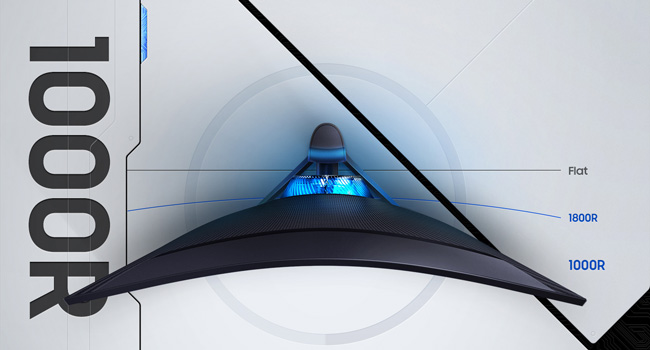
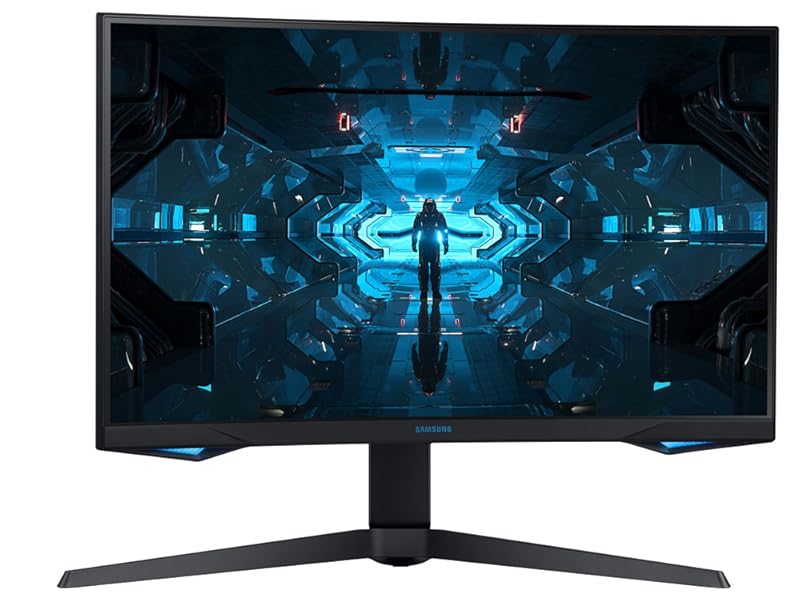
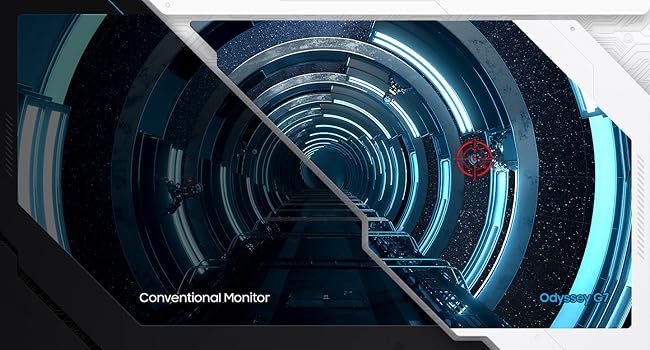
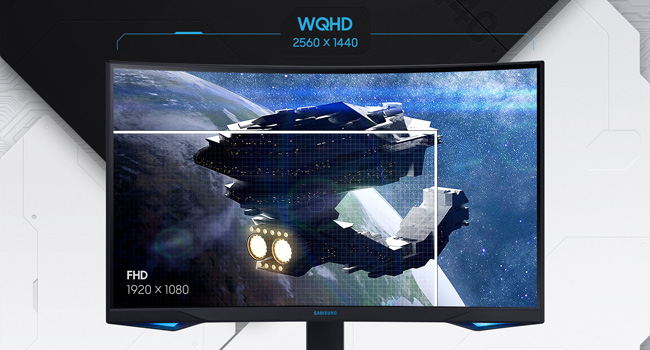
The Samsung 27" Odyssey G7 is a cutting-edge curved gaming monitor featuring a 1000R VA panel with WQHD 2560x1440 resolution, a blistering 240Hz refresh rate, and a 1ms response time. It supports NVIDIA G-SYNC and FreeSync Premium Pro for tear-free gameplay, enhanced by Quantum Dot QLED technology delivering 125% sRGB color space and HDR600 for vivid, lifelike visuals. Designed for competitive gamers and immersive experiences, it combines high performance with sleek Infinity Core lighting and robust build quality.



| ASIN | B088HJ4VQK |
| Adaptive Sync | FreeSync |
| Additional Features | Curved, High Dynamic Range |
| Aspect Ratio | 16:9 |
| Best Sellers Rank | #237,423 in Electronics ( See Top 100 in Electronics ) #4,775 in Computer Monitors |
| Brand | Samsung |
| Brightness | 1199.1 lm |
| Color | Blue |
| Connectivity Technology | HDMI |
| Contrast Ratio | 2,500:1 |
| Customer Reviews | 4.3 out of 5 stars 5,117 Reviews |
| Display Resolution Maximum | 2560 x 1440 Pixels |
| Display Technology | LED |
| Display Type | QLED |
| Hardware Connectivity | HDMI |
| Has Color Screen | No |
| Image Contrast Ratio | 2,500:1 |
| Is Electric | No |
| Item Dimensions D x W x H | 12.04"D x 24.2"W x 22.68"H |
| Item Type Name | Monitor |
| Item Weight | 15.9 Pounds |
| Manufacturer | Samsung |
| Model Name | SAMLC27G75TQS |
| Model Number | LC27G75TQSNXZA |
| Mounting Type | Wall Mount |
| Native Resolution | 2560x1440 |
| Number of Component Outputs | 1 |
| Picture Quality Enhancement Technology | QLED |
| Power Consumption | 100 Watts |
| Refresh Rate | 240 Hz |
| Resolution | QHD Ultra Wide 1440p |
| Response Time | 1 Milliseconds |
| Screen Finish | curved |
| Screen Size | 27 Inches |
| Screen Surface Description | curved |
| Shape | Rectangular |
| Specific Uses For Product | Gaming |
| Total Number of HDMI Ports | 1 |
| Total USB 3.0 Ports | 2 |
| Total Usb Ports | 2 |
| UPC | 887276413129 |
| Viewing Angle | 178 Degrees |
| Voltage | 100240 Volts |
| Warranty Description | 1 year manufacturer |
| Warranty Type | 1 Year Manufacturer Warranty |
J**.
Lots of misinformation about this monitor; it's better than reviews lead you to believe
Mine shipped with firmware v1011, the latest as of August 2021. Reviews and information about the monitor suggested that in some instances, earlier firmware may actually perform better in some contexts, so I was a bit nervous about this at first. Here's the facts. Yes, the monitor has "scanlines" visible during certain test patterns. You've probably seen the links to lagom or a specific page on ASUS's website. This is an issue with pixel inversion, and to some degree, every LCD based monitor is going to have a test pattern of some kind that will result in a visible, unwelcome change to the displayed picture. This problem doesn't show up in real content. It is completely pointless to be upset about these artifacts, unless a significant sum of your time is spent staring at lagom or that one ASUS page specifically. What people are talking about much less frequently is that in addition to the "scanlines" you can see in these specific test patterns, there is a lesser "scanline" artifact that can crop up when displaying specific colors, especially larger sections of them. This can become noticeable to an artist that is working on a still image, but is scarcely noticeable in real content. THIS is an artifact of the panel being pushed to the absolute limits of what it's physically capable of. Artifacts like these tend to show themselves when a lot of power is being pushed through the panel - anyone that has used a Valve Index has probably noticed similar "scanlines" in certain situations. Again, hardly noticeable in real content, but I can't say it's entirely invisible like the pixel inversion issue described above. With adaptive sync and VRR control on, the pixel response time is fantastic across the entire refresh rate range, and there are no visible sudden shifts in gamma, or "screen flashing" when the framerate changes. To those extremely sensitive to judder, it's been stated that this makes VRR "not as smooth feeling" in a way that nobody can seemingly articulate. I _believe_ what is happening here is that a technique is being used to internally double or triple the refresh rate of the input to the highest possible value while staying under 240hz. This can result in a delay if a new frame is ready to be displayed before the doubled or tripled image is finished being scanned out to the panel. In theory, this can have a maximum judder penalty of 4.166~ms (1 second divided by the refresh rate, 240hz), but in practice, we can assume it's going to be an average of half of that, 2.083~, since there's no way to predict if the new frame is ready near the beginning or end of the scanout for the doubled/tripled refresh. I would say that the judder that VRR control can cause is real, but as someone that isn't particularly sensitive to it, it doesn't bother me. It often melts away and becomes imperceptible amongst other performance issues a game may have that result in engine halts that are longer than the average potential judder period with VRR control on. You can't adjust the pixel overdrive setting with adaptive sync ON and VRR control ON, however, it's tuned well so that low refresh rates appear as smooth as they can, without high levels of overshoot or ghosting. Whether they accomplished this with an actual variable overdrive engine (like you can see as standard on any monitor that has a Gsync module) or through internal conversions of the input refresh to the monitor's maximum refresh, i'm not sure. Looks great either way. The curve can be weird at times, but disappears in most real content. Notable exceptions to this may be side scrolling or 2d games, where the rigid, straight lines are more easily noticed as being bowed out. I would personally prefer the curve not be there, but it's a small penalty to pay for how good everything else about the monitor is. Overall: Top tier monitor for gamers (provided you don't care about backlight strobing modes, in which case, the included function for it on this monitor is garbage and shouldn't be used), but if your primary use case is to do professional image editing, or play 2D games, you may find that certain elements of the panel performance and curve are unsuitable or take too long to get used to in order to feel good about the purchase. For everyone else, it's fine and I considered this a definitive upgrade over prior monitors I've purchased (Viewsonic XG2431, Viewsonic XG270, ASUS PG279Q) for non-strobed gameplay. The added contrast of VA matched with a pixel response time performance that is overall faster than today's fastest IPS panels is fantastic to look at. Model purchased: Samsung 27" G7. Don't forget to filter your reviews to the specific model you're wanting information about so you can get a clearer picture of the exact item you're considering, as the reviews on the store page cover every selectable option, including other sizes or models that use different panels entirely.
A**W
It's still the king of 1440p.
I've had this monitor for the past 2 years. It has been the best experience and quality I could have asked for. Aside from a tiny personal preference, I've had absolutely 0 issues with this monitor. **** TL;DR at bottom**** ------------------------------------------------------------------------------------------------------------------------------- My personal interests at the time of buying this monitor were: - school work - occasional creative work - mostly gaming in shooters (Valorant, CS, Fornite, etc.) ------------------------------------------------------------------------------------------------------------------------------- Pros: ****FPS**** - 240hz - this allows for very high fps (assuming your set up and gpu keeps up), and gaming for me was buttery smooth. - even with setting it at the max hz, I (along with others I know) have had no issues regarding ghosting, screen tearing, backlighting, or motion blur at max settings. ****Color quality**** - I mentioned I did occasional creative work which was a bonus in buying this monitor because of how beautiful the color quality is. It really does pop. - Even if the colors aren't suitable for you out the box, there is so much customization and options you can tinker with to get it to your exact preference. - I actually eventually started gaining more interest in creative work and that's when I truly appreciated the color quality. ****Build quality**** - The monitor and the monitor stand both feel incredibly sturdy and high quality unlike some of their newer models that feel like they can't hold the weight properly. - Bonus! The monitor stand has an actual built in mechanism for clean cable management... unlike some of their newer models that just have a band at the bottom. It actually hides it, and I loved that. - I bought mine and got one without any issues my first attempt, so no scanlines, dead pixels, backlighting, etc. (can't say the same for some people I know though) ------------------------------------------------------------------------------------------------------------------------------- Cons: ****Known issues**** - Specific issues I recall from people I know were most commonly dead pixel(s). Occasionally slight flickering with backlighting. - I know no one personally with any major issues, so you may also consider this more as a pro than a con. - potential FIXES to backlighting issues: play in full screen, set a custom resolution at custom hz in settings, cap fps in games, customize brightness levels. - Not sure if custom hz also solves ghosting for this model, but it did on my Neo G7. ****Small personal dislike**** - The blue flashing light when your pc is off or sleeping (it literally flickers a bright blue light) The fix is just to set Power LED On > Working in the monitor settings. It won't flicker and just stay blue. ------------------------------------------------------------------------------------------------------------------------------- Neutral?: ****Curved screen**** - I know it's all personal preference when it comes to liking a curved screen but... - I don't feel much of a difference at all. I don't hate it though. I honestly have no preference between a flat and curved monitor, both are fine imo. - I got use to it within a day or two with the monitor. ------------------------------------------------------------------------------------------------------------------------------- The Big Question: ****Would I recommend buying this monitor?**** - If it's like my initial interests where this monitor is primarily for high fps gaming (best of the best 1440p), absolutely. I couldn't ask for a better experience. Even now, where I occasionally play with friends, I swap to this monitor for the insane fps and quality. It's never let me down. - If it's primarily for anything other than high fps gaming, I definitely think there are more suitable options. ------------------------------------------------------------------------------------------------------------------------------- TL;DR 5 stars; BEST 1440p high-fps monitor I could have asked for. + insanely high fps (if your gpu can keep up) + very good color quality (gaming looks nice) PLUS very flexible to adjusting to personal liking + built very well, very sturdy + no issues at all in 2 years of nearly daily use. + monitor stand has very clean and slick cable management + rarely any major defects out of the box, if any issues at all (from personal experience and others I know) **This was 2 years ago, so I can't really vouch for rates right now.** - dead pixels are annoying that can happen with no fixes (but don't they happen for any other monitor?) - personally dislike the blue flickering feature of the monitor (there is a slight fix though) would I recommend this monitor? >> If your primarily want high-fps for games such as shooters, 100% absolutely. I couldn't ask for a better experience in 1440p. >> Otherwise, I believe there are better options. >> ALSO, if I could go back, I'd opt for the 32-inch instead. This 27-inch is perfectly fine, but as I used this monitor for more than just gaming, more screen real estate would have been very convenient. Hope this review helped. :)
A**.
An Honest Review for the best 1440p, 32 inch, 240hz monitor on the market!
So I actually want to talk about those "GHOSTING" concerns you might have when purchasing monitors like this first. If you don't know what "Ghosting" is; It's a monitor/display issue that has nothing to do with your system. Monitor ghosting usually occurs when there are multiple images moving fast on your screen, or when you’re moving your mouse quickly. You will notice blurry trails following moving objects; Previous image frame remains on your screen for a few seconds when you’ve moved to the next image frame; Current Image is blurry; and possibly discolored images. THIS MONITOR HAS NO VISIBLE GHOSTING, which is fantastic! I'd also like to mention how things look when running games at different frame rates. (Using GTX 1080 Ti 11Gb) First, I tested Minecraft maxed with some shaders and what not to see how things look when you are utilizing the whole 240hz refresh rate. And of course, that 240 fps is stunning! Second, I tested Star Wars Battlefront 2 maxed with a range of 70 fps to 130 fps, and it once again looked stunning and had excellent behavior. Third, I ran Skyrim with some pretty hard core graphics mods. Skyrim is a game that is or needs to be locked at 60fps. Once again this monitor handled 60 fps very well. So across all ranges of frame rate, this monitor stayed crisp and clear One Thing you may notice when you're set up and ready to go is some faint horizontal lines over a few solid colors. It is so small that you may not even notice at all. Initially I was concerned but then I launched a game and I couldn't see anything(meaning I couldn't see the horizontal lines). Believe me I tried. I literally moved my eyeball one inch away from the screen and still couldn't see any lines. And that's what we are here for folks, Gaming. So if it's perfect while I am gaming, it's a perfect monitor. That 1000R Curve is NO Gimmick. It's not like bragging that your Honda has V-tech. The Curvature of the screen does indeed match the curvature of the human eye and it makes a difference compared to other curved monitors. This monitor also offers a great little menu for customizing your picture settings. It is super easy to use so play around with it! If you don't care for any of the default picture settings then, in a few short minutes, you will be able to craft something up to your liking. Also if you want to use HDR, it looks pretty good as well. It's not HDR 1000 good, but HDR 600 certainly is better than HDR 400. Let's talk about the pricing of this unit. If you don't want to be disappointed and you don't want to have to return something, buy this. To me, most of the other 32 inch, 1440p, High refresh rate monitors are horrible. Yeah I know that they are half the price, but it doesn't matter how much you save if you want to pull your eyes out. If you are even half serious about gaming, you will not regret this purchase. From MMOs to FPS, From driving games to RPGs, this monitor takes the gold! I also encourage you to watch Linus Tech Tips review of the monitor on YouTube. Linus is the authority of the Gaming PC world, so let him give you a little more confidence as well.
N**N
Very nice monitor but with some issues that some may find irritating
To start off, I almost returned this because I thought I received a faulty monitor. Because if the fps doesn't match the refresh rate of the monitor when you're gaming for instance, then the monitor will do some sort of micro flicker. It looks like rapid white flickers in certain areas of the screen depending what game you're playing. Also it seem like my monitor would just crash and leave a grey screen. After doing some research, I had to do something called mpo disable which solved that problem. I still get the flicker time to time, but it's not so bad to the point that I can't deal with it. It happens to VA monitors because the fps of the game and the refresh rate of the screen isn't matched up. I believe if I get a better gpu that can push out more frames would solve most if not all of the flicker issues. Overall it's a solid monitor with some issues. If you have top end specs, then maybe you won't have the issues that I had. I'm using an older computer that can't push out the frames to match this monitor. But i wish that would never be an issue regardless. So I wouldn't recommend this at its regular price because of those issues. But if it's on sale then maybe. Personally I won't ever get another VA monitor again. But the screen is clear and watching movies on it is beautiful.
G**N
Accurate/Proper reivew
Ive noticed that there are too many reviews with incorrect/uneducated information. Im going to break this down simply. Requirements: In order to get 240 HZ 10 Bit color you need DSC (display port compression) graphics card otherwise you are limited to 8 bit. This also has to be set manually in the NVIDIA / AMD control panels. GPU capable of even achieving 240HZ and if you plan to game with this depending on the game /settings you may need a very high end GPU to hit high enough in the fps range to utilize as much as the refresh rate advantage as possible. Proper display port cables/ The ones it comes with from the OEM. Issues: Flickering - Completely resolved by the latest firmware update as near as i can tell. Latest firmware update contains a VRR control that you must set in the monitor menu. Backlight Bleed - its there and very apparent when the screen is completely black. Its not oled and its not FALD. It does have light zones though. This should be a non issue for the actual target reason to buy this monitor. Stuck Pixels - I got one with stuck pixels. It wasnt just one it was several in different areas. Its why i bought directly from amazon. Shipped it back. Got a different one without the issues. Panels Broken in shipping - Yes Samsung has an issue with this. 1000R curves will break at a high percentage during shipping. No real way around this due to the curve and carrier handling. If you can buy from a big box store that sells them regularly in store. they usually are shipped on pallets together and arent as mishandled by carriers. "My mac cannot detect this all the time Bro.. I have to unplug the cable and plug it back in" This at the current time appears to be true. though for some reason apple cannot ever seem to get this simple thing that windows has been doing since the 90s right. Its a problem for lots of monitors on their latest build of Big Sur and its a problem on their new apple silicone(m1) with their own cpu/gpu. I observed it on my own mac mini with the m1 PROC. No ultimate gysnc module - Yep it doesnt have it. Look up the BOM for it on the internet. then ask yourself would you pay maybe double for this monitor to have that module? Ive noticed no gsync issues with monitor and i personally cannot tell any justifiable difference between this and gysnc ultimate on a x27 predator i owned. Samsung service is terrible - In my individual opinion they are. Every comment online i have read about interacting with them is terrible. Its why i bought from amazon and made sure all was working. Slight vertical lines( non dead/ on broken pixel rows) - Yes this VA panel may have them. They show up in certain colors and brightness's in certain spots of the monitor. These are extremely subtle and i doubt most people will notice unless they really are looking or super uptight about quality. Rumored issues: Ghosting - Your high if you think so. Look at the Youtuve videos of the UFO test. This thing performs and has low response times. gtg 1ms HDR - Its HDR 600 and no FALD. They dont advertise it as FALD. HDR is noticeable and makes a difference in some games. Its not going to wow you and this isnt an issue with this monitor. HDR works at pretty much the level your paying for in my opinion. So why the five star review? 1. Curve is 1000R. For me life changing eye comfort. 2. 240 HZ 10 Bit color. Smoothest gameplay at 1440P i Have ever seen. If you can run at 240 FPS the game your playing its beautifully smooth. (There isnt a huge difference between 144hz and 240 that i can see but its still awesome) 3. 240 HZ productivity. window movement and any motion that can take advantage is beautifully smooth. 4. RGB lighting is nice 5. Color is nice 6. HDR while not the FALD 1000 NIT wow factor its i think pretty good for what you pay for. 7. Overall design... Very nice. stands out. 8. Power cable length. I have a slightly higher desk and lots of my cables don't reach. this one did. 9. Dual Display 10. Settings to adjust for gaming/response/performance/etc. 11. Monitor button. Very nice to switch between two computers. 12 Bezel... its not thing and technically its a bezel inside of a bezel which is common to give the appearance of a smaller bezel. 13. Mine included a vesa mount plate. 14. Super USB charging Is this monitor perfect? no its not. Is this monitor catering to something uniquely awesome 1000R 240hz 10 Bit color? Yes it is. I love this monitor. you can nitpick all the imperfections and obsess over them. When using this monitor I don't even want to ever touch another x27 predator or a asus pg27uq(regarded as the best monitor ever made by many). Reality has become this is my go to monitor.
C**Y
After 3 service attempts I can easily say... Do Not Buy This Monitor
I bought the 32inch version in May thinking it would be the best of the best. Turns out Samsung does NO QA on this product at all, and the process for supporting the monitor and fixing the issue does not exist. The common problem for this monitor is that is fails an inversion (pixel-walk) test at its rated setting (240 hertz) and needs to be turned to a lower setting like 144hertz (or lower) to have a normal picture. In the multiple attempts to service this monitor, all of them had this issue. I also ran into one instance of screen flickering. The impact of it failing a pixel inversion test is that it will struggles with certain images, For example if there is a blue gradient it will produce CRT like scan lines. This is not the only scenario that will cause this to happen. Starting with the first Monitor, It had pixel inversion problems at all refresh rates. I called up Samsung and they said to send it in. They did not provide me with a box, only the shipping label, and I had to pay about $100 (in packaging) to have it shipped via UPS. They received it, and it got damaged in shipping. Samsung wanted $150 to repair it. However after a call to their service department, they waved the repair fee. After the first repair it STILL had issues with pixel inversion, at all refresh rates. So I sent it in again. Luckily I kept the box this time. I'm left monitor-less for about 2 weeks, because they didn't have the part to repair it. After the second repair, it is able to run at 240 hertz with no pixel inversion... for about 1 week, then it started happening again. I was so drained from the service process that I set it to 144 hertz, and said screw it, I can live with it. Then I started to notice issues with the screen flickering in dark scenes. About 1 month later Samsung started blowing up(texting me multiple times and calling twice) my phone saying I needed to send in the monitor. I had not asked for another service... I called to make sure it was legit, and they informed me that they have a replacement for me and I need to send it in so they can ship me a brand new one. So I sent it in. Little did I know this would be the worst part. I sent it in July 18th. I receive a message from Samsung on my phone July 19th saying the repair center has received the monitor. But don't hear back from them for a week and a half. I call into their service department, and they tell me they haven't received it yet. I ask them to expedite the issue as I had to move August 1st. They say they will. It was now August 2nd, I haven't heard back, and I have moved. I call again, cause I need to update my address... They still don't have it. I politely ask to speak to one of their supervisors. The supervisor calls back several hours later and I tell him the whole ordeal. He informs me that they will just issue a refund... So in the end, I did not receive a working monitor, wasted about $100 dollars of my own money, and dozens of active hours trying to fix this, along with months of not having a monitor. This monitor should be recalled. If you check the internet, tons of people are having this issue. If this worked as advertised then this would be a great monitor. As it stands I can NOT recommended this, also I would not recommend Samsung at all after the multiple failed attempts to get this fixed. I can understand some monitors having issues and needing to be serviced, that will happen, but if you do not QA your own repairs, whats the point? TLDR: Samsung Failed to provide me with a working monitor after 4 attempts, (between the initial purchase, multiple repairs and replacement) They left me monitor-less for about 2 months total, cost me $100, wasted dozens of hours of my time, and they just gave up on trying to get me a working monitor and issued a refund. DO NOT BUY. Update: After not hearing back from Samsung for over a week, I called their support again, they informed me that it was going to be a week out for a replacement, which was odd as I was told by the last rep, that I was going to be getting a refund, the Rep lets me know that a refund would take 2-3 weeks starting today. I ask to talk to a higher up and they tell me the same thing. I wanted a refund, so the started the process, they proceed to keep me on the phone for 30 minutes to "generate a ticket number". Added screenshots to show issue at 240 Hertz (also a screenshot of it not showing the problem at 144 hertz) that I experienced after all of Samsung's attempts to fix the issue. Total Number so far. Time to resolution for the issue: Still pending currently 3 months Total Time on the phone with Samsung support: 3 Hours 46 minutes Attempts to fix/replace: 4 Money spent on shipping: $80
M**B
Outstanding Monitor - Happy I Purchased
Like anyone else here, you're probably doing a ton of research and watching youtube reviews on this monitor. Seems like reviews from summer 2020 there were some issues that firmware have fixed. I purchased in Jan 2021 and updated to the latest firmware and this monitor is perfect. PROS -240hz is gorgeous and it's obviously why you are on this page looking at this monitor. There isn't a ton of competition in the 240hz 1440p market right now -VA panel is done very well by Samsung. VA panels have typically not been executed well by other manufactures, but Samsung has been doing VA panels with their TVs for a long time, so they have all the kinks worked out. -Color was great out of the box, minor tweaks made it perfect. -Curved screen helps me not "lose sight" of things in the corners and far edges of the screen. 27" is a big monitor, if you are going from a 24 or 25 to a 27, you will probably have a transition period going to 27 and the curve definitely makes a difference. -Zero issues with ghosting, the top review on Amazon says he had major issues but I have had zero on this monitor. I have had it on previous monitors, so I know what it is. He may have just gotten a bad monitor or firmware not update. Don't let that dissuade you from this monitor -Was on sale when I got this for $599 and used a ton of rewards on it as well. Good deal at the time for me. CONS -Curve is jarring for some people, it looks goofy, but loved it now almost two months later. Won't know until you try it. Free returns with Amazon, so worth a shot IMO. -HDR is supposedly not bright enough for some people? I didn't have that issue but most of my games are not HDR, so this was a non-issue for me. -Firmware NEEDS to be updated before using. -Price? I don't know, that is obviously relative. Gaming and technology are my main hobbies, I will happily spend money on them. -Back panel cover is flimsy, some people broke it by not being careful. I knew that going in, so wasn't an issue. -VA isn't IPS? I had no complains with my picture quality or performance whatsoever. COMPUTER USED i9-10850k @ 5.0 RTX 3090 Evga XC3 Corsair Hydro X cooling 32gb 3600mhz All ssds are M.2 NVMe GAMES PLAYED -CSGO - main game, noticeable difference between 144hz and 240hz, very very smooth. -PUBG - game is still clunky as hell, but getting ~200fps makes it feel slightly better lol. -CoD Cold War + Warzone - feels buttery smooth running at 240fps consistently at competitively high settings ALTERNATIVES (prices as of 3/11/21) -Samsung G7 in 32" at $798 - it is the same monitor but just bigger, so the 1440p will be blurrier. My sweet-spot is 27" and want the same size to match my secondary monitor -Samsung G9 in 49" at $1400 - this really isn't comparable as it is twice the price and it's unbelievably ultrawide. A very niche product IMO. I have a 34" Ultrawide 1440p monitor at work and I love it, but I cannot imagine something this big. I have a powerful computer and I don't see the point of running like a flight sim on this as my 3090 is no where close to maxing out frame rate. -Dell Alienware AW2721D at $767 - this was my only really competitor that I was considering. It basically had all the specs that I wanted, the difference being IPS vs VA and Curved vs Non-curved. The main factor was timing and the Dell was $200 more expensive than the G7 on the time of my purchase, so I went with the G7. I have been a big fan of Dell monitors for a long time (work, gaming and personal use). I was replacing a 1440p 144hz Dell TN panel monitor I got on Amazon warehouse used for a great price many years ago. It is now my secondary monitor. -HP Omen X 27" at $609 - TN panel was not in the cards, I wanted to upgrade to either VA or IPS for this price point. People also complained about the VESA mount (requirement for me) and the matte on the screen. I also HATED the look of the bottom bezel area. OTHER NOTES Two months in, I love this monitor and I have no regrets whatsoever. Sorry if the review is all over the place, hopefully still helpful to some in deciding their next upgrade. Turn your g-sync on, read the blurbusters article if necessary on it. If you are gonna spend the money on a nice monitor, use it to the full extent. -G-Sync On in Nvidia control panel (both full screen and window mode) -V-Sync On in Nvidia control panel -V-sync Off in game settings -Cap FPS 1-3 fps below monitor max refresh (237 in this case)
J**N
Quality and powerful
This screen is amazing. I should say I am running a 30 series graphics card in my computer and if you do not have something that can handle the full resolution and refresh rate you will not enjoy this monitor to it's full extent. I have been using this for quite some time now and can say that it is a very smooth image (with a game that has higher refresh rates) and great picture quality. The larger screen was daunting at first but after playing with it for maybe 2 or 3 weeks you sort of get used to it. To cover different parts of the monitor I will start with the fact that the one I got had a minor issue with the button on the bottom of the monitor which apparently happens to a few people. This is like a minor inconvenience because I have to just move the button twice to make it work so it's annoying but once you have the settings where you want you don't need to change it so I guess it's fine. Other than that nothing wrong physically with the monitor. The stand is smaller than other monitors I have had (Asus brand) which have huge stands. Nothing against that other than losing desk space but the stand on this Samsung one is smaller and very sturdy. It holds the thing with no issues and gives me more space on my desk. The image quality is what you would expect from a decent 2K monitor with a high refresh rate. I don't go into all the little details like some may because if it works and doesn't look bad then why be picky over the tiny little space man who has some image tearing at high refresh rates. Watching movies is satisfying on this because it's a larger screen and you can enjoy them with that nice curve. My only issue with the quality is not much online content is quite there with the resolution yet. Gaming has been so much fun on this compared to my last 27 inch monitor because 32 is crazy when you first get it. But after that adjustment time I don't see how I can go back to the 27 inch monitor and be as immersed in the game. Overall if you can snag this monitor on one of it's sales where it's below 600 then it's worth it for sure. I would not have paid over that price for it personally but when it dropped down on sale I had to.
Trustpilot
3 weeks ago
1 month ago