We remain fully operational. Our teams are working around the clock to ensure your deliveries continue safely.

DOWNLOAD THE APP


Customer Services
Copyright © 2025 Desertcart Holdings Limited
DOWNLOAD THE APP

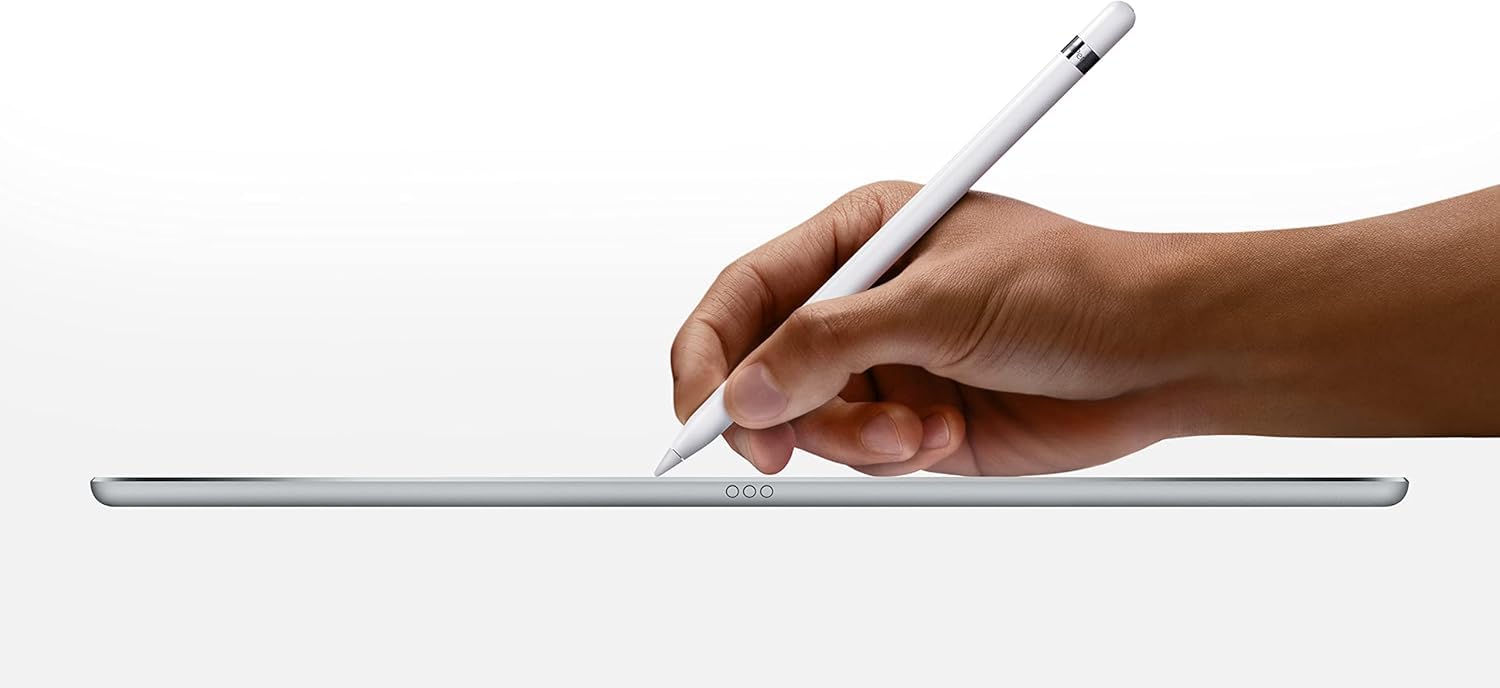
✍️ Elevate your iPad game—where creativity meets lightning-fast precision.
The Apple Pencil (1st Generation) transforms your compatible iPad into a versatile digital notepad and canvas, delivering precise, lag-free input with a natural writing feel. Featuring a lightweight design, magnetic cap, and ultra-fast charging that provides 30 minutes of use from just 10 seconds of charge, it’s engineered for professionals and creatives who demand seamless performance and reliability.


| ASIN | B016NY7784 |
| Date First Available | November 1, 2018 |
| Is Discontinued By Manufacturer | No |
| Item Weight | 0.73 ounces |
| Manufacturer | Apple |
| Product Dimensions | 0.07 x 0.35 x 0.07 inches |
A**R
Good Experience, Worth the Price and Charging speed is a Plus
First thing I noticed was that the Pencil is smooth and looked like it could slip from my hand, (which it didn't) but it sure can role, so make sure it's not on a slanting surface, or better yet, get a case with a pencil holder on the inside cause this feels and looks fragile. As for the butt cover, it is magnetic so I don't worry about it falling out (which I initially thought lol). Despite it's very slippery looking features, it is quite easy to grip and it comes with an extra point and an adapter. The point doesn't seem rubbery, more like a smooth, rubber like coated, plastic. Basically, it's really hard but is silent to very low on sound when you're using it on a screen, so its very unlikely to make noise to disturb you or persons around you unless you tap hard on the screen. It's heavier than an ordinary pen or pencil but it doesn't affect my writing or drawing. It's hardly noticeable when you start using it so you get use to it pretty fast. It doesn't lag one bit so it's safe to say it 'feels natural' for drawing and writing. For paring, you just insert it into the iPad charging pot and it asks you to pair, you accept the pairing and it pairs until you cut off the Bluetooth from the settings area. For charging, it's a bit awkward though, cause this looks like an accident ready to happen. My advise is to put it somewhere that it can't be disturbed cause it doesn't look safe to just leave around when charging. In the flip side, it charges super fast so the fact that the pencil loses power during rest mode, doesn't affect the whole user experience. From my experience, it doesn't die out quickly. I can write for a considerable amount of time and still not have to worry about it dying on me, (but it does warn you on the Ipad so it won't be a surprise) and even on low percentage (15 percent), it can still give you a good bit of time (maybe 20-30 minutes) to wrap up before it really needs a charge. Again, super charge, why take the risk right? 10 seconds gives you an extra 30 mins man! I also like that it barely upsets the ipad's charge either. I once charged my ipad to 100 percent, placed my dead pencil in to charge, come back a few minutes later and the pencil was 100% while the ipad was still 100%. What I don't like is that it takes forever to charge the pencil directly off the wall. If you want a fast charge, use your iPad. In other words, it may be pricey but the experience makes up for it. I doubt anyone who has a properly working pencil will regret it.
J**E
Amazing
Perfect to star . I do trade all ways whit my pencil sow smooth
J**S
Hands-down worth the money if you are do art/lettering
I've had many stylus' over the years for my ipads and nothing comes even remotely close to the Apple Pencil. The first time I saw this product I wondered why anyone would ever buy a stylus that is this expensive, but I completely know why now. First off, charging this pencil is so easy. I just plug it in to my ipad pro directly to get a charge and it comes to a full charge in a matter of just 20 minutes. I thought before buying this product I would be annoyed at the fact that you had to charge the stylus, but even when it dies on me when I am in the middle of drawing I just have to plug it in for 1 minute to get 30 minutes to an hours worth of charge. Another feature that I love is the palm rejection. I draw almost everyday and I have never been able to draw much on the ipad because the way I write and draw is with my palm pressed hard against whatever surface I am on. So this stylus was a game changer for me! I rarely find the palm rejection not working. Maybe a couple of times when my knuckle touched the screen in a weird way but that is very rare. I use the app Procreate to draw and the one thing that I wanted was a pressure sensitive stylus, and I got this with the apple pencil. It works extremely well too. If you do lettering, this is definitely a gamechanger. The only problem that I have encountered in the few months of using the apple pencil is a problem with the Apple Pencil working while charging my Ipad Pro. I'm not sure if this happens to others, but when I am charging my ipad the apple pencil will freakout and make a bunch of marks all over an act like it is not connected completely. I tested this in both the notability app as well as the Procreate app and they both did the same this. So I have to wait until my ipad is unplugged before using the pencil (which can be annoying at times). The only other problem I have with it is the cap is not connected to the stylus and easily comes off and can get lost. The magnet is not that strong on the cap which is very annoying. This is a workaround buy though which is a must if you don't want to buy an replacement cap https://www.amazon.com/3-Piece-Fintie-Pencil-Lightning-Adapter/dp/B01H6Q03IY/ref=sr_1_2?ie=UTF8&qid=1485457860&sr=8-2&keywords=apple+pencil+cap+holder Note: My next favorite stylus that I used for a long time was the Adonit Jot Pro which I will never use again after buying the Apple Pencil
J**E
Love It!
I love this pencil and I'm not an artist in any way shape or form! I've found that Apple products that I thought were pointless/useless i.e. apple watch, ipads, the apple pencil, are products that I've come to absolutely love once I got them. That list now includes the apple pencil! It is SO precise and responsive. I'm not an artist but I found myself downloading and enjoying sketch pad apps because of how fun it is to use the pencil. And if nothing else, it helps keep excessive finger prints off my screen because I no longer need to touch it as often. The pressure sensitivity is amazing as well! It really functions as a real pencil/paintbrush/whatever you need it to be. The one downside to the pencil is actually it's seamless connectivity. It's great because it instantly connects but if it's in the vicinity of my iPad, even if i'm not using the pencil, it will connect to my iPad and start draining it's battery. I wish there was an on/off switch but I can live without it. I just keep the pencil in a separate drawer when I'm not using it. I have a case with a pencil holder on it but it wakes up the pencil every time I move my iPad. All the other problems are not big deals. Sure, I wish there was some way the pencil charging cover was attached to the pencil, but it's magnet and will stick to your iPad while your charging the pencil. And yes, plugging the pencil into your iPad to charge seems like an accident waiting to happen, but the pencil comes with a USB cable adapter so that you don't need to plug it into your iPad. It's a great product and I will never use an iPad without one anymore.
X**.
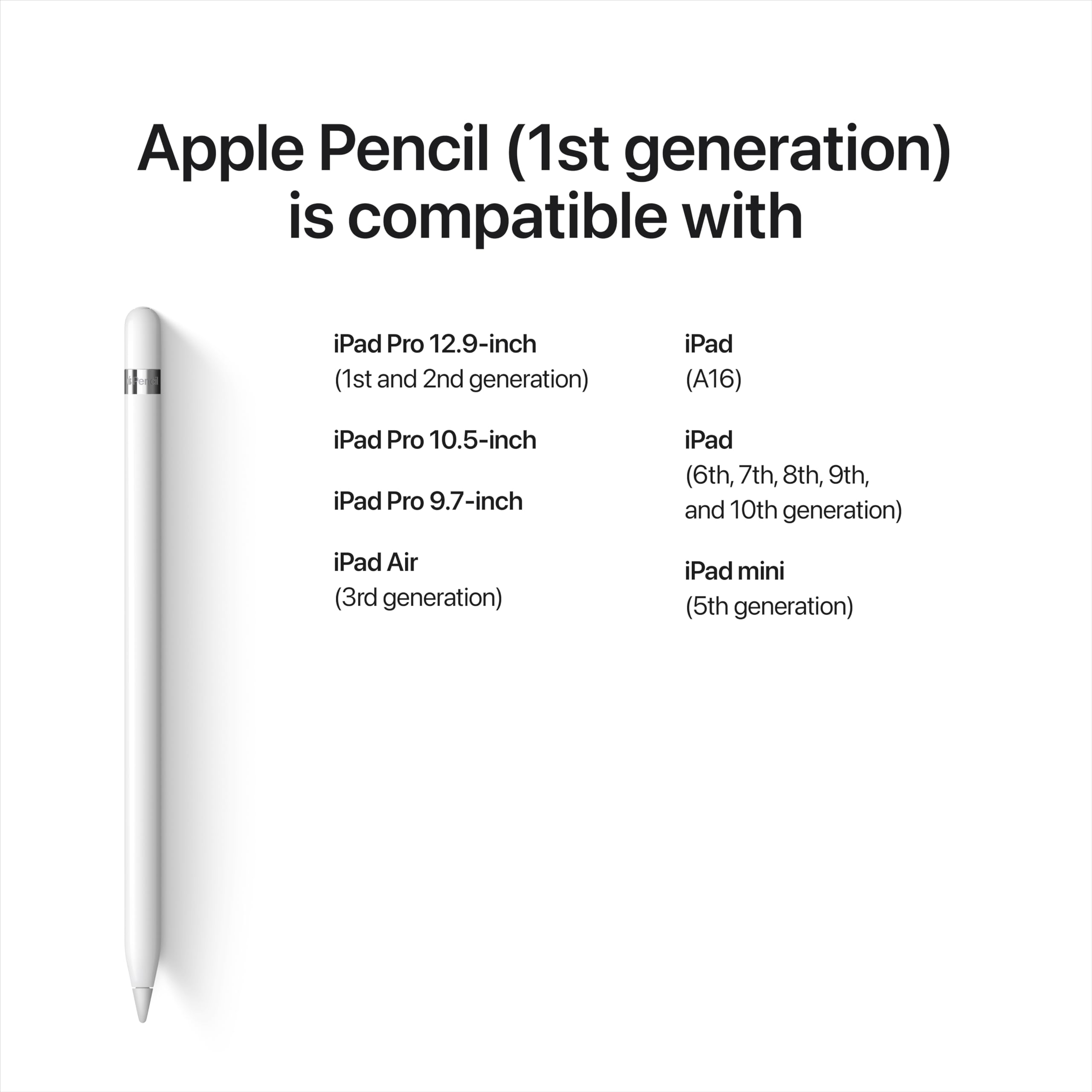
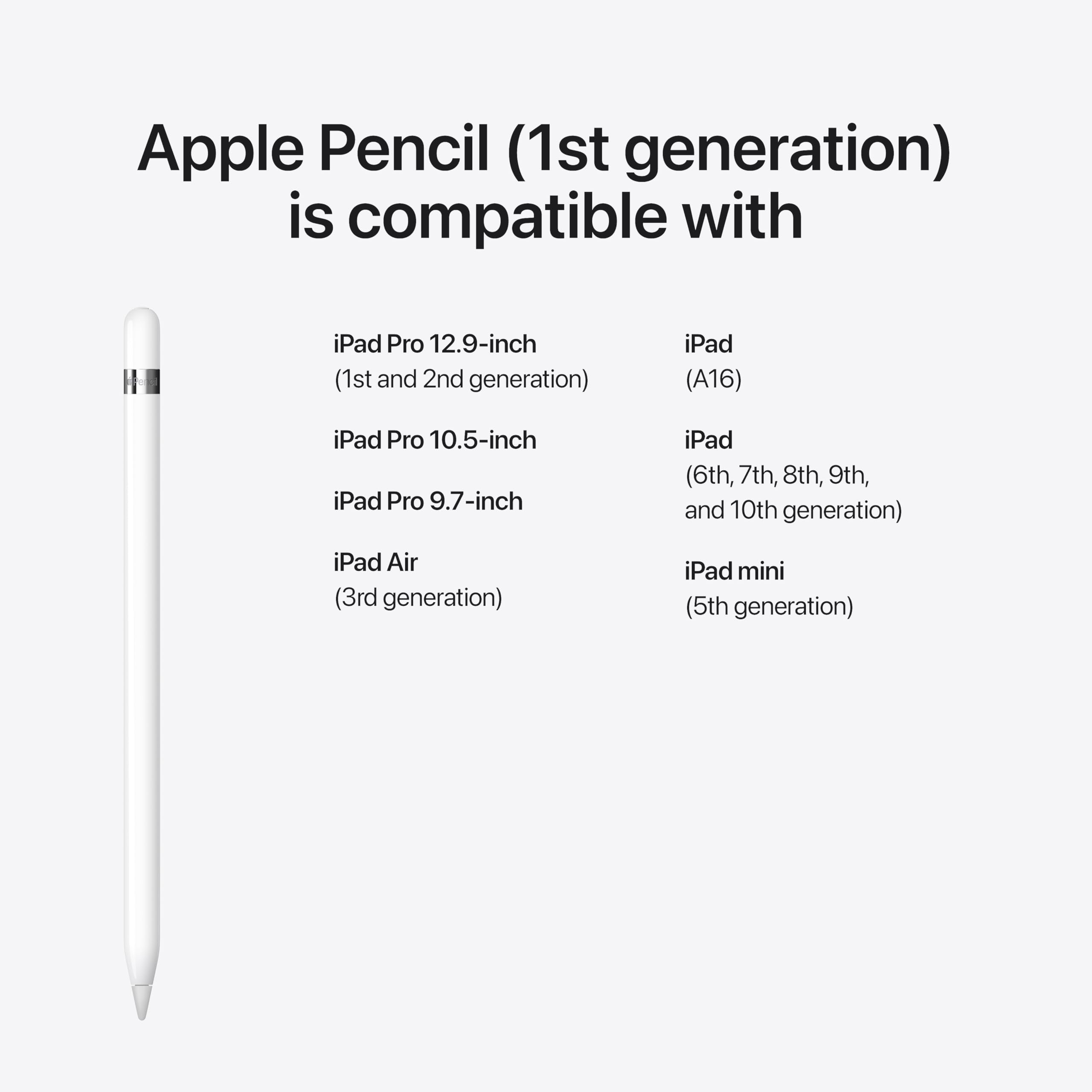
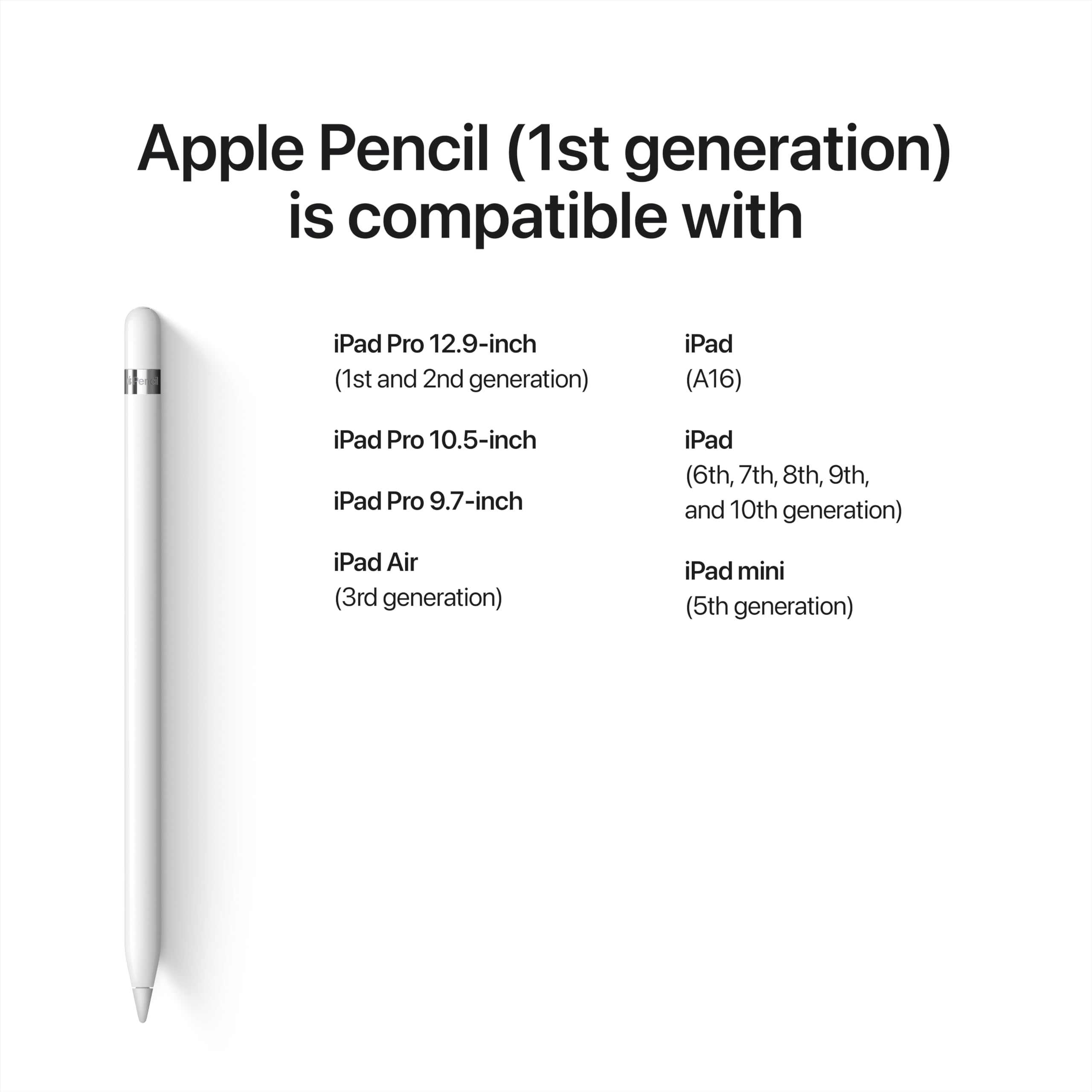
🔹 Aspectos positivos: ✅ Increíble Sensibilidad y Precisión: El Apple Pencil de 1.ª generación destaca por su increíble sensibilidad a la presión y la inclinación, permitiendo una gran variedad de trazos y efectos. Desde líneas ultrafinas hasta sombras sutiles, este lápiz digital replica la experiencia de un lápiz tradicional con una precisión milimétrica, ideal para dibujo, ilustración y toma de notas. 🖋️🎨 ✅ Diseño Elegante y Ergonomía: Con un diseño elegante en aluminio y un tamaño compacto (175,7 mm de altura y 8,9 mm de diámetro), el Apple Pencil se siente ligero y cómodo en la mano, permitiendo uso prolongado sin fatiga. Su acabado en blanco complementa perfectamente los dispositivos Apple, ofreciendo una estética sofisticada. 🖌️✨ ✅ Integración Perfecta con el iPad: El Apple Pencil se enlaza y carga de manera fluida a través del adaptador USB‑C incluido. Esta integración perfecta permite una carga rápida y una conexión instantánea con el iPad, facilitando el acceso inmediato a sus funcionalidades sin complicaciones. 🔌📱 ✅ Compatibilidad Amplia: Este lápiz es compatible con una amplia gama de modelos de iPad, incluyendo iPad Pro 12.9" (1ª y 2ª generación), iPad Pro 10.5", iPad Pro 9.7", iPad Air 3ª generación, iPad (6ª a 10ª generación) y iPad mini 5ª generación. Esta versatilidad lo hace accesible para una gran variedad de usuarios. 🌐📲 ✅ Duración y Eficiencia de la Batería: El Apple Pencil ofrece una duración de batería excepcional, permitiendo horas de uso continuo. La carga rápida (80 a 100 minutos) garantiza que el lápiz esté listo para usar en cuestión de minutos, lo que es esencial para largas sesiones creativas o de trabajo. 🔋⏱️ ✅ Funcionalidades Avanzadas: Además de la sensibilidad a la presión y la inclinación, el Apple Pencil ofrece una baja latencia, lo que significa que no hay retrasos entre el movimiento del lápiz y la aparición del trazo en la pantalla. Esto es crucial para una experiencia de escritura y dibujo fluida y natural. 📉🖌️ ⚠️ A tener en cuenta: ❌ Falta de Sensibilidad a la Presión en Aplicaciones Específicas: Aunque el Apple Pencil es altamente sensible, no todas las aplicaciones aprovechan al máximo esta funcionalidad. En aplicaciones que no están optimizadas para la sensibilidad a la presión, el grosor y la opacidad del trazo pueden ser limitados. 🛠️⚠️ ❌ Precio Elevado: El Apple Pencil de 1.ª generación tiene un precio elevado (108,30 €) en comparación con otros lápices digitales del mercado. Aunque ofrece funcionalidades premium, se puede considerar que existen alternativas más económicas que podrían satisfacer sus necesidades básicas. 💰❓ ❌ Carga a través de Adaptador USB‑C: El hecho de que el Apple Pencil (1.ª generación) requiera un adaptador USB‑C para cargarlo puede ser inconveniente para algunos usuarios, ya que este adaptador no está incluido en la mayoría de los paquetes y puede requerir una compra adicional. 🔌🔄 ❌ Durabilidad del Adaptador: El adaptador de USB‑C al Apple Pencil puede ser frágil con el tiempo, presentando problemas de conexión o daños físicos después de un uso prolongado. Es importante manejarlo con cuidado para prolongar su vida útil. 🛠️⚠️ ❌ Incompatibilidad con iPhone y Otros Dispositivos: El Apple Pencil (1.ª generación) es exclusivamente compatible con ciertos modelos de iPad y no funciona con iPhones ni con otros dispositivos. Esto limita su versatilidad para aquellos que buscan un accesorio multi-dispositivo. 📱🚫 💡 Recomendaciones: ⚙️ Aprovechar al Máximo las Aplicaciones Compatibles: Para obtener el máximo rendimiento del Apple Pencil, utiliza aplicaciones optimizadas para su sensibilidad a la presión e inclinación, como Procreate, Notability, GoodNotes y Adobe Fresco. Estas aplicaciones pueden potenciar sus funcionalidades avanzadas y ofrecer una experiencia creativa más rica. 📱🎨 ⚙️ Proteger el Adaptador USB‑C: Considera utilizar fundas o protectores para el adaptador USB‑C, o almacenarlo cuidadosamente cuando no esté en uso, para evitar daños físicos y prolongar su durabilidad. 🛡️🔧 ⚙️ Comparar Alternativas: Si el precio es una preocupación, explora alternativas al Apple Pencil que ofrezcan funcionalidades similares a un costo menor. Marcas como Logitech, Adonit y Wacom ofrecen lápices digitales que podrían ajustarse a tu presupuesto y necesidades específicas. 💸🔍 ⚙️ Mantener Actualizado el Firmware: Asegúrate de mantener el firmware del Apple Pencil y el iPad actualizado para garantizar una compatibilidad óptima y mejorar el rendimiento del dispositivo. Las actualizaciones de software pueden resolver problemas y introducir mejoras en la funcionalidad. 🔄📲 ⚙️ Evaluar la Necesidad de Funcionalidades Avanzadas: Si no necesitas funcionalidades avanzadas como la sensibilidad a la presión y la detección de inclinación, podrías considerar un lápiz digital más básico. Esto te permitirá ahorrar dinero mientras satisfaces tus necesidades básicas de escritura y dibujo. ✏️💡 📊 Valoración: ⭐️⭐️⭐️⭐️⭐️ 4.7/5 estrellas El Apple Pencil (1.ª generación) es una herramienta excepcional para aquellos que buscan precisión y creatividad en sus dispositivos iPad. Su sensibilidad a la presión e inclinación, integración perfecta con el iPad y diseño ergonómico lo convierten en una opción premium para artistas, diseñadores y profesionales que desean maximizar su productividad y creatividad. Sin embargo, su precio elevado y la necesidad de un adaptador USB‑C pueden ser consideraciones importantes para algunos usuarios. Además, la compatibilidad limitada y algunos problemas de durabilidad con el adaptador son aspectos a tener en cuenta antes de realizar la compra. En resumen, es una inversión valiosa para quienes aprecian las funcionalidades avanzadas y desean una experiencia de escritura y dibujo de alta calidad en su iPad. Siempre es recomendable evaluar tus necesidades específicas y comparar alternativas para asegurarte de que el Apple Pencil (1.ª generación) es la mejor opción para ti. ¡Una herramienta imprescindible para potenciar tu creatividad y eficiencia en el iPad, ofreciendo una experiencia de uso superior y funcionalidades avanzadas! ✏️📱✨
L**I
In questa breve recensione metterò a confronto l'esperienza con la penna tra i seguenti tablet, usati per lavoro e svago (principalmente per appunti e scarabocchi) segnando con una X i vincitori per ogni categoria: - Apple iPad 2021 (nona generazione) - Samsung Galaxy Tab A6 con S Pen - Huawei Mediapad M5 Lite con la sua M-Pen Lite. SENSAZIONE IN SCRITTURA: - [X] Apple: penna a gel su carta lucida - [X] Samsung: pennarello su carta lucida - Huawei: penna a sfera su vetro SENSAZIONE IN MANO ED ERGONOMIA: - [X] Apple: matitona, circolare, molto comoda e buon grip nonostante la finitura liscia - Samsung: pennina sottile, dopo un po' viene un crampo per la posizione innaturale della mano - Huawei: penna in metallo, circolare, abbastanza comoda e buon grip RESA DEL TRATTO: - [X] Apple: ottima in ogni condizione di inclinazione e pressione - Samsung: buona, tendenzialmente troppo spesso rispetto alla pressione - Huawei: buona su tratto normale, poco sensibile su tratto leggero PRECISIONE DEL TRATTO: - [X] Apple: ottima ad ogni velocità - Samsung: molto buona ad ogni velocità - Huawei: buona su tratto medio/veloce, tremolante su tratto lento RITARDO NELLA RISPOSTA AL TRATTO (LATENZA): - [X] Apple: praticamente nulla, omogenea indipendentemente dal software impiegato - Samsung: bassa, varia da software a software - Huawei: bassa, varia da software a software AUTONOMIA: - Apple: 12 ore - [X] Samsung: infinita - Huawei: 6 mesi RICARICA: - Apple: tramite porta lightning, o attaccata al tablet o tramite adattatore - [X] Samsung: non necessaria - Huawei: sostituzione 1 batteria AAAA SOFTWARE: - [X] Apple: ottimo, sistema integrato di scrittura e traduzione testo scritto intuitivo e preciso - Samsung: scarso, sistema integrato di scrittura e traduzione testo farraginoso e non particolarmente preciso - Huawei: molto buono, inclusa una versione free dell'ottimo software di scrittura e traduzione testo di Nebo CONCLUSIONI: Il sistema di scrittura con Apple Pencil è quello che più si avvicina alla scrittura su un foglio con una penna. Risulta facile abituarsi in poco tempo, il ritardo nella risposta è bassissimo e la fedeltà nella riproduzione del tratto è davvero ottima, soprattutto se comparata alla concorrenza. Non ho amato particolarmente la finitura lucida della matita né lo stupidissimo sistema di abbinamento (e ricarica) con la porta Lightning nascosta nel cappuccio... Nonostante il prezzo non propriamente economico (circa 90 euro al momento della recensione) risulta un dispositivo estremamente interessante che resta secondo solo alla sua versione aggiornata, la Apple Pencil 2 (compatibile solo con determinati modelli di iPad che non sono compatibili con la versione 1). Se state cercando qualcosa con cui prendere appunti sul vostro iPad lasciate stare le soluzioni compatibili e scegliete l'originale. Consigliata!
F**M
جميل جدا
D**S
I was sceptical about how often I’d use one of these, but I needn’t have been so. It can be used on the iPad on every single screen as a standard stylus/selector, but it absolutely shines when used for taking notes, doing sketches and using drawing apps. It feels good in the hand. It’s got a nice weight. The nib is bang on for precision. It connects instantly, the second it’s moved. It charges quick enough and lasts a long time once full. In work I have to mark up drawings for changes to be made, and I normally would either mark on by hand, scan and send back, or I’d use Adobe on the pc and use its mark up tools, which aren’t great. Both these methods are shown up to be so slow compared to what I can do now... I just email myself the image or pdf, open it on the iPad, draw straight on top using the Apple Pencil, and then from there email the file back to the draughtsman. It may only sound like a few minutes I save, and I suppose in isolation it is, but consider that i could save this time over and over again ten or twenty times a day, and you can see the savings there are to be made. The drawing mark ups I can now do are hugely clearer, so I can convey ideas much easier. I can undo mistakes. I can zoom in and out for great clarity, I have no idea how it does it, but with the pencil in hand, my wrist and base of my palm somehow doesn’t affect the drawing, it only reacts to the pencil. Even more strangely, I can hold the pencil and still tap with my finger to select things, it’s all very clever indeed. 5/5 all day long for another terrific Apple device, One tiny downside is cost. There are clones available for £25 upwards, which claim to have the same functions, but I felt it best in this case to stick with Apple devices to work other Apple devices. It’s a moot point though because I couldn’t buy one of the clones to test and compare, so I can’t comment on them at all . They might work and they might not. I made the choice to spend what I spent, and I have no regrets at all.
A**K
Produkt nie jest zgodny z zamówieniem. Opakowanie jest od oryginalnego Apple Pencil 1generacji, ale sam produkt jest innej firmy. Dodatkowo nie ma drugiego rysika i przejściówki, które w oryginale znajdują się w pudełku. Nie polecam. Najgorszy zakup w życiu !
Trustpilot
2 weeks ago
4 days ago