
DOWNLOAD THE APP


Customer Services
Copyright © 2025 Desertcart Holdings Limited
DOWNLOAD THE APP
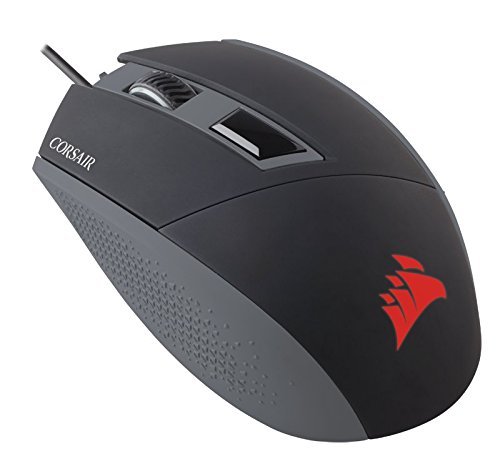


🎯 Elevate Your Game with Precision and Style!
The Corsair KATAR Gaming Mouse is a high-performance optical mouse featuring an impressive 8000 DPI for unparalleled accuracy. With USB connectivity, it seamlessly connects to both PCs and laptops, making it a versatile choice for gamers. Its dynamic red backlighting not only enhances your gaming experience but also adds a stylish touch to your setup. Designed for comfort, this mouse ensures you can game for hours without discomfort.
| Wireless Type | 802.11abg |
| Average Battery Life (in hours) | 2 months |
| Brand | Corsair |
| Item model number | CH-9000095-NA |
| Hardware Platform | PC, Other System |
| Item Weight | 2.99 ounces |
| Product Dimensions | 4.36 x 2.52 x 1.51 inches |
| Item Dimensions LxWxH | 4.36 x 2.52 x 1.51 inches |
| Color | red |
| Power Source | Corded Electric |
| Manufacturer | Corsair |
| ASIN | B016IAM864 |
| Is Discontinued By Manufacturer | No |
| Date First Available | October 27, 2015 |
C**N
Vale a pena, mouse com fio
Mouse bom e boa pegada na mão, tem opção de deixar ligado o simbolo dele ou não. Mudar a velocidade da rolagem apertando um botão.
C**N
excelente
se maneja muy bien, el precio es excelente, el softwere es intuitivo, lo recomiendo para todos los q quieren tener un mouse gamer pero no quieren gastar demaciado, este mause tiene todo lo q necesitas para todos los juegos solo necesitas manos
I**A
muy buen producto
esta a un precio muy económico y cumple perfectamente con su función llevo 6 meses con el y no tienen ninguna falla
A**C
ONE SOLID MOUSE
This mouse is pretty awesome from its general aesthetic having a matte finish, curves and sharp edges to its triangular side grips, a couple of champers and topped off with a glowing Corsair logo this thing looks amazing! I'll just jump into the pros and cons.PROS1. Glides super easy due to the decent sized pads on the bottom and the fact that it is lightweight.2. You can't really ask for more out of a sensor as I have never encountered any tracking issues.3. The clicks are super easy to engage, maybe even too easy in my opinion.4. the scroll wheel is super easy to move up and down.5. Easy to reach DPI button (Although I wish this was slightly harder to push as it is incredibly easy to accidentally press if you aren't careful)6. Cable is plenty long and has a yellow marker on the USB so if you find yourself frequently unplugging your mouse to take it with you it is super east to identify over all your other cables.7. The side grips are made of an easy to grip rubber and the triangle texture adds to the texture. I actually half expected the grips to be plastic.8. Awesome glowing Corsair logo.CONS1. I had a few issues initially, the cursor was jumping all over the screen so I changed it over to a different USB port and that did the trick. The port on the computer was just fine as I switched it with the USB dongle used for my keyboard for the one where the mouse was and the keyboard hasn't had a single issue after the fact. I've never had a USB devise of any kind be that picky before, but seeing as it's going to stay in the same spot and never be touched for a year or more, it isn't a huge deal, just kinda frustrating.Then the DPI button stopped working (wouldn't switch modes when pressing it) and I tried fixing it with the mouse's software but nothing could be done so I restarted my computer and that fixed the problem and haven't had any issues with it since.The last thing is I have a two monitor set up and the mouse stopped switching between screens without making huge circles with the mouse, again I restarted my computer and took the batteries out of my wireless mouse while the computer was doing so (the dongle is still being used for my keyboard and still in the pc and the mouse was turned off) and haven't had issues after a second restart.So as far as my initial set up experience I wasn't impressed, but again I haven't had any issues with it after getting everything set up the way it needs to be, so keep that in mind as a possibility.2. the clicks are too easy to press in my opinion as the switches will not support my fingers resting on them. A fact that is great when you are actually gaming because it is a "gaming" mouse after all, but if you want to use this fore something more productivity based on top of gaming and you like to rest your fingers a lot, keep that in mid as you will be disappointed here. But like I said it is marketed as a gaming specific mouse so I can't hate too much on it and I probably just need to get used to a mouse with a light click.3. It either isn't possible or I can't figure it out, but I cannot change the brightness of the Corsair logo which is a tad to bright for me when using te mouse at night.4. The middle click took some figuring it out as the scroll wheel is SUPER easy to move with your finger when trying to press down. To use it the same way every time I place half of my finger on the plastic directly over the scroll wheel and the other half on the wheel before pressing which insures the wheel doesn't spin and you can press it consistently every time.5. The cable is just a bit more stiff than I think it should be, but I assume it will loosen up over time.So all in all this is a great mouse, the solid build quality I have come to expect from Corsair, the way it feels in the hand when actually using it, and the few mishaps I had when initially setting up the mouse ears it a 4 out of 5 stars for me. the only reason I am removing a star is because of my set up experience, everything else about this mouse is rock solid! And I have a feeling that my set up experience won't happen to everyone and wouldn't hesitate to order a second one of these mice as I am super happy with it overall.
W**E
Great purchase when deeply discounted.
So I purchased this to replace a knock off brand mouse that had a 7200 DPI setting but found it to be really lacking in precision and having the mouse click buttons becoming less and less accurate resulting in having to click multiple times for it to register what I was clicking on. This mouse I purchased at a really low sale price of $19.99, and have been a fan of Corsair power supplies and hoped for the best here after reading some of the reviews. Been using it for about 3 weeks now, and found that the DPI setting of 8000 is great, however the mouse DPI setting button only goes in one direction and if you accidentally press it while using the mouse it drops down to 400 DPI and you are then frantically clicking it to up the DPI setting mid-game.I am also using this with a large Enhance mouse pad, and I am not sure if the mouse pad may be part of the source of the issue here or if it is just the mouse. When not touching the mouse at all, on occasion it will start to cause the cursor to shake and slowly move across the screen as if it is having a seizure. Even happens when I am trying to slowly move it into place to click on a small icon or something when gaming, but this does not happen on a regular basis. Additionally due to the high DPI rate, precision seems to be a bit of an issue with this mouse as well including the need to sometimes click multiple times on something before the click properly registers.I went to the Corsair website and downloaded the software for the mouse in hopes of possibly fixing these issues. First use after installing the software seemed to improve everything. However the following day it was still the same issues cropping up at times. Now the software is not all bad, and once again the need to have everything glowing in gaming products is annoying as hell. Even if it is the Corsair logo glowing bright red which happens to match some of the lights in my case which might also be Corsair made as well. Now they say you can turn off the light in the mouse with the software which is true and false at the same time. There is a setting called opaque that when you set it to this it appears to turn off the LED light in the mouse. However in a dark room you can still faintly see the red light is on when you come into the room and the computer is on. It seems they can only really dim it to the point of it appearing to be off. The other nice thing is the mouse setup feature. I have it set where I only have two programmed features for the DPI button, full on 8000 DPI for all use and when I need precision there is the sniper mode with a single click taking the DPI to 800. Then a single click later I am back to 8000 DPI.Overall it is a really good mouse, just do not like the need to require special software, which is bloated in that it has the capability to run and configure options for Corsair's K95 RGB keyboard, Void Pro Wireless headset, MM800 Polaris RGB mouse pad (I think it is a mouse pad), and the ST100 microphone (looks like a microphone). At $20 it is a great purchase, but the software and the seizure twitch cause me to rate this as a 3 out of 5 only.So after using it for a number of months now I have lowered my rating to 2 stars out of 5. Reason for this is the software did not effectively fix the twitched on the mouse where the cursor suddenly decides to bounce around back and forth especially when you are trying to make a precise click on something. Additionally it is getting progressively worse as time wears on and as such I am looking to replace this mouse already. Even at $20 on sale it is not worth it.
Trustpilot
4 days ago
2 months ago