We remain fully operational. Our teams are working around the clock to ensure your deliveries continue safely.

DOWNLOAD THE APP


Copyright © 2025 Desertcart Holdings Limited
DOWNLOAD THE APP



Buy anything from 5,000+ international stores. One checkout price. No surprise fees. Join 2M+ shoppers on Desertcart.
Desertcart purchases this item on your behalf and handles shipping, customs, and support to New Zealand.
☀️ Power your productivity with the MK750 – where solar meets seamless control!
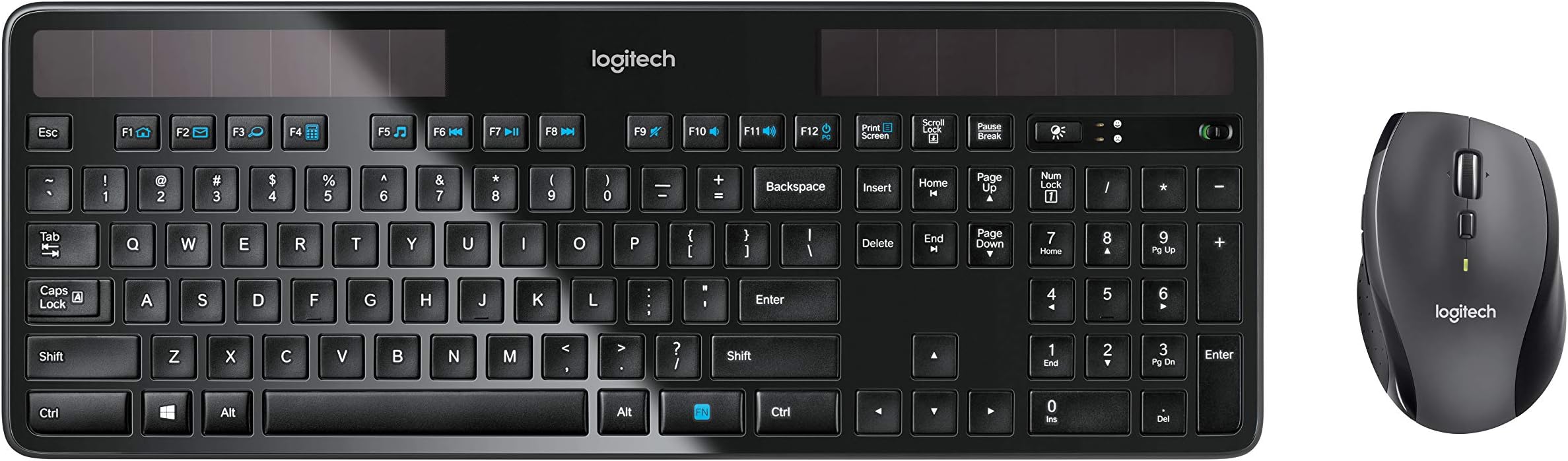
The Logitech MK750 Wireless Solar Keyboard and Wireless Marathon Mouse Combo offers a sustainable, hassle-free typing and navigation experience. Featuring a solar-powered keyboard that charges under any light source for months, a laser mouse with up to three years of battery life, and a single unifying USB receiver for easy wireless connectivity, this combo is designed for comfort and efficiency. Compatible with Windows PCs, it’s the perfect upgrade for professionals seeking reliable, eco-friendly tech that keeps pace with their busy lifestyle.


| Brand | Logitech |
| Item model number | 920-005002 |
| Hardware Platform | Laptop |
| Operating System | Windows 10, 11 or later |
| Item Weight | 3.12 pounds |
| Product Dimensions | 2.82 x 18.3 x 8.15 inches |
| Item Dimensions LxWxH | 2.82 x 18.3 x 8.15 inches |
| Color | Black |
| Power Source | Wireless Power |
| Batteries | 2 AAA batteries required. (included) |
| Manufacturer | Logitech |
| ASIN | B00LZVP73S |
| Is Discontinued By Manufacturer | No |
| Date First Available | July 7, 2014 |
A**K
Almost perfect...
Let me start by mentioning that I've only been using this keyboard for about 2 days, however I do feel like I can write an informative review based on my experience thus far.First of all, per usual, the Logitech packaging was very nice. The box contains the keyboard, a soft cloth (for wiping the inevitable fingerprints from the shiny surface of the K750), the USB dongle ("unifying receiver"), and a USB extension stick (to allow easier accessibility to the USB ports on your computer).After plugging the unifying receiver into my desktop computer, I quickly removed the protective film over the front of the keyboard and flipped the power switch to "on". The keyboard began working instantly (what a nice surprise)! The first thing I did was hop on the internet and point my browser toward the Logitech website to download the Solar App. Although this app isn't a requirement for the keyboard to function fully, it is a nice little added feature. In place of the Solar App, should you decide not to install it, there is a "solar" button which when pushed will light one of two LED's, green or red, to indicate whether the solar panels are receiving sufficient light to maintain a charge. If you do install the Solar App, the "solar" button launches the app on your desktop which has a real-time speedometer style display showing the LUX (amount of light) being collected by the solar panels as well as the current charge percentage of the battery. My office has no windows (*sad face*) and only the fluorescent lighting from above (6 four-foot bulbs total) but the LUX meter is always well into the green.As far as typing on the K750 goes, I'm pretty happy with the feel so far. Due to some residual muscle memory from my previous keyboard, and the orientation of the "insert", "delete", "home", "end", " pg up", & "pg down" key group, I find myself hitting the wrong button at times. I really like the "chick-let" style and spacing of the keys however this is something that will also take a bit of getting used to. I've always liked the way most lap-top keyboards have felt, and this is quite similar to that.Physically, the keyboard seems to be well constructed. It's VERY thin, and has a decent heft for its size. There is a certain satisfaction that I get from handling a product with a relatively high perceived density (if that makes any sense at all), and this keyboard has that. The flip-down feet are quite thin, but seem to be reasonably well made... just don't sit or set a book on your keyboard and they should be fine. Contrary to another reviewers comments, the keys do not "click" when they are PRESSED, however when typing fast or tapping the keys, they do make a bit of a "click-like" sound, as do all keyboards that I know of. The matte textured keys look nice against the gloss black surface of the keyboard, but I haven't yet decided how I feel about the white ring around the perimeter of the K750. It might be nice to be able to customize (or at least choose) the color of the surround.So far, everything has been hunky-dorey, but here is where I tell you why I would like to subtract a half-star if that were possible. The lack of a Caps-Lock, Num-Lock, & Scroll-Lock indicator lights is quite annoying. I realize that power consumption is of great concern with this device, but I believe that these indicators are necessary and could have been worked in, even if they were only momentary indicators when the buttons are pressed. The lack of indicator lights makes it difficult to tell when the caps lock is on (obviously). Under normal circumstances this isn't a HUGE problem, but when you're entering a password where the characters are hidden and you can't tell whether your caps-lock is on, it becomes an irritation. While I have not downloaded it, Logitech does offer their Setpoint software that incorporates an on-screen indicator for the caps-, num-, and scroll-lock buttons in Windows. I did not want to use Logitech's Setpoint software (v6.22) because I already have an earlier version of the software installed and highly customized for my mouse and per Logitech's installation instructions, all settings from previous versions would have been erased upon installation (why Logitech, why?). I found and download a little utility called "Caps Lock" (search el Goog for "caps lock indicator") in place of installing the Setpoint software and this in concert with the "Toggle Keys" feature found under Windows Accessibility Options (which makes your computer beep different tones for on / off when any of the "lock" buttons are pressed) take care of all the caps-lock indication that I need.Another possible issue is the proximity of the "PC power off" function key to the "volume up" function key. The two functions are directly beside each other, and I can see myself, during the course of a work day, accidentally shutting down my PC instead of turning up my music volume after taking a call. The Setpoint software may allow some customization of the function keys to make this a non-issue, but since I won't install the new Setpoint, I do not know for sure if this is the case.Last, and definitely least (it's hardly worth mentioning), is that I'd like to have a second "FN" (function) button for my left hand, but that's no big deal.All-in-all this keyboard is easy to look at, well-built, comfortable to type on, wireless, and green! What more could you really ask for? (Oh yea, a caps lock indicator light!) Anyway, I've always been a big fan of Logitech peripherals, and while they may not have hit a grand slam with this one, I think they at least hit another home run.edit 7/12/17: So after nearly 6 years, my original K750 finally gave up. One day, it just stopped working completely. I was devastated. After messing with the power switch and the unifying receiver, I finallyI removed the "non-user serviceable" rechargeable button cell battery and replaced it with another, and everything is working again. In the meantime, while I was waiting for the rechargeable battery to come in the mail, I bought another K750 to use as it simply wasn't an option to go back to a regular keyboard. I still love this keyboard.
J**R
I think I need to get more of these for my other computers!
After reading through the reviews here on Amazon I decided to go ahead and take the plunge on this keyboard, even though it was fairly expensive. The item arrived in perfect condition; I plugged it in and it immediately started working, and I've been very impressed so far.One thing that surprised me was that there is NO INSTALLATION AT ALL. Literally, you plug the transceiver into a USB port and turn the keyboard on. That's it. A few seconds later, my Windows 7 (64-bit) OS detected the keyboard, installed the drivers, and I was up and running. This is the single most seamless experience I have ever had with a wireless device, and it was impressive. This is how wireless device setup should be - other manufacturers take note.The solar panels on the keyboard are subtle and I don't notice them at all. The keyboard has a glossy black glass surface that accumulates dust very visibly, but when you keep it clean it looks like a darn cool keyboard. The keyboard comes with a cloth wipe for keeping the solar panels clear of dust. I use it once every couple days for aesthetics.Like other reviewers, I can also confirm that the battery meter never budges. I do a lot of computer work - I'm a professional software engineer whose HOBBY is also software, so it is a rare day when I do not spend at least 4-5 hours (and usually much much more) typing away. In the two weeks I've had this keyboard so far it has yet to leave the "100%" mark, and I leave it on constantly.Speaking of power, I live in the not-so-sunny city of Seattle and usually have the blinds part-way open. Right now as I type this, the keyboard software reports it is receiving 330 lux, more than enough to charge the battery (if it actually needed charging, which it does not and so far has not with two weeks of constant abuse). During the evening my lamp gives the keyboard about 50 lux, and for comparison that is a 60-watt bulb sitting about 2 feet from the keyboard behind a lampshade. On a sunny day, the keyboard receives several thousand lux, which is far beyond the good end of the meter that the keyboard software provides (500 lux).The feature set of the keyboard is decent - there's a FN key between CTRL and ALT on the right side of the keyboard that, when held down, allows the function keys to perform various functions: navigate to home, send mail, magnify, launch windows calculator, start Windows Media Player, previous track, pause, next track, mute, lower volume, raise volume, put computer to sleep and bring up the right-click context menu at the cursor location.As also mentioned in other reviews, there is no capslock, scroll-lock or numlock light. The one feature missing from this keyboard is a graphical indicator in the Windows taskbar for these keyboard states, but there are several free tools out there on the Internet that will provide this functionality if it really bugs you. I can't honestly say I've noticed or cared.The keyboard is as thin as advertised. It is very sleek, and looks great on a glass desk. It has feet for standing up, and unlike some other reviews I saw I do not feel that the feet are of inferior quality. I have been using computer keyboards for 27 years and I think the feet on this are actually way better than the ones on some other keyboards I've had in the past.The keys do have the general feel of a laptop keyboard, but are noticeably sturdier than most. The keyboard does not flex at all, and I had no problems adjusting to this keyboard style from my "classic" PC keyboard. The keyboard is full sized, unlike most laptop keyboards, so the transition is very easy. If anything I feel that my hands have less strain typing on this keyboard because it requires less effort to press the keys - but not so little that you'll make extra typos because of it (the keys have a satisfying pressure threshold for registering a keystroke).To summarize:* The keyboard is a bit expensive but is clearly of high quality* Most painless install I've ever seen in my life for a wireless device* Battery life is apparently as good as the other exuberant reviewers (and the manufacturer) suggest - even in a dark room for days on end, the keyboard has a full battery.* Looks totally awesome* Feels great to type onI'd say: spoil yourself just a bit and say goodbye to the keyboard wire forever because you will never want to go back after you experience this keyboard.UPDATE: 23 June 2011 - Keyboard is still working great. I've gotten the power down as low as 85% through prolonged sunlight starvation; leaving the blinds open for a single afternoon had it back at 100% the next time I turned on the computer, so I'm happy to report I'm still very satisfied with the device. If battery life does become a problem, the on/off switch is right next to the minus key on the numeric keypad, so it's simple enough to turn the keyboard off when not using it.
Trustpilot
1 month ago
1 week ago