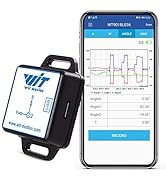
![[WiFi 9-axis Acceleration Sensor] WT901WIFI Wireless Tilt Sensor, 3-axis Accelerometer+Gyroscope+Magnetometer+Inclinometer, IMU AHRS MPU9250, Compatible with PC/Android](https://m.media-amazon.com/images/I/513s05vLS7L.jpg)


📊 Elevate your motion sensing game—wireless precision that keeps you ahead of the curve!
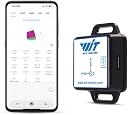
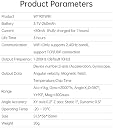
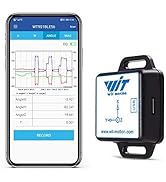
The WT901WIFI is a cutting-edge wireless 9-axis acceleration sensor combining accelerometer, gyroscope, magnetometer, and inclinometer data processed by a Cortex-M4 core. It offers real-time, high-precision motion tracking via 2.4GHz WiFi, supports multi-sensor connections, and integrates with free software for comprehensive data analysis on PC and mobile platforms. Ideal for professionals in robotics, VR, industrial monitoring, and more, it delivers stable, low-noise measurements with advanced sensor fusion and Kalman filtering.


| ASIN | B08QDCRTG8 |
| Best Sellers Rank | #313,309 in Industrial & Scientific ( See Top 100 in Industrial & Scientific ) #143 in Acceleration Sensors |
| Date First Available | November 12, 2016 |
| Is Discontinued By Manufacturer | No |
| Item Weight | 1.44 ounces |
| Manufacturer | WitMotion |
| Package Dimensions | 2.99 x 2.95 x 0.87 inches |
H**̠
High-Performance Wireless IMU Sensor
This Gen 3 wireless IMU sensor is an impressive piece of hardware for advanced motion tracking. The standout feature is its WiFi capability, which allows for fast, long-range data transmission without the need for cables or a separate Bluetooth receiver. It combines an accelerometer, gyroscope, and magnetometer to provide stable and accurate 9-axis data. I found the setup and connection process to be straightforward, and the data output is very responsive. It's a powerful tool for robotics, VR, or any application requiring precise, wireless orientation tracking.
M**G
Works Very Well. App is Flakey, PC via USB is Better
This WitMotion WT901WIFI Gen 3rd. AHRS MPU9250 9-axis Accelerometer, 3-axis Angular Velocity+Acceleration+Angle+Magnet Field (UDP + TCP Mode, WiFi Connection, Compatible with PC and Android) does work well, with lots of information. It is heavily filtered, however, so it does not measure drops or impulses well. There is some drift and you can calibrate it and zero it out as needed. It will measure vibration pretty well, but hardly measures anything if you drop it. It does measure weak and strong magnetic fields. Bringing it close to a refrigerator magnet did not seem to saturate the sensor, although I was still about an inch away. The angular measurement drifts the most. The Android app does not work on recent versions of Android. It does not connect via WiFi unless you actually select the WiFi from the unit and connect to it, losing you regular WiFi in the process. There are not many settings in the Android app, but it does record data and provides several useful screens and charts. The PC program is in a downloaded zip file and can just be unzipped and run with no installation required. There are a lot more settings available. I connected to the PC via USB to not have to disconnect the WiFi. I can't see how to connect multiple units, at least not with the devices and versions I tried. I could not find the baud rate setting, but the other settings were easy to find and change. This is a reasonable value, but if you need multiple, even if you could figure out how to connect all of them, the cost adds up. If I wanted to do motion capture with multiple units, I would probably look at something else.
J**.
Great little sensor
Great little sensor for when you need to record/capture some motion but don't want to develop a custom solution. App works well on android and is easy to connect. Data streaming speed is nice and consistent with very little latency or stutters. Connecting to a Windows PC over USB or wireless is easy and quick, and the software doesn't require any installation, simply unzip it and go. The sensor values are filtered pretty heavily, and I don't see any settings to change that filtering. Disassembling the sensor reveals that it is using an ESP8266 module for processing and wireless connectivity, so you could theoretically put your own firmware on this if you needed to.
B**G
Have to manually connect to wifi network so no internet at the same time
First thing to know is there is a QR code on the back of the device. Before you do anything, scan that. Make sure you are connected to the internet. It will take you to a google drive folder with the documentation for the device. The docs are well laid out and even have an SDK which is great for my purposes. I eventually figured out how to connect to it on my own, but couldn't get to the documentation because I was trying to scan the QR code while I was in the WitMotion app on android. It fails if you are in the app. You must manually find the wifi for the accelerometer on your device (2.4 Ghz only) and connect to that. Then you can open the app and get a connection. If you are relying on wifi for internet then obviously you lose internet when you connect to the device. The app is pretty good. I could tell right away that this device cannot be used for dead reckoning. For general motion tracking it's fine. When I would move it around and stop, it would take a while for the readings to settle, but even when they do there is drift. This is best suited for looking at general orientation, magnitude, and frequency of response. The price is great for what you get though. I certainly couldn't cobble the parts together to make something like this anywhere near as economically. So as long as your plans aren't for dead reckoning I recommend this.
T**X
Great 9-axis Wi-Fi IMU for DIY and prototyping
Using this "WT901WIFI Gen 3" as a quick drop-in IMU for DIY projects. Setup is fairly straightforward. It streams accel/gyro/angles/mag over WiFi and you can set the output rate (up to the advertised 200 Hz). Worked fine with the Windows app. Caveats: do the magnetometer calibration (figure-8) away from metal if you care about yaw; the plastic case is light but not rugged; the config app feels dated with a few translation quirks. Only made to work with PC and Android, so keep that in mind. For the price, though, it’s a very capable 9-axis sensor for prototypes and quick experiments. I also like the bluetooth and wired versions WitMotion offers.
D**S
Great scientific device
I recently purchased the WitMotion WT901WIFI Gen 3rd AHRS sensor, and I am thoroughly impressed! This 9-axis accelerometer with the MPU9250 chip delivers incredible accuracy and real-time performance. The 3-axis angular velocity, acceleration, angle, and magnetic field readings are precise and consistent. The setup was straightforward, and I love that it supports both UDP and TCP modes over WiFi, making it easy to connect to my PC and Android devices. The device is reliable, responsive, and works flawlessly for my applications. I highly recommend this sensor to anyone needing professional-grade motion tracking. Definitely a 5-star product!
C**O
L'appareil ne peut pas être connecté avec le réseau WiFi. J'ai essayé tous les moyens, ça ne fonctionne jamais.
Trustpilot
2 weeks ago
2 weeks ago