Desert Online General Trading LLC
Dubai, United Arab Emirates
Desert Online General Trading LLC
Dubai, United Arab Emirates


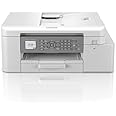
🖨️ Elevate your workspace with smart, wireless printing that keeps you ahead of the curve.
The Brother MFC-J4340DW is a compact 4-in-1 wireless inkjet printer offering high-resolution color printing, scanning, copying, and faxing. Featuring Wi-Fi, NFC, and mobile app connectivity, it supports seamless printing from smartphones and laptops. With a user-friendly 4.5cm LCD touchscreen and large in-box ink cartridges capable of printing thousands of pages, it’s designed for efficient, eco-conscious office productivity.


| Product dimensions | 34.3D x 43.5W x 18H centimetres |
| Controller type | iOS, Android |
| Maximum Supported Paper Size | A4 |
| Power consumption | 21 Watts |
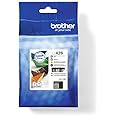
| Included components | Inkjet Cartridges |
| Print media | Envelopes, Paper (plain), Card stock, Glossy photo paper, High-resolution paper |
| Scanner type | Flatbed |
| Max input sheet capacity | 150 |
| Display type | LCD |
| Compatible devices | [Tablets, Computers, Smartphones, Laptops] |
| Maximum colour print resolution | 1200 x 4800 Dots Per Inch |
| Sheet size | A4 |
| Maximum black and white print resolution | 1200 x 4800 Dots Per Inch |
| Warranty type | limited warranty |
| Colour depth | 24 bpp |
| Dual-sided printing | Yes |
| Item model number | MFC-J4340DW |
| Manufacturer | BROTHER |
| Form Factor | All-in-One |
| Processor Count | 1 |
| Connectivity Type | Wi-Fi, Google Cloud Print, Brother Mobile Connect, Apple Airprint, Mopria Print Service |
| Number of USB 2.0 Ports | 1 |
| Number of Ethernet Ports | 1 |
| Wattage | 21 watts |
| Hardware Platform | Laptop, PC, Tablet, Smartphone |
| Operating System | Windows, Mac & Linux Compatible |
| Are Batteries Included | No |
| Item Weight | 24 kg |
| Guaranteed software updates until | unknown |
D**D
Great Printer at a Bargain Price!
Great Printer at a Bargain Price!I recently purchased this printer, and I couldn't be happier with my experience. The setup process was incredibly straightforward—literally took just a few minutes to get everything up and running. The user-friendly instructions made it easy even for someone who isn't particularly tech-savvy.Not only was it easy to set up, but I also scored it at a fantastic bargain price, making it an excellent value for money. The print quality is sharp and clear, whether I'm printing documents or photos. It also handles multiple pages efficiently without any issues.Overall, I highly recommend this printer to anyone looking for an affordable, easy-to-use device that delivers reliable performance. It’s a great deal and a smart choice for home or small office use!
K**R
Excellent printer with easy setup
Early days just yet but delighted so far. I'm no youngster and my tech days are long gone but setup was easy and trouble free. First connect to the internet, then go to the brother site, setup & downloads (not the exact title) , select youur printer and away it goes. All you have to do is sit back and occasionally click on "Yes" or "No"! It trully is that easy..I've only done b&w pinting so far but it's fast and without problems.The onboard display is very clear and a great pluspoint is that you can rotate it to the best angle for viewing
M**P
A ROBUST, EFFICIENT PRINTER
I've always used Canon and Epson printers and I suppose I've become used to their whirrings and grinding before they made their mind up to clunkily print anything. However, this printer opened up a new world of speed, efficiency and silent printing (apart from Greyscale which clunks a bit due to speed of printing). This is an ultra-efficient printer of near office quality. I was expecting photoprints to be of reduced quality but they were as good as any other home printer I have had over many years.Set up was a bit confusing but a bit of trial and error got there in the end. It is essential to download the apps from Brother to ensure appropriate Windows drivers are loaded. Software has a definite retro feel with dated graphics but works well.Only one snag to date and that is Photoshop Elementsreports scanner "not connected or in use" so currently having to use Windows native scanner or Brother software.All in all quite pleased with this purchase but hope inks last as long as software indicates because cartridges cost an arm and a leg!
A**E
BRILLIANT
A brilliant printer that works a treat. I am no wizz kid with modern tech but this was very easy to set up. The printing colours are very good. Great value for money. It was easy to set up and run without to much trouble. The only thing that threw me was I expected to see a Blue light or something to indicate that I was connected to the internet. On checking the screen I was told that everything was OK and that I was good to go. I have printed a few things and they suite me fine. All in all I am very happy and I would recommend this printe
K**L
Cool printer!
Wow, best printer I've ever owned. Setting it up was easy, the little screen on the front guides you through everything, literally, even if a sheet gets stuck inside (was my fault, I knew it was being card, but tried anyway).When it printed the initial "test" print, you put it in the scanner and it automatically aligns itself. But again, the screen quides you through everything.Cool that it also does double sided printing too. Yay, no more HP drivel too!
E**
Excellent printer/scanner/photocopier but problematic!
Initially this was the easiest printer yet. However every 4 weeks it stops working, and I have to spend 2hours on the phone to their service desk, cancelling and reinstalling everything 🤯🤨. So apply caution. When it works it's fantastic, but regularly wastes a lot of time.Excellent quality copying and quickly. Fantastic. 🎉 Miles better than my previous Cannon which refused to scan or copy. And when it won't print from laptop it still photocopys.Now Brother need to make their Download instructions clearer by using buttons instead of underlined text and it'd be perfectly easy.
S**.
Size incorrect and not fit for purpose
Unfortunately several issues with this printer.Firstly the size. I have a specific shelving unit that this needs to sit on and it looks like its a perfect size, however what they don't say is that the plug goes into the side, therefore you actually need a lot more space than it says.It prints the wrong way. If you print multiple different pages not in one print e.g I am printing out my weekly course notes for my MBA which involves one web page per item so have to print separately, it puts it on top of the other so every time you have to go through and rearrange the pages into the way you want to read it.Would not have bought and will be desperately hoping someone else needs one that I can hand this one over to and I can buy one suitable
A**E
Nice to have a printer that just works.
It has wifi, but there's no pressure to use it, unlike HP (Horrible Printers?). It was as simple as plug 'n' go.Printed out a document in B&W, and thought there was a problem because it was just rapid-firing paper, but turns out it's just really fast. Very good quality, too, even on shiny photo paper.
Trustpilot
2 weeks ago
5 days ago