We remain fully operational. Our teams are working around the clock to ensure your deliveries continue safely.

DOWNLOAD THE APP


Customer Services
Copyright © 2025 Desertcart Holdings Limited
DOWNLOAD THE APP


🌐 Elevate your home network to pro-level speed and coverage — don’t get left buffering!
The TP-Link Deco X50 (3-pack) is a WiFi 6 mesh system delivering ultra-fast AX3000 speeds and seamless coverage up to 6500 ft². Featuring AI-driven mesh technology, it intelligently optimizes your network for over 150 connected devices, ensuring smooth 4K streaming, gaming, and smart home connectivity. With easy app setup, seamless roaming under one WiFi name, and robust HomeShield security, it’s designed for modern homes craving reliable, high-capacity wireless performance.


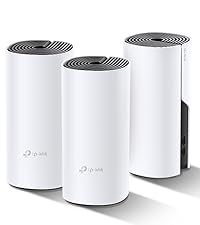

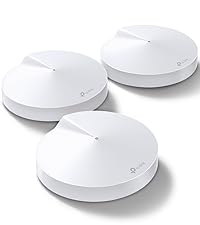


| ASIN | B09MFWNYC3 |
| Antenna Location | Business, Home |
| Antenna Type | Internal |
| Best Sellers Rank | 736 in Computers & Accessories ( See Top 100 in Computers & Accessories ) 3 in Whole Home & Mesh Wi-Fi Systems |
| Box Contents | Deco X50(3-pack) |
| Brand | TP-Link |
| Brand Name | TP-Link |
| Colour | white |
| Compatible Devices | Laptop, Personal Computer, Smart Television, Smartphone, Tablet |
| Compatible devices | Laptop, Personal Computer, Smart Television, Smartphone, Tablet |
| Connectivity Protocol | Wi-Fi, Ethernet |
| Connectivity Technology | Ethernet, Wi-Fi |
| Control Method | App |
| Controller Type | App Control |
| Coverage | Whole house coverage up to 604 sq ft |
| Customer Reviews | 4.4 out of 5 stars 6,092 Reviews |
| Data Transfer Rate | 3000 Megabits Per Second |
| Frequency | 5 GHz |
| Frequency Band Class | Dual-Band |
| Frequency band class | Dual-Band |
| Is Modem Compatible | No |
| Item Dimensions L x W x H | 11L x 11W x 11.4H centimetres |
| LAN Port Bandwidth | 1000 Mbps |
| Manufacturer | TP-Link |
| Manufacturer Part Number | Deco X50(3-pack) |
| Maximum Upstream Data Transfer Rate | 3000 Megabits Per Second |
| Model Name | Deco X50 |
| Model Number | Deco X50(3-pack) |
| Model name | Deco X50 |
| Number of Antennas | 2 |
| Number of Ports | 3 |
| Operating System | Linux |
| Other Special Features of the Product | Beamforming,QoS,Parental Control |
| Product Warranty | 3 Years |
| Security Protocol | WPA3, WPA2-PSK |
| Special feature | Beamforming , QoS , Parental Control |
| Voltage | 12 Volts |
| Wireless Compability | 802.11ax |
| Wireless communication standard | 802.11ax |
A**O
Excellent Deco Product
Wonderful product, took quite a while to setup, but upon setup it worked wonderfully, the app itself is easy to use and easy to set with your deco, the WiFi coverage is as advertised but don’t expect maximum WiFi speeds as you would Ethernet. I am very happy with this product
C**W
Very simple to setup, but you have to change the Wi-Fi on everything you own
UPDATE: Changed to Sky Q because they force you too from Sky HD. The TP Link really struggles to cope as Sky Q has its own mesh for three units. Downloads, BNC iPlayer and Netflix failed to connect via TP Link Deco 5. I had to use my Amazon Fire stick on Virgin router to watch Netflix. Downloading a program on TP Link Deco 5 took 24 hours each episode. BAD! I reverted the Sky Q back to the Virgin media hub and it now functions. BUT, a power cut and it went back to TP. So block sky from connecting to TP in the app. ————————————————- Original review now. Very simple to setup, but you have to change the Wi-Fi on everything you own. This would be an issue for less bale homeowner, especially if disabled or much older, it take as lot of time and the Meross WI-FI ambient light no longer functions on the mesh or with Alexa.. Yes, everything needs to be ported and in the case of TV's and Sky, entering passwords is a right pain from the remote. It seems to work very well once setup Note the initial instructions are confusing about turning your modem off, well they meant the wi-fi and just use it as a signal decoder, not Wi-Fi I guess. Badly worded as you need a decoder on the end of the line to function. The first unit plugs into you existing Decoder or Modem ( mine is a Virgin cable system, so not a modem technically, via the phone line would be an ADSM modem). The only way to set these up is via a smart phone and the app, it is straightforward once you have registered your self on the app. The first Deco is slow to set up, the 2nd and third ones piggyback onto the first one and they remember the password. Tip: is you use a suggested password, like ~!8"^%*/ etc, oit is near impossible to type it on a sky remote and sky won't use my USB keyboard, the two Sony Tv's did however. There is no WPS button on the Deco M5, but is it asks you if you want to use WPS. HOW? Update WPS is hidden in the phone app. In use the network is good, I added a brick built front extension and the Ring Doorbell (which is mandatory) would not work when re-positioned due to the brick twin walls. My Existing TP link Wi-Fi extended AS 1900 could get a send a signal out; so Amazon laid y my package out in the rain, instead of using my parcel bin, and no Ring doorbell signal did not help. I have mounted the 2nd Deco C5 on a table near the extension, 50% signal, it was better yesterday, weirds how it changes for no reason. It will have it's own power supply in the extension when wired up. Now how does one mount it away from the all-fingers grandson? Buy a wall mount, well they are cheap plastic and ship from China, slowly at £10 each for simple plastic plate with 3 clips. Honestly, they cost pennies to make, so include them in the box. I have already paid enough guys! Frustrating, but essential. I will experiment with a windowsill siting to see if the signal to the porch is better, maybe from above is the answer. If so, I will update this.
T**Y
Good WiFI Upgrade
I bought these Deco X50 Mesh 6 as an upgrade to a TalkTalk router as this was causing issues, poor wifi in back of house and never worked well with extenders. So after much research of functionality need against price (you can easily buy something you don't need with these systems and spend huge sums!) I chose the Deco X50 double pack. Pro's Easy to set up via the app, only took me a few minutes and I am deffo not a tech or even close! Wifi signal improved a lot (have a 1911 victorian terrace on 3 floors) and having the same wifi name as previous meant did not need to reset anything eg. Computers, TV's etc. I got the double pack and then realised as good as it is, it was not really sufficient and should have got the 3 pack, so ordered another single one which paired immediately. Now have full coverage at full strength as I move around the house. The ports are also useful if needed. Cons The double pack came with 2 pin plugs so had to use adapters (very annoying) but not the end of the world, however the single additional one came with a UK plug! You will NOT get wifi any faster than your package allows for, what you should get is the max you pay for depending on placement of the routers around your home, and wall thickness. So all in all very happy, been running now for a month with no drop outs or anything.......it just works! Will likely upgrade in years to come to whatever the standard is by then, but for me this is all I need so getting a wifi 7 version would not make any difference as it gives me max speed for my package anyways with the X50 so why pay for something I don't need! Overall, would recommend if you have weak areas or use additional extenders that have different connection names.
C**N
Solid Mesh WiFi System Even A Non-Technical Person Can Install
Whilst our house isn't that big, trying to get decent wi-fi coverage throughout has been difficult. With the main telephone jack located in the study at one end of the house, the signal from the ISP provided router (a BT Homehub) would drop out alarmingly by the time you reached the other end. Previous efforts to boost signal strength using powerline systems or wi-fi booster had been partially successful but inelegant and problematic. I was looking for something that would give us a stable, uniform wi-fi network that was easy to set up and maintain and also user friendly. A mesh system seemed to be the way to go. Having looked a various options in detail on-line I went for the TP-Link Deco system. Not only were online review generally positive, but I was also familiar with other TP-Link products, such as their wi-fi enabled smart sockets and smart bulbs, all of which I had found worked well. I went for the triple pack to give me a primary hub, a second hub for the ground floor and one for the first floor. Having used the Deco now for a couple of months I could not be happier with the way it has performed. Set-up was ridiculously easy, with the Deco App on my mobile walking me through each step clearly and logically and checking as we went along that everything was working as intended. Nothing failed to complete and the new network was up and running in next to no time. Since then I can't report any fault or outages. Even when we changed ISP a few weeks later and swapped modems from the Homehub to a Fritzl Box the Deco system linked up without and fuss. Best of all, because we weren't relying on the wi-fi router built into the new modem we didn't have to reset all our many devices. The network management App also works very nicely, showing you exactly what you have connected to your network at any time and allowing you restrict or prioritise access for specific devices with just a couple of easy to follow steps. Adding new devices using WPS also no longer involves rushing from device to router in order to press a button; you can do it all through the Deco App whilst standing next to the device in question. I haven't played around with functions like parental controls yet, but from a quick look they seem relatively straightforward to operate. In terms of looks, the Deco units are nicely low profile and unobtrusive. One of the things that made me reject the mesh systems offered by BT and others was the sheer size and prominence of each the hubs. Lying flat, only more than a few centimeters high at their tallest point and with a single LED indicating each hub's status, the Deco units don'r draw the eye and are easy to mask behind other objects. You can even set the Hubs to 'night mode' which automatically turns off the LEDs after a certain time of day. All in all, the Deco system has provided exactly what I wanted; a stable, uniform wi-fi network that provides coverage across our house and is easy to manage and maintain. The hardware may not be cheap, but you get what you pay for in terms of performance and user friendliness. Highly recommended.
N**K
Absolutely superb, super easy to set up. Gives me max speed all over a 4 bedroom, 2 floor house.
1 month after installing: still superb. I cannot fault it. I also love the parental controls which allow me to create profiles for each of my children and assign their wi fi devices. I can then set an age limit for content, set a bedtime on their wi fi connection and also cut the wi fi connection to all of their devices if I need to. ....... Original review: I got a mesh system because our router is downstairs (about 10m away) and my home office is upstairs at the back of the house so our 56-60 Mbps wi fi download speed sitting next to the router was approx 0.3-3 Mbps by the time the wi fi signal reached my office. Wi fi and internet connection were unstable, lots of web page loading errors and web meetings frequently froze. With the Deco M5 system I'm getting a rock solid 50-54 Mbps download throughout the house from a ~56Mb max speed service. In total we have about 20 wi fi devices with 12-14 of them actually using wi fi bandwidth at any one time. The speed is not impacted by this level of use and dual band mesh seems to be perfectly adequate (I also looked at tri-band systems with a dedicated backhaul but decided the additional cost was probably not worth it - so far this is the right decision). I bought the 3 node Deco M5 system but have found that 2 nodes in our size of home gives equal performance with one node connected to the router as the main unit and the other node positioned downstairs at the back of the house. Set-up was incredibly easy. I downloaded the Deco phone app and it walked me step by step. No network knowledge needed so long as you know which is the LAN port on your router and can plug the supplied cable into it. After that, it's just tapping your phone screen. I had all three mesh nodes set up within 15 mins, I moved each device over to the mesh wi fi network, switched off the wi fi coming from the original router so that devices could not connect to it again and everything has worked perfectly. A great system if you just want something that just works and is easy to setup!
S**N
Solid Mesh Wi-Fi — Strong, Reliable Connection Throughout the House
I installed this mesh Wi-Fi system to improve coverage around my home — and it’s doing exactly that. I’ve noticed no drop in connection anywhere, even in rooms far from the main router. Setup was simple, and the network feels stable and fast. The dual-band WiFi 6 and smart mesh design deliver smooth, consistent connectivity across multiple devices without lag or interruptions. If your home struggles with dead zones or weak signal, this is a worthwhile upgrade.
H**N
Simple set up for BT
Amazingly simple to set up. After reading reviews others had left about difficulties connecting if with BT, I was a little aprehensive. But it was so easy! Good quality, small, and much faster speeds than our previous plug-in extenders. Not tested the range in the garden yet, but house is covered, no dead spots.
A**N
Great Wifi - but read this if your provider is BT
These are great - MUCH better than the discs BT give you with your home system - the Wifi is faster, the reach better and they are much easier to manage. They did almost go back to Amazon as it was hard to find out how to set them up - after a bit from tech support and some tenacity they were easy to set up and work perfectly - but it wasn't straightforward. BT do it differently from a lot of internet service providers inasmuch as you need to use their router - normally you set a Deco to be a router and this system replaces yours, but since you have to use the BT router, the Deco's need to be set up as "Access Point" only. If you know how its easy, but if not the app just keeps failing. There are lots of pre-sets in the app, but sadly (and unbelievably) BT isn't one of them. Go to their website, find the FAQs and follow 2464 - Amazon won't let me post a link. Then: When it is displayed that it cannot be connected to Internet, Tap Skip This Step on the bottom of the error page, click on More. Then configure the VLAN ID as follows: (IPTV VLAN ID: 101; IPTV VLAN Priority: 0) Also see FAQ 2421 to set the Deco as "Access Point" which you can do when the above step is completed. once that is done, it all works really nicely. If you don't use BT as a provider, the app is really easy to use to set up the units. If you do use BT, please raise a ticket with TP-Link as they need to include BT as a pre-set.
Trustpilot
1 week ago
2 months ago