

Desert Online General Trading LLC
Dubai, United Arab Emirates
Desert Online General Trading LLC
Dubai, United Arab Emirates



🔥 Keep your SSD cool, your system sleek, and your performance unstoppable!
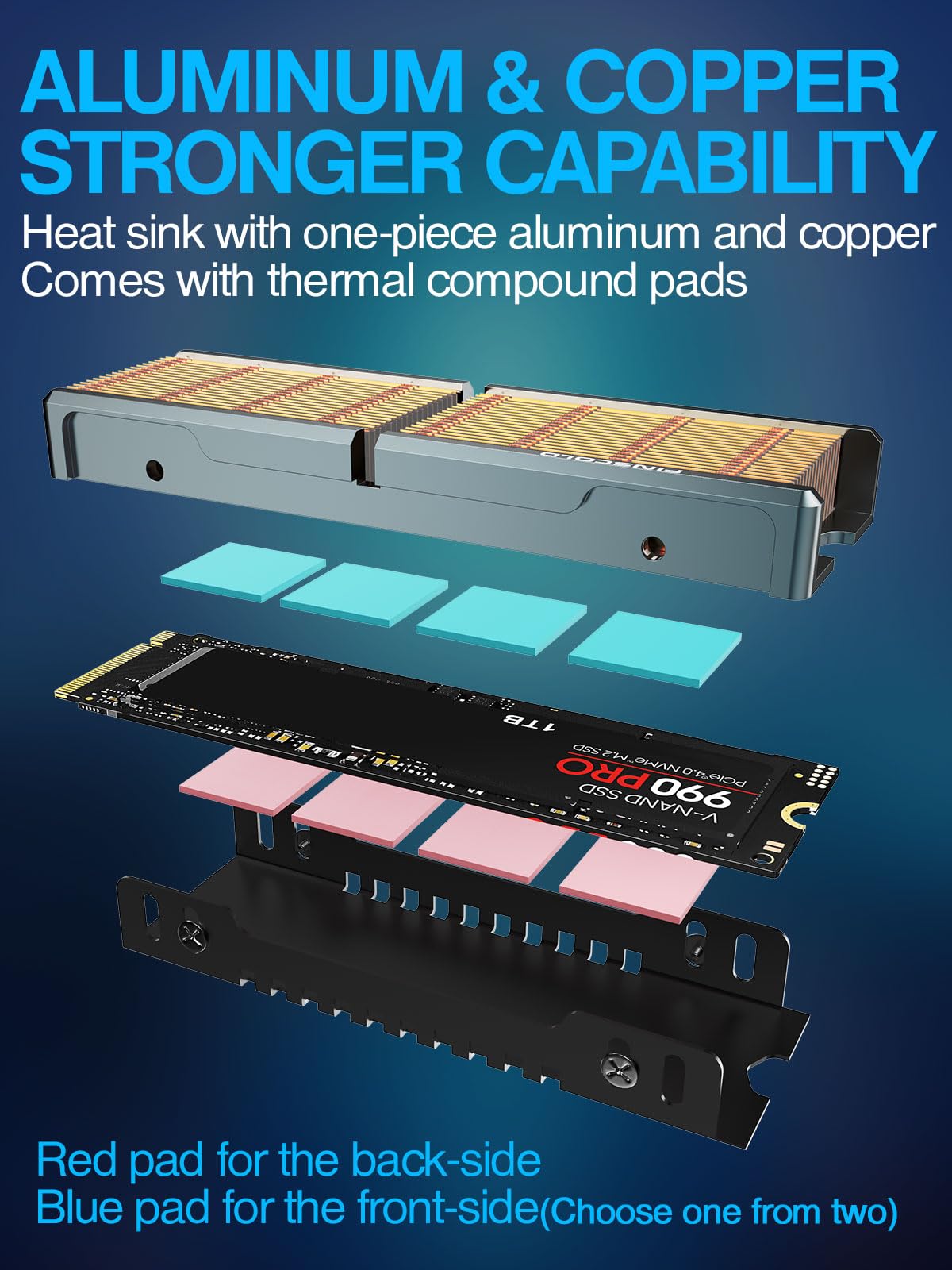
The JEYI Copper M.2 HeatSink Q80 features 36 precision copper fins and a CNC-machined aluminum frame, providing 401 W/m.K thermal conductivity and a surface area 20x larger than standard heat sinks. Designed specifically for high-heat M.2 2280 SSDs like Samsung 980Pro, it includes nano thermal pads and adjustable mounting screws for optimal cooling and secure installation, ensuring your SSD runs cooler and faster under heavy workloads.
| Brand | JEYI |
| Cooler Heatsink Material | Copper |
| Product Dimensions | 7.2L x 2.4W x 1.2H Centimeters |
| Cooler Heatsink Compatibility | Copper |
| Item Weight | 50 Grams |
| Mounting Type | Screw Mount |
| Manufacturer | JEYI |
| Country of Origin | USA |
| Model number | Q80 |
| Item Weight | 50 g |
| Item model number | Q80 |
| Noise Level | 65 Decibels |
| Are batteries included? | No |
Q**R
très bien, mais moins cher sur un site concurrent avec 40 voleurs
je suis très content, j'en ai donc acheté un deuxième sur l'autre grand site de e-commerce
D**H
Excellent NVME Heatsink
I have used various solution and this NVME heatsink works great. It fits under the video card and it doesn’t get in the way.
C**Y
4 stars for the weird plastic tape on top
Cooler would of been 5/5 but it has a thin layer of clear plastic over the top of the copper I’m assuming for two reasons one to keep it from oxidizing and two too keep them from damage or from falling out? My issue is heat transfers on bare copper is better than having to also go threw tape it will bender performance marginal or not. That being said the cooler is beautiful it looks 10x better in person then the 3D renders on here and people photos I bought two different coolers and now I want to get two more of these for my others I love the look and quality of these. Once my mother board comes in I’ll take photos and update my review I also have a cheap heat sink on already so I’ll do before and after temps and post the changes. Overall it looks awesome compared to what you see here.
T**.
Fit and works well.
For reference, I’m using this with a firecuda 530 on a TUF X570 board. As the heat sink wraps around the ssd, it will add to the width a bit. In my case it barely misses the latch of the PCIe slot.The copper is beautiful and the fit is excellent. Not sure how the metal will look over time, but right now it looks great. Note that the fins are closed on top and the design relies on axial air flow, while the other version (Q150) under this listing appears to support air flow 90 degree off.The included heat pads are a bit confusing at first as I didn’t see an explanation for the colors. The blue actually sticks to the surface and works best between the copper sink and the ssd. The pink one is for the black u-channel and the non-stick side (no foil) goes towards the ssd.Overall, I am impressed by the build quality, almost as much as I am surprised by the heat those ssd develop. The benefit turns out to be about 14C cooler than another M2 that’s directly under the original heat spreader of my motherboard.So I was curious and replaced the latter with another Finscold Q80. That's a 500GB version of the Seagate firecuda 530 while the original one is a 1TB version of the very same series. So it turns out that even with identical heat sinks, the SSD in the m.2_1 slot runs a bit warmer than the one near the CPU in the m.2_2 slot. That could have many reasons, but one plausible one would be that the air flow is better around the CPU while the other slot get a bit of heat from the GPU. (Note that PCIe slot in line with the m.2_1 slot becomes unusable due to the height of the Q80. The similar TUF X570-Pro board, doesn’t even have that particular PCIe slot.)Still, the difference between both is now 9C, or 5C less. Hence, the Finscold Q80 does cool better, even if not by much and certainly not a difference between life and death.I ended up upgrading the m.2_1 slot to a Q150, and while it may have resulted in 1-2C lower temperature of the ssd, the difference is minimal.
T**O
Works well and fits in tight spaces
I have an ITX motherboard with an m.2 slot on the bottom. This board is installed in a very tight InWin Chopin Max case. There is little to no airflow on the back of the motherboard, so my Western Digital WD Blue SN580 was idling at about 68° C. The motherboard has a shroud over its bottom that provides only minimal clearance around the m.2 SSD. Since this heatsink only adds about 1mm total to the width of the drive it was able to fit within this tight opening. It's not very tall at 12mm so it is also able to fit within the close height confines of the case. After allowing the machine to start up and temperatures to stabilize, the drive now idles at 58° C.I consider this very good performance under these conditions.This heatsink comes with 30 15x15mm thermal pads in three thicknesses that appear to be 1mm, 2mm, and 3mm. This allows one to place thermal pads on top of all drive components even if they vary a bit in thickness. The 1TB SN580 has no components on the back, but I still used some of the thinnest pads to ensure a thermal connection to the heatsink bracket that wraps around the bottom of the drive.Do not forget to remove the protective film from the top of the copper fins.I will definitely buy this heatsink again for future builds.
Trustpilot
3 weeks ago
4 days ago