
DOWNLOAD THE APP


Customer Services
Copyright © 2025 Desertcart Holdings Limited
DOWNLOAD THE APP
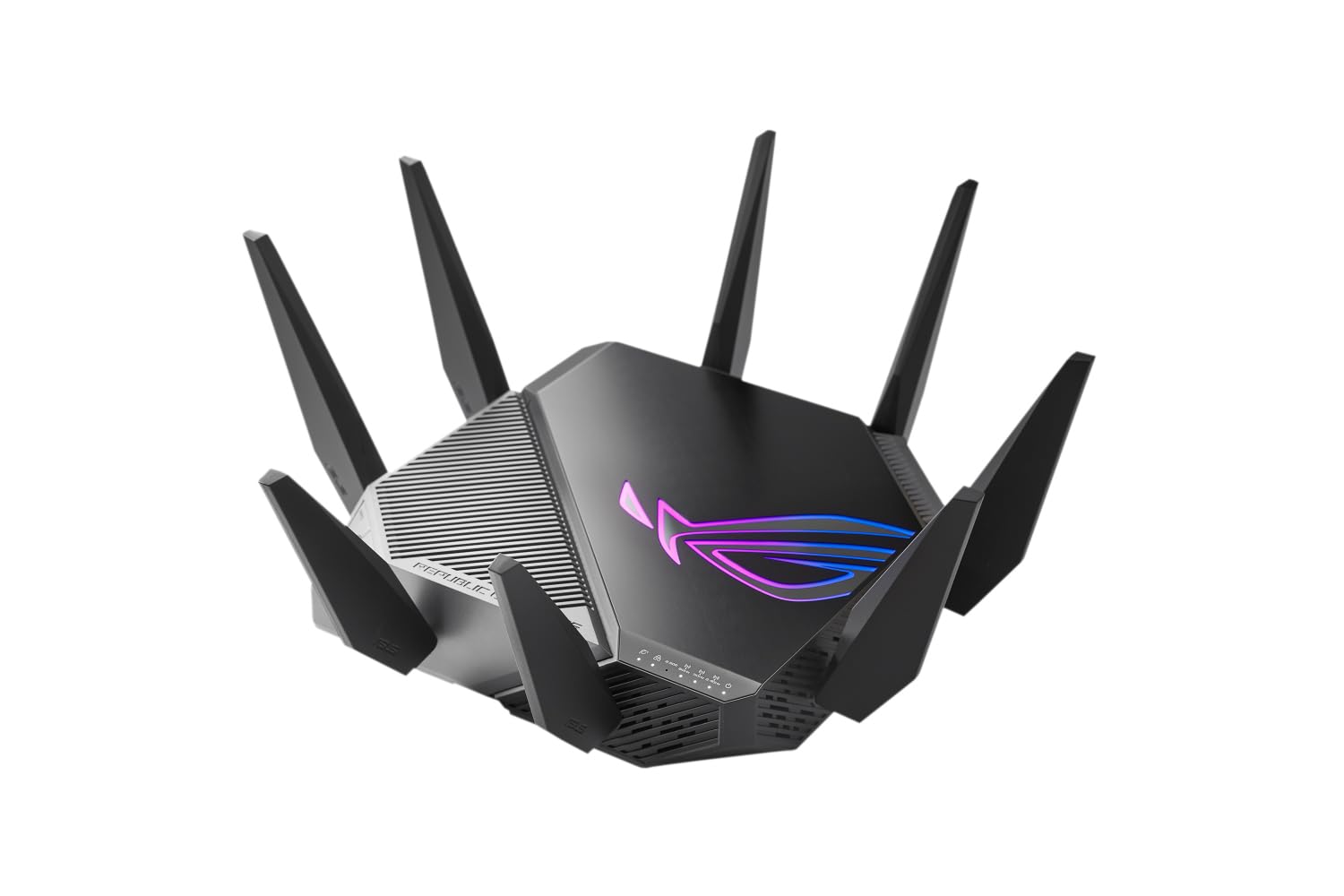
⚡ Dominate your digital domain with ASUS ROG Rapture – where speed meets security!
The ASUS ROG Rapture GT-AXE11000 is a cutting-edge tri-band WiFi 6E gaming router delivering ultra-fast speeds up to 11000 Mbps via the new 6GHz band. Equipped with a 2.5G WAN port, four LAN ports, advanced cooling, and lifetime free internet security, it ensures low-latency, high-performance connectivity. Its mesh WiFi support and VPN fusion features make it ideal for managing multiple networks securely and efficiently, perfect for gamers and smart homes demanding top-tier wireless performance.


| ASIN | B09Q67CYMC |
| Are Batteries Included | No |
| Batteries | 1 Lithium Ion batteries required. |
| Best Sellers Rank | 3,840 in Computers & Accessories ( See Top 100 in Computers & Accessories ) 30 in Routers |
| Brand | ASUS |
| Colour | black |
| Computer Memory Type | DIMM |
| Connectivity Type | Wi-Fi |
| Customer Reviews | 4.1 4.1 out of 5 stars (1,670) |
| Date First Available | 11 Jan. 2022 |
| Guaranteed software updates until | unknown |
| Item Weight | 1 g |
| Item model number | 90IG06E0-MO1R00 |
| Lithium Battery Energy Content | 2 Kilowatt Hours |
| Lithium Battery Packaging | Batteries packed with equipment |
| Lithium Battery Weight | 2 Grams |
| Manufacturer | ASUS |
| Number Of Lithium Ion Cells | 5 |
| Number of Lithium Metal Cells | 5 |
| Operating System | RouterOS |
| Product Dimensions | 32.8 x 32.8 x 17.9 cm; 1 g |
| Series | 90IG06E0-MO1R00 |
| Voltage | 220 Volts |
| Wireless Type | 802.11ax |
M**Y
this is the best device iv had for wifi
I got this to control multibe networks for my iot devices, kids network and primary network. To start the setup is easy and your up and running within 10 minutes usually but this is depending on the settings your ISP use. For what i needed it was great value for money and it is fast and handles crowded network signals really well in that there has not been a noticable performance hit over wifi. The device is regually recieves firmware updates and is still very much supported by Asus, the network segregation adds little to the security of the network but it does allow you to manage these seperate networks differently. It works well with older Asus mesh products but i did find the additional network ID's i had put in place did not play well with the older devices on older firmware. The feature i was interested in was the guest network pro which gave me the ability to control my kids network availability time but it also had limited support over older AI mesh devices. This is a top product for the price and the wifi speeds are as advertised for us but this will vary per household.
N**C
Beyond my expectations to go from WiFi 6 to WiFi 7
Currently upgraded my 2 GT6 routers working in an AI Mesh setup over WiFi to 2 GS-BE18000 same setup! After the initial setup was completed on the app (quick and painless like usual) im currently getting stronger signals and my speed increase was beyond my expectations! I was mostly after 6Ghz band and the added MLO for WiFi 7 which are fantastic in there own ways! The speed increase i have seen between my 2 routers has gone from 200-300 Mbps to 600-800Mbps for me this increases has blown me away! To me this upgrade for reliability, stability, range and speeds for the price these routers are, is worth every penny!
A**X
Good solid performance, awful looks
I was looking for an upgrade from me Asus Bluecave AC router, and this popped up on sale. Given that Asus generally are amongst the most active with firmware updates amongst router manufacturers, and that the few reviews of this online were positive i gave it a try. I was toying with a mesh network system, but the ET12s are silly money and the XT8s are getting on a bit. This also hit the sweet spot, as there have been a number of firmware releases since December which have helped squash a number of bugs, security issues etc.. But you'll have to manually trigger a firmware update to get the latest - and THEN set the router to auto update. This is big and loud; two things that had put me off. Thankfully the Mrs gave her seal of approval based on the pictures on the product page so i was covered! The RGB can be turned off, and the red colour on the antennas are just plastic - no lights/LEDs. Once setup it looks like an upended spider, not one of our piddly ones; think giant Aussie Huntsman. Coming from an Asus router the web admin console was familiar, with a few gamer apps/options thrown in. But compared to the Bluecave the AX6000s admin console if ridiculously quick. My Bluecave had a few issues which drove the upgrade; TP-Link KP303 extension strips would knock out 2.4Ghz wifi, Logitech Harmony hubs couldn't get online with it and on the odd occasion my Mrs Laptop would fail to get online. None of those issues have occurred with the AX6000. On to the main reason the buy this; Wifi 6. I have 2 wifi 6 clients active; an AX201 card in a PC motherboard and a Galaxy S10. The PC is located on the floor above the router in a back bedroom - the spacing is about 8-10 meters. Once 160Mhz bandwidth was enabled and the control channel set to over 100 on the 5Ghz band the speed hit: 1361Mbps down. Transferring a 5Gb file to my file server which is hard wired to the router from my PC achieves transfer speeds at 80MB per second. That was to a old fashioned HDD. The Bluecave hit 60MBs at best. In terms of signal strength improvement, i have a wifi security camera on the outside of the house and it would struggle with the BlueCave. Initially the AX6000 didn't far much better, but after 2 days the camera registered full signal - through 1 internal wall, 1 external wall where the camera is behind a steel lintel. All in all a good upgrade; better wifi coverage and speed, a newer product (hopefully supported for as long). The good: +Super simple setup - connect it via ethernet, launch a web browser and it'll start the process +It's fast both in terms of wifi throughput but also performance when in the web admin console +Some degree of future proofing with 2x 2.5Gbps Ethernet sockets (1x WAN and 1x LAN) +Gamer features - VPN, QOS; although some more of a gimmick +Great wifi signal across both bands - but allow it 1-2 days to build up an accurate picture of your house (which it does using wifi signal reflection) and will then adjust the signal to best suit the environment/maximise signal. +Reasonably priced (got mine for £280) +You can turn off the RGB +AiMesh software built into the firmware allows you to turn multiple single Asus routers into a mesh network +MerlinWRT firmware is now available The bad: - It's got a large footprint, almost the size of an A4 sheet - 160Mhz bandwidth is not enabled by default, but is easily enabled - The looks; it screams teenage gamer taste - Not fully future proof: no Wifi 6E A few tips: 1. Upgrade the firmware as soon as you can manually; mine shipped with the earliest release firmware 2. When replacing an existing router reboot your modem or ISP provided router once it's connected via ethernet and powered up. I needed to go this before the AX-6000 picked up the IP address and got onto the internet. 3. Enable 160Mhz bandwidth, it unlocks the real speed 4. Wifi channels below 100 don't make use of the full speed. This can be manually set. 5. Reboot any/all devices if you are re-using SSIDs and passwords from your old router with the new one to get them to register/back online. 6. Auto firmware updates with Asus can be a risk; with my previous router a firmware update killed guest networks and it took them a month to deploy a fix. 7. Use one of the 6 guest networks for your smart home products, and disable intranet access on the guest network for better security/segregation. 8. Use either the router app OR the web console for administration - don't use both as they can cause conflicts. A few full tech reviews: Linus Tech Tips (more a paid infomercial) Dongknows.com - best review by far AVForums
M**!
Very Fast Router with a Wealth of Settings
ASUS ROG Rapture GT-AX6000 The router comes well packed, with the router itself, aerials, and a power supply, a Cat6 cable and a quick start leaflet. One slightly disappointing issue is that there are only five lan ports. With a router this expensive I would expect eight. The finish is more like the RT-AX82U, in that it is not that expensive looking. Older routers certainly look and feel more impressive. This router is light and, well, dare I say it, very plastic. The legs don't light up and even the illuminated Asus logo really doesn't do it. Mine was unevenly lit and the effects not at all smooth. The aerials have red plastic inserts but they don't light up so I am not sure why they bothered. All in all it looks like a cheap router. Strange considering the gaming world is very particular about product looks. Strange coming from Asus too, they are normally produce good looking products. Plugging in you need to attempt to access the internet with a browser and you are immediately met with the Asus configuration page. You need to sort out some passwords so it’s advisable to have paper and pencil handy. The setup is remarkably good and is a really strong feature of the router. If you have owned an Asus router before then the user interface comes as no surprise. It has all the familiar options with a few new ones. Overall performance of the router is just staggering. It's very fast indeed. No complaints there! There are a wealth of options in the Asus including the new three step gaming acceleration. I have to say that I found this a little disappointing because it was involved setting it up. It is also very "Asus" oriented in that it boosts performance for Asus hardware and apps running on your PC. I couldn't even find where one of the apps downloaded from. This is very different to something like the DumaOS which is configured out of the box - ready to rock as they say - no configuration required. The Asus has more potential though as long as you don't mind spending time getting to know what it all does. One downside to the router is that nearly all of the advanced features need your consent to allow Trend to collect your data. That can even consist of emails. I am not sure what to think. On the one hand the performance is great, the flexibility is great, but the looks and ports are very meh for the price. Overall if you have a rubbish router at the moment then this is a great general purpose replacement but if you want an out of the box gaming router or if you are looking to upgrade an already good router then perhaps look elsewhere. The Asus is a lot to pay for not a lot of new features. As a general purpose router there is no doubt the Asus is excellent and now it is supported by Merlin which adds one star. Unfortunately the price really is a big negative with this router. Oh, and don't believe the "reduces ping by 90%". Unless you have a very specific problem, it's not going to solve anything. Recommended but over-priced and good grief Asus, do something about the looks!
أ**ي
بدون تغليف ويبدو انه مستخدم من قبل
P**H
Wonderful! Item perfect! delivery perfect!
V**Z
Lo tengo de nodo y perfecto
B**O
Excellent as described, It seems that this is a lower cost version of ROG router compared to mu previous AX-11000 Pro since it is very light. Hoping that this will be as durable as my prevous ones.
A**.
E' praticamente potente come un computer. Copertura wifi in una casa a due piani, ognuno di essi di 80 metri quadri. 2 ethernet , 1 wan e lan da 2.5gb , subito attivara offerta Tim Fibra da 2.5gb , saturo la rete ethernet e wifi facendo speedtest da 2400 mbit. In wifi con il telefono che e' wifi6 in speedtest arrivo a 2.350mbit. Trasferimento file in rete nemmeno a dirlo, 250megabyte da un computer wifi6 al mio desktop collegato su ethernet e viceversa. Possibilita' di estendere la retr wifi con AImesh in 30 secondi, fatto per prova con un vecchio DSL AC68U. Super reattivo, dopo 2 settimane sempre acceso mai un impuntamento con 38 dispositivi collegati tra cui telecamere, prese smart, luci e lampade wifi ecc ecc. Vpn client o server in 5 minuti. Possibilita di attivare DDNS e in automatico ti crei una url che ti permette di accedere da remoto al router anche se sei fuori casa. Mi e' risultato gia' una volta comodo per cambiare la password del wifi 2.4ghz che avevo memorizzato incorrettamente. Applicazione da smartphone ben fatta , mi piace. Veloce anche la usb 3.0 se volete collegarci una memoria di archiviazione, praticamente potete farvi un nas aggiuntivo con un bel disco grosso. Modalita' wifi eco comoda, l'attivo ogni volta che vado a letto e lascio attiva la maggiorparte del tempo perche' comunque il router continua ad avere ottime performance e ottime velocita'.l Per le altre menate inutili da gaming rimando al loro sito. Cosa non mi piace: l'estetica, e' brutto, brutto, sembra un ragno venuto fuori da trasformers. Fortunatamente e' nella mia camera la scatola della fibra altrimenti se fosse stato in sala da pranzo, l'avrei sostituito con qualcosa di piu' elegante. Problemino con la rete a 5g a 160mhz, non so per quale quale motivo se setto il canale solo per i 160mhz la rete wifi 5g sparisce. Se setto 20/40/80/160mhz torna up. Credo sia un bug del firmware che sistemeranno con gli aggiornamenti.
Trustpilot
2 months ago
1 month ago