
DOWNLOAD THE APP


Customer Support

Desert Online General Trading LLC
Warehouse # 7, 4th Street, Umm Ramool, Dubai, 30183, Dubai
DOWNLOAD THE APP
Customer Support
Desert Online General Trading LLC
Warehouse # 7, 4th Street, Umm Ramool, Dubai, 30183, Dubai


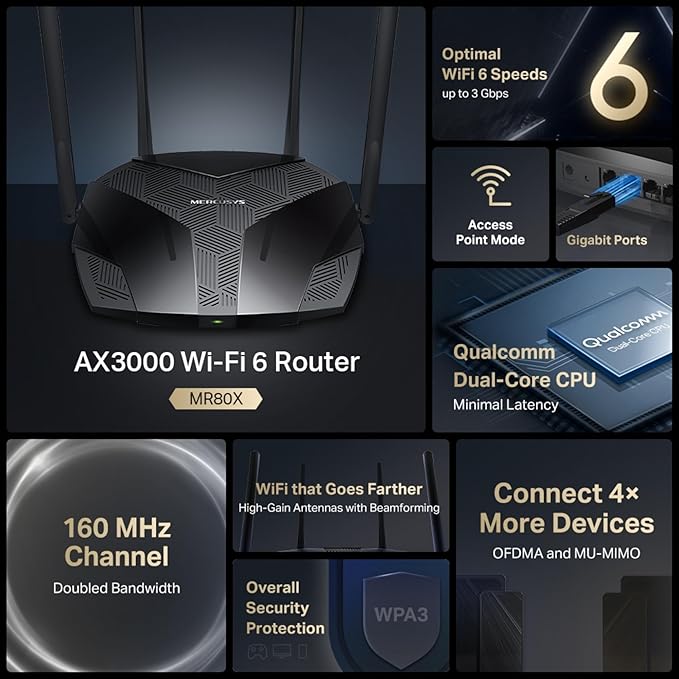


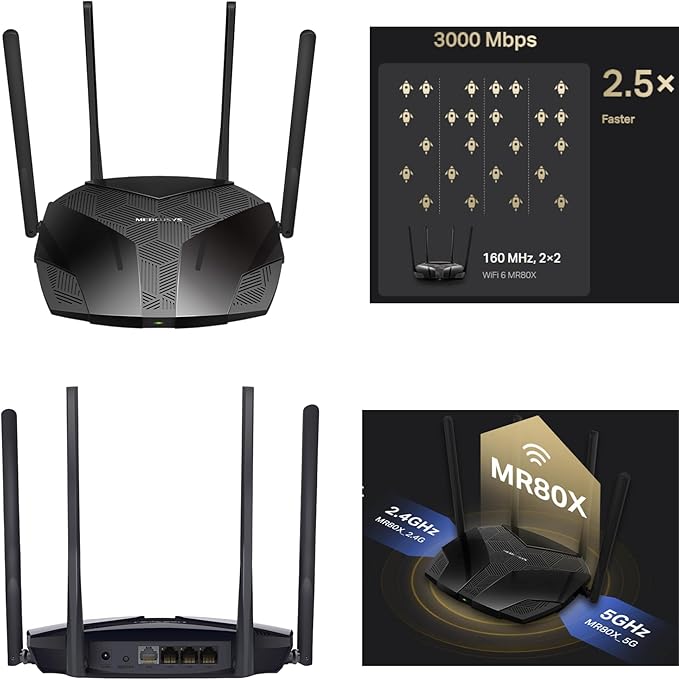

🚀 Elevate your home network to pro-level speed and stability — don’t get left buffering!
The Mercusys AX3000 MR80X is a dual-band Wi-Fi 6 router delivering up to 2402 Mbps on 5 GHz and 574 Mbps on 2.4 GHz. Equipped with 4 high-gain antennas and advanced MU-MIMO and OFDMA technologies, it ensures fast, stable connections for multiple devices simultaneously. Designed for gamers and 4K streamers, it features a 160 MHz channel for lag-free performance, 3 gigabit LAN ports for wired flexibility, and enhanced WPA3 security, backed by a 3-year warranty.


| Brand | MERCUSYS |
| Product Dimensions | 20.88 x 17.16 x 4.17 cm; 650 g |
| Item model number | MR80X |
| Manufacturer | TP-Link |
| Series | MR80X |
| Colour | Black |
| Connectivity Type | Wi-Fi |
| Wireless Type | 802.11ax |
| Operating System | RouterOS |
| Are Batteries Included | No |
| Item Weight | 650 g |
| Guaranteed software updates until | unknown |
K**K
So simple to set up and great connectivity
I purchased this after an internet outage in my local area, and I’m so happy I made the purchase. It was so easy to set up, took about 10 minutes total including sim activation and account set up - once up and running the WiFi was so easy to connect and has great strong signal with full bars, it’s fast and reliable which is great! It’s a tiny compact device which will be great to take wherever we might need WiFi in future! Very happy and would highly recommend!
L**N
brilliant device
I got this as emergency purchase when our internet went down and our provider wasn't helpful. everything we use on a daily basis needs internet. it is marketed as laptop/roaming but we used it to stream tv an wifi for phones. i used the smarty sim which was easy to set up an plenty of payment options to suit and super easy to cancel. this lovely little device worked way better than our full fiber broadband but bear in mind we only had 4 devices logged in and not the 16 that currently inhabbits our normal broadband so bear that in mind. I thought I was brilliant I was worried that it wouldnt like streaming from tv but it was great little to no lag cant fault it.
R**G
4mbps
I have great signal, never any issues. I got this due to moving house and not having Internet for 10 days, using this as a stop gap. I get 4mbps, checked with 3 different sims Vodafone, ee and giffgaff, all gave the same reading - when in a phone runs minimum 100mbps. Easy to set up but waste of money.
S**M
Great Portable WiFi Solution—Reliable, Easy to Use, and Perfect for Travel
The MERCUSYS MT110 MiFi has been a fantastic little device for staying connected on the go. Setup was incredibly easy—just pop in the included SIM card, follow the quick instructions, and you’re online within minutes. It’s very user-friendly, even if you’re not tech-savvy. The connection has been stable and surprisingly fast for a compact hotspot. I’ve used it with multiple devices at once—phone, laptop, and tablet—with no issues. It definitely lives up to the claim of supporting up to 10 devices. Battery life is another big plus. The 2200mAh battery gives me around 10 hours of use, which is perfect for travel days, working remotely, or keeping kids’ devices connected during long trips. It’s small, lightweight, and easy to carry in a pocket or bag. Having a SIM slot makes it super flexible—great for using local data plans when traveling abroad. The management app/interface is simple and gives you everything you need to monitor data and settings. Overall, this portable router delivers excellent performance for the price. Reliable, convenient, and perfect for anyone who needs WiFi wherever they go. Highly recommended!
F**H
Works Great So Far
So far I’m very happy with this device. I’ve only had it for a couple of days, but swapping SIM cards is really easy. It automatically detects the SIM settings, so you don’t have to set anything manually. The app is simple to use, and the overall quality feels good for running two or three devices. I just hope it lasts, since I haven’t used it long-term yet.
K**D
it does what it says
it works that simple
J**E
Cheap device, sleek design, and worth it!
So far so good, battery life is not bad for what it is, and charges quite quickly! Its relatively small pocket size device is good for being outdoors, and on the go. Connects up to 10 devices, although I haven’t tried to connect 10 devices yet lol. I’ve connected my Xbox Series X to it, and done it joy. The coverage im yet to put to the test, I’m expecting nothing amazing, but it is only a small device. The portable device takes USB-C for a faster charge too, so don’t forget that. I didn’t want a cheap and plastic one, but this (for what it is) is impressive quality, and powerful.
J**7
Simple, Functional, and Worth the Price
Work pretty well, nice price!
J**S
Bon produit, facile à configurer.
K**L
Solid WiFi router
S**.
Ich habe den WLAN Router für meine Schwester gekauft und konfiguriert, da sie nur über ein klassisches Modem ohne WLAN Funktionalität verfügt. Ich bin positiv überrascht von dem Gerät, es hat eine Vielzahl von Einstellungsmöglichkeiten und ist einfach einzurichten. Kurzes Fazit: + drei externe Antennen für eine gute Reichweite + schnell + Gerät ist ziemlich leicht, wirkt aber trotzdem stabil + vier Steckplätze für die Nutzung als Switch + gute Verarbeitung und schickes Design + einfache Konfiguration + umfangreiche Einstellmöglichkeiten Kurz zur Einrichtung, ich habe diese direkt über WLAN durchgeführt: 1. Router an das Stromnetz anstecken 2. Modem mit dem Router verbinden (mitgeliefertes Netzwerkkabel am WLAN Router in den blauen Steckplatz "Internet" stecken) 3. Mit dem WLAN "TP-Link_..." verbinden, zuerst im Betriebssystem auf "Verbinden" gehen, anschließend die "WPS-Taste" am WLAN-Router drücken (kleiner Schwarzer Knopf auf der Hinterseite des Routers mit der Beschriftung "WPS/Reset" 4. Anschließend wird die Verbindung zum WLAN Netzwerk des neuen Routers hergestellt 5. Danach mit dem Browser nach "192.168.0.1" navigieren (kann laut Hersteller auch 192.168.1.1 sein) 6. Einloggen mit Benutzer "admin" Kennwort "admin" 7. Im Anschluss wird automatisch das Wizard gestartet und mann kann die gewünschten Einstellungen vornehmen (im Wizard werden nur die minimalen Einstellmöglichkeiten angeboten) 8. Über die linke Leiste können dann die restlichen Einstellungen vorgenommen werden, folgendes empfehle ich auf alle Fälle: - Kennwortänderung für die Weboberfläche unter dem Punkt "Sicherheit" - Zeitzone anpassen (am besten einen Zeitserver angeben wie z.B. "pool.ntp.org") Anbei noch die offiziellen technischen Details des Herstellers: HARDWARE-FUNKTIONEN: Schnittstelle: 4x 10/100Mbit/s-LAN-Ports, 10/100Mbit/s-WAN-Port Taste: WLAN Ein/Aus, WPS/Reset, Power Antenne: 3 fixe, nach allen Seiten ausrichtbare 3dBi-Antennen Externe Spannungsversorgung: 12V/1A Gleichspannung WLAN-Standards: IEEE802.11n, IEEE802.11g, IEEE802.11b Abmessungen (B*T*H): 230mm*144mm*35mm WLAN-FUNKTIONEN: Frequenz: 2,4..2,4835GHz Signalrate: 11n: Bis zu 450Mbit/s (dynamisch), 11g: Bis zu 54Mbit/s (dynamisch), 11b: Bis zu 11Mbit/s (dynamisch) Empfängerempfindlichkeit: 270M: -68dBm bei 10% PER 130M: -68dBm bei 10% PER 108M: -68dBm bei 10% PER 54M: -68dBm bei 10% PER 11M: -85dBm bei 8% PER 6M: -88dBm bei 10% PER 1M: -90dBm bei 8% PER Sendeleistung: max. 20dBm WLAN-Funktionen: WLAN ein- und ausschaltbar, WDS-Bridge, WMM, WLAN-Statistik WLAN-Sicherheit: WEP mit 64, 128 und 152 Bit, WPA/WPA2, WPA-PSK/WPA2-PSK SOFTWARE-FUNKTIONEN: Quality of Service: WMM, Datenratenkontrolle WAN-Typ: Dynamische/Statische IP-Adresse, PPPoE, PPTP (Dualzugriff), L2TP (Dualzugriff), BigPond Verwaltung: Zugangskontrolle, Lokales Management, Fernwartung DHCP: Server, Client, DHCP-Client-Liste, Adressenreservierung Portweiterleitung: Virtuelle Server, Porttriggering, UPnP, DMZ Dynamisches DNS: DynDNS, Comexe, No-IP VPN-Passthrough: PPTP, L2TP, IPsec (ESP-Header) Zugriffskontrolle: Elterliche Kontrolle, Local-Management-Steuerung, Hostliste, Zugangsplan, Regelmanagement Firewall-Sicherheit: DoS-Schutz, SPI-Firewall, IP-Adressenfilter/MAC-Adressenfilter/DomänennamenfilterIP-/MAC-Adressenbindung Protokolle Support: IPv4 SONSTIGES: Zertifizierung: CE,FCC,RoHS Verpackungsinhalt: TL-WR940N, Spannungsadapter, Ressourcen-CD, Schnellinstallationsanleitung Systemanforderungen: Microsoft® Windows® 98SE, NT, 2000, XP, Vista™, 7, 8 oder 10, MacOS®, NetWare®, UNIX®, Linux Umgebung: Betriebstemperatur: 0°C..40°C Lagertemperatur: -40°C..70°C Betriebsfeuchtigkeit: 10%..90%, nicht kondensierend Lagerfeuchtigkeit: 5%..90%, nicht kondensierend
H**8
The product works good it's ok for using 1080p videos not suggesting for 4k videos but the price it deserves a good product thanks 😊 team and the seller for selling a genuine 👍 product
M**D
ابعد عنه
Trustpilot
4 days ago
1 month ago