
DOWNLOAD THE APP


Customer Services
Copyright © 2025 Desertcart Holdings Limited
DOWNLOAD THE APP
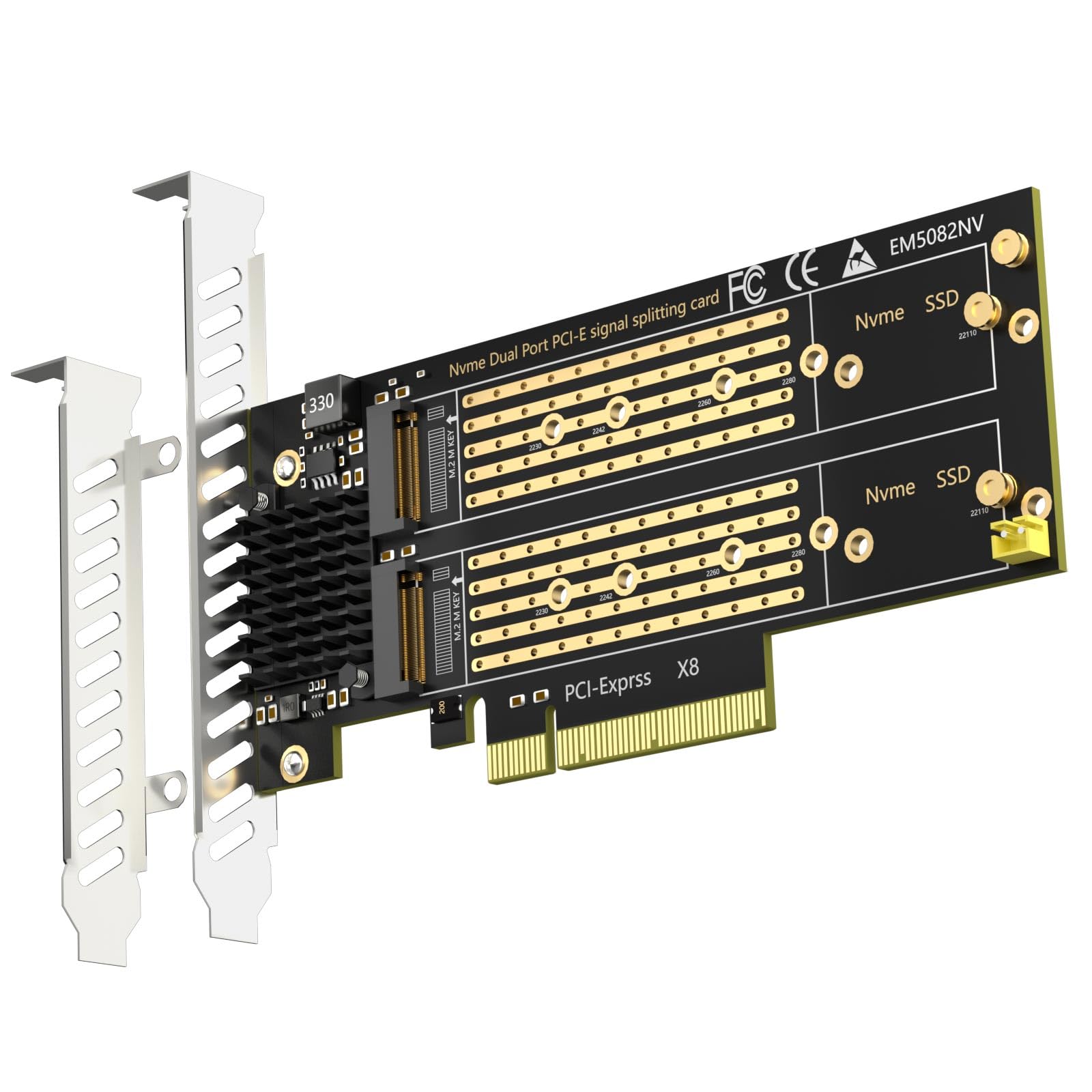
🚀 Double your speed, double your storage — PCIe 4.0 power unleashed!
The GLOTRENDS PA21 is a dual M.2 NVMe to PCIe 4.0 X8 adapter designed for professionals seeking to maximize storage speed and capacity. Supporting multiple M.2 sizes and soft RAID on Intel/AMD platforms, it enables simultaneous use of two NVMe SSDs with up to 64Gbps bandwidth. Ideal for high-performance setups, it supports OS booting and broad OS compatibility, requiring a PCIe bifurcation-capable motherboard to unlock full potential.


| ASIN | B09PGDMWKH |
| Best Sellers Rank | 11,001 in Computers & Accessories ( See Top 100 in Computers & Accessories ) 9 in RAID Controllers |
| Guaranteed software updates until | unknown |
| Item model number | PA21 |
| Manufacturer | GLOTRENDS |
| Product Dimensions | 15 x 5.4 x 0.3 cm; 130 g |
A**R
Really handy
Bought this to house my spare NVMe and works like a charm. Would recommend if you need a way of using if you have no spare slots left.
D**V
Perfect!
The GLOTRENDS 4 x M.2 PCIe 4.0/3.0 X16 Adapter is a game-changer! Setup was easy, and it instantly improved my computer's speed and storage management. The support for 4 x M.2 NVMe SSD RAID-on-CPU is excellent and compatibility with PCIe 4.0/3.0 X16 is a bonus. Especially loved how it handled large amounts of data with ease. If you need a storage management upgrade, this is a great buy. Highly recommended!
K**H
Works as intended. Reason for -1 star explained in review
I was apprehensive about buying this card due to the number of people saying there's "missing M.2 screws" - turns out that those people are just plain dumb 😂 the two screws in the little plastic pouch are just for mounting the card to your case. You get 3x brass grommets on the board (2 located with the M.2 slots and one on the corner of the board as a spare.) you just unscrew them from the back and the brass grommet is used to mount the M.2 drive. Reason for 4 stars, instead of 5: Overall this adapter appears to be well-made and if I had the right motherboard then I've no doubt that it would work as intended - unfortunately the instructions on this listing are poorly translated and as a result, it turns out that although my motherboard is a B450 and has Bifurcation options, it doesn't seem to have the *right kind of Bifurcation*. This means that only one of those 2 M.2 slots is recognised (M.2 Slot 1) by my motherboard. Not a big deal at the moment as my C-Drive was only a 500gb SATA-M.2 drive so I just swapped it out. Read/Write speeds of the M.2 NVME drive mounted using this adapter seem to be around the 450MB/s mark - this is obviously a lot lower than the 3500MB/s that the NVME drive is capable of but this may also just be down to my motherboard not bifurcating the PCI-E slot correctly.
D**M
The screws .. like all nvme screws are designed for use my a small child.
Great neat x8 dual v4 nvme adpaters. Easy to cool and reliable across all machines I've tried even in dodgy extension cables etc etc.
C**H
Regret purchasing
Bought this for my system, installed np. Less than 30 days later, my system died, no post, VGA motherboard LED stuck on, rebooting every 70 seconds. A £5k custom system. Sent it back to the original builder, this card died in the PCI expansion slot. I thought this was a reasonable priced, simple addition, it costed me £250 extra for a specialist to rip this put and send my PC back to me. Not worth it.
J**.
If you have bifurcation support, this will work
Works great on a z440 workstation once I set it up in the bios. I've had it well over a year, it's been on 24/7 hosting vm's and its performed very well. It cost around the £50 mark when I purchased it, so the value is great for me. Its hardware level compatability, so if your motherboard doesn't support bifurcation, don't get this.
D**R
It appears to work!
I tried this adapter on 2 different motherboards with 2 Gen4 SSDs and a 5 ports SATA HBA. They were all detected and I was able to get Gen4 speeds from the SSDs concurrently. The speed of the SSDs didn't change between my sequential and concurrent tests. This adaptor definitely doesn't work without motherboard support for bifurcation and it must be explicitly turn on in BIOS, "Auto" won't do. I do want to note that the first time I tested it, I got Gen4 speeds from one SSD and got abismal speeds from the other SSD. Swapping the SSDs appeared to fix this. Not sure what that was about but it works now.
C**8
Good product, but......
Firstly the plus, this card works well, but make sure your motherboard supports "Bifurcation" i.e. x4x4x4x4 on the slot you want to put it in. The bad, I have stopped buying them now as the last 4 I have purchased were all missing the steps\screws to mount the NVMEs
M**Y
Doesn't work well with X670E-E MB. Don't waste your time playing with bifurcation modes or searching for a solution, you'll get only one m.2 working at best.
H**.
Ich setze die Karte in einem Minisforum MS-A2 ein welche dort ohne Probleme funktioniert. Das Bifurcation funktioniert einwandfrei.
A**T
Ottimo, non rallenta la velocità della memoria montata.
S**Z
Works perfect with the low profile adapter in my Power Edge R730! Be sure your motherboard or server supports Bifurcation as the listing says this unit does NOT bifurcate on the card.
J**N
Works great for me I'd definitely recommend it
Trustpilot
3 days ago
2 weeks ago