We remain fully operational. Our teams are working around the clock to ensure your deliveries continue safely.

DOWNLOAD THE APP


Customer Services
Copyright © 2025 Desertcart Holdings Limited
DOWNLOAD THE APP

🚀 Elevate your home WiFi game—fast, smart, and unstoppable!
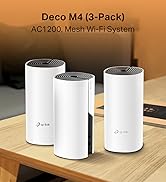
The TP-Link Deco X55 (3-pack) is a WiFi 6 mesh system delivering ultra-fast AX3000 dual-band speeds up to 3 Gbps, covering up to 6,500 sq ft with seamless connectivity. It supports 150 devices simultaneously and features AI-driven mesh technology for intelligent network optimization. Each unit includes three Gigabit Ethernet ports for wired connections, and setup is streamlined via the intuitive Deco app. Designed for modern smart homes, it ensures reliable, lag-free internet across large spaces.
















| ASIN | B0B8F146PQ |
| Are Batteries Included | No |
| Best Sellers Rank | 487 in Computers & Accessories ( See Top 100 in Computers & Accessories ) 2 in Whole Home & Mesh Wi-Fi Systems |
| Brand | TP-Link |
| Colour | white |
| Customer Reviews | 4.3 4.3 out of 5 stars (616) |
| Date First Available | 2 Aug. 2022 |
| Guaranteed software updates until | unknown |
| Item Weight | 1.2 g |
| Item model number | Deco X55(3-pack) |
| Manufacturer | TP-Link |
| Operating System | Linux |
| Product Dimensions | 11 x 11 x 11.4 cm; 1.2 g |
| Series | Deco X55(3-pack) |
| Wireless Type | 802.11ax |
G**1
Easy setup, excellent results
Excellent product. We have Virgin fibre to the premises, but were getting poor performance on devices over WiFi. My son was finding the Xbox unusable at times, despite trying different locations, boosters, etc. The problem is that most WiFi routers provided by internet companies are very poor. Within a few minutes of getting these I'd switched the Virgin device to "modem only" (so it just handled the fibre to the premises), plugged 1 Deco into the Virgin box, and scattered 2 others discretely around the house. We've now got seamless, reliable and fast WiFi that easily covers a (fairly large 4 bed) house and the garden. The App is easy to use - setup is trivial, you can check the status really, and it allows you to enable/disable a guest network, which you can share with a few clicks when you have visitors. If you've got a reliable internet but not getting good WiFi performance then I'd strongly recommend investing in these devices - they're a game changer
M**E
Excellent Dead Spot Elimination
If you are looking to upgrade your home network, the TP-Link Deco X55 WiFi 6 Mesh System is a total game-changer. After struggling with inconsistent speeds and frustrating "dead zones," this system has completely transformed how I use the internet at home. Say Goodbye to Dead Spots: The standout feature of the Deco X55 is its ability to eliminate signal drops. Whether I’m in the basement or the furthest corner of the upstairs bedroom, the connection remains rock-solid. Unlike traditional extenders that create separate networks and cut your speed in half, the X55 uses AI-Driven Mesh technology to create one seamless network. This means your devices automatically switch to the strongest node as you move around, without you ever noticing a transition. Blazing Speeds: With WiFi 6 technology, I’m finally getting the speeds I actually pay for from my ISP, even on multiple devices simultaneously. Massive Capacity: It handles over 150 devices. Between smart home gadgets, gaming consoles, and work laptops, the network never feels congested. Wired Versatility: Each node has three Gigabit Ethernet ports, which is perfect for hardwiring a TV or PC for the most stable connection possible. Effortless Setup The "Deco" app makes installation incredibly simple. It walks you through the placement of each unit to ensure you get the best coverage. Within 15 minutes, my entire house—up to 6,500 sq. ft. with the 3-pack—was blanketed in high-speed WiFi. Final Verdict: If you are tired of buffering and "WiFi dead zones," the TP-Link Deco X55 is one of the best investments you can make for your home. It’s reliable, fast, and remarkably easy to manage.
J**.
Powerful, reliable Wi‑Fi that finally covers the whole house
I’ve tried a few Wi‑Fi setups over the years — from a single router to old extenders — and struggled with rooms where the signal was weak or just didn’t reach. The TP-Link Deco X55 (3‑pack) mesh WiFi system has, quite frankly, solved those problems — it’s robust, fast, and has transformed internet coverage across my whole home. I first got the 3‑pack because we have multiple devices — phones, laptops, tablets, smart‑home gadgets — and needed coverage across different floors and rooms. Setting it up was surprisingly simple, even for someone not particularly tech‑savvy: plug in the main unit, use the Deco app to follow the prompts, and before I knew it the mesh network was live. The coverage is impressive — rooms that previously had weak or patchy signal are now solid and stable. Whether upstairs, in the kitchen, or tucked away in a corner room, I get strong, consistent Wi‑Fi. Even outdoors on the patio I noticed a usable signal, which has been great for music and streaming devices. Performance has been top‑notch. Streaming videos, video calls, gaming, working from home — everything feels smooth, with minimal buffering or connection drops. The WiFi 6 boost makes a difference, especially when multiple devices are connected: there’s no noticeable slowdown even during peak usage. I also like the extras: the three gigabit ports on each unit give flexibility if I want to connect wired devices, and the system’s ability to handle up to ~150 devices gives plenty of breathing room for current and future gadgets. The built‑in HomeShield security gives extra peace of mind, which feels important with so many smart devices around. Overall, the TP-Link Deco X55 (3‑pack) has been a real upgrade — it turned our home network from a weak, patchy system into a stable, high‑speed mesh that covers the entire house. For anyone struggling with poor Wi‑Fi range or juggling many devices at once, this mesh system is a strong recommendation.
J**N
Good but with a couple of caveats
The X55 certainly eliminates dead spots but you can expect a large drop in speeds away from the main unit, that isn't to say it drops right off to nothing, speeds still remain fast and usable but in my case around half of the speeds from the main unit regardless of where i place the other mesh pods. One thing to remember is the gigabit ports will limit your speeds if you have internet above 1Gbit, you'll need a system with 2.5 gigabit ports for higher speeds. Set was relatively easy but required multiple attempts to get up and running and the app software is on the poor side. Once it's all up and running though it's all trouble free.
M**S
Riktigt bra!
E**I
Très bon achat avec un résultat exceptionnel
J**K
Très bon produit, toutefois trop cher. Bonne application, installation facile. Dans ma maison j’ai de 800 mégas à 1 giga de wifi en moyenne. Petit conseil laissez le wifi de la box pour les invités et créez un nouveau réseau personnel et puissant à votre usage. Contrairement aux idées reçues adsl ou fibre n’ont pas de meilleur wifi, d’où l’intérêt de ce type d’appareil.
D**R
Mit 4 Stk Deco X50 4 große Ebenen mit Stahlbetondecken sehr gut abgedeckt. Einfache Installation auch für Laien wie angegeben, funktionelle App. Telekom liefert 100 MBit/s, über Ethernet Backhaul (einfach anstecken und wird erkannt, habe ich überall 90-95 MBit/s.
P**R
Easy to set up; get it
Trustpilot
2 months ago
3 weeks ago