
DOWNLOAD THE APP


Customer Services
Copyright © 2025 Desertcart Holdings Limited
DOWNLOAD THE APP


✈️ Elevate your flight sim game with pro-level control and cockpit customization!
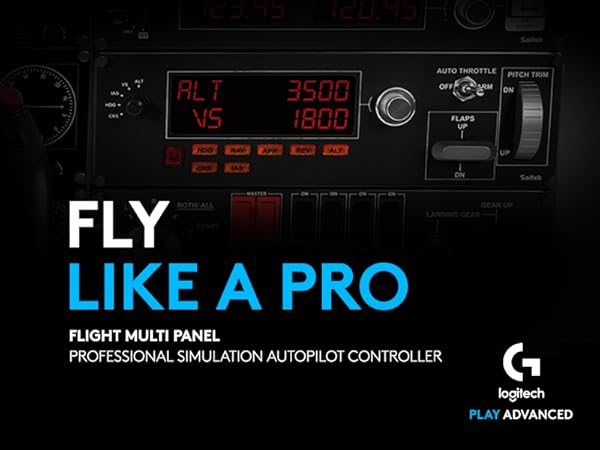
The Logitech G Saitek Pro Flight Multi Panel is a professional-grade autopilot controller featuring a crisp LCD display, 14 dedicated control buttons and knobs, and USB connectivity. Designed for serious flight simulation enthusiasts, it offers precise control over autopilot, throttle, flaps, and trim. Its modular design allows stacking with other panels to create a fully customized virtual cockpit. Compatible with major flight sim software like FSX, X-Plane, and Prepar3D, it delivers reliable, lag-free performance with a durable build and intuitive plug-and-play setup.




| ASIN | B01MFBNN9J |
| Best Sellers Rank | 4,274 in PC & Video Games ( See Top 100 in PC & Video Games ) 7 in PC Flight Controls |
| Brand | Logitech G |
| Brand Name | Logitech G |
| Button Quantity | 14 |
| Colour | Black |
| Compatible Devices | PC, Microsoft Windows XP/Vista, USB 1.1/2.0 |
| Compatible devices | PC, Microsoft Windows XP/Vista, USB 1.1/2.0 |
| Connectivity Technology | USB |
| Connectivity technology | USB |
| Controller Type | Joystick |
| Controller type | Joystick |
| Country Of Origin | China |
| Customer Reviews | 4.3 out of 5 stars 2,031 Reviews |
| Global Trade Identification Number | 05099206069831 |
| Hardware Platform | Desktop |
| Item Dimensions | 28.2 x 8 x 8 centimetres |
| Item Weight | 0.57 Kilograms |
| Manufacturer | Logitech |
| Model Name | pro |
| Model name | pro |
| Package Quantity | 1 |
| Power Source | Corded Electric |
| Product Warranty | 2-year Limited hardware warranty |
| Special Features | Touchpad |
J**N
Very useful Flight sim add on - which works!
This brief review is in respect of the Logitech (formerly Saitek) Pro Flight Multi Panel. I only say that because the reviews in this area seemed to be bundled together in respect of products that are as different as chalk and cheese. The Multi Panel is one of a series of separate Flight Simulator add ons made by Logitech for use alongside a joystick, control column, and other flight simulator controls. To the un-initiated, perhaps considering buying as a gift, please speak to the recipient first. By itself, this item will be useless! Right, having got that over with. If you are in the market for an add-on Flight Sim controller that provides elevator trim, flap control and simple autopilot functions, then you'll be please with this. I have it working with Microsoft Flight Sim X, X Plane 11, and Aerofly FS2. By itself it's tricky to get working, but install FSUIPC software (free download, no catches and well respected in the FS Community, which will be sufficient, or payware if you want full facilities) and you'll be away in seconds. I'm no expert at the techie bits, but once I connected this, I love it!
S**5
Taking Flight Simulation To The Next Level....
I have steadily expanded my home flight sim over the years and amongst other things now have three Logitech radio panels and one Logitech multi-panel. I have found that for reliability, it's best to use powered USB hubs for each device (not supplied). I am running MSFS 2020 on a Windows 10 PC and fly PMDG 737-800 and FBWA32NX. I highly recommend SPAD.neXt to get the most out of these panels. However, unless you are already familiar with this software, expect another learning curve but, trust me, the possibilities are pretty much endless once you know how to create your own custom profiles (YouTube is your friend here). The panels themselves are very well made, mostly from plastic but rotary knobs are metal. The large LED displays are easy to read, even from a distance, and remain flicker-free even after many hours of continued use. Rotary knobs and displays operate in realtime and accurately reflect what is seen in the cockpit with no noticeable latency. Overall, a quality product which looks and feels solid. Each panel is supplied with a plastic bracket which the front panel attaches to using four screws (supplied) enabling the device to be used free-standing or vertically mounted to form a stack using additional screws (supplied).
D**T
Radio Panel - Good build; flaky setup
This is a review or the Radio Panel. First the good points. - nice solid unit; quality build - comes with a slot to bolt into - nice screws supplied - the unit screws onto a compatible yolk that keeps everything steady - the click buttons are very solid - quite stiff but a satisfying click. - the twiddle buttons work fine - very clear digital display - options to tune NAV1 & 2, Comm1 & 2, adf, show DME, etc. On top and bottom not so good things - setup! Logitech drivers (via website) waste of time. Could not get this to work with FSX. - managed to get it consistently working downloading the free SPAD tool. Only way to go (but requires FSUIPC) other thoughts not sure I like it mounted on the yoke. It pretty much sits in your face, so am trying it just under the FSX radio panel. The usage of it does allow me to run the GPS bigger. Using it to tune NDB (ADF) royal pain. If you are at 900 and need to get to 300 say, that's a lot of knob turning. Easier to use the on screen ADF. Unless I missed something.... A bit of an extravagance and in two minds whether I should have bought this!
S**D
Love this product once set up correctly.
I love flight sim and when the MSFS 2020 was released it was an amazing step forward, although I still use XPlane 11. Having flown with the military in the past I have a love for proper flying and this product was the answer. I also have the switch units from Logitech. In short this is a really effective and adds to the whole flight sim experience if you enjoy realistic flying, the down side is you must get set up correct and follow the instructions to the letter. First download the complete drivers from the website before connecting, I also found that when you have multiple units make sure you download all the drivers and updates. When I finally had the perfect set up save this on your backup settings. I had one unit and you can scroll through all the screens available using the small arrow buttons, I have decided to purchase a second unit now for navigation, I use one with the multi data screen and the other for navigation aids, also great for engine management. Overall I recommend this product, please make sure though you understand the correct set up, if it does not work correctly the easiest resolve is remove the drivers and the unit, reload and start again, it will work.
A**G
Excellent product
I ordered this on Friday after many months of holding back thinking do I really need it and it arrived Saturday. I am so glad I bought it and I will be expanding my collection. The setup is pretty straight forward, you plug the lead in and the driver installs however I do recommend that you go to logitechs website and download the driver from there also. Once you have installed the drivers, start p3d v4 and load your flight, if the display doesn't light up, you need to find the Logitech folder on your pc and the run the application from there which I believe simply activates the display screens and I think that only needs to be done once. Once your flight has loaded, the screen will light up with an instrument display, to toggle through the displays, press the up down arrows, you will see various instrument displays which will respond as you begin your flight. There are buttons on the left side of the display which I believe you can assign various commands although I haven't used them yet. The display comes with a mounting bracket and screws for attaching the display to the bracket. Little tip that I found out, and this applies to the Saitek multi panel as well, go to device manager on your pc and in your usb properties under power management take the tick out of power saver mode as I believe that the USB port goes into sleep mode if there is no activity. As I said at the start, I am going to collect these as I think they will make for a really good cockpit setup so when I order the next one I will update this review with regards to using two.
D**N
Waste of money with no support from Logitech don’t buy.
Normally I wouldn’t write in these reviews, but given the price of this product and the lack of support from Logitech I feel it is only right that I write a review. The product was delivered promptly, there are no instructions provide but I downloaded the drivers from the Logitech site and the splash screen came up and said it had finished. So I plugged in the screen and it flashed a few times and that was it, I tested it with a multiple of flight SIM’s that it was supposed to support and it didn’t work. With lots of chasing on the internet found that you are supposed to do a onetime run of the drivers, tried this and it still didn’t work. I contacted Logitech who asked me to try it in another PC, luckily, I had a spare PC. But it didn’t work in that PC. After other numerus suggestions and changes they asked me to run the joystick calibration. I did this and noted that didn’t even mentioned panel, I then notice that it was coming as an unknown device in device manager. I told Logitech this and they went quiet and stopped communication with me. So, after a week or so communication to stop like this after I point out an issue, I can only assume that Logitech are aware of an issue that they can’t fix and shouldn’t possibly selling the panel as it has a known issue and is not fit for purpose. I note that there are other companies that are selling their version of drivers that will guarantee it working with most flight sim’s including MS 2020. This further reinforces my suspicions, as I don’t see why you would need to purchase £100 + product and then subscribe to a third-party vendor to make it work. Don’t purchase
P**O
Plug and play
Excellent ‘plug & play’
A**R
MSFS immersion
Love these FIPs, took a bit of time to work out the best way to use/connect them. But i have 4 now all connected to MSFS via SpadNext and work great. Use them each time I fly sad to see them sky rocket in price though. My first ones were £100 only a year ago. Would recommend a powered USB with on/off switchs to use them though. Do not connect direct to you pc as you need to reset them occasionally.
Trustpilot
2 weeks ago
1 month ago