
DOWNLOAD THE APP


Customer Services
Copyright © 2025 Desertcart Holdings Limited
DOWNLOAD THE APP


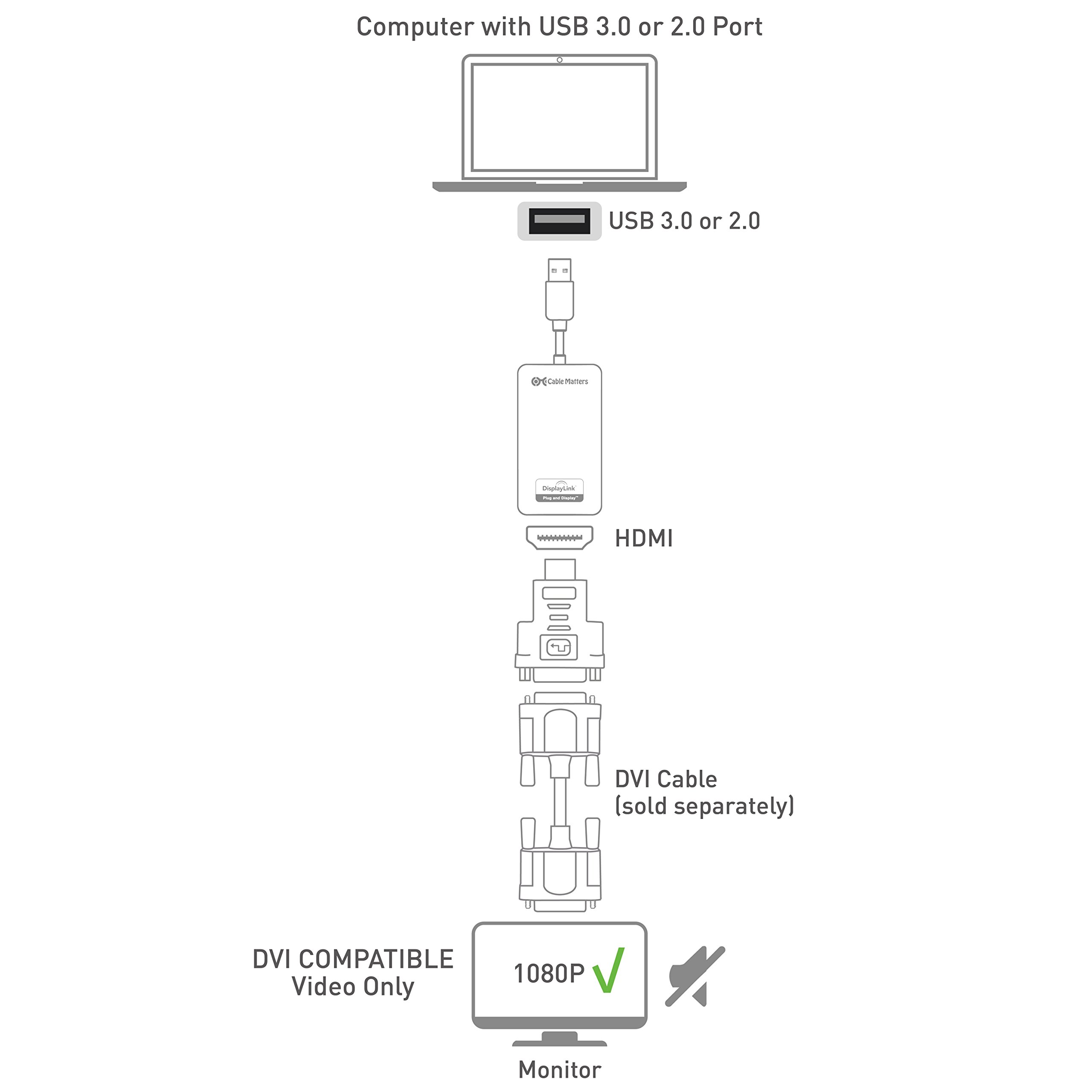
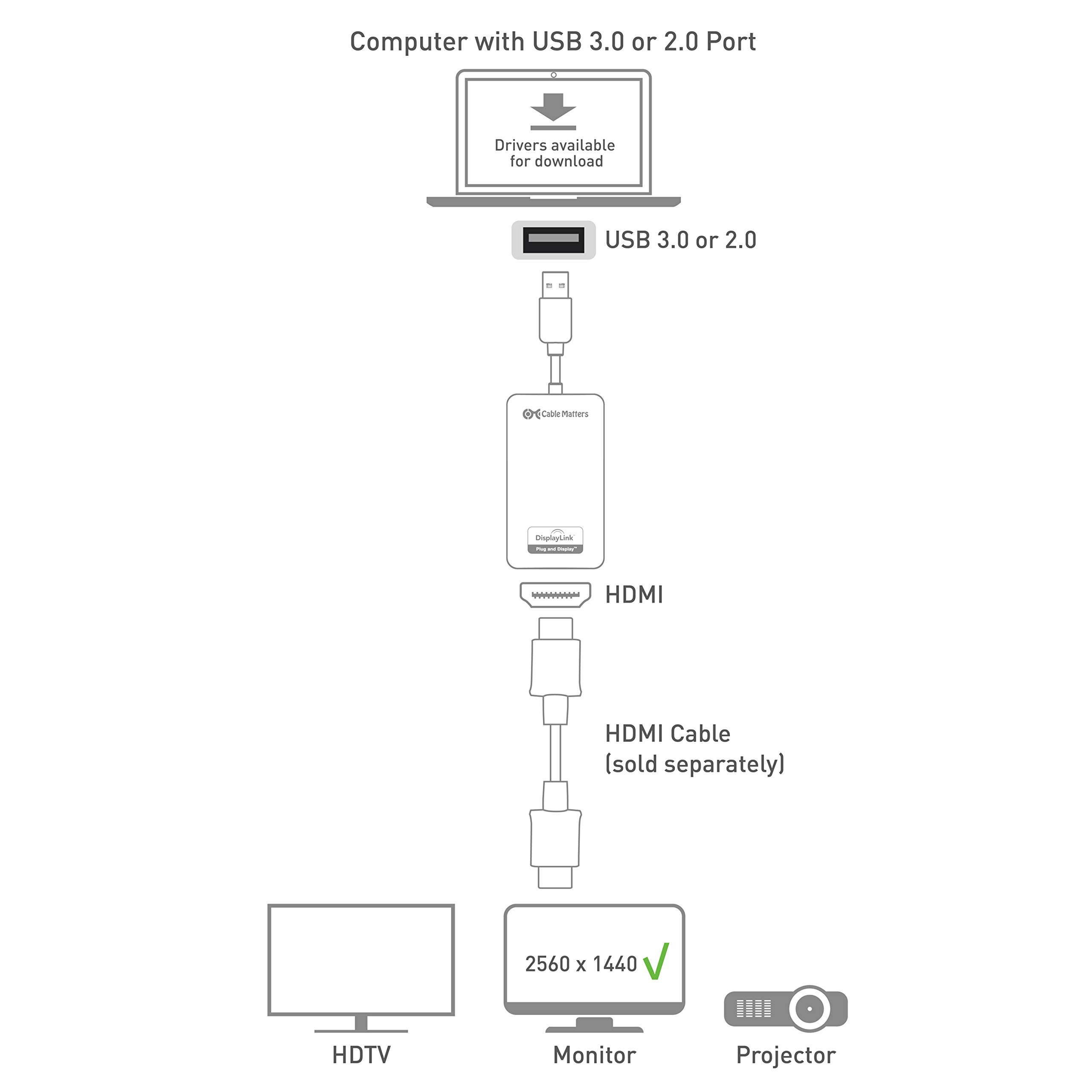

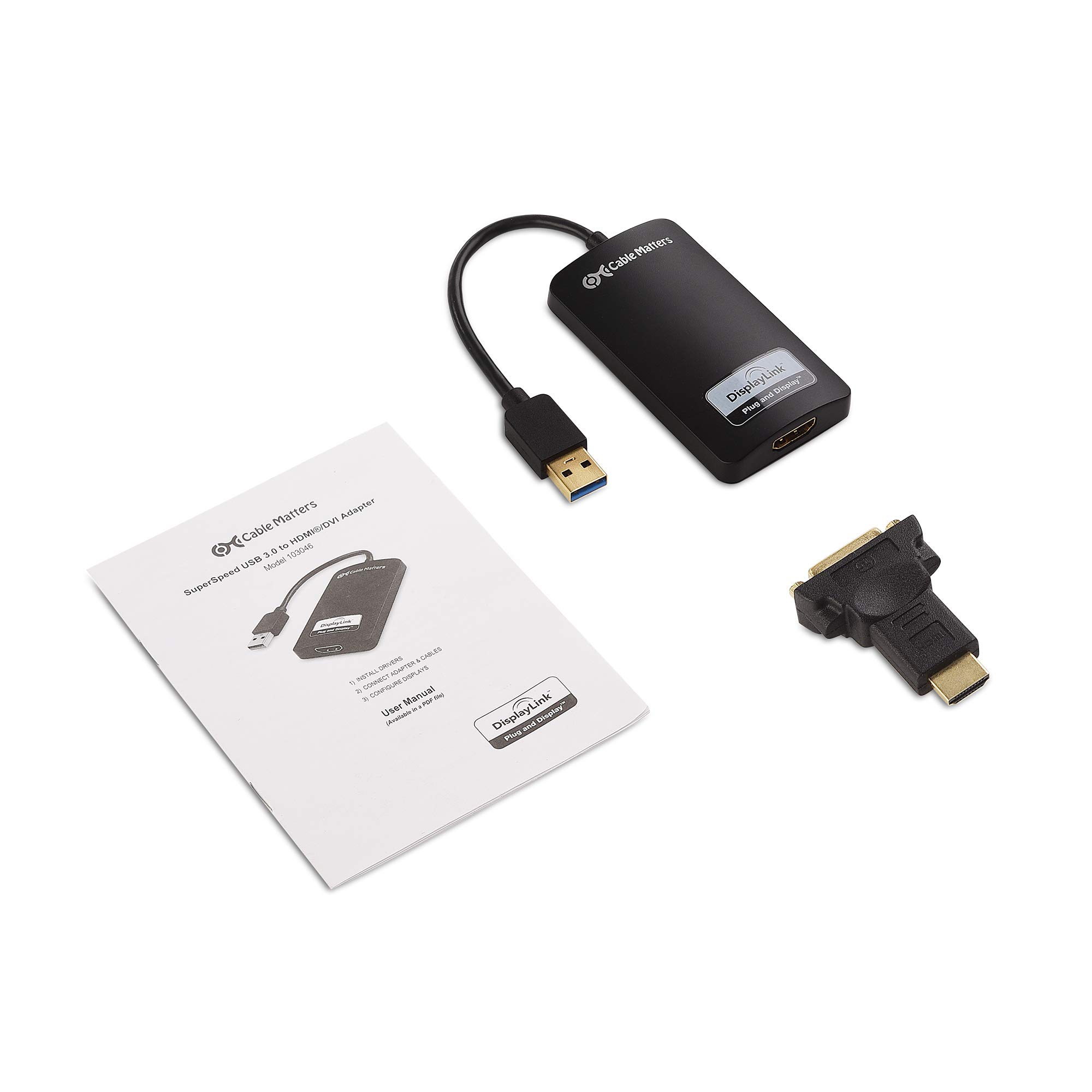


🚀 Unlock dual-display power with a sleek USB 3.0 boost!
The Cable Matters SuperSpeed USB 3.0 to HDMI Adapter transforms any available USB port into a high-definition video output supporting up to 2560x1440 resolution. Designed for professionals needing extra screen real estate, it delivers lag-free visuals via SuperSpeed 5 Gbps USB 3.0 bandwidth, is compatible with Windows and Linux, and offers hassle-free installation. Its compact, bus-powered design makes it the perfect travel companion for seamless multi-monitor setups anywhere.


| ASIN | B00BPEV1XK |
| Best Sellers Rank | 116,448 in Computers & Accessories ( See Top 100 in Computers & Accessories ) 496 in DVI to HDMI Adapters |
| Guaranteed software updates until | unknown |
| Item model number | 103046-BLACK-AU |
| Manufacturer | Cable Matters |
| Product Dimensions | 22 x 15.6 x 1.4 cm; 105 g |
I**G
For Mac OS X Yosemite users
UPDATE - 26 Nov 2014 -------------------------- Cable Matters shipped me an updated device with a DisplayLink chipset to replace my old version. Hats off to Cable Matters the customer support is very good. I'm pleased to say the difference with the new device is like night and day, previously the old driver was a little laggy at best and would crash causing a black screen for a few seconds while the driver reloaded. This version is much much better, the screen is very responsive, surprisingly so as I am using an older USB2.0 connection even though this device is capable of USB3.0 speeds. I imagine on USB3.0 it would be indistinguishable from a normal video card for general office work. I've just tested some youtube video and it works well, it struggles a little with fullscreen (this may be to do with the lower bandwidth on USB2) but in page video is indistinguishable from my thunderbolt connected display. I've updated my review to reflect the new device and would whole heartedly recommend it for Mac users who only have one display output and want two distinct desktops. I had a little difficulty with the v2.3beta driver for Yosemite but the Mavericks v2.2driver works well. All in all I'm very pleased, and so is my wallet as I'm no longer considering upgrading my MacBook. This applies to the OLD version with the SMSC chipset: --------------------------------------------------------------- This adapter has slowed down considerably on OS X Yosemite so much so that even typing on the connected display is noticeably laggy, I'm assuming there is an issue with the driver (I have the SMSC driver version bought Nov 2013). I am using this with a 2011 MacBook Pro with 16GB and SSD but USB 2.0 only. Under Mavericks the performance was acceptable for coding and general office work, however the driver did seem to crash every now and then which involved the screen going black for a about 5 seconds or so before being usable again. Under Yosemite the driver seems to be slowing down all the graphic effects on both displays (I have a HDMI display connected via a Thunderbolt/DisplayPort cable), if I unplug this adapter the visual performance is liquid smooth, with this adapter plugged in, the new display is so laggy it's almost unusable, it's annoying just typing and positioning the cursor and it slows down the Thunderbolt connected display. I'm hoping that a new driver is released soon or I am going to have to look for another solution to run dual displays. Until then I would not recommend this to anyone hoping to run it under Yosemite. UPDATE - As the unit I purchased is within warranty (by two days) Cable Matters have been in touch and offered me a replacement apparently with an updated chipset, mine was an SMSC chipset, the current versions have a DisplayLink chipset. I'll update when I receive the new unit.
M**P
Working on Linux Mint
I've had this adapter running well for a couple of weeks now. My PC runs Linux Mint 20.1. It can be a challenge getting Linux to work with hardware sometimes, but not in this case. Downloading and installing the DisplayLink driver was straightforward and quick, and worked first time. I'm writing this review on a Dell U2719D 27" monitor at a resolution of 2560 x 1440, connected through the adapter. This is the maximum resolution the adapter supports. There is no lag, and no noticeable degradation of performance versus direct HDMI connection. (Though my laptop has quite a powerful i7 CPU with 4 cores/8 threads - more basic PCs might suffer more of a performance impact). Note this is in general office use - business apps, web usage, watching videos. I am not a gamer and cannot vouch for the adapter's gaming performance. The adapter is also well made and was delivered promptly and in good order. I've written a procedure explaining how it performed on Linux but can't link it from here. For anyone interested, search "unixetc" together with "USB to HDMI adapter". In conclusion I would say this is a good way to add extra monitor(s) to your system if you are stuck for ports.
L**R
Worth the investment
Web for a cheaper one first and it didn't support full HD portrait resolution, which turned out to be an issue. Then got this one, plugged into a USB 3.0 on my laptop and it works beautifully. Sometimes feels like it's even more responsive than a dedicated HDMI slot I have (used for the other screen). Metal casing helps cooling it down as well: the screens are only used for office stuff (remote desktop), but the adapter does warm up still. Feeling good about the purchase.
I**T
Great product!
Great product..I originally had a mini hd usb 3.0 to hdmi and I upgraded to this. This is so much better. Easy installation and then plug and play. Very happy. Occasionally the screen goes black for a second but I am running 2 extra monitors off my laptop bit this isnt much of and issue for me
S**.
Works but not the way I want
I have a HP All-in-One with HDMI ports that are capped at 1080p. My external monitor can do 1440p and I was hoping that this adapter would allow my monitor to run at 2560x1440 from the USB port. It doesn't - it gives the same 1080p via HDMI. If I connect the monitor via DVI cable - using the adapter's DVI connection I get 2048x1152. There appears to be no way to get it working at 2560x1440. It might be my HP PC - I don't know - but I am disappointed as would love to have the monitor displaying at 1440p.
F**O
Ce l'ho da una vita e funziona benissimo, senza problemi su Mac e PC (lo alterno spesso tra uno e l'altro). Su mac con sistemi operativi vecchi c'è stato un periodo in cui non andava con Sierra, risolto con il successivo e funzionava con il precedente. Sui nuovi va perfettamente. Richiede installazione veloce di un driver sia su PC che su Mac, per trovare la versione più nuova basta cercare DisplayLink su internet (è uno standard di un consorzio, tipo USB o Bluetooth o Wifi, per dire, quindi il driver è solido, ben testato e aggiornato)
O**I
Der Adapter kommt bei mir an einem 2 Jahre alten Windows10-Laptop zum Einsatz. Auf dem Laptop laufen KEINE Spiele sondern er wird als DAW (Digital Audio Workstation) zur semiprofessionellen Produktion elektronischer Musik eingesetzt, und zwar sowohl mobil, um schnell Ideen zu konservieren, als auch dann daheim im Homestudio, um die Ideen dann in anspruchsvolle Kompositionen zu verwandeln. In so einem virtuellen Musikstudio kann man gar nicht genug Bildschirme haben :-) (Sequenzer, Mischpult, diverse Editoren, die Instrumente und Effekte, alles will man gleichzeitig im Blick haben). Bisher hatte ich den internen Monitor und einen weiteren externen Monitor in Betrieb, und damit 2x Full HD Auflösung. Damit hatte die GPU eine maximale Last von unter 3%. Das liegt aber halt auch daran, dass solche Programme wie z.B. auch Officeprogramme keine besonderen Ansprüche an die Grafikleistung des Rechners stellen. Mein Laptop besitzt keine dedizierte Grafikkarte sondern verwendet einfach der integrierte Grafikchip des Core I7 Prozessors (9th Gen), was bei dieser Art Anwendung bereits mehr als genug Grafikpower bietet. Obwohl mein Laptop sowohl einen HDMI- als auch einen VGA Anschluss hat war es mir aber leider nie möglich, das interne Display zusammen mit 2 externen Monitoren gleichzeitig zu betreiben. Es gingen immer nur maximal 2 Monitore gleichzeitig, nie alle drei, egal in welcher Konstellation. Nun zur Inbetriebnahme des SuperSpeed USB HDMI Adapter: Adapter auspacken und mit einem HDMI-Kabel mit dem Monitor verbinden. Treiber aus dem Internet runterladen (Adresse steht in der mitgelieferten Beschreibung) und installieren. Danach den Rechner neu starten (!!!) Nach Neustart den Adapter mit einem freien USB 3.0 Anschluss verbinden. Windows 10 erkennt den zusätzlichen Monitor sofort und stellt auch direkt die richtige Auflösung ein. Jetzt nur noch mit den Windows Bordmitteln einstellen, ob Mirroring oder erweiterter Desktop gewünscht wird, (bei mir natürlich erweiterter Desktop) Monitore in Windows Einstellungen korrekt platzieren und fertig. Die gesamte Inbetriebnahme des Adapters hat problemlos funktioniert. Auch der laufende Betrieb ist bisher einwandfrei. Es gibt trotz der zusätzlichen Last am USB Port auch keinerlei Störungen im Audiobereich. Ich habe jetzt 3x Full HD und damit ist der Blick in mein virtuelles Studio vom Blick in ein echtes Studio praktisch nicht zu unterscheiden. Es gibt kein Flimmern, keine Grafikprobleme, nichts. Der Monitor am Adapter liefert ein genauso gutes Bild wie der Monitor, der am internen HDMI-Port hängt. So soll es sein! Die GPU-Last ist allerdings deutlich angestiegen. Sie liegt jetzt bei maximal 8%. Da sie weiterhin im einstelligen Bereich liegt bedeutet das aber auch, dass ich mit der Bilddarstellung meines Studios niemals Probleme bekommen werde, da ist noch sehr viel Luft nach oben. Von der reinen GPU-Last könnte ich mir vorstellen, dass da locker noch 3-4 weitere Bildschirme, ebenfalls mit Full HD Auflösung laufen könnten, nur leider hat mein Laptop nicht so viele USB 3 Anschlüsse. USB 3 ist für diesen Adapter aber Voraussetzung, damit Auflösungen von mehr als 800x600 Bildpunkten erreicht werden können. Natürlich ist es nicht nur eine Frage der GPU-Leistungsfähigkeit, auch USB 3 kommt irgendwann an seine Grenzen. Ich denke daher nicht, dass anspruchsvolle 3D Spiele mit eine Framerate von über 30 in Full HD mit dieser Grafiklösung über USB möglich sind. Vielleicht schafft man damit gerade noch, einen HD-Film in voller Auflösung zu gucken. Mir egal... Für reine Officeanwendungen oder eben meine DAW ist dieser Adapter eine perfekte Lösung und tut genau das, was er soll. Ich mag es, wenn Technik einfach nur funktioniert wie versprochen (das ist heute leider nicht mehr selbstverständlich), und gebe deshalb hier gerne die vollen 5 Sterne. Dabei bleibt es auch, wenn der Adapter über die Zeit gesehen eine gewisse Ausdauer zeigt (nicht nach ein paar Monaten den Geist aufgibt).
S**E
I'm using a MacBook Air (13-inch, Mid 2012) running OSX 10.10 Yosemite, which only has one thunderbolt port for video out. I write code professionally, and wanted to have 2 monitors and my laptop screen to do so. I don't need it to be low-lag, or have super high framerates, but I do need high resolution so I can display lots of text. This adapter does that (at 1920x1080 at 60 FPS as claimed), but not perfectly. Firstly, you have to download/install drivers from their site, plugging in the adapter without them does nothing. This isn't a problem for someone like me, but may confuse new users, especially people who are used to Macs, since most Mac hardware is plug-and-play with no custom driver installs. On the plus side, the drivers were updated last week, which means they're being actively worked on, so the bugs I'm about to mention may be resolved later on with new drivers. On to the bugs: If you want to do triple-monitors on a Macbook Air, you'll need to plug in this adapter AFTER you plug in the thunderbolt adapter, or the drivers freak out, use 100% CPU, and your framerate becomes terrible with visible tearing and artifacting. Fortunately, when waking up from sleep this doesn't become an issue, and it takes 2 seconds to unplug/replug if you do it wrong. Other than that, by far the biggest bug is that Mission Control (which I use constantly to switch windows) does not get along with the adapter. When it's plugged in, Mission Control causes the screen to freeze for 3-5 seconds before showing you the overview, though this can be significantly cut down if you run defaults write com.apple.dock expose-animation-duration -float 0 in a terminal. This removes the animation at the start and end of Mission Control, though, which makes finding windows slightly harder, but makes mission control launch in a sane amount of time. Also, if you want to use the adapter-connected monitor as your main monitor, the menubar loses transparency and can lose all its text, though it is still functional. Additionally, some applications (specifically Intellij Idea) don't like it when you use the adapter-connected monitor as your main, though they will run fine and display fine on that monitor if it's set up as a secondary. There is also the minor issue of antialiasing not working in Mission Control, meaning text looks weird in the overview. Also, 10.10's new transparency stuff is glitchy and causes some weird colorations and small black/white squares sometimes, but you can disable it to remove this effect. [EDIT:] I have discovered that disabling transparency significantly improves performance of apps on the connected monitor. The setting is under System Preferences->Accessibility->Display->Reduce Transparency. Lastly, though it does claim to be 60FPS (and looks like it actually is) there is a slight lag (maybe 3 or 4 frames) on the picture. For work, this is not an issue, but if you're wanting to use it for gaming (especially with a single game spanning two monitors), it would be very noticeable and problematic. The adapter gets warm while in use, which leads me to believe that there's some sort of processing going on, which is probably causing the lag, so this may not be something the driver updates could fix.
J**N
Easy to download the displaylink software. After that, everything was plug-and-play. Bought it to be able to use 2 external monitors for my M1 macbook pro. So far no lag or other weird behaviour from the displaylink monitor.
J**2
I have two 43" Samsung smart TVs but only one HDMI port on my laptop Acer Nitro5 (AN514-54). I was able to plug in this adapter to my USB 3.0 port and an HDMI cable from the adapter to the TV. My second monitor connected immediately. The highest resolution I can select for the second monitor is 1920x1080 but at least I'm connected and I can extend across both screens (3 if I leave my laptop open). I have an NVidia GTX 1650 graphic card and have no problems since I connected this two weeks ago. No scrambling, pixelation or anything. Very happy with this purchase.
Trustpilot
1 month ago
3 weeks ago