Desert Online General Trading LLC
Dubai, United Arab Emirates
Desert Online General Trading LLC
Dubai, United Arab Emirates


🎨 Elevate your art game with precision and freedom—because your creativity deserves the best!
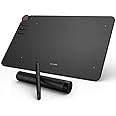
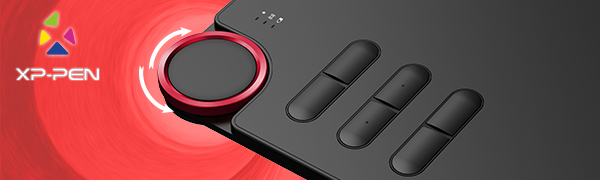
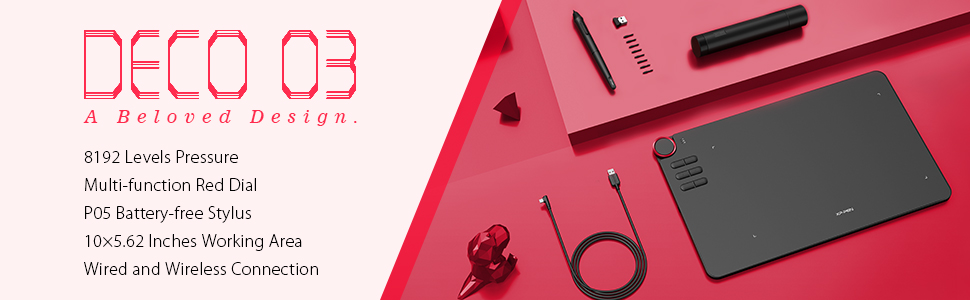
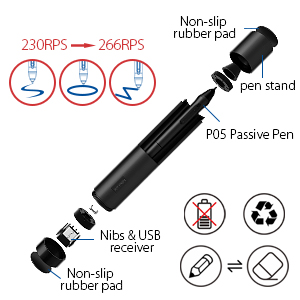
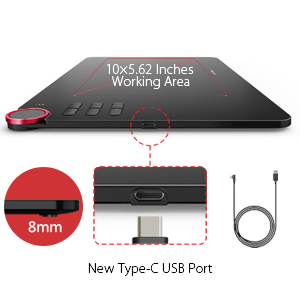
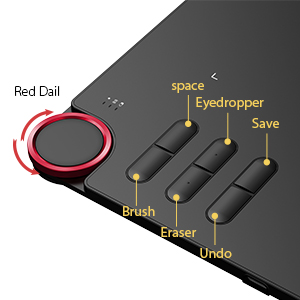
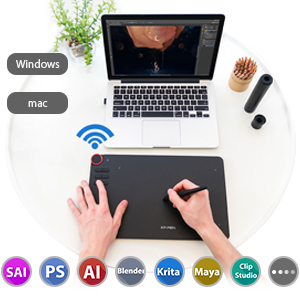
The XP-PEN DECO03 is a sleek, lightweight graphics tablet featuring an expansive 252x142mm active area, 8192 levels of pen pressure sensitivity, and a unique red shortcut wheel with six customizable keys. Designed for both right- and left-handed users, it supports wireless Bluetooth and wired USB connectivity, compatible with Windows and Mac OS, and integrates seamlessly with major creative software. Ideal for professionals, educators, and digital artists seeking precision and workflow efficiency.

| Brand | XP-PEN |
| Product Dimensions | 35.6 x 21.8 x 0.1 cm; 1.3 kg |
| Batteries | 1 Lithium Ion batteries required. |
| Item model number | Wireless Drawing Tablet |
| Manufacturer | XP-PEN |
| Series | DECO03 |
| Colour | Red |
| Standing screen display size | 10 Inches |
| Screen Resolution | 1000 lpi |
| Connectivity Type | Cellular |
| Operating System | Compatible avec Windows 10/8/7 et Mac OS X 10.10 (et versions supérieures) |
| Are Batteries Included | No |
| Lithium Battery Energy Content | 3.89 Watt Hours |
| Lithium Battery Packaging | Batteries contained in equipment |
| Lithium Battery Voltage | 1 Volts |
| Lithium Battery Weight | 2 g |
| Number Of Lithium Ion Cells | 1 |
| Item Weight | 1.3 kg |
| Guaranteed software updates until | unknown |
J**S
The best Wacom alternative for under £100.
If you really want a Wacom tablet but can't afford their ridiculous prices, look no further. This is an excellent, smart looking professional tablet for less than a third of the price of an equivalent Wacom. However, the things this tablet doesn't include are pen tilt and touch functionality, but checking online, it seems most people don't use these anyway.Installation was really simple, I made sure to uninstall any other tablet software, close all other programs and disable antivirus/firewall, as per the instructions and everything ran fine, both wired and wirelessly.After researching online, prior to purchasing, XP Pen are the only Wacom alternatives that have both batteryless pens and wireless functionality. The tablet is also very thin and lightweight, and it is the smallest you can buy with a 10x6 active area, so great if you have limited desk space.I actually use it as a mouse replacement for video editing in Premiere and After Effects and it's a complete game changer, especially with a Logitech G13 instead of a traditional keyboard. Everything becomes a lot more fluid and precise. The tactile scroll wheel is really handy for this setup as you can use it like a mouse wheel. The only annoyance with it is that it takes three clicks for one scroll, so it's not quite as precise as a mouse wheel, but hardly a deal breaker. [EDIT: Since the latest software updates, the scroll wheel now works as it should, one click of the wheel per scroll] You can also use one of the function buttons on the tablet to switch between wheel functions, such as zoom or increase brush size, which is also really handy. However, it would be nice to have an option to choose which functions to switch between instead of having to cycle through every one.As I use this with 3 monitors, you can set a button to cycle through the individual monitors and also a mode that covers all 3 on the tablet surface at once.I've also tried this in Photoshop and Illustrator and it works great with the pressure sensitivity and you can use the function keys for various actions, such as brush size, layer select, zoom and more.All in all, after much online research, I decided to go for this tablet as it seemed to offer the most for this price range - scroll wheel, wireless, batteryless pen and compact design.I cannot recommend this tablet enough, not just for digital artists, bit for those that want a mouse replacement to speed up and improve your workflow. The best Wacom alternative for under £100.
Z**
This is my review after i use this tablet for 4 months.
I love to draw, but unfortunately, I do not have the talent to practice drawing so I've been looking for a way to draw and make it "easy"no paper, pen, marker that costs a lot is not that you can not do this just because you do not have everything in one program so I decided to grab a graphic drawing but I started to draw graphics I can say that we have evolved and that I have managed to put on the "Sheet" what I have in mind. I chose this tablet because it is not very expensive nor cheap is a fair price for what the 8192 offers helped me enormously to draw the most perfect lines the 6 buttons 100% programmable buttons are like a 3 hand much easier than to use and the keyboard while drawing at least this is my opinion that everything is in one tablet and do not have to use the keyboard and mouse as to read dial is brilliant and beautiful at the same time very useful zoom to zoom and zoom cat and the brush even when sitting on social media use it as a scroll down and up the size of 254 × 159mm is more than necessary is not too big but neither will not feel the need for more.PROS-Very thin-Stylish-Level Pressure Sensitivity 8192-Wireless-Free Battery Pen-Very High Quality-Very useful Red Dial-6 programmable buttons-Very good compatibility its work with every program I used (Krita, PhotoShop, Adobe Illustrator, PaintTool SAI, Manga Studio )-Type C port and Cable-Usable with right and left hand-Free drawing glove-8x extra Pen Nibs-Pen HolderCONS-Easy scratchable (like all tablets)-It's picking a few fingerprintsIf you want a graphics tablet and you have the budget you definitely should go with this you have no reason to not do it, it's a perfect tablet it's has everything you need.
S**O
Looking for a Wacom alternative... Finally here's one.
I really couldn't justify paying for a Wacom tablet with the spec this Deco-3 has. So I took a gamble on this following reading numerous reviews and watching Youtube videos. The earlier versions of this tablet were not up to scratch according to many, but this model is everything! Easily customisable, you can adapt to your work flow easily. The assignable wheel (and buttons) are something you will wonder how you've managed to function without before.The ONLY reasons it doesn't get a 5star is:1) Literally straight out of the box light use has scratched the surface of the tablet. So you really need to work on the pressure settings as soon as possible before getting into some work.2) I love the fact that the blue tooth is so easy to set up, but with everyone working at home, it seems I was losing connection a bit, so I use the USB cable and haven't had a misstep since.For the price I paid I really can't complain. Packaged great, lots of spare nibs, tidy pen caddy, nice weight and dynamics to the pen, all round very nice bit of kit.
Trustpilot
3 weeks ago
2 weeks ago
3 weeks ago
2 months ago