
❄️ Stay cool, game hard, and glow up your setup!
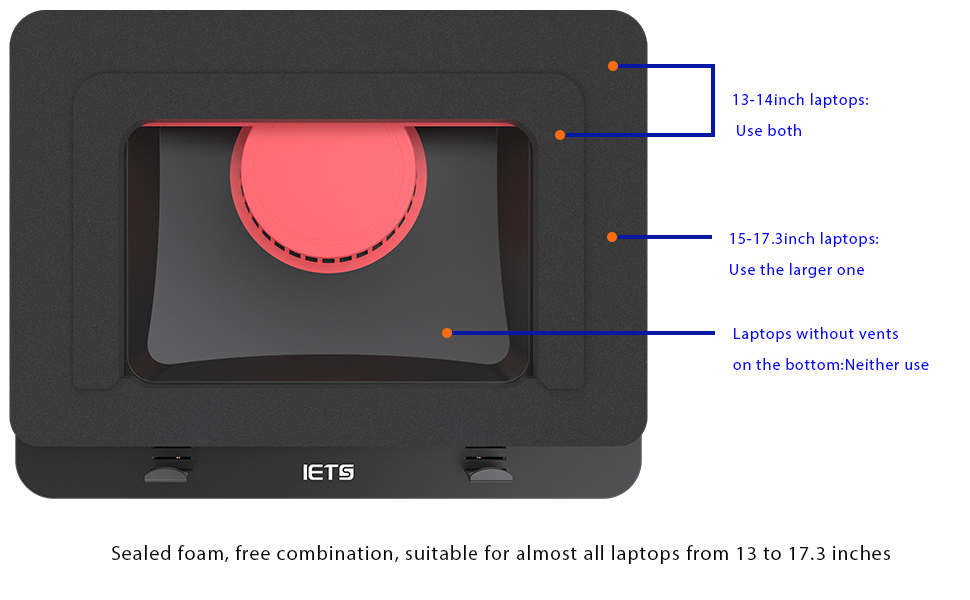
The IETS GT500 is a premium laptop cooling pad featuring a powerful 5000 RPM industrial turbo-fan with infinitely variable speed control, designed for 13-17.3 inch laptops. It offers 360-degree cooling enhanced by sealed foam and a dust filter to protect your device. With customizable RGB lighting and a unique bottom air intake to prevent heat backflow, it’s engineered for serious gamers and professionals seeking optimal thermal management and hardware longevity.




| ASIN | B09FJ961PG |
| Best Sellers Rank | #7,336 in Electronics ( See Top 100 in Electronics ) #25 in Laptop Cooling Pads |
| Brand | IETS |
| Color | S2(RGB) |
| Cooling Method | Air |
| Customer Reviews | 4.5 out of 5 stars 1,876 Reviews |
| Enclosure Material | Metal |
| Item Weight | 1.14 Kilograms |
| Manufacturer | IETS |
| Material | Metal |
| Warranty Description | 1 |
B**Y
In a unique league of it's own in terms of laptop cooling.
Just to address the big complaint real quick, the noise. On their website, they bring immediate and substantial attention directly to this issue. They provide accurate decibel levels for the fan noise on their various models at various speeds. And warn people that this pad may not be for everyone if you cannot tolerate that. They use an industrial grade fan and when you get to between 4,200 and 5,000 RPMS, there is going to be some sound. This is a POWERFUL cooling solution for people that require serious thermal reduction in order to achieve proper performance due to their machines lacking ability at heat displacement, or for other individuals that want increase their possible performance output in gaming or content creation by achieving a greater degree heat displacement and thermal cooling. For example those Overclocking their hardware for max performance and such. If you are one of those people, then this is the pad you want. If you are someone that already has a good gaming laptop that does not suffer from overheating, then you are almost definitely not ever going to need to turn this thing above about half power, in which case, the noise is not bad at all. You can fine tune the power of the fan with a dial that allows you to very slowly increase the revolutions. I have a 17.3 inch Lenovo Legion with an i7 and an RTX 3000 series GPU, Legions naturally have a very good heat pipe system, and prior to this pad, I was just using a cheap pad for elevation and some extra light cooling. Playing Elden Ring at all max settings, while monitoring with MSI Afterburner, and after long periods of gaming, my thermals were between 68-72C, which is great, but I wanted better, and wanted dust protection, so I got this pad, and at all the same settings, at about half power or maybe less, I average about 58-62C and the fans are not loud enough that I even need headphones if I don't want. So the reason I am going into this kind of detail, is to point out, that unless you are having serious cooling issues, which forces you to blast the fans over 70% power, noise can be highly customized to fit your thermal requirements. So that is what I have to say about the main complaint people have with this pad. Otherwise it does what it says. I have a friend that had an older MSI laptop with a good CPU and GPU, but the cooling system just could not handle the hardware, common to MSI laptops. Their laptop was at over 105C which is to the point where you are going to start seeing permanent damage to your system, after getting this pad, and using at or near max power, it was noisy, but it took it from 105C to as low as 75C, that's literally game changing, lol. I have not seen any pad on the market able to come even slightly close to getting those results. It's the difference between your laptop gaming, and your laptop being replaced. On the downside the pad is pretty pricy, can go all the way up to $90 if you want the three data hubs and lightning, which is totally unnecessary, but would be nice if they provided you with all of it for the normal $70 price, but when you have the best laptop cooling solution on the market, with no other brands even coming close, I think it's worth it. This pad can be used by both people wanting to provide security for their expensive laptop, keeping the components cool and preventing dust buildup, at a totally tolerable noise level, or also be a saving grace for people that are in thermal meltdown mode, in which case you are going to require some headphones. Personally I think any serious laptop gamers should take time to consider this device, given the insane price of laptops right now, especially those with dedicated GPUs, this can be a very solid investment. Either way, can't hurt to give it a try. Only people I would not recommend this pad to, are those that have a laptop design that does not have rear intake fans. The pad could still possibly provide you with some cooling effect, but you might want to do some additional research before purchasing. Happy gaming Ya'll.
A**D
After buying two labtop coolers that were ineffective, this one does a great job for my Acer
I have an Acer Predator Helios Neo 16. It has a GPU and gets quite hot when I run programs that are energy intensive, such as tensorflow for some of my more advanced python programs. I don't game, so I can't comment on that. In the past I tried to use two different inexpensive labtop coolers, one of which was rated on Amazon about the same as the IETS (4.5), but were much less expensive, and neither one lowered the internal temperature of the labtop measurably. I am VERY happy with the IETS, though. It is basic in that there are no glowing lights, no displays of fan speed, but it absolutely gets the job done. Most of all, I wanted a cooler that would not make a lot of noise when its running. This model is excellent in that regards, even though the advertisement warns that it is loud when run at high speeds. I never need to crank it all the way up to near maximum speed, which avoids the loud noise, but the labtops internal temperature still runs 10-20 degrees F cooler even on a very reduced fan speed. I have measured it several times and there is no doubt that it is excellent in its control of internal temperature of the Acer. There is a soft hum at the level I use it, but it is quiet and not jarring. You control the fan speed, by the way, by a small wheel on the left side of the IETS. The unit does not plug into the USB port of the labtop, but has a separate power plug with about a 5 foot long cord. Works fine from my perspective. The unit did cost in the range of 80+ dollars, but my experience is that buying the $25 units that I tried don't get the job done, as does this unit. So, my take home message is if you don't want bells and whistles (I mean, its job is just to cool down the labtop), but you really care about keeping your gaming labtop cool without having to suffer through loud noises, this model performs quite well.
R**R
As described, tested with excellent results, but noisy at max cooling capacity
Ran Second Life Firestorm viewer at maximum graphics resolution with 20fps, draw distance to 1024, and maximum complexity 300K and in parallel ran Google Chrome browser with a youtube video playing. This pushed the NVIDIA GForce GTX1050 to 100% and Intel i7 to 25% with internal fan cooling only. The GPU temp hit +72C, turn on this cooling fan at low settings for minimum noise and GPU temperature dropped to +68C. Turn fan to maximum and the GPU temperature drops from +72C to +54C. Big difference and no thermal throttling! The cooling pad can be very noisy with the fan running at full capacity, but with headphones on, no system lag, no thermal throttling (usually clocks turned down), the noise is tolerable. Noise canceling headphones are best. If you do not want to used head phones, then be aware that this unit can be very very noisy at max fan speed. Next, the USB expander on the right side is perfect (one to three ports). I can expand one of my USB-C ports to three USB 2.0 ports. This is available on the IETS GT500V1. I used the expander for headphones, camera, and wired mouse. This product is from China (we'll see if it lasts, but Chinese companies can produce and export good products ... if they want to, so far this product appears to be of very good quality and solidly built).
S**S
Best external laptop fan on the market.
I cannot thank my coworker enough that suggested this to me. I noticed a roughly 10 degree drop in temps overall when running harsh programs like adobe applications and games. I've even noticed my actual laptop fans running far less. Couldn't give it 5 stars due to some of the materials. The arms that extend feel very weak - I find myself knocking them out of place pretty easily and the rubber padding on the feet fall off frequently. The foam is great for conforming to my device, however I do notice it has started to give a little to easily after several months of use. It's loud, but I could care less about that. It's very lightweight and the design makes it very portable. Using it's own power source is a massive plus, I hate taking a USB cord for fans. Get it. Worth.
S**A
Cooling is significant well worth it.
Background i7-8565U (HP Spectre laptop). It runs hot and had to use throttlestop to even consider the laptop useable when running anything because HP had the wonderful idea to run a fan curve from 0 to 100% at 95C which didn't always catch it before the laptop would thermally shutdown at 100C. throttlestop did well to keep it below that cooking point but unfortunately had to use the laptop at a pretty undervolted state making it run slow on windows. Mitigated this performance dip by moving to linux however linux didn't have a throttlestop equvalent and the undervolting solutions seems to hit a wall with a locked BIOS leading me to at best BIOS always fan on, but still would run at a lower speed on the cpu fans so overheating was a possibility. (after cleaning out laptop of dust and setting to fan always on, undervolting not an option on linux due to locked by bios) I ended up with the IET GT500. when running at full speed it can get my laptop down to 30C on idle and 40-50C on high demand (which I was seeing 60-80C on idle and 95C to possible shutdown at 100C without the GT500) on quiet lowest setting was getting about 40-60C Idle and 70 to 80C on demand. There is a significant cooling with my laptop since it is a metal frame thin laptop, has bottom vent and back, outflow vents and the cpu fans on always on along with the GT500 fan working with the foam provided. This product has given me full performance on a laptop that was recommended to remain undervolted due to its lack of cooling to run its chipset at its highest setting. Definely would recommend. Only one small caveat probably is the power cable for this cooler is a bit on the short side so would recommend getting an extender for it if you want to use it as a lapdesk for your laptop.
P**A
I don’t game without this anymore!
I apologize for taking so long to post this because people should get it. If you have a laptop and perform activities that make it run hot like gaming and you’re hoping to cool it a bit for longevity then you should just go ahead and buy this! DISCLAIMER: If your laptop has no vents on the bottom or no vents at all this fan is UNLIKELY to help you. You need those vents for it to force the air through. Without them it probably won’t cool well. I have an ASUS ROG STRIX G15 Advantage edition. If you also have this laptop I suggest getting the liquid metal looked at, it’s likely applied badly leaving bare spots, FYI. Anyway, the video here is from the very first time I turned this fan on so I didn’t know what to expect. I opened Grounded and ran it for maybe 20 minutes or so. Temps got to 75ish. Usually runs around 75-83 for this game. I turned the fan on full speed and this is what it did and how long it took. With the fan this game hovers about 67-75 now. The screenshot is from DayZ which runs a bit cooler, around 65-67 normally now running in the 50’s! Very impressed. I try not to run games without it. It forces cool air in the bottom and out the sides. Good force, you can feel it blowing out on your hand pretty strong from all side vents! I left the sound on hoping go give an idea of volume but the phone is too close to it. It’s noisy but not THAT noisy. If you have headphones on it’s a non issue. If someone is next to you trying to watch tv it might be a bit annoying for them. I can watch tv while using it at a higher volume but it’s not ideal. That said, the fan can be adjusted easily and you may be able to get sufficient cooling at a lower speed which makes it a lot quieter. I can run my Sims 4 game with 400gb custom content on medium speed and get both sufficient cooling and low enough noise level to watch tv while I build. If I’m just browsing or something I keep the fan off. For the price, I was a bit disappointed to see it’s made of plastic rather than metal or a metal/plastic mix. Makes it lightweight but I do worry about the longevity especially with the foam piece. It’s been 5 months and all is well but I do care for my stuff. If you’re rough and lugging it around a lot idk if it could be an issue. You can raise and lower it for comfort. My biggest gripe is the cord. It is VERY short. Too short to go in the same strip as my laptop cord where it was. Had to move the strip to behind my head and even now if I need to get up it’s literally too short to move the tray to the side off my lap to get up for anything. I have to unplug it which is very annoying. It’s a common cord though (my external HDD cord fits it as well as I found out one night when I forgot to bring the cord on a trip) and I’m just going to buy a longer one. If a short cord is an issue for you just save yourself the trouble and grab a long one when you buy this. 100% recommend if you have a gaming laptop. Try it!
J**Y
Worth it!!!
This is the best cooling pad i ever owned. At the beginning of the video, thats the speed i keep it at and honestly its not too loud and easily get used to it. As i speed up the fan throughout the video you can hear how loud it can get. If you game on a beast like MSI ge76 or Alienware X17 R2 or Razer Blade 17 pro you will definitely need something this strong to preserve your laptop and get the most performance out if it. Pros: So far worth all the money. It actually cools off my beast of laptop amazingly. For references i have the newest MSI GE 76 with alder lake and 3080 TI and it can get really hot. I saw a huge improvement in temperature from 76 down to 50 easily (also worth mentioning that i havent gotten to game for more than 30 minutes on it this laptop yet but if it doesnt live up to the standards i will update this review). It has feet in the bottom to lift the pad. You can choose speed of the fans instead of like fixed speeds (like 1 or 2, 3 and go on). It has wall charger instead of USB thats one if the reason i got it my laptop already uses a lot of power i didnt want a pad that depends on my laptop for power. Cons: Even though its worth it, cost is still a con. It can be loud but again if you are gaming and have the volume up you wouldnt be able to hear it. A bit bulky (i have 17" and bulky laptop and i still have space in the front pic for reference). Overall if you have invested in an expensive laptop to last you for years to come i think a small investment like this cooling pad is worth it to help keep your laptop cool and protect it from overheating.
R**A
This cooling pad is the best I've ever found
This cooling pad is the best I've ever found. I have my laptop on most of the day, sometimes 12-hour days. I needed a good cooling pad and found this one. I keep it running 10 - 12 hours a day, 7 days a week, and it doesn't miss a beat. I love that the fan speed is easily adjusted to meet my demands. To adjust the fan speed, you simply turn a dial. It is fairly quiet, depending on how high you have the fan speed. I've had this cooling pad for several weeks now, and it performs perfectly. If you need a reliable cooling pad, then this is the one. It's worth the cost and will definitely protect your laptop from overheating. Oh, and there is a filter built in to protect your laptop from dust. Highly recommended!
Trustpilot
2 weeks ago
1 month ago



