
DOWNLOAD THE APP


Customer Services
Copyright © 2025 Desertcart Holdings Limited
DOWNLOAD THE APP

🖱️ Elevate your workspace: multi-device, multi-task, multi-win!
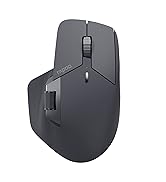
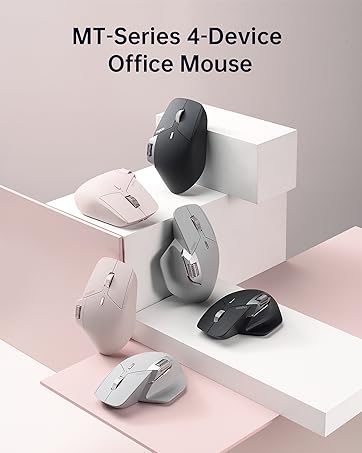
The Rapoo MT760Mini is a cutting-edge Bluetooth wireless mouse featuring Bluetooth 5.0 and 2.4GHz multi-mode connectivity, supporting seamless switching across 4 devices. It offers 7 DPI levels, 11 programmable buttons, and innovative M+ Cross-Computer Technology for effortless multi-screen control. Designed ergonomically with a magnetic side scroll wheel, it ensures comfort during extended use. Powered by an 800mAh battery, it delivers up to 90 days of use with USB-C quick charging and supports Qi wireless charging for ultimate convenience.





| ASIN | B0CYSC3N2R |
| Batteries | 1 Lithium Polymer batteries required. (included) |
| Best Sellers Rank | #198 in Computer Mice |
| Customer Reviews | 4.4 4.4 out of 5 stars (811) |
| Date First Available | March 22, 2024 |
| Item Weight | 2.82 ounces |
| Item model number | MT760Mini |
| Manufacturer | Shenzhen Rapoo Technology Co., Ltd. |
| Product Dimensions | 4.53 x 2.91 x 0.04 inches |
D**K
Strongly Recommend for Mac, If you're looking for an Ergo Mouse
Better than expected. Works great with my Mac- the side-scroll was the most important feature for me because I use it a lot on the Magic Mouse that I'm replacing with this mouse. I connected via BT with no issue at all; put the mouse into BT mode and saw it show up in my BT menu on my Mac within seconds. The left and right clicks are very quiet. The Mouse is soft-to-the-touch and fits like a glove, for me. This is also my first ever ergo mouse because it I could never find one with side scrolling. Again, that is by far, the most important feature about this mouse, for me. Closely trailing this side scrolling in the #1 spot, it the fit. My hand fits comfortably, feels natural- the side scroll wheel doesn't feel too far away from my thumb, which was a concern when I was "window-shopping". Very happy with this purchase so far and the added convenience of the page-back and page-forward buttons (literally) right at my fingertips, makes it even that much easier to enjoy this mouse. I strongly recommend it.
J**N
Great mouse
Very impressed with it so far. The dual connection option is nice and it feels just as nice as my couple year old MX master. The clicks are so much quieter but don't take any extra force
C**A
Nice but not the best
This is a great alternative for the Logitech one, with similar economics and comfort. I've had no problem with the battery or connectivity, as it is responsive and sensitive. However, I don't like the click noise at all. It's somewhere between a tactile click and a silent one. The sound is inconsistent from click to click, and the feeling is kind of mushy. The pink color is beautiful, though, and it's a good deal for the price.
A**N
Just because it isn't an MX Master replacement, that doesn't mean its bad
I'm a lifelong palm grip guy, so I tend to gravitate towards mice that work well with that grip. After trying the MX Master 2 for productivity at home (I do photo/video editing on the side), I decided to transfer that mouse over to my office day job to see how it would fare. It worked pretty well, but ended up leaving a void at home for when I wanted to work from home or do something other than game. There was no way I was going to spend over $100 to get the MX Master 3 for home, so I started looking at this Rapoo. For my hands and my grip, the Rapoo was a great fit. The ergonomics really allow me to rest my entire palm on the back of the mouse. I'm sure a lot of people are like me and are looking for an MX Master alternative/replacement. While similar, I wouldn't consider this a replacement. Here are some things that each one does better than the other. MX Master: - Infinite scroll is a nice feature - Horizontal scroll is in a better spot if you work with a lot of spreadsheets - The thumb click button is a nice if you can map it to something useful - The clicks from the left/right buttons are much more tactile Rapoo: - Instead of infinite scroll, you get a DPI switcher. Useful if you occasionally game, but also useful for if you do photo editing and need finer control - While the horizontal scroll is in a little more of an awkward spot, the back/forward buttons are in a much better spot. I use those way more often than I use horizontal scroll. - The unit comes with a USB dongle which gives you an additional method of connectivity. Very useful if you often have to switch to devices that may not have BT built in. - The left/right buttons are way quieter. They still give positive feedback, but there is some tactility loss due to the damping. This is a compromise I'll gladly take when working in an office environment. As a result, the Rapoo is now my work mouse and I moved the MX Master 2 back to home.
H**E
OK Mouse
The Bluetooth is unreliable, and it wouldn’t connect automatically on some time. Also, the mouse would disconnect randomly WHILE I am actively using it and almost caused a major problem during an important task. However, when using the dongle, the mouse functions better and does not disconnect randomly. With the dongle, there is no lag. The mouse is a good size and comfortable. The buttons are pretty silent, and the battery life is solid. I hope they can improve the Bluetooth functionality in the future.
B**N
This mouse is honestly amazing for the price and as long as you are looking for a simple mouse, this will fulfil 99% of the requirements. Build quality: 9/10, the only reason I deducted a mark is because it does look a little cheap, got some rough edges but other than that in the hands it feels great. How it feels: The clicks aren't your typical cheap mouse clicks, they feel solid but also don't make a snappy click sound, but rather a dampened "thump" sound/feel. I say sound, but in reality it's dead quiet and perfect for the office. Some people have said that the middle mouse button is easy to press and I will slightly agree with them. It is not light enough that you would accidentally trigger it and you may get used to it very quickly however it could be a bit light for some people. Side buttons feel a bit mushy but are okay. The side scroll wheel is amazing. Driver: The driver is truly atrocious, the UI even looks bad. Don't expect much from the macros, you can only bind simple things that combine ctrl, or shift, or alt, or win, PLUS one other key. This means you can't create any complex macros like you could in Logitech, so this is definitely not going to be a powerhouse users. As an engineer, this is fine for me. As a video editor this may not be fine for you. Features: This does feature bluetooth connectivity as well as the ability to move your cursor between two completely different devices if you have both of them plugged into the same LAN network and have a usb receiver in both of them. Additionally, it has 1000hz polling and the sensor feels extremely responsive. Cons: This does not have the free scroll that the mx master has, depending on your profession this could be a deal breaker. For me, it is fine to not have it. All in all, I would have given it a 4/5 if this was any more expensive than it is, but for the price, you are getting a solid piece of kit as long as you aren't expecting it to be an MX Master. If you want an MX Master, simply get an MX Master, you will be severely disappointed if you get this mouse.
M**D
Love it.
M**J
This is one of the best mice on the market for gaming! It connects super easily to up to 7 devices! I don't even have 7 different devices that all need mice but I could use it like that if I wanted to. The dpi selector is excellent to help with how fast the response is. I can use it on my laptop, phone, tablet, or even my PS5 and I can switch between all them with a button. The programmable buttons are very useful for whatever function you like and it doesn't need any batteries, it just recharges using my phones charger. The battery last a long time and it fits very well and comfortably in my big hands. I'd definitely recommend this mouse for gaming. I tried it on my laptop for gaming with first person shooters and strategy games and works exceptionally well for both. The color is nice also, a grey color that matches my laptop. It's very quiet on the clicks, it responds well and fast but doesn't make much noise from pressing the buttons. The plastic body itself is smooth and feels very premium to the touch. The laser is responsive on all surfaces I tried it on even without a mousepad. It's good on plastic, wood, or even glass surfaces. It's range is also very good. You can have something connected to the tv and use the mouse from far away and it still works like a charm. Overall, it's a very good gift or mouse for the gamer in your family.
S**L
I ordered this mice to try it out, and I am extremely surprised, at half the price it blows the logitech out of the water. The quality feels outstanding, it is much lighter than the MX Master, and it also feels better ergonomically. I also love the silent clicks and the polling rate is perfect, it doesn't feel laggy on my 160hz monitors as it can be configured with 1000hz (or 2000hz wired allegedly). I wanted to love the MX master as a software engineer, however the low polling rate of the Logitech always bothered me, it resulted in a laggy pointer. The sensor also tracked very poorly and the pointer felt floaty with the additional weight. It also comes with two USB receivers to switch between devices, I am not going to use this as I already have a usb switcher but great on them for including this functionality! USB 2.4 is much more stable and less latency than using Bluetooth. All in all I am extremely pleased with this, I'll take the weight savings any day over the infinite scroll gimmick of the MX master. As a software engineer, I use keyboard shortcuts so I do not need any frantic scroll wheel movements.
R**H
Great mouse and the build quality appears very good. I don't know about the software though so I would use your own mouse utility if possible like bettermouse on Macos.
Trustpilot
1 month ago
3 weeks ago