
DOWNLOAD THE APP


Customer Services
Copyright © 2025 Desertcart Holdings Limited
DOWNLOAD THE APP


🚀 Elevate your game with Alienware’s 4K QD-OLED powerhouse — see it, feel it, own it.
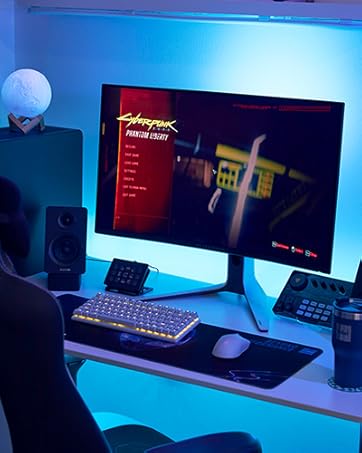
The Alienware AW3225QF is a 32-inch 4K UHD curved gaming monitor featuring cutting-edge QD-OLED technology for exceptional color and contrast. With a lightning-fast 240Hz refresh rate and 0.03ms response time, it delivers ultra-smooth gameplay. Dolby Vision HDR and VESA DisplayHDR True Black 400 enhance visual depth, while 99% DCI-P3 color accuracy meets professional standards. Comprehensive connectivity options including USB-C, HDMI 2.1, and DisplayPort, combined with AlienFX customizable lighting and ergonomic adjustments, make it a premium choice for gamers and creative pros alike. Backed by a 3-year warranty, it’s designed to future-proof your setup.




| ASIN | B0CVQGSRZ9 |
| Are Batteries Included | No |
| Best Sellers Rank | 5,090 in Computers & Accessories ( See Top 100 in Computers & Accessories ) 126 in Monitors |
| Brand | Alienware |
| Colour | Black |
| Customer Reviews | 4.5 4.5 out of 5 stars (2,180) |
| Date First Available | 6 May 2024 |
| Guaranteed software updates until | unknown |
| Item Weight | 6 kg |
| Item model number | AW3225QF |
| Manufacturer | Dell |
| Number of HDMI Ports | 2 |
| Power Source | AC |
| Product Dimensions | 71.55 x 30.58 x 58.27 cm; 6 kg |
| Resolution | 3840 x 2160 |
| Screen Resolution | 3840x2160 |
| Series | Alienware 32 4K QD-OLED Gaming Monitor - AW3225QF |
| Standing screen display size | 31.6 Inches |
| Voltage | 240 Volts (AC) |
M**1
Alienware AW3225QF with HDR DolbyVision 240Hz OLED Gaming Display
Dell Alienware AW3225QF (shipped with FW: M2B105) This display is next-level good, as-in Exceptionally Good. Prior to purchase I done the usual research to narrow down the field in terms of what features I was looking for in my next Gaming display verses the competition, the long and short of it is this particular panel has some of the best-in-class features and technologies which made the decision to upgrade an easy one. Coming from my old Acer ET430k 42" 3840x2160p 4K UHD IPS display I was a bit hesitant, as the drop in screen size I thought may have been more noticeable than what it actually feels like coming to this Alienware 32" However I am pleasantly surprised. The overall build quality is really high, it also has a nice "V" shaped mount as a stand which has a good footprint on my desk with the option to VESA Mount with desk sprung arm stand at a later date. The Curve on this screen is subtle and nothing too crazy which adds to the feel of this display visuals. The color gamut is excellent with Factory pre calibrated certificate and also under windows you can modify these *.icc profiles if you should wish. The downside to this display is the fact you need to clear the pixels with a refresh every few hours to ensure longevity BUT this can be configure to do automatically either during sleep or when the screensaver is triggered. In all, this is a very nice bit of kit. Movie watching is great with HDR/DolbyVision is something else as is G-Sync coming from older LED display technology to this OLED is like night and day difference. Gaming is Crazy good, paired with a 3070/4080/XBOX-X its on another level. MENU: The On-Screen Menu is laid out very nicely with hotkeys and under screen joystick to navigate the menu or change settings, Pair this display with DDM (Dell Display Manager) AlienFX and the ability to sync the color of rear lighting or change it like ambient lighting is a nice touch. This display is packed with features, Automatic Screen windows arrangement under Easy Arrange is really good with the press of a Key I can switch profile to have my usual workspace arranged is brilliant. The USB ports underneath the display are super useful, which I used for Biometric fingerprint readers to unlock my System. Future: I would like to add a second display to this one, and switched into portrait view by rotating 180 deg. Side-by-side for the ultimate visual array! Maybe another Alienware AW3225QF as a third. This is a 5/5 star review (I am only on month 1 with this Display and will update if i discover any shortcomings in the future) Overall a exceptional product with some very nice touches!
T**.
Perfect monitor, inky black, great colours & clarity
Looks perfect, went with the 4k 240hz 27” version, the OLED looks fantastic the quality and colours and perfect when “HDR PEAK 1000” is enabled in the monitor settings
G**R
Highly recommended.
Incredible monitor. Did a lot of research and tried a couple of other monitors before settling on this one. Easy to setup, looks breath-taking in games and 4k content, feels like a premium monitor at a good price. This is what OLED should be like.
M**3
Brilliant monitor
I’ve had this monitor for years now. Great monitor. Loved the ultra wide and the switch to 1440p. Everything was so crisp. It was expensive at the time but deffo worth it at the time.
A**N
Perfect once sorted
Had the monitor for a week now, made a review of it on day one but there's a lot I've learned about it since then, so adjusting my review. The monitor uses 30-50w at idle depending on what you're doing, obviously white screen will have it use more power. Not had time to game due but will test it in an SDR game and HDR game with both the True Black and 1000 HDR settings and update this with my findings. Measuring the power draw, I used the Tapo Smart Plug, so these are approximates. Gaming used between 40-60w at HDR 1000 and 40-50w with HDR 400 depending on how bright things were and they were pretty bright, especially when looking directly at the sun in game. To get to that 200w of peak draw would require the brightness to be maxed out and have the entire screen as white. Whilst in standby it's 0.5-1w. SInce doing the power testing, I've found I prefer HDR 1000 in games that support HDR and have left it on over HDR 400 True Black but this is a preference thing. This mounts straight to a 100x100 Vesa mount. If your vesa mount is bigger than 100x100, you will need an adapter, as there's just enough space for the 100x100 vesa mount. This sits firmly on a dual monitor arm with a 1080p monitor in portrait mode beside it of which previously supported but struggled to support an Acer Predator X34p (2017) wityh tilting which is meant to be about 6-7 KG, this is meant to be 6 KG but felt far lighter than the X34p and tilting is pretty easy and doesn't just go "limp" when trying to arrange the perfect angle. HDR is not enabled out of box so make sure to enable it through the monitor settings to HDR True Black or HDR 1000. Turn brightness and contrast to 70-75 (I've gone for 70 on brightness and 75 for contrast and left sharpness at 50 and then once you've done that, enable HDR in Windows, as some games such as Cyberpunk2077 won't allow you to enable HDR if it's not enabled in Windows and this is from my own experience. You can adjust the brightness of SD content in Windows. I have mine at 41 but adjust yours to whatever you prefer and then get the colour profile from RTINGS and apply it through Colour/Color Management (Need windows 10/11 to follow this). I had a custom resolution of 10 bit at 150 Hz and the colouring was amazing, going to 8 bit with dithering at 165 Hz, there is a slight tone difference but it's hard to notice it unless you're actively looking for it in game and in some cases would need to have 2 of these monitors side by side to actually see a difference. Outside of games, I don't see any real difference aparft from what might be my imagination. I don't have 2 of these monitors to compare sadly haha.
J**R
Excellent 4K monitor not just for gaming.
QD Oled is extremely beautiful and the size and resolution of the screen is great too. The monitor is obviously great for gaming with super fast response times. HDR has been difficult to justify using in my personal use so I cannot comment on that but I can confidently say that this monitor is also excellent for professional colour work given you know the appropriate settings for the monitor. I use it for lots of rec709 Gamma 2.4 colour grading and has great accuracy out of the box. The curve took a while to adjust to but I think I've come to prefer it when sitting at an appropriate distance. The added USBs are convenient but if you're working with high speed ssd external drives the I've noticed it can struggle to read the drives on occasion through a usb extender dongle.
I**R
Öncelikle paketlemesi gayet güzel ve sağlam yapılmıştı Ebrar bilgisayar'a teşekkürler! Kurulumu gayet kolaydı ve içinden çıkan talimatlara göre kurulum yaparsanız hiç sıkıntı yaşamadan tek başınıza kurabiliyorsunuz. İçinden Display port kabloları çıkıyor ilave kablo almanıza gerek yok. Ölü piksel testinden de sıkıntısz bir şekilde geçtik :) 42' Samsung M7 akıllı monitörden bu canavara geçtim tabiki QD OLED farkını dibine kadar yaşattı diyebilirim. Renkler son derece net ve parlak. mat siyah ekran gerçekten yansıtmasız tam mat siyah ekran. yansıma, gölge vs yok. Oyunlara yeni bir keyif getirdi, detaylar harika bir hal aldı. Gönül rahatlığı ile alınız ;)
M**A
Great product and good value for money. Colours are good, screen is uniform and bright. HDR implementation is not bad. Overall another great monitor from Dell.
A**X
L’Alienware AW3225QF est un écran PC gaming incurvé de 32 pouces offrant une résolution 4K UHD (3840 x 2160) avec une courbure 1700R qui plonge le joueur au cœur de l’action. Ce modèle se distingue par sa dalle QD OLED, garantie d’une qualité d’image exceptionnelle avec des noirs profonds et des couleurs éclatantes. Avec un taux de rafraîchissement de 240 Hz et un temps de réponse ultrarapide de 0,03 ms, il garantit fluidité et réactivité, indispensables pour les jeux compétitifs. Il est compatible NVIDIA G-Sync, assurant une synchronisation parfaite entre la carte graphique et l’écran pour éliminer les déchirements d’image. En plus du HDR et du Dolby Vision pour un rendu visuel saisissant, l’écran propose une connectivité complète avec USB-C, DisplayPort, 2× HDMI et 4 ports USB, alliant performance et praticité pour tous les gamers exigeants
D**W
As the title
S**K
Je suis passé d’un écran 2K IPS 165Hz avec un module G-Sync physique à ce Dell Alienware AW3423DWF, et c’est une véritable claque ! Pour la première fois, je vois un vrai noir – un contraste incomparable avec l’IPS. La différence de qualité d’image est immense, les couleurs sont incroyablement riches et fidèles. Bien que ce modèle ne soit pas certifié par NVIDIA, il suffit d’activer G-Sync dans le panneau NVIDIA, et tout fonctionne parfaitement en mode adaptatif. Aucun problème de compatibilité à signaler. Enfin, après avoir goûté au format 21:9, je ne reviendrai jamais au 16:9 ! L’immersion est totale, que ce soit pour le gaming ou le travail. Un écran au top, je recommande à 100 % !
Trustpilot
1 month ago
2 months ago