Some deliveries may take a little longer than usual due to regional shipping conditions.

DOWNLOAD THE APP


Customer Services
Copyright © 2025 Desertcart Holdings Limited
DOWNLOAD THE APP


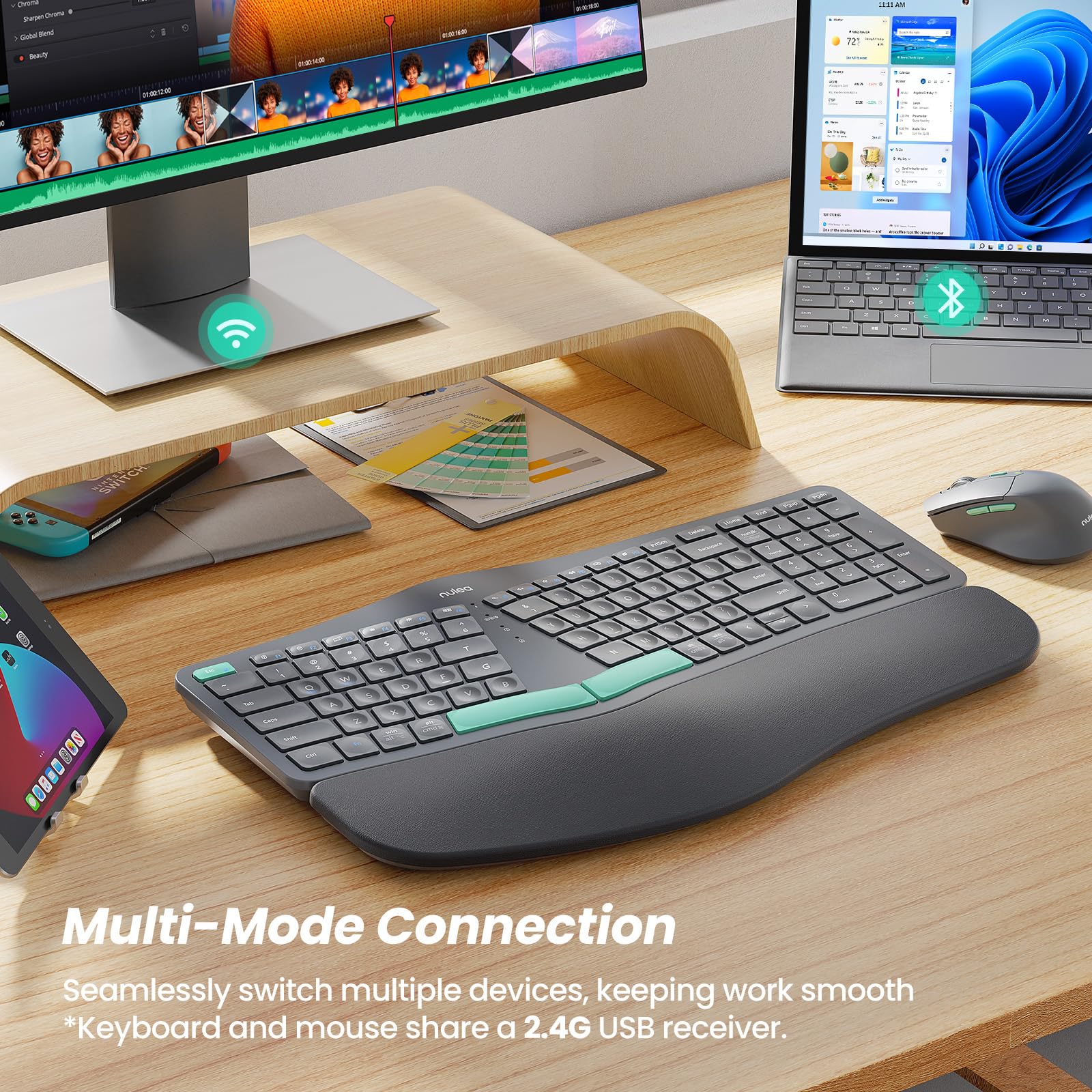


⌨️🔋 Elevate your workspace with comfort and connectivity—because your hands deserve the best.
The Nulea KM75 is an advanced ergonomic wireless keyboard and mouse combo designed for professionals juggling multiple devices. It features seamless switching between Bluetooth, 2.4G, and wired USB connections, a memory foam palm rest with adjustable tilt for superior wrist comfort, and a sculpted mouse with adjustable DPI and silent clicks. Both devices are rechargeable with long-lasting batteries and smart power-saving modes, compatible across Windows, Mac, and Android platforms. Ideal for reducing wrist strain during extended typing sessions while maintaining sleek, compact efficiency.


| ASIN | B0D1C4T2XK |
| Best Sellers Rank | #651 in Computer Keyboard & Mouse Combos |
| Customer Reviews | 3.9 3.9 out of 5 stars (340) |
| Date First Available | June 4, 2024 |
| Item Weight | 4.16 pounds |
| Manufacturer | Nulea |
| Package Dimensions | 16.93 x 11.69 x 2.13 inches |
J**Y
Best Keyboard/Mouse Combo
Very surprised by the quality of everything here. The keyboard has the nicest palm rest I've used, and the keys are very well balanced between being soft and smooth but also clicky and responsive. It's a bit more compact than other ergonomic keyboards because of the efficient layout - though that does come with some challenges (in the next paragraph). The Bluetooth connection has been flawless unlike many other keyboards I've used. And wow the mouse is QUIET. Again very soft and smooth but has a nice subtle click. Both being USB rechargeable saves so many batteries and allows for wired connection - which between the wireless dongle, Bluetooth, and wired connection means you can connect to 3 different devices, amazing for my dual PC setup while allowing me to plug it into any other PC without messing with those connections. But even though I'm still giving it 5 stars I do have a few nitpicks. I've used many ergonomic/split keyboards, and this one is a bit more challenging to get used to because the spacing is very different - I feel like I have to stretch my hands a bit more, particularly on the right side. I noticed a significant improvement in the first few hours, so I suspect this won't be an issue for long, but it's worth noting because it relates to another oddity - the key layout has some interesting quirks. I didn't even notice until I tried to use it, but there's no Ctrl on the right side. I'm guessing this was done to save space, but instead of a Ctrl key there's a Win key, which feels even less useful. The Home/End/etc. keys are also away from their normal place, which is probably fine for most people, but might be an issue if you use them a lot. Overall, loving this keyboard and mouse combo, but if you're a programmer I would give the layout some extra scrutiny in case any of those changes would be a dealbreaker for you.
P**E
Ergonomic Keyboard
I wasn’t sure about this keyboard at first — it felt funky BUT it has been the best keyboard. Its ergonomic design has truly helped alleviate my severe tendinitis in my wrist. Super easy to set up, can attach with the cord or by Bluetooth. The battery is rechargeable - so no batteries to change out - plug her in and let her charge. The charge lasts for a couple months at a time and only takes overnight to recharge once plugged in. Functions normally, takes some getting used to at first with how the keys a spread out for ergonomics, but once you’re used to it it’s easy. No problems with sticky keys at this point. Definitely a great buy if you need a new keyboard that’ll keep your hands and wrists pain free. And it’s cute!
T**E
Keyboard stopped working
It was great till the keyboard stopped working. No issues with the mouse at all. BUT, after about a week, the keyboard just stopped working. Looks like the battery stopped holding a charge, so I was just using it plugged in directly to the laptop. Beats the purpose of having a wireless keyboard but it worked so I just stuck with it being plugged in through USB-C. After about a month, the keyboard just stopped working completely. Mouse still works however. Now I have to get a new Keyboard. I don’t think I will be buying this brand again. *UPDATE* the vendor contacted me to offer a replacement. So far it seems to be working. I will keep using it and will report back with any updates
K**R
Decent for a few months then trash.
Summary - buy something else. Details: I will start off saying that I am typically a keyboard snob. I'm a writer so I spend a lot of time on my keyboards. When my 10yr old wireless logitech started to die, I was not in a position to buy what I really wanted and opted for this combo to tide me over. I had never heard of the keyboard, but it came as a combo and I have found some real tech gems in off brands over the years. My initial issue with this keyboard is that the keys are super close and set a little off and I found it awkward to type on. I touch type quickly and found my accuracy tanked. This issue alone was not enough for me to return it and all in all, I know I'm a keyboard snob and wasn't going to take it out on the keyboard in a review. I figured I would adjust and eventually it would bother me less. It wasn't a Logitech, but the price was right for my budget at the time. I love the mouse. It scrolls nicely, clicks nicely, and is in general a great mouse and feels quite natural in my hand. Over the last week or so I started to notice that keys were starting to stick or not go down. I figured, my bad, I snack at my computer and concluded I must have dropped crumbs. Today I am typing mid-sentence to a friend and suddenly all sorts of weird key presses were happening. I could not type at all, as it appeared to be a stuck CTRL key. I tapped it, which usually resolves stuck keys, and no joy. I turned the keyboard off and on - still no improvement. So I popped the CTRL key off and found no issue underneath. I rebooted the system and yay I could type again, but was still getting random key presses and issues with the Control key. Now I can't get the key back on. As I order a Logitech I end up with phantom windows key presses and control key presses. I should have sucked it up and used the payment plan option in December when I got this combo and just got a Logitech. I'll keep the mouse, but as soon as my Logitech comes, the keyboard is going in the trash.
A**Y
Good Stuff
Great keyboard for the price.
D**E
Backspace key doesn't work properly & Space bars are loud and not smooth when pressing!
I wanted to love this keyboard, it is very nice with the wrist rest built in, looks high quality and fit my hands well, it sync'd right up to my computer and the mouse is super smooth and glides. However, the keyboard I couldn't stand 2 important things and will be returning it. 1. The Backspace key you have to press just right to make it work, it seems if I press it hard it will work otherwise I have to press it several times to get it to backspace. Drives me nuts, you can't be typing super fast and remember to push the Backspace key extra hard and stop to make sure it worked. 2. The space bars are very loud when pressed, very annoying. The letter keys are smooth and quiet but those spacebar keys are not smooth and I couldn't stand hearing the clunky sound every time I pressed the space bar.
A**N
I got the Ergonomic wireless keyboard and mouse, and I’m really impressed! The set offers excellent value for the price, and it’s comfortable and easy on the wrists during long use. I especially love the design the blue accents on both the keyboard and mouse give it a sleek, modern look that really stands out on my desk. It’s responsive, stylish, and a great addition to any setup. It’s so great for me in specific weeks that require suitable for my carpal tunnel!! Highly recommend!
J**D
I’ve been using this keyboard and mouse combo for about a month, and overall, it’s been great. The ergonomic design really helps with wrist comfort, and it didn’t take me long to get used to the split layout. I mostly use the 2.4GHz dongle, and the connection has been solid. Just be careful not to accidentally press the function keys like F1-F3—they can switch modes and disconnect the keyboard. It was frustrating at first, but once I learned how to reconnect, it wasn’t a big deal. The built-in wrist rest is soft and supportive, though it would’ve been nice if it were detachable. The battery life is excellent—I’ve only had to recharge it once so far. One downside is that the support legs don’t feel very sturdy, and there’s no backlighting, which can make typing in low light a bit tricky. Also, the compact arrow keys and unconventional key placements (like the Delete key) take some time to adjust to. The mouse is lightweight and works well for casual use, but it’s not super ergonomic, so it might not suit everyone for long sessions. If you’re looking for a compact and comfortable setup for typing or office work, this is a solid choice. ✔ Pros: Comfortable and ergonomic design Long battery life and rechargeable Quiet, responsive keys Multi-device connectivity with Bluetooth, 2.4GHz, and wired options ✘ Cons: Flimsy support legs No backlit keys for low-light use Compact key layout takes getting used to Mouse is small and not very ergonomic This review takes a look at the "KM75 Advanced Ergonomic Wireless Keyboard and Mouse Combo" made by Nulea.
B**M
This Nulea wireless combo is a very good quality keyboard and mouse combo. Out of the box, this combo works with the 2.4g dongle provided. Just plug the dongle into a USB port on your computer, turn on the keyboard and mouse and they just work. You can also use Bluetooth to connect this combo to a device if it does not accept the dongle. A final option is to connect either the keyboard or mouse with the provided cable and plug into the device you want to connect the combo too. The mouse has a bottom on the bottom to select the connection mode (Bluetooth, 2.4G, wired). To set the mode on the keyboard, you use the F1, F2, F3 keys. The keyboard has flip up feet at each corner so you can adjust it to your desired angle on your desk. The listing indicates that the keyboard has "scooped keys that match the shape of your fingertips for quick, responsive typing" and that is true. The keys are indented which helps find the individual keys when typing. The action of the keys is very similar to Logitech keyboards I have used. The mouse has some ergonomic features such as the larger area to support your palm and a thunderer on the left hand side for your thumb if you are right handed. I like how the mouse has a switch on top to allow you to quickly adjust the DPI sensitivity between 4 set levels. There are also buttons on the left hand side of the mouse for quick access to page forwards or backwards. I really like how this combo is rechargeable with the provided USB charging cable. This means you will never have downtime due to dead batteries. The USB cable plugs in the front of the keyboard and mouse so you can continue to use them while they are plugged in for charging. One thing I want to point out is that the ergonomic keyboard does take up considerably more room than a plain keyboard. If you use a small desk or a keyboard tray, you will need about 9.5" of space to accommodate the depth of the keyboard. If you are looking for a good quality, ergonomic keyboard and mouse combo, then I would recommend this combo.
C**R
Cómodo
C**R
This set has lasted for such a long time, the batteries last forever, the mouse is so comfortable to use - and the keyboard is amazing. It does take a little bit of time to get used to the layout, but once you do - I noticed a huge difference in how my fingers felt after typing all day. It's affordable, and a great product! Definitely recommend!
Trustpilot
4 days ago
1 day ago