Desert Online General Trading LLC
Dubai, United Arab Emirates
Desert Online General Trading LLC
Dubai, United Arab Emirates


🔍 Unleash Your CPU's True Power!
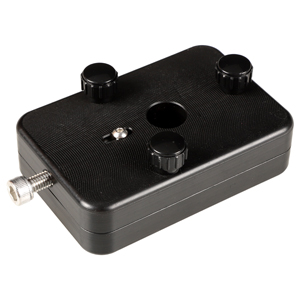
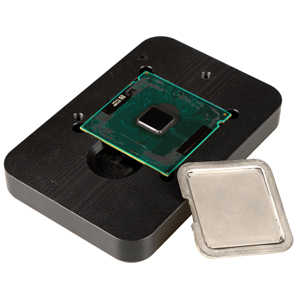
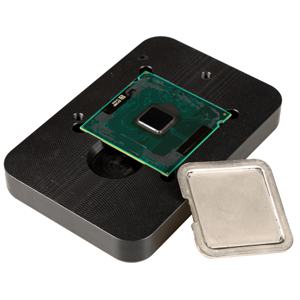
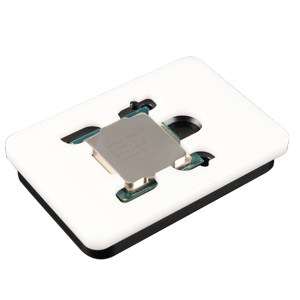
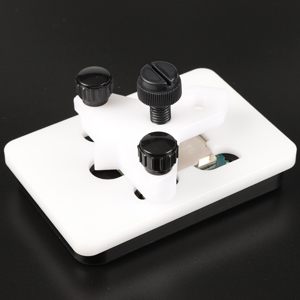
The EG STARTSKaby Intel CPU Delid & Relid Tool is designed for enthusiasts looking to maximize their CPU's performance. Compatible with a wide range of Intel processors, this tool ensures a safe and effective delidding process, allowing for optimal overclocking potential. Its user-friendly design and durable construction make it a must-have for any serious gamer or tech aficionado.



E**B
Cost effective CPU delidding tool with relid jig
Works exactly like instructions show. No issues at all with delidding a 7700K CPU. Clamped CPU in the tool, turned screw until it contacted the IHS then gave it one turn on the screw and waited a few seconds. Backed it off and turned it again one turn and maybe a little bit more and the IHS popped loose. Applying the IHS back was easy, but the tensioning screw can make the IHS twist ever so slightly when clamping it for regluing, so make note if this and look at the IHS on top of the CPU to make sure it stays 100% straight, but this is not really that much of any issue, as the CPU will still fit in the socket and you probably won’t notice it, just a FYI. I also used JB Weld black silicone, which was ready to go after about 3 hours under a halogen lamp being clamped to make the glue warm. Also, make sure you screw the 3 clamping bolts in all the way. They protrude out the bottom and if you don’t, the CPU is not held in place firmly and you will have issues.
M**9
Easy if you know what you are doing
Just delidded a 4690K as it was getting hot on Core 0 and 1 (90+C) compared to core 2 and 3 (50 C).The metal block should slide freely and butt up against the lid edge of the cpu and ride on top of the PCB. The corner of the cpu with the gold triangle needs to match the corner symbol indicated on the bottom holding block. Take note of this as you install the top half of the holding block. This will prevent shearing off any of the tiny caps inside.Before applying force to remove the lid, take note of the letters through the view port. For me I could only see the "469" of the 4690K. When applying force, the lid should only need to slide two and a half letters to see the text. After removing the lid, clean up the insides and have liquid metal and RTV sealant on hand to complete the process. Allow 24 hours to complete the job. Tip: I used clear fingernail polish to insulate the tiny capacitors on the PCB from any possibility of getting liquid metal on them. Watch Youtube to see how others have done it. A little tiny amount of material is all you need. Suck in the excess if too much comes out on the first squirt. Same goes for the sealant when relidding.I used Thermal Grizzly Conductonaut for the liquid metal. The before and after temps are amazing.Before, Temp at load:Core 0 99Core 1 99Core 2 58Core 3 58After, Temp at load:Core 1 51Core 2 51Core 3 50Core 4 50I used MX4 and CM Hyper 212+ for the cooler. I am really impressed with the results as this process saved this CPU and evened out the temps of a supposed terribly unlucky cpu. Good stuff. Be patient and take your time.
J**B
Worked perfectly.
It worked perfectly to de-lid several 4th generation Intel Core processors. This was my first experience with de-lidding and it went well because of this kit. Pay attention to CPU orientation during the lid removal and you will be fine.
C**Y
Very easy to use!! Delided my 8700k and saw 15C+ temp drops!
Title explains it all. I purchased this tool with a rebate I got at the time from a GPU purchase and decided to delid my 8700k for better thermals. The tool was extremely easy to use and only took about 5 minutes to actually delid the CPU. The hard part was removing the thermal paste and silicon. Repasted with some Thermal Grizzly Conductonaut and saw thermals drop from 82C~ to around 65C~ (!!!) under full load @ 4.6GHZ. I ended up going higher to 4.9ghz @ 70C~. Great and simple to use product.It seems unlikely that it will destroy your CPU as long as you're careful!
P**.
If you are into modding, this is the tool for you
I was scared to put my $379 brand new CPU in this device and remove the IHS, but I am so glad I did it. Unlike the youtube video's I watched, my IHS did not pop. It crunched. I seriously thought I ruined the PCB, but said Eff it. If it's ruined, nothing I can do now about it. Nope. CPU runs like a damn champ.As you can see in my pics, the first is my 8700k delided. The second is prior to deliding and the last is after deliding. Best mod you can do to you CPU IMO.The product is well made and extremely easy to use.
K**L
Works if properly used
The tool does the job. I can see why some people might have broken their PCB with though because if you start tightening the screw from the very end with the CPU inside, the CPU might move before you get the metal block above the PCB. I would recommend holding cpu down with the finger, or even better, tighten the screw to the position where the metal block is just about to go above the PCB.I subtracted one star because the tool comes without any instruction or box to keep the tools (there are multiple parts and it's not supposed to be a one-time use tool, right?).
J**T
Exactitud
Grate
C**L
This is the one you need
My 4770 cpu was thermal limiting its speed. After some research I found it was a known issue and could be fixed by de-lidding the processor and applying new thermal paste. I have never attempted anything like that before but this kit made it easy to do.
Trustpilot
4 days ago
1 month ago
3 days ago
1 day ago