Some deliveries may take a little longer than usual due to regional shipping conditions.

DOWNLOAD THE APP


Customer Services
Copyright © 2025 Desertcart Holdings Limited
DOWNLOAD THE APP
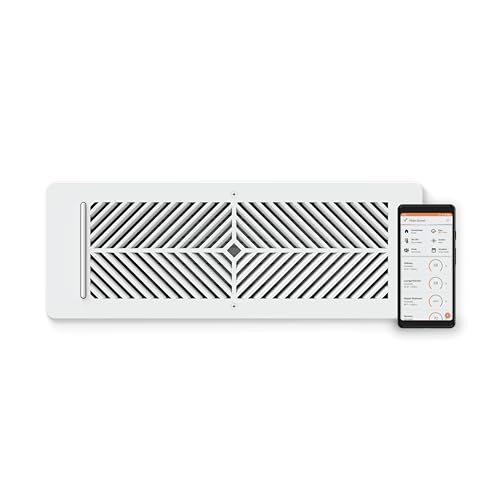


🌡️ Upgrade your comfort game with Flair — where smart meets sleek!
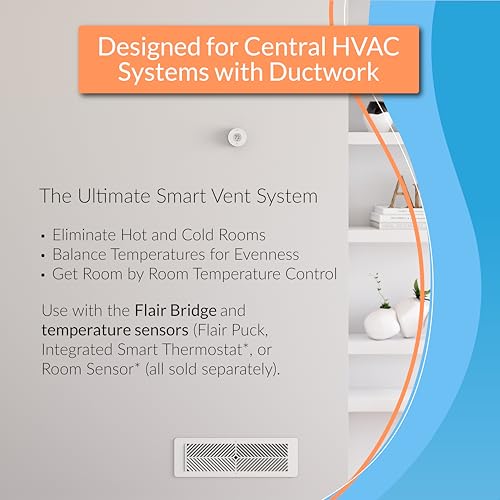
Flair Smart Vent is a professional-grade, smart HVAC vent designed to eliminate uneven temperatures by intelligently redirecting airflow. Compatible with major smart thermostats and voice assistants, it offers flexible power options (battery or 24VAC), robust steel construction, and up to 260 feet wireless range. With on-board sensors and customizable scheduling, it optimizes home comfort while saving energy—making it a must-have for modern smart homes.


| ASIN | B07TKHXX8S |
| Are Batteries Included | Yes |
| Battery Type | Alkaline |
| Brand | Flair |
| Color | white |
| Customer Reviews | 3.3 3.3 out of 5 stars (90) |
| Date First Available | October 20, 2019 |
| Included Components | Battery |
| Item Weight | 1.22 Kilograms |
| Laser Class | 通信用915MHzラジオ、フレアパックで動作、スチール構造、ネジで壁や天井に取り付けます。 |
| Material | Alloy Steel |
| Model Number | FLAIRVENT412 |
| Name List for Name Plates | Modern |
| Power Source | Battery Powered |
| Product Dimensions | 12.95 x 35.56 x 6.86 cm; 1.22 kg |
| Voltage | 24 Volts |
T**9
These are great, when they work like they are intended. For all of the other times, it is extremely frustrating and I really wish I would have looked into the company and their support structure a little further. The single biggest point of frustration for me is that there is no live support option. You have to send an email to their support email box and just wait for a response and then go back and forth with them until your issues are resolved. There's not even a live chat option. The products seem to be extremely touchy. My current problem is the vents keep resetting the mode that the Thermostat is in to Heat, even after I manually update it to Cool. This results in the vents operating off the wrong trigger temperatures and defeating the entire purpose of having them. Great thought and idea for the product, but awful execution in terms of support structure for working through buggy systems and issues. **5/23/2023 Update** Now, when the Air Conditioning is on, half of my vents say they have poor signal and just stay closed. They've not moved, the pucks haven't moved so I'm not sure what is causing it but the problems coincided with the transition from Furnace use to Air Conditioning use. 10/9/2023 Update Flair vents and pucks are doing the exact same thing as before, but in the inverse where they wo t register a change from cooling to heating. Update to reflect 1 star. A "smart" device shouldn't require constant oversight and manual interference for them to work properly. Avoid until they figure out how to offer live tech support and/or build a more reliable back end.
A**D
I have always complained that my bedroom is so cold. My roommates complain that their bedroom is way tooo hot! We have an Ecobee smart Tstat and I woke up one night about 3:30 am, looked, and discovered my room was 67 degrees and my roommates room was 79 degrees. Installing these vents are a total game changer! One vent did get stuck in the closed position initially, but the first night it worked itself out. We didn't have any other issues with the vent or the bridge. I have wanted these vents for some time, and got them on sale during black Friday. Now the rooms both stay around 71-72 all day and night. I monitor them a lot out of curiosity. Aaaand - I go to bed every night with a smile on my face because my room is no longer freezing! I only did a total of 4 vents, and purchased the bridge. Having almost 20 vents throughout the house is an expensive change. Doing only 4 was still a bit pricey - but so worth it.
H**E
First, let me say that a lot of the negative reviews of the Flair products seem to be written by people who do not understand what this product is. The Flair vents will not magically turn your standard HVAC system into a multi-zone system. It will not overcome all air flow problems, although it does handle most of them. These vents, combined with a Flair Puck, will automate the opening and closing of your HVAC vents based on the measured temperature in the room. That's it. The end. The good news - they do it well. The 2nd floor of my house has terrible air flow. During the summer, it would be easily be 10-12 degrees hotter than the main floor. I did all the normal things - replaced the attic fan, added insulation, etc. Then I purchased a Honeywell T9 thermostat and several remote temperature sensors. The T9 allows me to set a schedule so that the 'set point' for the thermostat (the temperature reading used to turn the system on or off) can be one of the remote sensors, not just the the main thermostat which is located in the dining room on the main level. So, I set it to cool the 2nd floor in the evenings. This worked, but since the HVAC system services the whole house, the main floor would cool to 65 or colder just to get the 2nd floor down to 72. My temperatures were evening out, but my electric bills increased. I added booster fans to the upstairs vents, and this again helped a little. To get things working right, I had to go around opening and closing vents every night and morning to get the room temperatures where I wanted. I recently put in a few Flair smart vents and one puck, to see how they worked. They did what I wanted, so I now have most of the vents in my house converted to Flair, and have 3 more on order to complete the transition. Using the app, I set the temperature point in each room to the desired temperature. During the winter, when using the heat, when the room temperature is below that set point, the vent is opened. When at or above that set point, the vent is closed. And it just works. Since I already had the Honeywell T9 and remote sensors, I ordered more Honeywell sensors to install in each room. The Flair system can use them to monitor the room temps, and they are $38 vs $119 for the Flair pucks. The Flair system can directly control most thermostats, and has a schedule capability built into the app. In theory, you can set the temperatures you want in each room, and the Flair gateway puck will activate your system and open/close the vents to achieve your desired temperatures. IT DOES NOT WORK. At least, not for me. It opens and closes the vents just fine, but does not turn the HVAC system on and off when it should. Based on comments on the Flair website, I'm not the only person reporting this. But, since I am using a Honeywell smart thermostat and remote sensors, I can use the Honeywell app to set a schedule, and use the Flair schedule to control the vents. It's a little more complicated than using one schedule app, but once set up, they work great. One last thing - the Gateway puck communicates via WiFi to the internet. That's where your configurations and schedules, etc. are stored, and that's how it communicates with your smart thermostat and sensors. But communication between pucks and vents is via a separate 915mhz wireless network. Technically, it's called a PAN (Personal Area Network) and does not use your wifi system at all. That's why you need at least one puck set up as a gateway - it is literally the gateway between your 915mhz vent network and the internet, and controls the vents. This is fine except for one thing - the 915mhz frequency is more easily blocked by walls and other obstructions that the 2.4ghz or 5ghz frequencies that home wifi uses. So, even though you may have a good wifi signal all through your house, that does not guarantee the Flair system can have good communications to all corners of the house. I have one puck controlling 10 vents, scattered throughout my house, and it works just fine, but I had to experiment to find the correct placement for the puck so that it could get to the most remote vents. Pros : It does what I want it to do. Vents open and close based on room temperature and my settings/schedule. This is the main reason for the 4 stars. It has built-in protection against closing too many vents, which can cause pressure build-up in the HVAC system and damage the system. Integrates very well with the Honeywell thermostat and sensors. I highly recommend using a T9/T10 and Honeywell sensors instead of a puck in every room, especially if you're using these in more than 3 rooms. If you already have a smart thermostat (Honeywell, Ecobee, etc) it is much cheaper. The app gives good status information, including room temperatures, duct temperature, duct pressure, open/close stats, RSSI (signal strength). I like data when evaluating products like this, and it is there. Cons : The scheduling app just did not work for me, and apparently not for a lot of people. If you don't have a smart thermostat to supply this feature, the value of the product is diminished. The temperature readings of the puck are not right. When compared with temperature readings of the Honeywell sensors, and also with a separate room thermometer, the pucks will report temperatures up to 3 degrees too high or too low. Fortunately, I am using the Honeywell sensors, which seem to be spot on. There seems to be no way to add the puck to my Honeywell T9 as a remote sensor. Since I use the Honeywell T9 schedule, it would be convenient to have a Honeywell-enabled sensor in every room. To do this, I need both a Flair puck and a Honeywell sensor in one of the rooms. Price. The price of the sensor puck, doing basically the same job as a Honeywell remote sensor, is too high. As stated above, the Honeywell sensor is $38 on Amazon while the puck is $119. Also, the entire system is pretty expensive if you're using it like I am, just to automate the manual task of opening and closing vents several times per day. All that being said, I am happy with the performance of the system so far. I may update this later, but for now, 4 stars. Update 2/12/2024. I have now been using the Flair system for about 4 weeks, and have converted all of my vents to Flair smart vents. The system continues to perform as I want it to. I am using the schedule on the Honeywell app to control the thermostat, and the Flair schedule to control the vents. I am pleased with the combination of the T9 and Flair vents. Various areas of the house are maintained at the temperatures I want. Most days, I don't even give it any thought - the rooms I am in are comfortable. I don't know what effect this will have on my electric bill yet, But it will certainly not go up, and may indeed come down. After several emails with Flair support, and them assuring me that the schedule works well with the Honeywell T9, I disabled the Honeywell schedule and used the Flair app to control both the vents and the thermostat. It worked well this time. For 2 days. Then the heat come on one morning, as it was supposed to, and never turned off. I switched back to the Honeywell schedule when the average temperature in the house was about 74. It was set to 71 on the schedule. I will continue to use the Honeywell schedule. It may be that my particular use of the scheduling is just more complicated than the Flair app was built for. I have monitors in every room, and my schedule is set to use different rooms in combination, at different times, to control the thermostat. The T9/Flair system works the way I want, so I'm leaving it alone. Keeping the 4 star rating, because of the scheduling app and the price. Otherwise, it would be 5 stars.
G**H
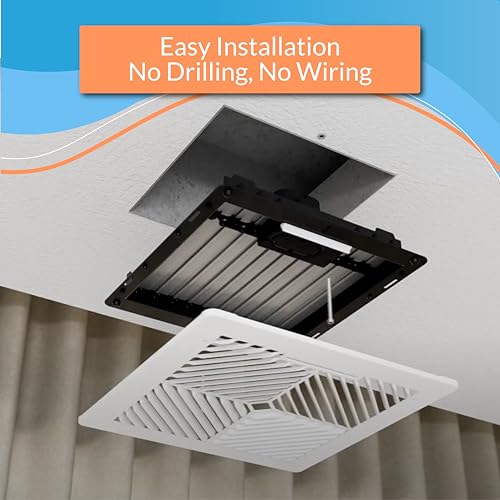
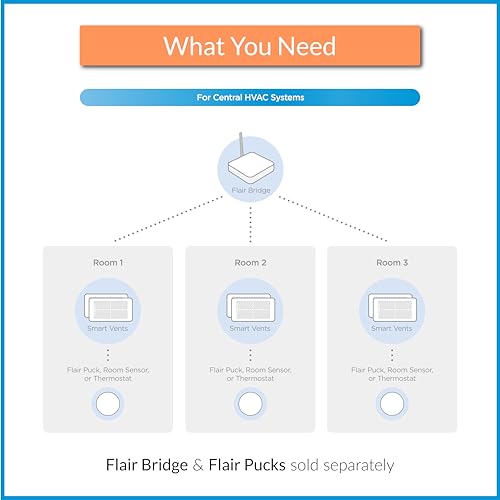
Over the last 2 years I have replaced virtually every vent in my home with Flair vents. I currently have 20 vents, with 8 pucks (2 pucks are set as Gateways). I’m not sure why there are so many negative reviews. The vents are easy to install and setup if you can use a screwdriver and follow directions in the app. Yes, I agree with a few of the posts regarding the battery holder being a bit difficult to assemble and if you’re not careful, you can strip the screws. However, I have 20 vents and managed to install them all without an issue. Just use the correct size screwdriver and tighten the screws firmly without over tightening them. Many of the negative reviews also discuss setup issues, which I thought was fairly straight forward and is app based and guides you through. Understand also, that the vents do not stand alone, and that you must use pucks(thermostats) to control the vents. For my home, the vents have made a huge difference in temperature control being even throughout the house. Is this a cheap solution? No, but it’s much cheaper than adding zones to an existing hvac system and can accomplish the same thing. Each system must have at least 1 vent and 1 puck. The puck in a single system would be considered at “gateway” puck and requires direct connection via a usb plug into a usb outlet. This can be accomplished by converting an outlet to an outlet with USB port. There are many available here on Amazon. The more vents you add, the more gateway pucks you need. I currently have 8 pucks with 2 being designated as gateway hubs. Each puck will control the vents associated with it. Non gateway pucks can be plugged in to usb or run off AAA batteries. I use batteries in my non gateway pucks. I decided to put a puck in each room so that it will control the vents in that individual room. You don’t have to go all out like I did but I think the more vents and pucks you utilize the better overall temperature control. Additionally, I have reached out to Flair on multiple occasions via email and have always received a response within 48 hours or less.
D**T
I purchased seven vents and five pucks to fix my problem of too much cold air downstairs and not enough upstairs. Now I can regulate all rooms and keep them at the same temperature. The setup was relatively easy, but I had to watch the video a few times to get it right. Overall it took me about one hour to set everything up. Problem: When I have some vents closed, and the system is still running, they rattle. I did read about this in the reviews, but I purchased them regardless. Three out of seven vents rattle, and it's enough of a sound to annoy you while trying to get to sleep. I contacted Flair customer service, and they recommended the following: The following are the available options that are available for whistling Flair Smart Vents: 1) Try rotating the vent(s) orientation 180 degrees to change the way air flows through the vent(s). - This did not make a difference. 2) Try keeping more vents open by lowering the number of total vents associated with the thermostat. - I'm confused about this. If the downstairs is at the recommended temperature, then all those vents should be closed. Opening one or two would make the room cooler. 3) An alternative is to check with your HVAC contractor on fan speed (might need a lower speed). - I just had the system checked, and it's running correctly. Solution: One suggestion on a "smart vent" blog was to put electrical tape on the louvers, so I did. It fixed the problem; however, I don't think you should have to modify them straight out of the box. Other than that, I am happy with my purchase.
Trustpilot
3 days ago
3 weeks ago