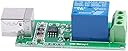
⚡ Command Power with a Click — The Smart Relay for the Modern Pro
The ARCELI SRD-05VDC-SL-C is a 1-channel 5V USB relay module featuring plug-and-play HID technology that requires no drivers. It supports Windows 7 and XP systems, controls high loads up to 250V AC/10A, and is built on a military-grade PCB for durability. Compact and easy to integrate, it offers instant LED feedback and stable USB connectivity, making it ideal for professional-grade automation and control projects.
| ASIN | B07J2PY13G |
| Batteries Required? | No |
| Batteries included? | No |
| Customer Reviews | 4.0 4.0 out of 5 stars (87) |
| Date First Available | 4 Oct. 2018 |
| Item Package Quantity | 1 |
| Item Weight | 20 g |
| Item model number | 00245 |
| Package Dimensions | 11.8 x 7.8 x 1.9 cm; 20 g |
| Part number | 00245 |
| Plug profile | Dial |
M**M
Got working from Delphi within 20 minutes with no drivers or DLLs
Managed to get working in Delphi really quickly (should be same for Lazarus as well). Just need JEDI JVCL component suite (open source) which has a TJvHidDeviceController component for controlling HID devices like this. This will talk natively to the USB relay, which is a HID device. No drivers to install nor any DLLs - lovely. I then also downloaded a sample application called 'USB Relay Control Using HID' from SourceForge, which has the code to call TJvHidDeviceController properly, e.g. to find/list attached relays and then control them from mouse button click. Seems can handle multiple relays attached and relay modules can have more than one channel/relay. Note, this was all in Windows 10. It was so cool to see the relay activated from press of button on the screen. The relay has useful LEDs with a green one for power and red one when relay activated. Note, relay quite loud. Note, no need for additional power - works fine from USB port.
K**R
Does not work with Windows 8.1
Doesn't work with Windows 8.1, can't find the driver
M**K
Das Relais habe ich heute verbaut und mußte feststellen, daß das Relaismodul hängt, d.h. die Spule bewegt den geschlossenen Kontakt nicht, oder wenn das blaue Modul (Relais) nach draufklopfen dann doch schaltet, bewegt sich der Kontakt nicht von alleine zurüch wenn das Modul stromlos ist(wieder ein wenig draufklopfen). Hoffe, das sind Anfangsprobblemchen, die sich mit der Zeit geben, weil zwischendurch verrichtet das Relais ganz normal seine Arbeit - deswegen leider nur zwei Sterne (sollte sich das Relais mit der Zeit normal funktionieren, werde ich diese Rezension aufwerten, denn eigentlich ist das Modul 5 Sterne Wert - gute Verarbeitung und die Lösung mit USB - B Buchse ist eine sehr gute und sichere Verbindung. Jetzt nach einigen Tagen der Benutzung mit mehreren Schaltvorgängen / Tag wird das Bauteil als empfehlenswert von mir beurteilt - es arbeitet nun einwandfrei.
M**.
Installerade - som enda åtgärd - 'usbrelay' via Programhanteraren i Linux Mint 20.3 Sedan är det bara att starta terminalen och skriva sudo usbrelay HW348_1=0 resp. sudo usbrelay HW348_1=1
え**う
Linuxで簡便にデバイスの電源をON/OFFするために購入しました。 usbrelayのページを見ながら、 physon3、hidapi、hidapi-develをyumでインストールした後、 (hidapiなどはyumでepelを追加した後) usbrelayのソースコードをダウンロードし、 Makefile内のCFLAGSの行の末尾に -std=c99を追加してmake、make installすれば使えるようになります。 と、どっかに書いてあれば良いのですが 纏まっては書いてないのです。 しかし、一度インストールしてしまえばすごく便利です。
А**К
Perfecto, se requeria un Relay USB como éste para Linux y sin mayores complicaciones ni apaños especiales ha funcionado a la primera, desde la línea de comando con simples scripts se controla y hace actuar a voluntad. Sí que tiene conectividad de alimentación por la parte del PCB superior, no hace falta añadir alimentación adicional (al menos en el modelo recibido). Muy económico y recomendable.
M**X
Il rele funziona perfettamente e il connettore USB type B e' comodo per poterlo installare distante dal PC tramite il cavo (non incluso nella confezione). Funziona in Linux, nel mio caso in Debian. Installare usbrelay. Da finestra shell "sudo usbrelay" per identificare il nome del dispositivo, che si trova nell'ultima riga dell'output. Nel mio caso e' "959BI_1". Sempre da finestra shell "sudo usbrelay 959BI_1=1" per attivare il rele e "sudo usbrelay 959BI_1=0" per disattivarlo. Semplicissimo, consiglio di fare degli script per i comandi piu' frequenti.
Trustpilot
4 days ago
1 month ago