Buy anything from 5,000+ international stores. One checkout price. No surprise fees. Join 2M+ shoppers on Desertcart.
Desertcart purchases this item on your behalf and handles shipping, customs, and support to New Zealand.
🔒 Elevate your security game with AI-powered clarity and endless peace of mind!
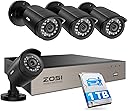
The ZOSI 3K Lite Security Camera System combines 4 high-definition 1080P weatherproof cameras with an 8-channel H.265+ DVR featuring AI human and vehicle detection. Equipped with a 1TB hard drive, it offers ultra-long recording and remote access through the ZOSI Smart app, making it a robust, cost-effective solution for professional-grade home or business surveillance.


| Antenna Location | Business, Home, Indoor/Outdoor |
| Asin | B00MP57IOY |
| Best Sellers Rank | #6 in Surveillance DVR Kits |
| Brand | ZOSI |
| Built In Media | 1 x H.265+ 8CH 3K lite DVR with 1TB Security Grade Hard Drive, 2 x power supply and 1 x USB mouse, 4 x BNC Cables and 1 x Ethernet Cable, 4 x Security Cameras and 1 x 1 To 4 Power Splitter, 4 x mounting screw bags and 1 x quick start guide |
| Camera Description | Front, Rear |
| Color | Wired-4Cam |
| Compatible Devices | Laptops, Smartphones, TV, Tablets |
| Connectivity Technology | Wired |
| Customer Reviews | 4.2 4.2 out of 5 stars (6,175) 4.2 out of 5 stars |
| Frame Rate | 30 FPS |
| Global Trade Identification Number | 00698545075425 |
| Hardware Interface | HDMI, VGA |
| Item Dimensions | 15 x 11 x 7 inches |
| Item Type Name | Security Camera System |
| Lens Type | Fixed |
| Manufacturer | ZOSI |
| Manufacturer Warranty Description | One Years quality warranty |
| Memory Storage Capacity | 1 TB |
| Mfr Part Number | LYSB00MP57IOY-ELECTRNCS |
| Model Number | 8WN-211B4S-10-US |
| Night Vision | Night Color |
| Night Vision Range | 80 Feet |
| Number Of Channels | 8 |
| Operating System | Linux-Based Or Proprietary |
| Optical Sensor Technology | CCD |
| Other Special Features Of The Product | App Control, Automatic Overwrite, Human Detection, Image Sensor, Motion Sensor |
| Power Source | Corded Electric |
| Recording Mode | Event, Schedule |
| Signal Format | Analog |
| Total Usb Ports | 2 |
| Unit Count | 1.0 Count |
| Upc | 698545075425 |
| Video Capture Resolution | 1080p |
| Video Input | BNC |
| Viewing Angle | 90 Degrees |
User
Read this review before you purchase, install, or return this system. .. Seriously, this will help.
So, this is one of many systems I have bought and installed in my many years . What you will receive is a high quality DVR, with four very good cameras and the hardware to get it all connected. The DVR performs excellently. My old ZModo system looked great on the camera, but playback was one third the resolution, this one looks live during playback. This all sounds great, but there is always a downside, the downside in this case is the total lack of instructions. there are steps that are totally left out of the leaflet of instructions, and intuitive this is NOT. You will NEED and Android/Apple phone to install it. Set up the cameras, connect, and power up the DVR. Before you can do ANYTHING, you need the username and password. Again, no instructions on this step. Download an app called SPD to your Android/Apple phone. Open the app, scan the theqr code on the DVR, or the QR code that appears on the monitors screen when you try to access the DVR Menu. This will give you the "Super Password" for the DVR. Leave the username as "admin" and the password is LONG and case sensitive. You can now set the DVR up... Again, nowhere is this evident. (You may think ... ahah!, go to the website!... Well, it does explain the steps, but the "translation" is not at all clear. (It also has apps that are outdated that will confuse the situation, "Zosi view" for example, is obsolete, but still posted). Now, you should have access to the DVR menu, so you can connect it to your router. There will be a screen on the website to set the online viewer up. there will be an area that shows you to activate the "cloud viewer" ... my software didn't even have this, but when I checked my internet connection, it came back as ok, and it was good. Do NOT install the "Zosi View" app as previously mentioned, install "Zosi Smart" app and check the website to figure out how to get the QR code displayed on your monitor from your DVR to again use the SPD app to scan the info for another super password. log in and you should be good to export the DVR info to the phone app. To view the DVR on a Windows PC was tricky, (The software had to be downloaded in three parts, so you know you have downloaded the correct "Active" link) ... but the good part is the IT support staff @ Zosi is dedicated, professional, and willing to help. There is NO phone support, use Facebook messenger. This worked out great for me, but be aware, in the US, in the Northeast, their hours of operation translates to 9:00PM to 5:00AM. If you download the "Teamviewer" program, (It's got a free version) The good old team @ Zosi can remotely operate your PC and set it up for you. These instructions will make your installation MUCH easier and less frustrating, enabling you to purchase this system, install most of it, and enjoy the fact that it operates very nicely, especially for the price. Again, Kudos to the support team @Zosi, they save the the day! :DThis system is very nice, I DO recommend it, use Facebook messenger for help, be patient, and you will end up with a very nice system, at a great price point.
User
Great system and great value. Easy to install
I love this new system!I was on the hunt for a security camera system. After doing some research I decided I didn’t want to use a cloud based service that would cost me a monthly operating fee. I then looked at the big box stores, but I elected to try the ZOSI DVR wired camera system. Best value and cost by far.I installed the system without any problems. One could just hook it up and it automatically starts recording, or you can use many other useful features. My mom probably could have just plugged it in to record without any reading... if you want other features, some degree of technical abilities is needed.Points to know:1. I created a gmail account just for this and set security on my gmail to low so that the ZOSI dvr was able to use the outgoing mail server without any issues. I could then make settings on the DVR to email me alerts when motion is detected.2. I didn’t use a PC to program, but rather the included mouse. It’s easy. One can then look at a frame and select where in the frame to look for motion and set the sensitivity. This is useful if a frame has trees blowing and cars going by, but you only want an alert if a gate opens.3. I downloaded the ZOSI app for my iPhone and I initially couldn’t get it to work. I emailed their tech support and they were fast and helpful. The manual is not well written and the tech support by email required me to think a bit differently. I sent screen shots and they texted back, “Please use zosi smart app on your phone, your DVR's network is okay, And the e-mail issue, the smtp server is smtp.gmail.com please refer to the below link” I was initially thinking... “don’t they see I did use the ZOSI app? But then I thought to look and there is more than one app... and there is one called, “ZOSI smart” I had ZOSI view. So get the right one! And I quickly said to myself... that’s how I set up the email... but I wrote “google” and not “gmail”. It was easy once I corrected my mistakes. Thank you ZOSI support.4. Lots of options for cameras and DVRs. I have a guest house and a front house. Small city lot, but still further than the 65’ of run for the camera cable. I ended up buying 2 different ZOSI systems. Both are great. The cost is great. The app registers the devices and I can monitor from my iPhone.5. In trying to solve some email issues before contacting their support, I read some posts on setting up port forwarding on your router. Don’t worry... it wasn’t needed. This isn’t as complicated as I was thinking!So in the end, I was able to install 2 systems with 6 cameras and my property is covered! All for much cheaper than a monthly fee based service.
User
Working Fine Now
8/25/17 update: system working as advertised since firmware update.6/30/17 update: updated firmware. Process went smoothly. Still testing and monitoring. Other than these system bugs, cameras are clear, good night vision, remote viewing using Zosi View provides clear monitoring, Today I took system offline until sheetrockers are done and I can rerun the camera wires. Another bump on the rating.6/26/17 update: I have to bump the rating up to two stars. Got a prompt response from Zosi support. Have not tried their suggestion to check if firmware was up to date yet, But I will advise when I do and change rating as applicable.6/25/17 Several issues with my DVR. Have been using only for about four days. Each time, I had to unplug and restart to return it to proper function.1. Remote viewing via Zosi View has stopped two times. Each time, system appeared otherwise to be functioning normally from connected monitor. Just could not get cameras to connect on my home computer (wired connection), my IPhone, nor my Android devices.2. Mouse stopped working frequently. No way to change settings or control DVR when this happens.3. When attempting to play back, a couple of times it showed a message that there was nothing saved on disk.Also, I have been unable to get the email function to work. I set it up with the same email and smtp as I use successfully on another manufacturers device. When I click the test email button, I get a message that it could not connect to email.Positives:1. For 720p, the cameras look pretty good.2. Low price
User
Good
Their service is very professional and of very good quality.
User
Worked mostly well, until it didn't
It seemed to do an alright job. Good picture quality during the day. I had the cameras installed inside pointing through a window so the night time quality wasn't great but it wasn't bad (IR glare through the window, if you really want night vision don't install them inside). I could never get the remote access to work, never was able to get the DVR to connect to the internet. Tried to forward ports etc but I am not super savy with that. The instructions are not very clear but that was to be expected when being translated from another language.General installing is easy, just screw the cameras where you want them, run the cable, plug them into the DVR and you're good to go. They sell extra cables if you need to run longer distances, which you probably will need to. But again I could never get the remote access to work. I just had them recording 24/7 so I didn't use the motion sense at all.The user interface is a bit clunky running through the menu but it isn't the worst out there and you can go through it fairly easy once you get the hang of it. Going through the recordings is also a bit clunky but you get the hang of it after a bit.My only issues were with the remote access never working, other than that I didn't have any complaints until about a year and half in. I don't know if the motherboard failed or the HDD but it no longer functions. There is a very loud audible high pitched tone coming from he DVR. I opened it up and the sound is coming from a piece on the motherboard. Not sure what it is that is wrong but I assume that is a chime to let you know something failed. Hopefully I just got a bad DVR that can be replaced. The cameras seem to be good quality.
User
Great system for the price (Read Review for detailed information)
I was skeptical about the price of this whole entire set but don't I am glad I did!These cameras were very easy to setup and the quality is very good but there are some things you need to know before purchasing them.1. Web InterfaceThe Web Interface ONLY works with IE. In order for this to work you need to go into IE's settings for your zone and change ActiveX to Prompt for unsigned active X controls.I have had some crashing of the web interface but nothing unbearable. I do like the program that comes with the kit but just like anything else, it has a learning curve.2. WiresThese are terminated wires. The size is very large so in order to run them to your DVR you will have to drill at least a 5/8" hole to run these cables unless you can terminate yourself then that would make that part of the project easier.3. Motion SensitivityIt took me about a week to figure out the sensitivity of the motion detection. 1 is actually the highest sensitivity and 10 is the least. If I didn't see that important fact on other review on amazon I would have still been fighting that part of the configuration.4. Mobile AppI use the mobile app (secu365) and it is pretty straight forward to use. I do not have my cameras out on the internet. I set them up on a segregated VLAN that has no traffic out to the internet. I use VPN to access my system when necessary for security purposes.Overall, I am using these for home surveillance. They are great for that purpose. For the price you really can't go wrong. The things mentioned above were just small obstacles I came across when working with this system so hopefully if you are reading this review you will benefit from the information I specified above. Feel free to ask questions if you have any about this system.
User
BUYER BEWARE - Customer service is TERRIBLE
EDIT 12/29/2020: Zosi support will not leave me alone. I have asked multiple times for them to stop contacting me and they will not. The "manager" reached out to me and said that the customer service agent I was working with has been fired and would like to give me a discount to correct this review. BUYER BEWAREI want to start off by saying I absolutely LOVE my camera system. I did a lot of research to find the right fit for me and I was looking for a wired camera system that has motion detection because I didn't feel like paying for a subscription fee for competitors.If you're an at-home DIY person, it takes a little bit of drilling and climbing through your crawlspace to run the wires/install the cameras, but it's really not too bad. The picture quality is great and having 3 different ways to adjust the direction of the camera was awesome.You can connect the DVR to internet with a wired connection and access your live feed from your phone, which is another feature I was looking for. The price point is great, and I bought the longer wire kit just in case I would need more than 60 ft, and I'm glad I did.During installation, I was using a screwdriver to push a cable from the camera into the newly drilled hole, but the hole was a little too small. I ended up pushing so hard that I broke the cable. It had been a long day and I was getting rammy, but that's on me. So I reached out to Support and said "hey, I broke this cable, here's my order number, can I buy a new one or is this covered under warranty?" I haven't been able to find a single camera for sale anywhere, so I figured Support was my best shot.The next email asked for a picture of the box and label, the following email asked for a picture of the camera and the label, and finally the most recent email asked me for a description of what happened to the cable WHICH WAS DESCRIBED IN THE FIRST EMAIL.So if you want to take the chance that you don't have an issue while trying to install this camera system and don't ever see yourself having to return it due to warranty, then I highly recommend this. If you're someone that hopes to have a strong customer support team behind their product, then stay the heck away!
User
After giving it a full year
I decided to write a review. For the money I think this product is well worth it. I had one bad camera and they replaced it quickly without a problem.It does require some maneuvering around in the attic to get set up. I also bought some extra cables that were a bit longer. Don't skimp on the quality of these or your video quality will degrade. We have had temps -29F here in Minnesota and these cameras have worked great without incident. No fogging, condensation or failure of any kind.Wi-fi set up could be a bit easier. Not quite plug-and-play but don't need to take any classes either.Pictures show night and day images from my phone that I can see from anywhere verizon has a tower.Again, great for the money, would buy again.Additional 5/7/19: I see reviews commenting on the motion detection. Very sensitive and yet also works intermittently. Set it to record all the time NOT after detecting motion. The If you have the 1 TB DVR it will record several days in a loop.Additional: After using these for a few years I thought I would add to this review.A year or so into this my cameras stopped working after a bit of trial and error I found the power cord to the cameras was faulty. Found a "not quite matching" cord laying around the house and that seemed to work just fine. fast forward another year or so and night vision on all cameras and the camera with the longest video cable stopped working. Thought maybe 2 years was as long as night vision lights worked as none were coming on. Bought 4 new cameras and those ir night vision lights did work either. Contacted Zosi and they do try to help. You need to wait a day or so due to night/day differences. Something also lost in translation. They had no more help than the 7 fixes on their website and owners manual.Got to thinking about that cord I replaced about a year earlier. Bought a new OEM cord and the system again works great. If you have night vision or long cable issues check you cameras power supply.Quite happy with this product. Does everything it's suppose to (except motion detection, just turn it off). The hard drive occasionally makes noise if it restarts like when the power goes out but at this price can have a spare. NO MONTHLY OR YEARLY SUBSCRIPTION. YAY!
User
Excelentes camaras
Estas cámaras son difíciles de instalar, no por que su instalación resulte difícil, sino porque es difícil seleccionar dónde colocarlas. La imagen es excelente, se pueden cubrir áreas muy grandes, se pueden colocar en prácticamente cualquier angulo que uno desee (esta es la parte difícil) e incluso graban en la obscuridad. Son tan buenas cámaras que incluso compré dos juegos más para poder tener más seguridad en mi hogar. El DVR incluye un disco duro de 2TB, lo que es suficientemente grande para grabar por meses sin tener que borrarlo en su totalidad; además se puede conectar a tu internet por si tenemosque salir (aunque no creo que esto sea posible en estas condiciones). El DVR permite conectar otras 4 cámaras, tomar fotos, mandar archivos a una memoria USB y está en español, ideal por si tenemos dudas en su manejo.
User
Calidad al precio justo
Es de fácil instalación y material contenido es de buena calidad, hasta ahora no he tenido problema, leía que algunas personas tienen problema para visualizar su equipo en sus dispositivos móviles, solo como recomendación, una vez que haya creado la cuenta, solo es necesario que agreguen el dispositivo 1 vez nada más, la velocidad en la que puedan recibir señal de sus cámaras dependerá de la velocidad a internet que tengan en casa.
User
Muy buenas pero faltan las contraseñas
No puedo ingresar me. Pide una contraseña y no entra ninguna de las que dice
Trustpilot
2 months ago
1 week ago