Buy anything from 5,000+ international stores. One checkout price. No surprise fees. Join 2M+ shoppers on Desertcart.
Desertcart purchases this item on your behalf and handles shipping, customs, and support to New Zealand.
↔️ Elevate your workspace, split the difference, and type pain-free! 💻
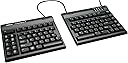
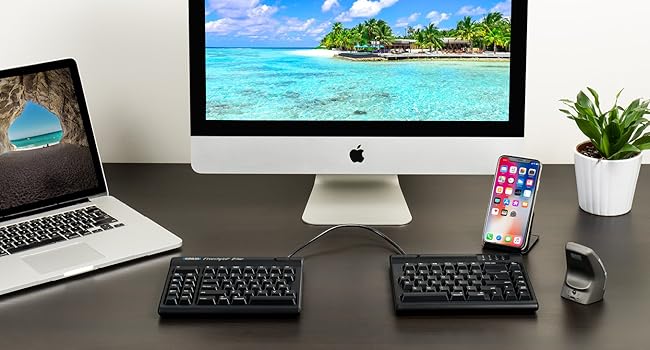
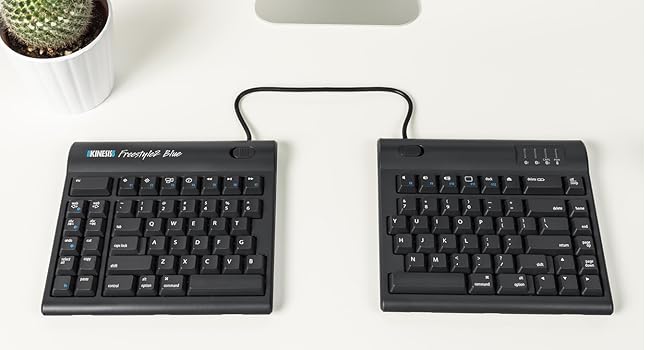
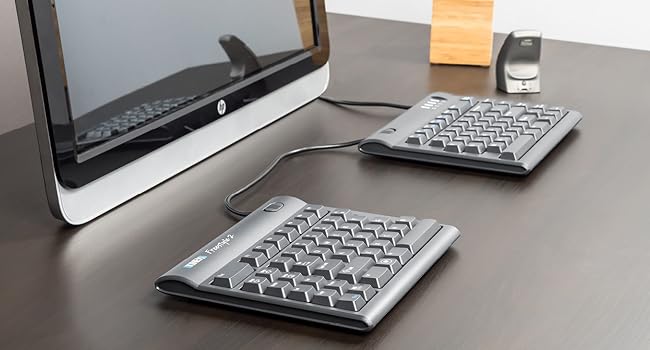
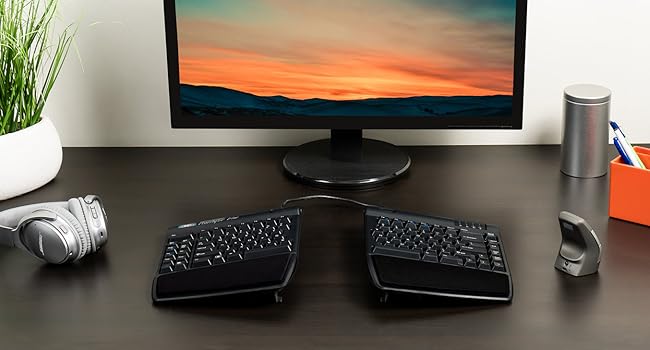
The KINESIS Freestyle2 Ergonomic Keyboard features a unique 9" adjustable split design that promotes natural hand and wrist positioning, reducing strain and improving posture. Equipped with low-force tactile membrane switches and an embedded numeric keypad, it offers a comfortable, efficient typing experience. Compatible with Windows 7-10, Linux, and Chrome via plug-and-play USB connection, this keyboard is ideal for professionals seeking ergonomic wellness and productivity enhancements.


| ASIN | B00CMALD3E |
| Additional Features | Ergonomic |
| Antenna Location | Office |
| Best Sellers Rank | #224 in Computer Keyboards |
| Brand | KINESIS |
| Built-In Media | USB Cable |
| Button Quantity | 10 |
| Color | 9 Inch Separation |
| Compatible Devices | Windows 7-10 |
| Compatible Operating System Family | Linux, Windows |
| Compatible Tablet Computer Models | AAUB P30 |
| Connectivity Technology | USB |
| Customer Reviews | 4.3 out of 5 stars 1,423 Reviews |
| Enclosure Material | Plastic |
| Global Trade Identification Number | 05050914725976 |
| Hand Orientation | Ambidextrous |
| Item Dimensions L x W x H | 15.94"L x 9.25"W x 1.26"H |
| Item Weight | 2 Pounds |
| Keyboard Backlighting Color Support | Single Color |
| Keyboard Description | The KINESIS Freestyle2 is an ergonomic, split-design keyboard with a standard Windows layout, low-force tactile switches, an embedded numeric keypad, and plug-and-play functionality for Windows 7-10, Linux, and Chrome. Keyboard Description The KINESIS Freestyle2 is an ergonomic, split-design keyboard with a standard Windows layout, low-force tactile switches, an embedded numeric keypad, and plug-and-play functionality for Windows 7-10, Linux, and Chrome. See more |
| Keyboard Layout | QWERTY |
| Manufacturer | Kinesis Corporation |
| Mfr Part Number | 0607998800010 |
| Minimum Required Operating System Version | Windows 7 |
| Model Name | Freestyle2 |
| Model Number | KIN-FS2-01US |
| Number of Keys | 10 |
| Number of Sections | 1 |
| Power Source | USB powered |
| Processor Count | 1 |
| Recommended Uses For Product | Office |
| Series Number | 2 |
| Special Feature | Ergonomic |
| Style Name | Contemporary |
| Switch Type | Tactile |
| Theme | Ergonomics, Computer Accessories |
| UPC | 607998800010 |
| Unit Count | 1.0 Count |
| Water Resistance Level | Not Water Resistant |
M**N
Awesome with one small exception.
UPDATE: I think the one real issue I have with this keyboard is the inability to map the three web-dedicated buttons on the left to something else. I'd LOVE an Enter key on that side. If that's not a dealbreaker for you, read on, because 99% of this keyboard is amazing. ORIGINAL: I've been dithering over getting this keyboard for a long time. I have RSI in both hands and have tried almost every other keyboard out there. I even looked at the Kinesis $300 one with the 'hand wells' but decided against it because people described the keys as needing force and there was no good option for 10-key number pad entry (Accounting major so std 10-key is a must). My RSI requires that I not need a lot of force to press the keys. Pros: The 20" cord between the keypads fits perfectly on my VariDesk 36" giving me plenty of room in the middle for my mouse (any of the 4 I switch around to keep those tendons from complaining at me!) and/or my drawing tablet. That 20" gap also allows me to sit in a relaxed, shoulders-back position to type which is worlds better than the hunch or crouch that happens when concentrating intently on what I'm typing on a regular, even ergonomic, keyboard. There is a group of buttons on the left-hand side that are Copy, Paste, Cut, Del, Undo, Web, and Forward/Back web buttons. These are SO USEFUL when using the mouse in the right hand. If you buy this with the tilt/wristpad accessory that Amazon 'recommends' with it it gets even better, with several good tilt angles for each side independently. The wrist pads are soft and comfy. You don't have to have it 20" apart, there's a way to link the two halves together and just tilt them out from each other if you're short on space. The keys are easy to press but still make a good clicky sound. I'm a gamer and I haven't had any issue with them. Cons: There's a little bit of a learning curve but if you're a touch-typist like me it's quite quick to get over. The accessory kit mentioned above does not have positive or negative tilt front/back, only left-right. I'd like to be able to tilt the top of the keyboard down and the back up, as well as the sides. The accessory kit tilt feet are kind of loose so it's easy to change the tilt when you move the keyboard, that's kind of a pro/con. The little rubber feet are pretty good at keeping the keyboard still under normal usage. Set it and forget it is the best way to work with this, I think. With the 20" cord in between, if you're not using the whole thing, it's in the way. I tucked mine under the VariDesk middle bit (see pic) and it fit perfectly. But not everyone has that option, so just be aware that the cord might be annoying unless you can tuck it under something else. The 10-key keypad is an extra buy. That's kind of annoying but I get that not everyone wants/needs it. Also with the main keyboards so far apart, putting the keypad on the far right like I'm used to was not an option. I put in the middle because while I do use it, I don't use it often enough to make a special place for it in my setup. I move it aside when I pull out my drawing tablet. Overall I highly recommend this keyboard to touch typists with RSI, or who want to avoid it, those with w/ back issues, shoulders, neck, etc. It really opens up your posture if you use it at the 20" and lets your whole body be in a more neutral position than a centralized keyboard setup. It actually makes me feel more relaxed overall with my posture more relaxed.
J**Z
A fantastic upgrade to your Ergonomics
Last post I wrote about the Kinesis Freestyle Edge RGB Keyboard, an ergonomic gaming keyboard that is nice but expensive. Know that if you are purchasing the Freestyle Edge, you are paying for the luxury of RGB backlighting. You can see my full review of the Freestyle Edge here. For a more affordable option, consider the Kinesis Freestyle2. Before I begin, I would like to mention that I am not a doctor, and this review is based on my personal experience. For medical advice, always consult a doctor. This is not a paid review, but I will be using affiliate links to the products. If you choose to purchase anything I recommend, I get a small commission if you buy using my links. It isn't much, but every little bit helps. The Kinesis Freestyle2 is a wired split keyboard designed for ergonomics. The keyboard comes in a nine-inch split and a 20-inch split variation. I have the nine-inch split version, and I don't feel like I need any more. Plan for your setup. I have wide shoulders, and the split design has allowed for a more comfortable position. My only complaint about the Kinesis split keyboards is that they do not come with the optional tenting kit. Kinesis offers an optional tenting kit for all their split keyboards for a more ergonomic experience. I used the Freestyle2 without the kit, but I am so used to the tilt that I had to buy the kit for this one as well. Most people should be fine using the keyboard without the kit, but personally, the tenting kit makes long typing sessions a lot more comfortable. The Freestyle2 has two options for tenting, a 15-degree variant ($40 on Amazon) and a 90-degree variant ($200 on Amazon). I use the 15-degree variant and think it is perfectly fine, but the 90-degree is a solid option if you prefer a vertical keyboard. I don't have any experience with the 90-degree version and can't speak on how sturdy it is. The main differences between the Freestyle Edge and the Freestyle 2 are the switches and backlight. The Freestyle2 is a membrane keyboard with no backlight and it honestly doesn't need either. The key presses are soft and responsive, but they aren't customizable. I have been using this keyboard regularly for two years and haven't seen any visible signs of wear and tear. Unfortunately, Kinesis doesn't offer keycap replacements keycaps or mac conversions for this keyboard. The Freestyle2 also comes with a few preprogrammed macro keys for productivity. I haven't found too much use for these with my workflow. I used to use a cheap flat keyboard for work that left my hands useless by the end of my shift. There were days when I couldn't finish my work because the pain would be unbearable. Since making the switch to the Freestyle2, I haven't had any issues with pain in my hands and wrists. I recommend taking regular breaks and looking into stretches for added comfort. My only other complaint about this keyboard is that there is no number keypad. I don't really need one for my workflow, the number line works well enough, but the split design makes using numbers a slower experience. It isn't unmanageable, but people who work with numbers should look into getting a separate keypad. Kinesis offers a Numeric Keypad for those interested. If you are looking to make your setup a bit more ergonomic, consider the Kinesis Freestyle2 Keyboard. This is the perfect option if you don't care about a backlight, customizations, or key switches.
M**O
Split-type is awesome but woe to anyone used to a giant Enter key
A split keyboard really is the way to go. You're in more comfortable posture and slouching less. The only drawback is there is no one-handed typing, ie if you want to quickly type a search term while still holding onto the mouse. As an added bonus a split keyboard is also more portable. Two halves can be packed into a backpack much more neatly than one whole. As to Kinesis Freestyle2 specifically, it is the most affordable split-type keyboard I was able to find. Not counting the R-Go Split which is compact-form and has shallow keys (ie it is a completely different type of keyboard) there is nothing else on the market anywhere near its price point. Everything else is at least $150 (including the mechanical Freestyle Pro) but can easily exceed $300. So at $90 the Freestyle2 is the cheapest way to test out the split-type. For me personally, the function keys on the left get in the way, as does the page-up row on the right. I'm used to there being empty space to the left of Tab and to the right of Enter, but in Freestlye 2 there is another 1 row beyond Enter without increased empty space in between. (And 2 more rows beyond Tab.) I find it disorienting and it increases the learning curve. Users may end up blaming typing difficulties on split-type that are really caused by Kinesis opting to cram a high number of keys on a relatively small board and sacrificing separation space. Just look at that enter key, it's small and surrounded on all sides, good luck finding that in a hurry.
J**Y
Convenient Small Learning Curve
Though I've not had this long, I'm already loving it! I do wish it had backlighting and would have paid more for that feature, otherwise I would have needed to settle on the pro version with noisier keys. I'm just saying a version of this 'Freestyle 2' with a backlighting option would be perfect. With the other additional options offered, why not one more. That is another thing I want to mention before getting into this keyboard, the fact all you're getting are the 2 tethered keyboard halves, tenting options and number pad cost considerably more, in my opinion the tending add-on way overpriced. It's just 4 pieces of plastic and 2 stick-on cheap thin cushion pads, probably didn't cost $1 dollar total to manufacture. So, in that respect, and my opinion, they're sticking it to you by getting another chunk of money just for keeping this something unique from the others which honestly is all this is, a only slightly tented limited keyboard if you choose not to spend the ridiculous over-cost. That being said, the tenting option is great and combined with the keyboard feels wonderful. OK, enough fussing, now the good stuff. This is my first split keyboard and almost purchased others before this, due to the aforementioned personal negatives which the others offered standard. The caveat was they required new muscle memory in order to learn and become efficient in typing on it. I'm decades-long QWERTY flat horizontal line keyboard conditioned, and this particular one feels no different than I'm used to, except for the hand separation. But, honestly it's not been an issue whatsoever, everything is where my hands remember them being from a individual feel and the fact my hands are now comfortably shoulder width apart and orthopedically angled perfectly, I'm in typing Heaven. If you're like me, I highly recommend this keyboard. There's no doubt Kenesis has a reputation to uphold, and they haven't done a disservice with the 'Freestyle 2', but you are jumping through their, um I'll say pretentious hoops to get the perfect setup to give this keyboard its full potential, just spend the extra money in my opinion and mentally scold Kenesis for it. The unappreciative way over charge for tenting certainly feels like a cheap shot on their customers.
C**K
Awesome ergonomic keyboard with a few quirks
tl;dr: Amazingly adjustable ergonomic keyboard with fantastic key feel that has a few slight quirks. I love this keyboard and would not knock off a star for a those minor quirks that I will likely adjust to over time. I have been in the software development industry for 15 years. Over the past year or so, I have noticed signs of it catching up to me and have started experiencing aches and pain in my wrists and forearms. I have used the Microsoft natural keyboard for the last 5 years in an effort to avoid those issues but apparently it only delayed it at best. When I actually looked at how I used the MS keyboard, I realized that it straightened my arms and wrists out a bit when compared to a traditional flat keyboard, but a combination of my desk layout and having wide shoulders resulted in my wrists needing to splay outward somewhat. In short, the angle provided by that keyboard was insufficient for my desk and body. When I saw the Kinesis, it was obvious that the independent halves would be completely adjustable in angle and separation to fit my needs at my current desk or future setups, so despite the much higher price tag than the MS keyboard I purchased it as well as the VIP3 accessory that adds wrist rests and angled adjustments. I've used it now for several weeks and am happy to report that pain from lots of daily typing has drastically reduced, almost to the point of elimination. I feel with continued use that problems will cease. Lots of people talk about the somewhat strange keyboard layout. While I agree that some of the keys are laid out in a way I am not yet used to, 95% of the keys that I use primarily are right where I expect them to be, and there was very little adjustment period. There are only two keys that have given me persistent problems over the two weeks I've been using it: the Delete key atop the Backspace and the toggle function of the Fn key. The Delete key I tend to hit when I'm trying to hit Backspace, and for a second I'm confused as to why the wrong characters are getting deleted. Not a huge deal. The Fn key I occasionally hit when going for the left Ctrl key, and the toggle nature of it then causes me to start typing numbers or alternate characters that I am not expecting. No big deal on either account and I'm sure that I will adapt over time just like I have when switching between Windows and Mac, or when I first started using the MS keyboard. Another minor gripe is it seems that the VIP3 accessory should just be included as standard on what is a premium ergonomic keyboard. However I don't feel the cost of the whole package is overpriced so it's probably nice for those that don't want angled adjustment to have it sold separately. There's a lot of things to praise about this keyboard. While I don't want to drag on and on, I would be remiss to a least mention the key feel. These keys are awesome. They require a light touch but retain a satisfying clicking mechanical sound and feedback. Typing on this thing is a pleasure. Secondly, I was concerned when I opened the box and attached the VIP3 attachment that it would not be stable and that the two halves would push apart from each other with use, but that has thus far proven to be an unnecessary concern. The little feet grip incredibly firmly and have not budged since I set it up. Other reviews have complained that the pads have fallen off...I will monitor mine as it ages and see if I have similar problems.
J**W
Thank YOU!!! Ergonomic perfection!! I love this keyboard!!
I got my intro to computers as a very young man in the USAF. I'm talking DOS, 5.25 floppy disks, the real floppy ones, etc. And in the many years to follow, I have had a cold addiction to the various styles of computer keyboards. I've had the MS Ergo types, with the little hill in the middle, you name it, I've owned it. Now, that I am a UPS data entry guy, and 55 years old, I am SURE that I have found THE keyboard config that I will STAY with for the long haul!! And trust me, I have done my homework, read a bunch of reviews, etc. Your all's keyboard is THE ONE I am staying with as long as I am blessed to have a computer related job!! Now I am not rich, so I couldn't get the MOST up to date item you offer, but the one I bought, the older model, I am totally satisfied with it's performance, great button response, and the EXTRA features, the left hand added buttons, copy, paste, etc., I LOVE IT. Just like WIndows@ itself, there's always several ways to get the same process accomplished. These added key features on the left and right, are just very awesome! I read reviews where people were complaining about this feature. I am now like...WHY?? When you are a keystroke fanatic like I am, those exra buttons HELP. As with any keyboard change, it takes a little time to get the feel and layout of it. So, why people were complaining because they kept hitting the wrong buttons by accident, need to ADJUST to the change, because it's BETTER! Muscle memory will eventually take over, and you will get the layout down without thinking about it eventually. I love the construction, the quality, the added features, it's just what I need for my long shifts typing constantly. It makes my work more enjoyable, and productive as well! I couldn't afford the tenting, so as per my pic, you can see I had to get creative with some mouse pads with wrist support to get the final ergonomic element complete! I clock in fairly soon, and I look forward to it! I love the work, and my gear is complete! I sure do thank you all for making an old man's keyboarding life even more enjoyable! I didn't rate Tech Support, as I have not even had to consult anyone there! But I am sure the crew is just as outstanding as their products! Thank you SO much!!
M**T
Revised review...second keyboard failed in just over a month; first failed in 24 hours
Review updated to say: No Longer Recommend. The first keyboard failed within a day. The second lasted, with problems that were fixable by unplugging/replugging usb. Now, three days after end of ability to return for refund, the keyboard has failed entirely. Too bad. I really wanted to use it but won't try Kinesis again. I'd probably give this keyboard a 3.5 star rating if I could. It's good, but not perfect. Pro: The ability to space the two sections far apart really does relieve an enormous amount of stress on the shoulders, front of the shoulder joint, upper arms, and back muscles. And it does it better than the Microsoft and Logitech ergonomic keyboards, which I like but which still require your hands come toward the center rather than being straight out from the shoulder. For this alone I will keep using the keyboard and be glad I bought it. Cons: -- the cable that joins the two halves should be longer. I only need another couple inches to make it a perfect separation, but others would need more distance than that. -- quality of build. Time will tell, but I'm wary. I had to return the first keyboard within a day--the right hand half stopped working, and nothing I did fixed that (I was aware of other reviewers reporting similar issues due to a poor USB connection). The second keyboard gave me similar concerns a couple of times, but in this case, playing with the USB resolved it. It's now been perfectly reliable for three weeks, but I haven't moved anything. Don't know what will happen if I do. -- key action is merely acceptable. I do prefer chiclet keys, but I also regularly use keyboards with these standard, non-mechanical keys, and even some of the cheap ones have a cleaner, sharper response. Plus the stroke on this is fairly long. -- Placement of the 6 key on the left hand side. This happens on ALL the ergonomic keyboards I've ever seen and it continues to annoy me. Touch typists are accustomed to using the right hand to reach the 6, not the left. It really throws off my speed. I've dealt with it on other keyboards, but I still don't like it and never will. -- The control and shift keys on the left side are just a little too straight down for comfort. I wasn't quite sure why I found that so but, in comparing other keyboards, realized on many, if not most, those are larger keys so the little finger reaches them with a bit of an angled reach, rather than finding them quite so tight beneath the "a". One can adjust, but...still not great. I can't comment on the fn or other keys since I generally prefer to use keyboard commands rather than specific key and I use this primarily for text. In short, this keyboard has achieved what I wanted--significantly reduced the strain on my shoulders and back because I no longer have to squeeze in for the keys. For that alone, I'm pleased with my purchase. Would I buy another one? I'll wait and see how long this one holds up before I decide on that. Recommendation to manufacturers: why don't you try improving on this? It's a great idea!
A**E
A mostly fantastic keyboard with some brain-dead design decisions.
I own two of these keyboards -- one for home and one for the office, both with the VIP3 attachment (highly recommended). I've been through several ergonomic designs, and for me, this is the best on the market, by far. The low-pressure, rubber-dome keys are pleasant to type on, and the 20" separation means that i can position the sections in such a way that i can keep my arms by my side and my shoulders relaxed. I have zero complaints about build quality, and i feel that my money was well spent. At this point, i should be clear: I do recommend this keyboard (see above). Despite its shortcomings, i bought a second, and i would buy a third if i had a third location of on-site programming work. But for the remainder of this review, i will be lambasting the designers for some unfortunate decisions that cause me daily grief. Given the attention that Kinesis gave to most areas of this keyboard, i find it perplexing that they included some truly brain-dead "features" for a modern piece of equipment. Firstly, the placements of several keys are questionable. The escape key may as well be in the upper atmosphere -- it's large, but i have to completely remove my hand from the keyboard and issue a shoulder movement to be able to reach it. As a programmer and a vim user, i press the escape key a lot. This keyboard has forced me to remap it to another key. The 'home', 'end', 'page up', 'page down', and 'delete' keys are nearly impossible to navigate efficiently without looking down at the keyboard. Somehow, 'insert' wound up as a function key (that is, you have to use the Fn-modifier to access it), along with 'scroll lock' and 'num lock', whereas 'pause/break' and 'printscreen' get center stage. Was this keyboard designed in the late '80s? Speaking of the Fn-modifier, the Fn key is a locking modifier. You can't hold it and press the key you want (e.g. 'insert') -- when you press Fn, the keyboard locks in Fn mode, and you have to press Fn again afterwards to revert. I get that they're trying to make life easier for people who use number pads a lot (which, um, you need Fn mode to access, even with 'num lock' on), but i can't imagine that it would have taken more than ten seconds' thought to realize that this would be a bad idea. The "convenience keys" (web keys, copy/cut/paste keys, etc.) are also poorly placed. I'm constantly accidentally hitting them, either at random or when i mean to press, say, the 'grave' key for a backtick or tilde (as a programmer, i use these a lot as well). This is frustrating, yes, but i could have easily disabled them or remapped them to something more benign, were it not for my next, and perhaps biggest, complaint. The "convenience keys" are not actually media keys. They cannot be remapped, because Kinesis made assumptions about your running operating system and hard-coded them as key combinations. I practically excreted a brick upon discovering this. A little background (skip this paragraph if you know how key events are handled by the OS): On a typical keyboard, if you press 'a', the operating system receives an event with a certain keycode. Your operating system knows that, since you told it you have a US keyboard, this keycode is associated with the letter 'a', per the US qwerty keyboard map. Typical US keyboard maps have keycodes for media keys, as well, which are interpreted as special key symbols. When you press a "web forward" key, the OS would look at the keymap and see that it lines up with the WebForward event. If a web browser then sees that you pressed WebForward, it knows how to handle it. Similarly, there's a WebHomePage event, a VolumeUp event, MediaPause, etc.. I use Linux/X, so my events are called things like 'XF86Forward', 'XF86HomePage', 'XF86AudioRaiseVolume', and others, respectively, but it's the same idea. Even if you buy a special keyboard with some newfangled media key that has no entry in your operating system's keyboard map, you can still map the key to do whatever you want, because a unique keycode is issued when you press it. That is, except on this keyboard. Here, the 'web forward' key does not issue its own (standard!) keycode, but instead issues an "alt+right arrow" key combination. 'Web backward', similarly, issues "alt+left arrow". "Web home" issues "alt+home". "Copy" issues "control+c" and "paste" issues "control+v". Actually, since it issues them by keycode, and i switched the 'control' and 'caps lock' keys in my keymap, for me, these latter events issue "capslock-c" and "capslock-v", instead. In what seems to have been an effort to combat what they knew was horrible placement for these failures of convenience keys, they put raised ridges on them (and on the home/end/pgup/pgdn keys) , so you can tell what key you're on. You know, like the raised ridges on the 'f' and 'j' keys. However, they put these ridges on _all_ of the right-edge keys, so they don't help you know which key you're fingering _at all_. The ridges are thus completely useless, since you already know that your fingers are at the rightmost edge of a column of keys with a gap beside it due to, well, the gap that's beside it. This last point feels like a nitpick in comparison to my previous complaint, but since it's also related, i'm including it as well. In summary: The day that someone comes along with something comparable, without the stupidity listed above, i will buy it. The day that Kinesis releases a Freestyle3 that's identical to this one, but fixes all of the above, i'll buy two. But until that day, this is, begrudgingly, my keyboard of choice.
Trustpilot
3 weeks ago
1 week ago