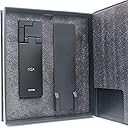
๐ Scan Smarter, Not Harder!
The xcanex Bookscanner with FlatPage Pro Technology offers a revolutionary scanning experience, ensuring high-quality images without the hassle of manual adjustments. With features like automatic page detection and finger image removal, this scanner is designed for professionals who value efficiency and precision, making it the perfect tool for digitizing books on the go.
| ASIN | B00DFWCCXS |
| Brand | PiQx |
| Connection Type | USB |
| Customer Reviews | 3.5 3.5 out of 5 stars (37) |
| Item Weight | 1.3 Pounds |
| Manufacturer | piQx Imaging |
| Media Type | Slide |
| Minimum System Requirements | Windows 7 |
| Optical Sensor Technology | CIS |
| Resolution | 300 |
| Scanner Type | Document |
| Standard Sheet Capacity | 4 |
| Warranty Description | 1 year limited warranty |
B**I
Revolutionary product with a high learning curve and need for refinement.
UPDATE 2\2014: piQx provides free software updates for the "perfecapture" software. Recent update not only speeds up operation, it also provides user interface enhancements. Strengthens my 5 star review of this system. I give this product 5 stars for amazing potential and the ability to serve a need that was previously unimaginable. With that said I have two warnings: 1. Do not buy this product if your computer is slow and you plan to scan large books. If you plan to scan 200+ pages, you should have a fast computer. 2. Do not buy this product if you do not have patience and a willingness to learn. Did you ever think you could scan a 500 page book in a matter of a couple hours? Once you have gotten the hang of this wonder, you can. ADVICE: 1. Use Auto mode - manual mode is buggy and will result in inferior pictures. Auto mode lets you know when the picture will be good. Use the proper orientation and Document mode as well. These things matter. 2. Make sure to angle the camera at about 45 degrees to avoid glare reflection. You can take a picture in a dark room thanks to the built in auto flash, but it requires you to angle otherwise you may get unreadable images from glare. The product is amazing. I had a 500 page textbook that I could not find any digital purchase route to go with. I had a crazy idea, "maybe I can scan the book and read it on my Nexus 7 FHD". A quick amazon search, and WOW there is something. I ordered it thinking it won't work... and for a few days I thought I was right and was just about to return it when I finally decided to watch the demo videos and learn. I don't regret it now because I have a beautiful 500 Page PDF of my text. It took a ton of work to get the hang of, but the results are great. When used properly, it crops, automatically adjusts the angle of the page, and just generally takes great shots. My requests for improvement in next generations: #1 get rid of the velcro strap... it's just annoying and tacky to an otherwise beautifully made product. #2 work on stabilizing and improving performance of the PerfeCapture code. it's amazing magic but at the same time needs to be cleaned up as far as performance and stability. Bring the joy to all users, regardless of CPU strength. Thanks for making this dream possible!
J**.
The product design is nice, the product itself - not so much
I chose to give this product a low rating because I am a MAC user and software is not available on this product despite promises to launch prior to the close of 2013. The amazon description is inaccurate. An email from the manufacturer confirms the inability and unavailability of Mac software. Despite not being able to turn the the item on and scan my head off, I went ahead and installed it on a PC laptop anyway so that I could still write a thoughtful review. It's a nice, well built design, images are nice (glossy images have glare - period) BUT the scanner SLOWs to turtle speed with heavy scanning 20+ pages, digital finger removal is time consuming and over all the program that runs the device crashes often. Frustrated and sending it back! Thankfully Amazon has great customer service and is accepting my return. They do need to correct the product description - Beta only NOT FOR MAC. Buggy at best for high work load scanning (i.e. 20 pages of a book does not a book make). 5 stars for product concept, 1 star for execution. I'm a MAC user - I'm just not used to things "crashing"! Definitely not seamless and not intuitive despite the sleek design.
K**3
Buggy software
I purchased this scanner to scan different sizes books both on normal and glossy paper, occasional glossy brochures and newspapers. Company and its tech support is located in Singapore. Packaging was good. Package material advises not to hookup camera with usb 3 port. You have to watch helpful installation videos on included DVD which are also present on their web site and youtube. Trick is to adjust the height of camera in such a way to scan a good size book. This was thoroughly explained in their installation video. Camera has a led light so you can scan in dark too. Now comes the software which is source of major frustration. Software version on dvd is 2.1.1.0, newest update is 2.1.1.1 which can be downloaded from their web site after you enter your scanner serial number. First I installed it on my windows 8.1 laptop which only has usb3.0 port in a hope it might work but as expected did not work. . I moved onto windows 7 desktop with usb2 ports, it worked for a little while than it crashed in middle of a book scan, I restarted after crash but software did not have mode selector icon anymore so I uninstalled it on that machine and moved onto windows 7 laptop with same results, most crashes happened on book scan module, other modes worked flawlessly such as sheet and business card modes etc. After a crash software may not restart or becomes unstable so you may have to reinstall it all over again. After many crashes I shoot an email to tech support which I guess located in Singapore, answer came next day which is by my standards is late as any email takes a second to reach its destination, I guess there may be a phone number to call which I assume dials to Singapore. Scan quality is awesome and software has different book modes such as single page, dual page for both left to right and right to left languages. Finger shadows removed successfully. Pages deskewed and spine curves were flattened with no effect on text. I was able to scan few photographs and business cards their quality was very good, after scan business cards will open in included card application prepopulated with info from the scan which I thought was cool. I finally returned it back to amazon after a week of use. I spent lot of time to troubleshoot software on three machines and did not have patience to keep going. I liked hardware and scan quality but software is the main issue here. If software crashes taken care of and scanner works with usb3 ports it will be an awesome solution to the book scanning.
Trustpilot
1 day ago
3 weeks ago