
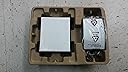
NETGEAR PS121 USB 2.0 Mini Print Server
Product ID: 12355853
🌐10 Mbps Ethernet port for fast network printing
📏Compact 3.4 x 0.96 x 2.32 inches design
🔌USB 2.0 interface for broad printer compatibility
Desertcart purchases this item on your behalf and handles shipping, customs, and support to New Zealand.
🖨️ Network your printer, amplify your productivity!
The NETGEAR PS121 USB 2.0 Mini Print Server transforms any USB printer into a shared network device with a fast 10 Mbps Ethernet connection. Its compact design and easy Smart Wizard setup make it ideal for home offices and small businesses seeking seamless multi-user printing. Compatible with major printer brands and backed by a 1-year warranty, it’s the smart, space-saving solution to elevate your printing workflow.
| ASIN | B0001BXVA4 |
| Best Sellers Rank | #111 in Computer Networking Print Servers |
| Customer Reviews | 3.9 3.9 out of 5 stars (73) |
| Date First Available | April 6, 2006 |
| Is Discontinued By Manufacturer | No |
| Item Weight | 2.72 ounces |
| Item model number | PS121NA |
| Language | English |
| Manufacturer | Netgear |
| Product Dimensions | 3.4 x 2.32 x 0.96 inches |
C**D
Works Fine with HP LaserJet 1012 Printer
I installed this print server into a wireless network supporting two computers - one running Windows 98 SE, and one running Windows XP Home Edition SP2. The only difficulty I had was when installing the printer port on the Windows 98 machine. It was no fault of Netgear. I kept getting an alert message that a specific .dll file could not be found. After a couple of hours trying to do a "work around," I finally figured out I could go to a website and download the .dll file which was missing from my operating system. Since then, everything has worked like a charm. I should mention that I have disabled the Windows firewall on my XP machine and I'm running Norton firewall in it's place. The PS121 works just fine with the HP LaserJet 1012 Printer. I was a little apprehensive at first because it is not listed on Netgear's web site in their list of compatible printers. I was delighted to discover it has no difficulties. You will need an inexpensive RJ45M/RJ45M Patch Cable (Cat5e, or better) to connect the PS121 to a physical port on your router. The print server comes with a USB cable to connect it to your printer. One last note: The firmware upgrade available on Netgear's web site actually consists of two files - the upgrade utility, and the binary file containing the new programming instructions. You need them both. The upgrade utility will ask for the binary file to send to the PS121.
G**E
Works great with my Samsung printer
My setup: IBM laptop running W2K, Proxim wireless card, Microsoft MN-500 wireless router, this Netgear PS121, and a Samsung ML-1710 printer. Plug the PS121 into the wall, the usb cable from the printer into the PS121, and an ethernet cable runs between the PS121 and a spare port on your router. Now I can print from anywhere in my apartment. Setup was a snap, took about 5 minutes. I did have to read the troubleshooting part of the instructions to discover that I needed to disable 'bidirectional printing'... whatever that is. I don't know why the amazon description says that you can share with 'up to 3 computers', because you can share with any number on a wireless network. One complaint: this thing comes with a usb cable but no ethernet cable. Everyone with a usb-printer already has a usb cable, but some people might not have an ethernet cable laying around. I would prefer that they lower the price a few bucks and include no cables, most people who buy esoteric gadgets like this have extra cables. Overall, this is a nice little toy, I highly recommend it.
V**L
Not Compatible With All Printers
I purchased a mini print server because I wanted to use my laptop in one room and print from another, and I chose this particular model because I have a Netgear router and the manual for that router suggested the Netgear USB Mini Print Server (PS121). I consider myself moderately computer-savvy. The directions were clear, and I was able to install the software with no trouble. However, the print server did not work--- no test page would print. After much research on the Internet, using Google to find various forums, including a Netgear forum, I discovered that the Netgear USB Mini Print Server (PS121) is not compatible with all-in-one printers. A moderator on the Netgear forum stated that a person could use the Netgear USB Mini Print Server (PS121) with all-in-one printers by downloading printer-only drivers. It boiled down to (I guess) 1) choosing to use all three functions of my printer (printer, copier, scanner), but having to carry my laptop into the room with the printer, 2) only using the print function and being able to print from another room, or 3) buying a new printer that was compatible with the Netgear USB Mini Print Server (PS121). I chose to return the Netgear USB Mini Print Server (PS121). I rated this item only one star because I could not use it and because it was not obvious before purchase that many printers are not compatible (not merely the all-in-ones, as I found out through my research). I am very happy with my Netgear router, but not with the Netgear USB Mini Print Server (PS121). I highly recommend that a potential buyer visit the compatibility list on the Netgear website to make sure that their printer is compatible before purchase of the Netgear USB Mini Print Server (PS121).
D**S
Works with Windows 8!
Works perfectly so far! I have a new Windows 8 computer and an old HP LaserJet 1012 printer. I carefully followed the instructions on NetGear's support website at http://kb.netgear.com/app/answers/detail/a_id/47, and it only took a few minutes to set up. Now I can print from my laptop anywhere in the house, and my husband and sons can print from their laptops too. This was certainly a bargain compared to buying a new laser printer with built-in networking. Update 6 months later: still working perfectly! Every computer in the house can print on our old printer.
A**R
easy set up works like any print server with no software install needed.
Trustpilot
3 weeks ago
1 month ago