Buy anything from 5,000+ international stores. One checkout price. No surprise fees. Join 2M+ shoppers on Desertcart.
Desertcart purchases this item on your behalf and handles shipping, customs, and support to New Zealand.
🖱️ Elevate Your Click Game!
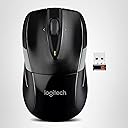
The Logitech M525 Wireless Mouse combines a sleek design with exceptional functionality, offering a remarkable 36-month battery life and easy navigation features, making it the perfect companion for professionals on the go.


| ASIN | B005KSAHZU |
| Additional Features | Wireless |
| Antenna Location | Office |
| Are Batteries Included | Yes |
| Are Batteries Required | Yes |
| Battery Average Life | 36 months |
| Best Sellers Rank | #1,624 in Computer Mice |
| Brand | Logitech |
| Built-In Media | Logitech M525 Wireless Mouse, Batteries |
| Button Quantity | 3 |
| Color | Black/Gray |
| Compatible Devices | Personal Computer |
| Connectivity Technology | Connection Type: 2.4 GHz wireless connection Wireless range: 393.7 in (10m) 8Wireless range may vary based on user, environmental and computing conditions. Unifying-ready mouse: Yes Unifying-ready receiver: Yes |
| Customer Reviews | 4.7 out of 5 stars 17,670 Reviews |
| EU Spare Part Availability Duration | 3 Years |
| Enclosure Material | Rubber |
| Global Trade Identification Number | 00097855080929 |
| Hand Orientation | Ambidextrous |
| Hardware Platform | Mac, PC |
| Item Dimensions L x W | 4"L x 2.24"W |
| Item Type Name | Mouse |
| Item Weight | 4.54 g |
| Manufacturer | Logitech |
| Mfr Part Number | 910-002696 |
| Minimum Required Operating System Version | Windows 10 |
| Model Name | Logitech M252 Mouse |
| Model Number | 910-002696 |
| Mouse Maximum Sensitivity | 1000 Dots per Inch |
| Movement Detection | Optical |
| Movement Detection Technology | Optical |
| Number of Batteries | 1 Lithium Polymer batteries required. (included) |
| Number of Buttons | 3 |
| Operating System | Windows 10, 11 or later, Chrome OS, macOS 10.5 or later |
| Power Source | Battery Powered |
| Range | 10.0 meters |
| Special Feature | Wireless |
| Style Name | Mouse |
| UPC | 804993513628 097855080929 |
| Unit Count | 1.0 Count |
| Warranty Description | 3 year limited |
F**P
Nice mouse, perfectly symmetric for a left or right hand use
I am on a computer all day long and know what a good mouse feels like. This is a good mouse, and is very responsive and a good value for the money. Definitely get the free logitech software that lets you assign the buttons that will really speed up your workflow for copying and pasting or doing any repetitive activity. Works well with my full-size Logitech keyboard. Lastly, I really like the unifying receiver and allows you to easily set it up to use any combination of keyboard and mouse on any computer. Here’s an example of useful scenario. I have two mice programmed to the same receiver. If my child is working on their computer and they need some assistance from me, I just have an extra mouse that I can use to control their computer so I don’t have to pass the miles back-and-forth between two people. Particularly useful if you connect the computer to a television allowing either of you to control the cursor with your own mouse
D**I
Needed a wireless mouse for traveling
Amazon provides tons of choices when it comes to the wireless computer mouse. However, not all can compete with the Logitech M525. It came down to Logitech M525 and Logitech Anywhere Mouse MX. I took the time to compare the two mouse, but the difference was slight. On the chart provided by Logitech the Anywhere Mouse MX is better than the M525, but I guess it is to the persons preference what they are looking to gain from the mouse. When doing the research I took the following categories into consideration before buying. Travel, Battery Life, Compatibility with Windows & Mac, Mini USB, and Multi Surface Tracking. Traveling Most of the time I am on the road for my company, and I needed a mouse that will fit my needs. The M525 is perfect when it comes to the mini USB. There is no need to take out the USB when putting the laptop into the sleeve of the travel bag. The design of M525 is small and compact so it can be taken anywhere. I was worried that since this is not a full size wireless mouse that my hand will be too big for the mouse, but it is ok fit. I picked M525 over Anywhere Mouse MX because it has better battery life, price difference, and the reviews. I was not looking for advanced mouse, just a simple mouse that I can grab and go. I guess the only drawback that I did not realize is that the M525 does not support backwards and forward on Mac computers. Pro *Small *3 Full years of battery life (depending on usage) *Battery light indicator *Multi surface *Works with Windows XP, Windows Vista, Windows 7 & 8, Mac, & Linux (I have tested & can confirm that it works great with Windows Vista, Windows 7, Windows 8 and Mac Book Pro) *Awesome designs *Comes with 2 AA batteries * Amazing optical tracking! The cursor does not run away. Cons *Does not support backwards and forward on Mac computers *Not the best comfort fit for your hand, since its smaller *M525 requires 2 AA batteries so if you are used to M305 which only requires 1 AA battery that might be a drawback for you. * Scroll wheel. I wish it had resistance not just smooth scrolling
J**E
Nice Mouse (also works with Linux; see end of review)
I really like this mouse and the Unifying Receiver (this is my second one). I used to use the M505 and liked it but it now feels clunky compared to this one, especially the scroll wheel (I just ordered two more M525s to replace the two M505s I have on my desktop). The scroll wheel on the M525 is quieter and turns much more freely, allowing faster vertical scrolling without losing any precision. A quick flick on the wheel will send the page sailing up or down. Clicking the scroll wheel button was a bit tricky to learn how to do because the scroll wheel spins so freely but I was able to get the hang of it pretty quickly (allowing the tip of my finger to rest on just in front of the wheel and pressing down on the wheel pretty much always keeps the wheel from turning). The Unifying Receiver and the associated software allow up to six devices, such as mice and keyboards, to be paired up with one Receiver, a real plus when faced with a paucity of USB ports. There is a place inside the mouse's battery compartment where one can park an extra receiver (the Unifying keyboards also have a place to park extra receivers). Unfortunately, a device can be paired up with only one receiver (don't ask how I found that out). The mouse is roughly midway in size between a full sized desktop mouse and a laptop mouse. Full size mice are a bit large for my hand and laptop mice are small enough to be hard to hang onto comfortably; the M525 fits my hand perfectly. After using the M525, a full sized mouse feels like a clunky monster. The reason I initially gave it only four stars is because of the software (I also knocked off another star for the feet). First, there is no CD with the drivers included with the mouse even though the box was more than large enough for one (come on, Logitech, how expensive would it be to include a CD?); one has to go to Logitech's website to download them (Logitech's website is not the easiest one to navigate). There are three programs to download: the one for pairing up devices with the Unifying Receiver, a scroll app that's supposed to make the mouse scroll more smoothly (I think), and the Set Point software for making settings on the mouse. The Unifying software works well and is easy to use (which is fortunate because Logitech's documentation is pathetic). The Smooth Scroll software is supposed to make scrolling smoother, I think. It does seem to be smoother with it enabled but Logitech doesn't include any documentation saying exactly what it is supposed to do so I can't be sure if it is working the way it is supposed to or not. Edit: After fooling around with it some more, I've found the Smooth Scroll does smooth out the vertical scrolling function. However, it did make the scroll wheel extremely sensitive and scrolling does overshoot a bit after you release the scroll wheel, making precisely positioning a page vertically difficult and unstable. Fortunately, it can be disabled, which I have done. The Set Point software also suffers from a lack of documentation, such as Help screens. Most settings were easy to figure out but I had to go to my old friend Mr. Google to find out what the heck Smart Move was (it causes the mouse pointer to snap more quickly to a pop up box, which, in my opinion, would be annoying so I left it un-enabled). The setting that drove me insane before I finally figured it out was for using the scroll wheel for horizontal scrolling by pressing the wheel sideways. First, Logitech labeled the left and right position of the wheel as Forward and Back. I eventually figured out if I selected Back, then clicked on Other on the menu to the right, a window would pop up. Clicking on the down arrow opens up a drop down menu that has around forty functions (seriously), one of which is Left Scroll. When I clicked on that, a couple of sliders popped up: one for scroll speed and one for scroll acceleration. I had to do the same thing for Forward to get Right Scroll, including setting the scroll speed and acceleration. Why someone would want to be able to want to be able to set different scroll speeds for left and right is beyond me. There is a menu in Set Point for Gaming Settings. I didn't understand any of the settings in there but, then again, I'm not a gamer. Mayhap a gamer would be able to make sense of it. I just left it un-enabled. There is a section for check the battery condition (the mouse uses two AA batteries; I use Sanyo Eneloop rechargeables). It's a bit redundant since the mouse will give a popup alert when the batteries get low. Also, it will show the batteries for only one mouse at a time (I guess it never dawned on Logitech there may be someone who would want to have two mice turned on and connected to one machine). Changing out the batteries is easy since the battery compartment is clearly marked which end is positive. There is also a section for pairing up the Unifying Receiver. I don't know if it can replace the separate software or not since I had all three programs already and I'm too lazy to check it out. Post Edit 1: I've found out the settings I make in Setpoint do not stick. I have to reset them frequently, especially every time I boot up. I'm removing it. When you register the mouse with Logitech (probably makes warranty claims easier when you do), the website asks for a bunch of information that isn't on the bottom of the mouse; it's hidden under the left battery. Also, the model number isn't M525; there is a different one under the battery. Break out a magnifying glass because the print is tiny. As aggravating as the support software was to obtain, install, and use, I knocked off only one star since one only has to deal with it once when setting up the mouse. Amazon's price for this mouse is also very reasonable, almost half what I paid for my first one. Post Edit: The two feet on the bottom of the mouse at the end closest to my arm came loose. I first had to clean the smeared adhesive off both the feet and the mice; it was amazing how hard it was to remove the adhesive because it was so sticky yet it couldn't keep the feet in place. I reattached the feet with double sided cellophane tape and that has been keeping them in place since. Not long after that, the mouse started dragging on the mouse pad. I checked with Logitech to see if they carried replacement feet for this mouse. They didn't but offered to replace the mouse under warranty. I decided against doing so since I would have to pay to ship the mouse back and the replacement might have the same problems. Instead, I ordered a roll of mouse tape (search for CS Hyde Conformable PTFE Tape With Silicone Adhesive, Brown 1 inch x 36 yards) and applied that to the feet (it's a bit pricey but a roll will last a lifetime). That made the mouse glide over the pad like it never did before. I took another star off for the hassle with the feet but the mouse itself still works very well. Post Edit 2: Since my first mouse, I have accumulated a mischief of ten of these mice (mouses?) and I'm going to order a couple more for spares (even though I have yet to have a mouse go bad on me). None of the additional mice have had issues with their feet so I added back a star to the rating. I've grown to really love these mice. I still use Teflon tape on the feet to protect them from wear but the tape also makes them glide much more smoothly. I ditched Windwoes a year and a half ago and now exclusively use Linux Mint. Logitech does not supply supporting software for Linux (which is my reason for keeping only a four star rating; shame on you, Logitech!). One can pair mice (and other Unifying Receiver devices) from within Linux by using a program called Solaar (you may have to go to Solaar's website to get it). There is no software for changing mouse settings but Linux Mint has its own settings that cover most functions (wheel tilt being one that is not supported; I never used wheel tilt anyway so that's no great loss to me). Three year battery life, even if one switches off the mouse when not in use, is rather optimistic. Maybe if one used lithium batteries, used the mouse only a couple hours a day, and switched the mouse off when not in use, one might be able to eek out three years of battery life. I'm still using NIMH rechargeables and switch off the mice when not in use, and I still only get no more than four to six months of battery life. I always have spare, fully charged batteries on hand so having to replace the batteries every few months is not a problem for me. Typically, the mouse I use daily is on for 8-12 hours a day. Post Edit 3. After 10 years of use, one of these mice (I've built up a herd of them over the years) finally had to be replaced because the wheel click button finally wore out (I have a second mouse on the way out for the same reason). That kind of longevity in a mouse is practically unheard of and prompted me to raise my rating to five stars despite Logitech's lack of support for Linux. Instead of having to keep reapplying Teflon tape to the feet, I removed the stock feet, filed the feet bosses flat, then installed ceramic mouse feet to all my mice (https://www.amazon.com/gp/product/B07MW5XJ8G/ref=ppx_yo_dt_b_search_asin_title?ie=UTF8&th=1). After a year of use, these feet are still like new and well worth the cost. They make these mice pretty much maintenance free.
J**D
Ok, but not great
Let me start by saying that I have been a dedicated Logitech customer for many years, and never have I been disappointed in any of my purchases, Until now! I had a V450 nano mouse that in my opinion was the best mouse ever engineered . It was perfect in every conceivable way, from size to performance, to battery life, to price point. Why on earth would a company like Logitech discontinue this product? I'm still scratching my head! The M525 is almost exactly like the V450 in size and shape. It still has the 2 AA batteries and the compartment to store the nano receiver, and the size is perfect. what Logitech did was change the mechanism in the scroll wheel and did something with the laser. The wheel spins a lot more freely and doesn't have the noticeable click and feel that it once did. sometimes it just keeps spinning. it needs to be more tamed. the optical lens seems to lag a little, but when your on the computer 8 hours a day like I am, its more noticeable. I think it may be from the new Unifying receiver that they are changing over to handle more devices. This is a good mouse for casual users. the design is comfortable and the price point good. I went back to using my V450 after calling customer support. If your mouse is experiencing odd behavior , especially on the left or right click, take the batteries out and hold the left and right clicks down for a minute or so. This discharges built up static and in my case the mouse is working flawlessly again. Kudos to Logitech techs! Any questions please feel free to ask
A**R
Nice Mouse, But. . .
A week and a half ago I purchased the Logitech Wireless Backlit K800 keyboard. It works very well and I like having one less cord stretched across my desk. So yesterday I ordered, and today I received, the M525 wireless mouse, because the K800 and M525 are marketed as being able to communicate with my PC through the same USB Unifying Receiver. BUT, the K800 will not communicate through the one that came with the M525 and the M525 will not communicate through the one that came with the K800. Each one will only connect through the Unifying Receiver that came with it. So, while I like having yet one less cord across my desk, I still need to use two receivers in order to use both the keyboard and the mouse. If not for that snafu I would give it a higher rating. Since writing the above, Logitech support reached out to me. The snafu I mentioned has been fully resolved. Also, as other reviewers have mentioned, it helps to have the receiver within line of sight for the mouse, and using a mouse pad makes it both easier to move and more quickly responsive than placing it directly on my oak desk. So, I'm raising my rating from 3 stars to 5.
M**S
Still going strong after 12 years
I bought a Logitech M525 in January of 2013 for $23.99. It was pretty much the go-to USB wireless mouse at the time. I remember thinking it was a little expensive, but... I've been using it continuously ever since, and it's practically like new. Battery life is still outstanding, buttons are still good, pointer precision is still flawless. There's some minor wear on the rubberized surfaces, that's about it. One or two of the mouse feet fell off a few years ago and had to be glued back on. That was the only repair. I've always been happy with the design: the size, weight, and shape are all spot on. The two tone color goes with just about anything. The only design choice I would quibble with is the scroll wheel. It's the smooth kind, and very sensitive. Easy to scroll accidentally. I prefer the stepped kind that require a little more force. But for a scroll wheel to still work after 12 years is pretty remarkable. This is an excellent mouse. I've used it across many systems -- Windows 98, XP, 10, many flavors of Linux -- never had any compatibility issues. I used it yesterday, and I'll probably use it tomorrow. Love it when consumer goods have that kind of longevity.
J**Y
Good Mouse, Good Price
After shopping around, I settled on the Logitech brand (Microsoft left a bad taste in my mouth since my last mobile mouse 6000 petered out). This little guy is ready out of the box, from plugging in the receiver to it's first mouse click, the set up is a no-brainer. Solid and quiet clicks and tracks rather well. I took a tip from another reviewer about the batteries and how you really only need to use one in the mouse even though you get two in the box. No loss of performance when using just one, so you can save $$. The receiver can be stored inside the mouse for travel (if you really need to, although the mini form factor of the receiver will allow for plugging it in and leaving it). Scrolling performance from the wheel is just right as well as the other functions like backward and forward paging with the wheel. With only one battery inside, powering this little guy, the weight is much less. As for gaming, it works just fine, tracks without lag or skipping. Don't know what more to say, this is a great mouse and if you need a decent performing and relatively cheap device, go for it!
K**M
Happy with it
I was nervous reading some of low rating comments about this mouse, but I'm happy I got this mouse. I literally just started using it minutes ago, so it's still new and works very smoothly. The mouse came with batteries and works perfectly so far, and I like that it has an on/off switch so it doesn't waste battery when not in use. Another cool small detail is that it has a button for you to slide to pop off the cover for the compartment that holds the battery AND the USB receiver that plugs into your laptop/computer. The scrolling wheel is appropriately sensitive, and the slight inward curves/dips on the sides and on the left and right mouse buttons offer an unexpected and added touch of comfort while I rest my hand on the mouse. I don't know if it would be comfortable for especially large hands, but my "average" hands/fingers settle into the grooves nicely. I can tell you that the mouse works whether it is scrolling over multiple surfaces, like a book, the couch, and the part below the keyboard on my laptop, so you don't even need a mouse pad.
H**E
The worst scroll wheel...
Was looking for a cheaper alternative to my Anywhere 2 mouse for another laptop hence bought this because of the middle left/right click but beware....the scroll wheel is probably the worst I have experienced. Very hard to get a proper selection with middle click, just keeps scrolling that extra few lines as you try and click. Settings in win10 work marginally better than in Ubuntu which is ....painful
天**鬼
完成度が高くつかいやすい
5年間使用し故障したので買い替え。 5年たっても進化しないのは完成度が高い証拠と思うことにする。 「光学式」ではなくレーザー式。これがどんな面でもよく読みとる。 光学式では読めないことがときどきあったが、これはありがたい。 KB用のレシーバーにこの新しいマウスを認識させるにはソフトが必要。簡単。 しかし付属のレシーバーを使うならそのまま認識するらしい。
P**N
so,so
Comprador de larga vida y usuario de Logitech, pero parece que la calidad empeora con el tiempo. problemas de desplazamiento y rebote de contactos en el botón izquierdo del ratón. Windows 10. Life long buyer and user of Logitech, but it seems the quality is getting worse over time. scroll issues and bouncing contacts on left mouse button . Windows 10 .
J**C
Solid product
I’ve used several Logitech mouse and the mouse wheel always became lose or won’t scroll anymore. Or the buttons became lose and no clicky feeling. So I changed it to Microsoft mouse for long time until it recently died. I decided to gave another try on this one and it didn’t disappoint me so far. (Few months now) The scrolling is very smooth and I like the ergonomic design (I don’t see it very ergonomic but it’s a comfortable design). Hopefully it will last for a while.
E**R
Eine Maus, die verlässlich das tut was ich will
Es ist eine Maus für eher kleine Hände, für diese passt sie aber wunderbar. Die Koppelung mit dem Laptop ging problemlos, schnell und von selbst. Die Bedienung ist präzise, ohne Ruckeln oder "Hüpfen" des Cursors. Tastenklick (sehr angenehm leise) und Rad hinterlassen einen wertigen Eindruck. Mit der Maus arbeitet es sich einfach angenehm (besonders nach meiner Erfahrung einer Billigmaus). Zur Langlebigkeit kann ich nichts sagen, dazu ist sie noch zu neu.
Trustpilot
2 months ago
1 month ago