🎯 Dominate your digital arena with precision and style!
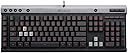
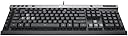
The Corsair Raptor K30 is a wired gaming keyboard designed for competitive PC gamers, featuring adjustable deep red LED backlighting, six programmable G-keys with onboard memory supporting up to 18 macros, and game-optimized anti-ghosting with a 1000 Hz USB report rate. It includes dedicated multimedia controls and a Windows lock key to enhance uninterrupted gameplay.


| ASIN | B00F0DCH9Y |
| Additional Features | Lighting |
| Antenna Location | Gaming |
| Best Sellers Rank | #144,652 in Video Games ( See Top 100 in Video Games ) #5,386 in PC Gaming Keyboards |
| Brand | Corsair |
| Button Quantity | 110 |
| Color | black |
| Compatible Devices | A PC with a high-power (+500mA) USB 2.0 port |
| Connectivity Technology | USB 2.0 Type-A |
| Customer Reviews | 4.3 4.3 out of 5 stars (165) |
| Enclosure Material | Plastic |
| External Testing Certification | N |
| Global Trade Identification Number | 00168141471780, 00843591038607 |
| Hand Orientation | Ambidextrous |
| Item Weight | 2.3 Pounds |
| Keyboard Description | Gaming |
| Keyboard Layout | QWERTY |
| Language | English |
| Manufacturer | Corsair |
| Model Number | Raptor K30 |
| Number of Keys | 110 |
| Power Source | Wired |
| Style Name | Raptor |
| Switch Type | Linear |
| Theme | Gaming |
| UPC | 729471451691 168141471780 843591038607 803982792099 |
| Water Resistance Level | Not Water Resistant |
M**Z
A solid "starting" gaming keyboard
I have a 17.3" HP Elitebook that I use for gaming. (I know, for gaming) Using a keyboard vs the keypad that's on the laptop is so much better. I'm further away from my screen and I my elbows can relax much easier. I will say this about the shipping. I don't know why but FedEx has been sending packages to the USPS instead of shipping it themselves. So it was a day delayed and that's not the vender's fault. I will fault the venders for the box they shipped the keyboard in, way oversized for the keyboard. Enough about that. Pros: Very sturdy The keys are not very clicky, but they are responsive. Keyboard length is smaller than I imagined which is perfect for long gaming sessions (my arms are not very far apart nor are they too close, it's a very comfortable fit) 3 levels of brightness settings Brightness settings are solid The lower keys are at an angle (it feels like less work when using my thumb for the space bar) Dedicated media keys Dedicated light toggle switch Dedicated "Windows Lock" key On board memory (for the different macro settings) which allows you to use this keyboard on multiple setups without having to redownload and reinput the macro key functions Cons: The light toggle switch adjusts the lights throughout the keyboard. Meaning the white lights get brighter as well. It may or may not bother some people. The keys are a little squeaky when you run your fingers lightly on them, it might bother some people. If you are used to a chiclet keyboard, you may or may not have some difficultly getting used to raising your fingers slightly to reach keys and press down on them. (it wasn't an issue with me but for some it might be) This keyboard, Corsair Raptor K30, is a 2 year model (manufactured in 2013). You don't get many of the bells and whistles that the newer gaming keyboards have. This model does not come with some kind of keyring remover. I wish it did in case I need to replace a key. I don't believe this model can add a wrist rest. Software and driver do not work with Windows 10. There is a work around to get drivers working again with Windows 10. You have to do some looking around. Overall I would suggest this keyboard for those who are looking to get a serious gaming keyboard. It isn't mechanical. But for those who are on a budget and wish to get a good product I would suggest getting this keyboard or something of this caliber. I plan on adding more to this review after a month of owning this and some serious gameplay.
D**N
After many hours of looking for a keyboard, I'm glad I got this
I mulled over the decision for many days, reading dozens upon dozens of reviews on keyboards. I looked into many of the issues that have plagued some of the higher end named boards, and I wanted a set a features within a price that I could justify spending on a keyboard with my budget. What I was looking for: Solid keys that were responsive and high profile. I can't stand low profile boards. I want my keys to feel distinctive and be able to tell where my fingers are easily. I also like the sound of the keys. Not too soft, not too loud. The keys needed to be spaced out well for my large fingers. I found alot of boards compress their keys down to make room for added features, this Corsair board sizes them just right for me. The only oddity that took a little adjusting was the difference in size/shape/position of the backspace and \ key as other reviews have mentioned, but if you're concerned about that, it didn't take me long to adjust at all. Illumination: I game in the living room at night, mostly with the lights off. The lights aren't super bright on their highest setting, but just enough to see without being distracting. Windows key lock: Works like charm, and was a feature that was a necessity for me. Volume/music controls: For some reason, alot of gaming boards drop these features for space for other things. I like to be able to adjust my music while I'm playing without having to tab out. Works fine. I haven't actually installed the software or set up the macro buttons, as I have plenty of extra buttons on my mouse. All the features I've used work fine out of the box, just plugging it in and windows detecting it. My one minor gripe about the board is the cable. It feels just a bit too short for my taste and it isn't braided like most gaming peripherals are these days. The braid helps protect from accidental damage or a curious cat.
K**.
Pretty good keyboard
I purchased this to replace the factory keyboard that came with my HP computer. That keyboard was one of those with the flat laptop style keys. Personally I prefer the old style full height keys that this Raptor K30 sports. I also like the lighting effect with being able to turn on and off the red under-lighting and adjust the lighting level. This keyboard does take up a bit more real estate on my desk, but that is to be expected with the column of programmable buttons on the left side. I'm using Windows 7 Pro and all the function keys seem to work fine for me. Bottom-line, yeah I would probably been happier with one of the more expensive keyboard with mechanical switches - but until I can justify spending that kind of money this one is more than adequate for my needs.
M**A
Excelente vendedor excelente producto recomendado producto a tiempo y excelente estado seguiré comprando más productos por este medio gracias amazon
A**R
Very Good product
A**N
Rollover is adequate. Stays clean. Why doesn't every keyboard have an open case like this?
R**R
Good
F**P
This thing is sweet. really like using it. feels sturdy, no ghosting.
Trustpilot
1 month ago
4 days ago