Buy anything from 5,000+ international stores. One checkout price. No surprise fees. Join 2M+ shoppers on Desertcart.
Desertcart purchases this item on your behalf and handles shipping, customs, and support to New Zealand.
🔥 See the unseen. Diagnose with confidence. 📱
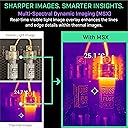
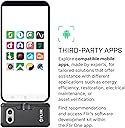
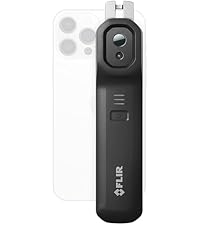
The FLIR One Pro is a compact, industrial-grade thermal imaging camera that plugs directly into USB-C Android smartphones. Featuring advanced Vivid IR super resolution (480x360) and MSX image fusion, it delivers sharp, detailed thermal visuals with ±3°C accuracy. Built tough for jobsite conditions with 1.5m drop resistance, it includes an intuitive app offering step-by-step inspection guides for home, automotive, and industrial diagnostics—empowering professionals to detect hidden issues fast and confidently.


| Best Sellers Rank | #5,242 in Industrial & Scientific ( See Top 100 in Industrial & Scientific ) #3 in Thermal Imagers |
| Customer Reviews | 4.1 out of 5 stars 1,345 Reviews |
B**R
Excellent thermal imaging tool for PCB analysis
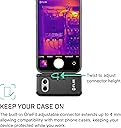
Thrilled with the performance of this camera using the free flir app (also excellent) on android. I do electronic ckt and PCB design and primarily use it with my phone (pixel 3A) to image PCBs for thermal analysis. It views in real time and optionally detects the hottest (and/or coldest) spot, and can also be configured with a few other (reposition-able) spots to report the specific temperatures at those points. Displayed temp values update very rapidly (seems around 10 times per sec or so). Saved images are saved as readily viewable .JPG files, but those files also invisibly include all the thermal data for every pixel in the image. These images can be further analyzed on a PC using the "FLIR tools" app (downloaded free from FLIR). In that app the image color scheme and range can be scaled/changed. You can display spot temps, average or peak or minimum temps within user defined regions. I generally use the camera at a distance of around 6 inches and get fine results. The only downside I've noticed when using it that close is that the optical image overlay on the thermal image does not align very well, so I just disable that feature. Quick start usage guide (for android): Charge the camera. (must be charged using it's USB-C charging jack - does not get charged at all from phone) Download/install the Flir phone app on google play. Optionally download Flir Tools (PC app) from FLIR website. Camera works without this, but allows later analysis of saved images. You might need to provide your proof of purchase details to download. Before plugging the (charged) camera into the phone, first turn it on by pressing the button on bottom of camera. LED in button will light. Not sure if this is just with mine, but the button doesn't seem to depress when pushed, but just the pressure of my finger on the button turns it on. Once on, now plug it onto the phone. Note that the knob behind the USB plug can be turned to adjust the length of the plug to fit a recessed USB port due to a phone case. The (previously downloaded) app should automatically start within a few secs of when the camera is plugged in. If it doesn't automatically start, open the app directly. The camera views the scene in real time, and snapshot images are saved to your phone just as normal photos. They can be transferred (as JPG) to your PC via the normal methods (email, USB, etc) where they can be further viewed, analyzed, printed using the Flir Tools app.
M**3
High Quality and Perfect for Industrial Use
This one is for ANROID, iPhone product equivalent is here: https://amzn.to/4c1pdSA The FLIR ONE Pro has exceeded my expectations in every way. This thermal imaging camera is of high quality and works great, especially in an industrial setting. I use it in my machining shop, and it has become an indispensable tool for detecting temperature variations and diagnosing issues with equipment. One of the standout features is its high resolution. The thermal images are clear and detailed, making it easy to pinpoint hot spots and other anomalies. This level of detail is crucial for industrial applications where precision matters. Setting it up was simple and straightforward. It connects easily to my Android smartphone via USB-C, and the accompanying app is user-friendly, offering a range of features and settings to customize the thermal imaging experience. Even if you’re not particularly tech-savvy, you’ll find it intuitive to use. Despite its advanced capabilities, the FLIR ONE Pro is compact and portable. I can easily carry it around the shop or take it on-site for inspections. The durability of the device is also impressive, which is essential in a demanding industrial environment. Overall, this thermal imaging camera is worth every penny. It’s a high-quality, reliable tool that delivers accurate results, making it ideal for industrial use. Whether you're in a machining shop or any other field requiring precise thermal imaging, the FLIR ONE Pro is highly recommended.
S**.
Great device. Android 9/10 users download app from FLIR not Google Play (supports 11 and above)
I bought this FLIR a year ago, worked great. Software stopped working at end of 2022, but it is only the software on the Google Play, since it requires Android 11 or above now. If you have Android 10 or 9 (go to their support and search on "FLIR ONE® Device Compatibility"), then you need to use a different version downloaded from their support site, found by searching for "FLIR One Legacy App v3.6.1 for Pro, LT & Gen3 Cameras" or you can open up a ticket and they will give you the link. Battery life is a little short (maybe about 20-30 mins of solid use), but the device is quite light and pocket-sized as a tradeoff. It has come in handy for me scoping out water leaks, cold air leaks and of course, having a lot of fun with the kids. I have them hide, then I track their heat footprints! It makes hide and seek easier :)
M**D
Useful little tool
Reading through the other reviews, I was a bit wary of how this IR camera attachment would work; many reviews saying it either didn't work or the app/phone didn't work. I've used this for a few weeks now and have had no issues at all. Phone: Moto G Power. I let it charge for a few hours and set my phone settings to auto open the Flir app when I plug in the attachment. The attachment is solid with my existing case. The included carrying case safely stores the attachment between uses and there are no accidental on/off button presses. Boot up takes about 20-30 seconds and power down about 2 seconds. The app is smooth and seamlessly auto rotates the screen when switching from vertical/horizontal viewing. The lag when moving about is less than a second and the image freezes for 1-2 seconds about every 2-3 min to recalibrate; or you can manually calibrate. The heat gradients are customizable and I set it to show the temp for the cross hair I have in the center of the screen for point temps. I also have two auto seeking cross hairs for the hottest and coldest temps on the screen at any given time; quite reliable and useful. The battery has been found to last longer than anticipated. Maybe a 1% drop every 2-3 minutes. Over the last several weeks I have found all of the negative comments to be unfounded but I will update my review if anything comes up. Overall I have found this IR camera attachment useful in my day to day work troubleshooting electrical panels, wire runs, plumbing, hydraulic systems, and steam systems. I do not rely on an IR camera for the bulk of my work but it's a useful tool for troubleshooting or detecting issues before they become more serious.
R**G
Was 2 stars, now 1. Virtually no support. Obsoletes devices, stops working with what used to work
UPDATE December 2024. As with all my reviews, I write about products I buy for myself and when I can, share my use experiences so that others have more to go on than some paid for review where someone gets something for free and then talks about it. I bought his over a year ago, it's been a real challenge to get any reliable use out of it because the software isn't done well and therefore the hardware is a work when it wants to affair. I've tried plenty of devices (phones and tablets) from Android Version 8 to 14. WIth Android 14 (yes there is now 15) it doesn't work. The company drops versions like a hot potato and while end of life app timelines do have their place, when an app doesn't really work the answer isn't to deprecate it and move on, the answer is to make it work, reliably. Hardware without software support is not a good value. The hardware in this case is the Flir One Pro. One would think "PRO" means professional or at least tier one function and quality. It is not. While the camera itself has in the past worked...sometimes and then on just one device semi-consistently, now it works on nothing because the software app (which is part and parcel to the camera because without the app the camera is useless) isn't well supported and becomes obsolete on even Android 9 devices. Lets be open about this, many people do not trade up hardware all the time meaning they might hold onto a phone and especially tablets. The buy a Flir One Pro and then find they can't use a device that used to work with it and the reason is what used to work (app and tablet) no longer work. The company makes an APK install file available which also doesn't work. Then, the Play Store makes the newer version of the app unavailable to you and the company doesn't offer the APK file so you can see if it will work on your older device. Remember, it used to work until an update and then stopped working. This isn't some cheap thermal camera attachment, its rather expensive in that for about 1/3 the price more you can buy a phone with a built-in thermal camera easily as good as this one and you'll have everything you need built-in. FLIR is a well known company and they sell really high end equipment but this is just one one of them. Read the volume of comments available on the Internet, lots of people have lots of problems with the APP, support and the hardware too. I regret this purchase and can't recommend you buy this unless you are willing to accept what works today might not tomorrow and you won't find it works in the future either. Execution doesn't match the idea. This is not some cheap thermal camera attachment, it's pricey and for that you should expect more than a few minutes of use before the battery drains. The connectivity is also problematic and the app you need to use which comes from the same company is sort of they had to make one so they pushed it out half baked. The quality of the actual camera is pretty good but past that is where things fail. Fully charged the connection to the phone is a hit or miss with the misses exceeding the good connections. By the time that is sorted there are perhaps a few minutes of actual battery life remaining. As he battery discharges the camera often disconnects from the phone and you are back to charging the camera. While the charging doesn't take long, probably because it's so small, the process is repeated over and over until I finally just put it back into it's nicely padded case and use something else. For the money, adding just some can get you a smartphone with a thermal camera and also true IR night vision built-in. While thermal cameras need quite a bit of power to function and IR even more, at least with a phone that has the features built-in there is more than a few minutes of actual use. I like the extendable USB connector but in execution that too has its problems. The connector if fully retracted becomes very difficult to extend and when extended it doesn't fit well into the case. Once connected to the phone or tablet (I tried both) the camera just hands there with no stability and one accidental brush up against anything and that connector will get damaged on either the camera or the phone or both. What is needed is a sleeve that slides up on the back and front to insure that the camera is somewhat protected from being bent in those directions. The entire setup as with many USB dongle type accessories is fragile so that isn't unique to this camera but the manufacturer could include some protection given the price you pay. The quality of the image is ok, midrange I'd say and the pictures are of the same quality. Once again however, the app has a lot of lag time when selcting features and the controls are clumisly arranged. The apps seems to be updated but some problems like lag time which have been reported for quite some time go unaddressed. The potential in this camera is good but until the manufacturer spends more time making it better and less time telling everyone how good it is, I can't recommend it. I had high hopes and good use cases for buying it but the price for what it does has me using alternatives that do far more with better results.
A**R
Works well for the most part
Works well, I was slightly concerned after reading other reviews, but decided to give it a try, and I've had good luck so far. Image quality isn't perfectly sharp, but is very acceptable and it's easy to tell what your looking at. Videos do tend to be jerky. Battery life was a concern I had, and the battery percent indicator is slightly wacky, it drops as soon as the camera is unplugged from the charge cord and sometimes goes up if you disconnect and reconnect it without being charged. For a test I deliberately left the camera on and my phone lit up, and it was nearly dead but still running over an hour later and had only used about 8 percent of my phone's battery. For continuous use over about 45 minutes at a time, it needs to be fully charged and a battery pack would be a good idea. The Android version of the app had caused me no trouble. The USB-C connector is just barely long enough to connect to my Moto Z2 in an OtterBox commuter, it actually doesn't quite plug in all the way, but gets close enough to work. Overall it is a great entry product into thermal imaging, maybe even good enough for semi-professional use.
K**G
Extremely compact, high-res, but slow and some odd design choices which make it flimsy and annoying
Very compact, suitable for basic home inspections and recording. I work in property development and construction, and it can be hard to identify potential air leaks and electrical faults without thermal cameras. Previous ones have been exorbitantly expensive and difficult to use, since I often have to take pictures of problematic areas and quickly communicate to the subs. This product is relatively inexpensive, but the startup time and auto shutoff function can be quite annoying. Takes 20 seconds to "warm/boot up", and switching out the app midway (a random text msg or call) shuts it off! Super annoying to start up again EVERYTIME you switch back to the app. This needs to be fixed as a software update. Image quality is good. The software seems to auto-draw some mechanical lines (the white markers) which make interpretation easier. Saves pics and videos, but for some reason you cannot include the temperature scale (on the right) with recorded images. You can save up to 3 pin-pointed temperature spots. That difference makes no sense at all. This is NOT for heavy duty use since it's a weak phone attachment held in place by the USB-C connection. Battery life is also weak. Barely 30 mins. Which means a field inspector can at best check 2-3 properties before running out, which also means they need to constantly charge it in their vehicle or something. There's a weird rotating/extendable USB-C connector, which I assume is there to make it more compatible with different Android phones. But that same function also makes the connection point weak and wiggly, even when the camera sits flush with your device. I'm terrified of dropping the phone accidentally at job sites and breaking it. Maybe take a cue from other phone attachment manufacturers (lens filters, video rigs, etc) and include a simple cradle that provides more secure attachment?
W**E
Powerful Plumbing Tool!
I'm plumbing contractor in Arizona and we often get called to address leaking pipes under the concrete or in the walls of our customers home. After many years of using acoustical electronic leak locators and 512 Hz line locators I now have a new tool in my toolbox - a FLIR ONE Pro Thermal Imaging Camera. One of the many challenges to repairing leaking pipes is finding them with minimum amount of damage to the walls or floor of the house. This FLIR camera is powerful tool which helps minimize that damage. First of all you can used this camera to trace the source of a leak in the wall. When a pipe is leaking in the wall, water creates a difference in temperature which this camera can pick up on. Many times the IR image from this camera is like following a map straight to the source of the leak. Another use for this camera is locating where plumbing manifolds are located in the walls. Often this is a hit and miss guessing game which results in extra drywall removal. Not anymore. Simply turn the hot water on at the location where you are trying to find the manifold, wait a minute or two for the water to get hot and then use the camera to find the glowing pipes in the wall. If there is insulation or some other material shielding the plumbing in the walls you might only get a small glow but this is still enough to know where to cut open the walls. One of the most helpful uses of this camera for me is after I've opened the wall and located the manifold only to find that there are several pipes, only one of which is the leaking culprit. Before my FLIR, I would try and listen to which pipe was making the most noise and then cut loose that pipe and cap it off to make sure it was the leaking pipe. This often resulted in cutting the incorrect pipe, thus requiring additional work later to re-solder the pipe back into the manifold. Now with my FLIR camera I can see exactly which pipe the water is moving through because the difference in temperature. If I'm not sure which direction the water is flowing through those pipes I simple use my torch to heat one of the copper pipes and watch which way the heat moves through the manifold piping. Last but not least, the camera is a wonder for locating hot water leaks under the concrete or in the wall. Incredible sensitivity and great imaging which allows me to show the customer exactly where the leak is at. This camera paid for itself the first time I used it.
J**D
Will save you money in the long run
Great item, already worked out where I have drafts coming in on the front door and the kitchen window, it's a big outlay but it will pay for its pretty soon by letting me know where I need to seal areas prone to drafts and save on my heating bill. I have 1 recommendation, look at the picture of my camera in its case, you will see I have cut foam away where the usbc is, this stops you having to retract the USB every time you put it back in the case, also you will see i have removed foam where the switch is, this stops the button being pressed when your putting it back in the case and the battery going flat, I've not charged mine for about 3 months and I use it about 2 minutes a day 5 days a week.
L**N
Ein spitzen Tool
Zunächst einmal eine wichtige Info: Das Gerät (Stand 09.01.19) funktioniert mit einem Samsung Galaxy Note 8 (Android 8) einwandfrei. Bevor ich die WBK an den USB-C Anschluss anstecke, schalte ich die Kamera ein und warte, bis die Status-LED von orange durchgehend leuchtend auf grün blinkend wechselt. Dann erst schließe ich die Kamera bei gestarteter App an das Smartphone. Funktioniert immer auf Anhieb ohne Probleme. Der Hinweis in der Produktbeschreibung ist für mich zumindest für das Note 8 betreffend nicht erklärbar ("HINWEIS - Nicht kompatibel mit Samsung S8, Samsung S9, Samsung Note 8....") Die Qualität ist für diesen Preis sensationell, die Auflösung absolut ausreichend (Dank MSX Darstellung erfreulich detailreich) und die Genauigkeit ist ok. Wenn ich an einigen Punkten mit meinem IR Thermometer nachmesse, gibt es leichte Abweichungen, ABER: Es handelt sich hier um eine WBK der Einsteiger-Klasse, die dafür konzipiert ist, Temperaturunterschiede mit gewissen Toleranzen darzustellen. Für Freunde der genauer Messungen empfehle ich kalibrierbare WBK's in der Preisklasse ab 2.500 Euro. In unserem gemieteten Haus hat diese Kamera blitzschnell erhebliche Kältebrücken gefunden, aus denen sich der Vermieter mit den gelobten Worten "Sie haben aber nicht richtig gelüftet" leider nicht mehr herauswinden kann. Ein sehr schönes Feature ist, dass man nachträglich Temperatur-Messungen an den erstellten Thermografien durchführen kann. Somit kann ich bequem nach erfolgter Aufnahme der Thermografien die Messungen an den interessanten Punkten durchführen. Die Verpackung ist wertig (sogar trotz Warehouse Deal ordentlich verpackt und ordentlich von Amazon deklariert!) und es wird noch ein kleines Etui für den Transport sowie ein USB-C Kabel mitgeliefert. Für mich auch in der Zukunft ein unverzichtbarer Helfer.
C**S
not compatible with most android phones
not compatible with most android phones. had to download apk of a older app and it only worked for 20 seconds.. and it took pictures instead of video. For a company this well known this is a really bad product below all expectations. A one star is too much to give.
E**N
Fungerar fint
Funger utmärkt
J**L
Excelente câmera térmica
Pontos positivos: - Resolução suficiente. - Permite detectar facilmente pontos quentes em placas de circuito impresso. - Permite detectar fugas de água no interior das paredes/tecto. - Permite detectar onde passa a canalização de água quente no interior das paredes. - Permite detectar em que pontos a habitação perde calor para o exterior. Pontos a melhorar: - A capacidade da bateria é um pouco baixa - O ajuste da imagem de video com a térmica é impossível de fazer quanto o objeto está a uma proximidade inferior a 20/30 centímetros
Trustpilot
1 month ago
3 weeks ago