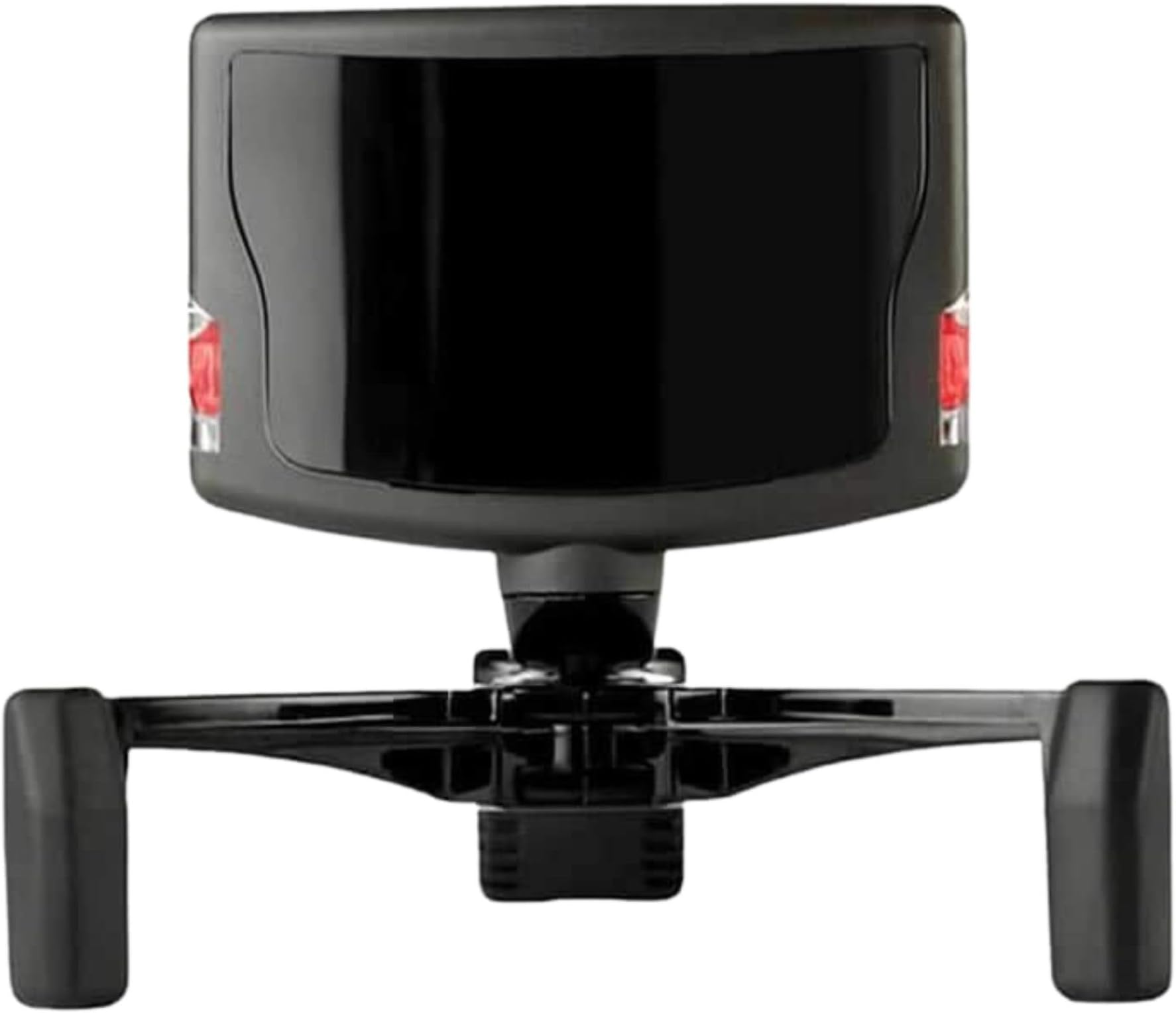
🎯 Elevate your game with precision head tracking that puts you in the pilot’s seat!
The TrackIR 5 Head Tracking System by NaturalPoint delivers cutting-edge 6DOF optical motion tracking via USB, enabling full three-dimensional head movement detection for PC gaming. Featuring a high-precision sensor with low latency and customizable software profiles, it enhances immersion in flight, racing, and combat simulators. Its magnetic mount ensures quick, tool-free setup, making it a must-have for serious sim enthusiasts seeking unparalleled realism and control.
| ASIN | B0029M6VKA |
| Best Sellers Rank | #3,903 in Video Games ( See Top 100 in Video Games ) #233 in PC Game Controllers |
| Customer Reviews | 4.3 4.3 out of 5 stars (1,921) |
| Date First Available | June 5, 2009 |
| Is Discontinued By Manufacturer | No |
| Item Weight | 2.4 ounces |
| Item model number | 92994 |
| Manufacturer | Natural Point |
| Product Dimensions | 8.82 x 7.4 x 2.13 inches; 2.4 ounces |
| Release date | February 22, 2010 |
| Type of item | Electronics |
A**.
100% worth using this instead of VR
A friend of mine bought one of these and I got to try it out first before I bought mine. I was sold on it immediately. For my purposes, I currently use it for Microsoft Flight Simulator and Warthunder. It's ridiculously easy to set up, just plug it in, download the software, then grab a hat to attach the hat clip and you're good to go. It works seamlessly with the games, all you have to do is open the TrackIR software first before you open the game. I didn't have to change any settings or anything, literally plug and play interface. What I like about this is that you have awareness of your surroundings vs being blind to everything around you in VR. It's a lot more convenient, a lot less intrusive in PC resources, not to mention a fifth of the cost. Wherever you move your head, it follows, and it's VERY accurate and smooth. For those of you that like to fly tail-draggers like I do, this allows you to open the canopy and stick your head out to see past the nose of the aircraft when taxiing. Not to mention be able to look around and find all your switches for startup procedures. 10/10 would definitely recommend.
H**)
Most important flight sim add-on!
I fly Microsoft Flight Sim X as a way to keep my head in flying while I cannot afford to exersize my real life certificate. I've been wanting one of these for a while and during the wait, Natural Point put out the new version 5. I finally bought it and, all I can say is "WOW!" Okay, that's not all I can say. When the package arrived, quickly I might add, from GoGamer, I was surprised at the size of the box. It was well over-packed and protected from the rigors of shipping. The actual unit is quite small. Unpacking from the bubble package is easier than the normal bubble packaging, too. I was going to wait for Christmas, put it under the tree, etc. but the kids will just have to understand! Setup is a snap. Installed the software from the website first, then plugged it all up. It just works. I picked one of the default profiles and went flying. It was wonderful to look around the airplane, although I habitually use the hat switch which is now largely useless. I haven't even explored all the settings, profiles, or adjusted anything but the flying is 100% better. I turned my head to look where the runway is! Simple thing, but so, so important for realism. Imagine leaning in forward to see and set the radio, or turn the OBS knob to a precise setting, or craning your neck up to see over the dash better. I'm hoping today to explore the settings some more. I picked a profile that moves actually too well. I need to expand the "dead zone" just a bit so my head movements don't make flying into what my wife calls a puke ride. It isn't of course. The only difficulty I've had so far is trying to assign buttons for "Center" and "Pause" to my Saitek yoke. I haven't figured out how to make it work. But this is due to my not having explored the software yet. The buttons assign in the Track IR software, but when I start the sim, they aren't functioning. I need to RTM. Bottom line: This Track IR should win the Nobel Peace Prize. It is an OUTSTANDING product. Even at the default settings I'm still using, it is a HUGE improvement over using the hatswitch for panning, the + and - buttons for zooming, the shift+enter to raise my head, etc. It's only going to get better for me as I improve my personal profile settings. If you are not sold on it yet, read flight sim forums for reviews. There are YouTube videos you can watch it in action. No one ever says they don't like it. If you're reading this review, you want it anyway. Buy it. You will NOT regret your purchase.
W**N
I'm Trackin'. You Trackin'?
Looking up TrackIR year back, and having used FreeCamNoIR for a while with just a webcam, it was exciting to try out an official TrackIR product. After getting it setup and using it for a while now, here's my takeaway! What You Get: In the package is the TrackIR Camera, a plastic bar made to fit on a baseball cap with the three reflective 'trackers' affixed to it, a small adjustable magnetic mount that you place the TrackIR Camera on and can then place on top of your TV or whatnot, and the usual promotional/instructions paper stuff. Programming: After downloading the drivers and software from TrackIR's website and getting everything plugged in, I gave the software a go. It's a handy tool that lets you preview movement in a 3D sphere and adjust some settings to your liking (turning range/sensitivity). There's profiles you can use or create for more settings, but I haven't done that yet. You might want to look into that first thing, as there's an 'auto-center snap' feature that means when you're looking close to dead-on wherever your center point is, the TrackIR feature won't turn your view until you move far enough outside of the deadzone. The size of the deadzone, for me at least, is small enough that I am at least aware of where my 'center' is at all times, but big enough where it's always a distraction to have my in-game-view suddenly snap whe I don't want it to--or where I have to turn my head further than I normally would, just to 'escape' the deadzone. Take this paragraph for what it's worth in my opinion: software good, but be prepared to look into changing deadzones if that's going to be a distraction for you. However, the head tracking itself is pretty darn good. There's no, or at least, very little latency--your head movement will move your view in real-time, and being able to look around in ARMA or Elite Dangerous is a pretty sweet experience! It is well implemented and functional, and that's definitely a good thing! When it comes to what games are supported, it depends. Obviously, simuation games like ARMA, Flight Simulator X, XPlane, Elite Dangerous etcetera, are going to have built-in support. Getting TrackIR working in those games was as simple as checking a box labeled "Enable TrackIR", and in Elite Dangerous' case TrackIR was working as soon as I started the game. And in ARMA 3, at least, TrackIR movement was interpreted as joystic movement--if that holds true for other games, you could probably use TrackIR inputs for other games as well--but that's just me speculating. All in all, I'm pretty satisfied with this. Fun stuff!
J**E
El track ir perfecto. No trae el track clip pro, sino el cacharrito metálico para montar en una gorra o los cascos (lo digo por si alguien no lo tiene claro). El funcionamiento, perfecto. Es el segundo que tengo, ya que antes tenía el track ir 4, que vendí hace algún tiempo. En cuanto a la entrega por parte de DHL, la hicieron dentro del plazo previsto, pero podría haber llegado mucho antes, ya que cometieron varios errores de clasificación del envío. Recogieron el paquete en Alemania el 29 de diciembre, y tenía que venir a España por transporte terrestre. El recorrido que hizo fue: Alemania, Lyon (Francia), Bruselas (Bélgica) (?!), Oslo (Noruega) (???!!!), de nuevo Bruselas, Barcelona, Coruña, y finalmente mi casa el 9 de enero. No ha llegado a tiempo para reyes (debido al viaje turístico que se hizo el paquete por el norte de Europa), pero al menos ya lo tengo...
C**N
Fonctionnel et simple à configurer. Seul inconvénient port obligatoire de la casquette avec les reflecteurs
S**N
I tried FacetrackNoIR for a few hours, thought it was really cool and gave me a taste of what headtracking would be like. But it was jittery and just not anywhere close to the level of precision I wanted. Ordered TrackIR5 a few days later after debating whether it would be worth the price and I'm happy to say I have absoloutly no regrets. I'm just using the basic trackclip that came with the product on a hat. Curves were solid out of the box and only needed like 10 seconds of tweeking on the Y-axis for me to work as I wanted. You're paying for the solid plug-and-play software just as much as you are the hardware itself. I've been using it with FSX;SE and the Chaseplane camera addon. Practicing GA patternwork has become a million times better now and just tracking your turn out on to final with your head feels amazing. In additon, I can look down to quickly access buttons and switches that before required me to hit buttons on my keyboard to swap to pre-set camera angles. If anything I just wish the mount was better suited for my laptop's thin screen. It works fine but is a tiny bit loose as it was designed for thicker bulkier monitors. It's sits okay but only at its most extreme position. Luckily the mount is magnetized and independent of the actual IR sensor / blaster meaning I can likely 3D print a new mount for my laptop or something. Otherwise tracks great, easy setup. Solid precision and absoloutly 0 un-wanted jitter or head movement out of the box. I suggest you try FacetrackNoIR to get a sense of what head tracking is and then purchase TrackIR after. It'll totally change the way you sim. Here are hopes we get TIR5 support for Flight Simulator 2020. For me its a far better solution than VR as I still get to run the sim at 1080p without it looking blurry like in VR (for me that also means less motion sickness). And overall significantly less money. I'd 100% recommend this product if you take sims even remotely seriously.
K**N
Excellent product. Bought it for using with Elite:Dangerous and it has transformed the game. Coupled with a hotas controller setup, this is the only way to get the best from Elite in my mind. I've heard people saying the Track Clip Pro is flimsy and doesn't work very well compared to the Track Clip used on a cap. I've tried both and can safely say that the Pro is superb and I have had no issues with it, nor does it feel like I could break it easily unless I grabbed at it aggressively. The only downside is that the Pro needs to fit to your headset, so there isn't the option to not used headphones when gaming. To be honest, I always wear a headset so it's no big issue for me. Can take a bit of getting used to, but after a week or so it becomes second nature. The added bonus is that it supports so many other games I have too. I also use Flight Sim and have done for years, but haven't yet tried TIR with it yet, so can't comment - but I have only ever heard good things about it. I just can't stop playing Elite, so haven't had the time! I expect using it with FSX addons like the PMDG NGX must be great though and hope to try it out soon. A few tips: Make sure you have enough room above your monitor for the camera to sit on. I had to remove a shelf that sat above my monitor to make room for it. Give yourself about 10cm and you should be fine. If using it for Elite, download a good Elite profile to use with it. Search the net and you will find them. Also try combining this with Voice Attack (http://www.voiceattack.com) and ED Voice Pack (http://www.elitedangerousvoicepack.com) and you will have the ultimate setup for Elite. Controlling your ship with voice commands is superb!
M**M
Great product, recommend it strongly
Trustpilot
2 weeks ago
1 month ago