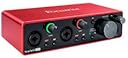
🎧 Elevate Your Sound, Own Your Studio Vibe
The Focusrite Scarlett 2i2 3rd Gen is a compact, USB-C powered audio interface designed for professional-grade recording, streaming, and podcasting. Featuring two upgraded mic preamps with Air mode, dual high-headroom instrument inputs, and 24-bit/192kHz converters, it delivers crystal-clear, studio-quality sound. Compatible with Mac and PC, it includes a comprehensive software bundle to unleash your creative potential right out of the box.


| ASIN | B07QR73T66 |
| Best Sellers Rank | #23,412 in Musical Instruments ( See Top 100 in Musical Instruments ) #158 in Computer Recording Audio Interfaces |
| Body Material | Aluminum |
| Color Name | Red |
| Color Screen | No |
| Compatible Devices | Microphone, Instrument, Personal Computer, Tablet, Headphones, Smartphone, Studio Monitors |
| Connector Type | 2-in / 2-out, USB-C |
| Customer Reviews | 4.7 4.7 out of 5 stars (15,638) |
| Date First Available | June 27, 2019 |
| Hardware Interface | USB 2.0 |
| Hardware Platform | Audio Interface |
| Is Discontinued By Manufacturer | No |
| Item Weight | 1.1 pounds |
| Item model number | AMS-SCARLETT-2I2-3G |
| Material Type | Aluminum |
| Mixer Channel Quantity | 2 |
| Operating System | Mac OS, Windows OS, iOS |
| Product Dimensions | 3.88 x 6.88 x 1.88 inches |
| Supported Software | All audio recording software |
| Voltage | 240 Volts |
L**0
Plays my speakers way better than my old onboard sound
I have an x370 asus crosshair vi hero motherboard with onboard sound and its supposed to have upgraded sound. I got new creative gigaworks t20 series II speakers and i could never turn my bass up near halfway because it would sound awful. I thought the speakers just couldn't handle the bass, i tried movies, games, many different songs, cds, the speakers just seemed like they couldn't handle the bass. with the new focusrite sound mixer, i plugged these up and the sound was 100% better. I could max out the bass if i wanted to, and it was clear and smooth. It sounded great at any settings i changed on the speakers, just like if you liked that setting. it sounded like it was working. there is no lag or any problems with this compared to a regular like pci card soundcard. its awesome and i plugged up a microphone and it sounds 100x better than my old onboard made my mic sound. people said it sounded basically before like a robot, very low quality with no real lifelike sounding to it. it made it sound way better. i got a new mic and it sounds very good for the quality of the cheap microphone that i did get. this is the best sound mixer/card ive ever got. great price to performance ratio. Update 4yrs later: The mixer has started to have audio crackles and starts to fritz out on me occassionally now after having it about 4 years. I have to unplug and plug it back up to get it to work again. Beyond any warranty period and a bit high for this length of working time. I've heard other comments but I can't confirm anything but have found a few other same results on focusrite. I dont know what else to pick, maybe should have picked something else. Should have done some research before I picked this up. I dont know if the newer versions would be any better. The sound was much better than my other motherboards "upgraded" sound compared to it, though.
T**S
Unleash Your Creative Potential with the Focusrite Scarlett 2i2 3rd Gen USB Audio Interface
Review: The Focusrite Scarlett 2i2 3rd Gen USB Audio Interface is an absolute game-changer for anyone involved in recording, songwriting, streaming, or podcasting. As an owner of this remarkable device, I can confidently say that it has revolutionized my creative process and elevated the quality of my audio productions. First and foremost, the audio fidelity delivered by the Scarlett 2i2 is unparalleled. The pristine sound reproduction, powered by Focusrite's renowned preamps, captures every nuance and detail with remarkable clarity. Whether you're a vocalist, musician, or podcaster, this audio interface ensures that your recordings are professional-grade and sonically pleasing. Setting up the Scarlett 2i2 is a breeze, thanks to its user-friendly design. The intuitive controls and clear LED indicators make it easy to navigate and adjust settings on the fly. The inclusion of two XLR/TRS combo inputs allows for simultaneous recording of vocals and instruments, accommodating versatile recording scenarios with ease. One standout feature of the Scarlett 2i2 is its exceptional compatibility. With USB connectivity, it seamlessly integrates with your preferred digital audio workstation (DAW) and is compatible with both Mac and PC systems. This versatility ensures that you can unleash your creativity without any limitations. Furthermore, the Scarlett 2i2's rugged and robust build quality inspires confidence for both studio and on-the-go use. Its compact size makes it highly portable, allowing you to take your recording studio wherever inspiration strikes. Whether you're an aspiring musician, established artist, or content creator, the Focusrite Scarlett 2i2 3rd Gen USB Audio Interface is an indispensable tool. It empowers you to capture professional-grade audio with ease, elevating your recordings, songwriting sessions, streaming performances, and podcast episodes to new heights. Investing in the Scarlett 2i2 is a decision you won't regret. It's a reliable and versatile audio interface that unlocks your creative potential, making it an essential addition to any studio setup. Get ready to experience audio excellence like never before with the Focusrite Scarlett 2i2 3rd Gen USB Audio Interface!
H**R
Clean Digitizer
I chose the 2i2 to digitize my vinyl and it works well. It was quickly recognized by Windows 10; the supplied software allows good control of the digitizing rate. The Nuetrik style input connectors accept 1/4-in phone plugs (simple tip & ring) for line-level inputs. Two RCA-to-phone plug cables connected the line level outs from my amplifier to the 2i2. Having a simple knob to adjust the input sensitivity is very welcomed. The pictures on line show a green ring around the left channel gain knob and red around right. This is totally an artificial effect; the color changes to indicate if the input level is good (green) or clipping (red) and typically is quite dynamic as it changes with the actual level of the music. The color can be changed by the Focusrite software from the PC, but I used the defaults. The front panel headphone jack is a real convenience for getting the initial analog setup all scoped out. Critically, the Focusrite software does NOT provide actual recording capability; it simply makes the 2i2 available as a audio device for your computer. Other software will provide your web hosting or album recording function. I chose Vinyl Studio software and the 2i2 integrated beautifully into that package. I did not try the mic input function; this uses the XLR-style input on the Nuetrik connectors. If you need to do a stereo mix of mics and line level inputs, you may need the 4i4. Otherwise, this is a great little input device with very clear directions and driver software that loaded easily on a fully patched Win 10 PC. I did not need to contact Focusrite tech support as the directions were easy to follow and everything worked the first time.
V**E
Hay esfuerzos encomiables en las tarjetas de sonido e interfaces USB, pero en cuanto te pones un poco en serio no hay otro modelo al que acudir: durante tres generaciones las interfaces Scarlett de Focusrite son recomendaciones de referencia para músicos en un estudio casero o hacer un podcast serio. Este modelo 2i2 cuenta, como su nombre indica, con 2 entradas XLR y soporta alimentación Phantom P48 de 48 V. Normalmente los micrófonos de calidad como el Rode Procaster (enlace) funcionan sin averiarse si conectas la alimentación, pero en lo posible mejor quítala si no la vas a usar. La preamplificación de esta interfaz es legendaria, como lo es la confianza que ofrece: es uno de esos productos que, sencillamente, hacen lo que dicen y no dan problemas. Que se conecte con un solo USB y su reducido tamaño la hacen ideal para meter interfaz y cables en una mochila e ir a grabar a cualquier sitio, además de la extrema sencillez de uso del panel de control de Focusrite y el valor añadido del software que obtienes con la compra. Para los que ya conozcan las Scarlett, en esta 3ª generación Focusrite ha ampliado las ya excelentes cualidades técnicas de la interfaz, pero la mayor novedad reside en que ahora se conecta con un puerto USB tipo C, más opciones de configuración de E/S y un "Air Mode" que potencia las pistas de voz emulando la amplificación de un amplificador analógico. Además, las ruedas de ajuste de ganancia se iluminan con un código semáforo: verde cuando la ganancia está bien configurada, ámbar cuando nos estamos pasando y roja si la estamos saturando. Todas estas características más la sencillez de uso la hacen ideal para auténticos principiantes pero con la posibilidad de obtener un resultado profesional con poco tiempo de aprendizaje. Instalar la interfaz es trivialmente sencillo: la conectas por primera vez y ya arranca la instalación, que te guía para registrar el número de serie en la web de Focusrite y obtener el software añadido. Este software permite hacer de todo y tiene la ventaja de que te ayuda a familiarizarte con herramientas que son estándar de la industria incluyendo una versión personalizada de Avid ProTools First. Si ves que estás un poco perdido con tu nueva interfaz, échale un vistazo a los vídeos de la guía rápida, que explican todo muy detalladamente con guías paso a paso que imprimir - eso sí, en inglés. Sin ninguna duda, la 3ª generación de interfaces Scarlett es la mejor que haya producido Focusrite y, a su vez, son posiblemente las mejores interfaces que pueda comprar un usuario doméstico que se ponga en serio. Tal vez si ya tienes una el cambio no merezca la pena salvo para pasar a un modelo con más E/S pero es un producto intachable, con cambios que mejoran la vida al usuario y que no estropean ninguna de las características a las que deben su éxito. Recomendadísimo.
A**M
I’m using this to record mediations using an audiotechnica mic with FL studio, it works well and I’ve had no problems , although sometimes it needs to be restarted but I’m not sure if that’s fl studio glitching or the device
O**K
Ok
S**L
This is a legendary sound card. You can always go for it
B**M
ممتاز
Trustpilot
1 week ago
1 day ago