Buy anything from 5,000+ international stores. One checkout price. No surprise fees. Join 2M+ shoppers on Desertcart.
Desertcart purchases this item on your behalf and handles shipping, customs, and support to New Zealand.
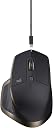
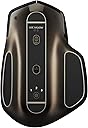
🚀 Elevate your workflow with the mouse that masters multitasking and precision.
The Logitech MX Master Wireless Mouse is a premium productivity tool featuring a Darkfield high-precision sensor with up to 4000 DPI, a speed-adaptive scroll wheel for fluid navigation, and the ability to connect and switch between three devices effortlessly. Designed with ergonomic contours for all-day comfort, it offers up to 40 days of battery life on a single charge and supports fast charging. Compatible with Windows and Mac, it’s the go-to mouse for professionals demanding precision, speed, and seamless multi-device control.
| ASIN | B00TZR3WRM |
| Additional Features | Wireless |
| Antenna Location | General computer use |
| Are Batteries Included | Yes |
| Are Batteries Required | Yes |
| Battery Average Life | 40 days |
| Best Sellers Rank | #3,564 in Computer Mice |
| Brand | Logitech |
| Built-In Media | Unifying receiver |
| Button Quantity | 8 |
| Color | Black |
| Compatible Devices | Personal Computer |
| Connectivity Technology | Wireless |
| Customer Reviews | 4.3 out of 5 stars 4,406 Reviews |
| Embellishment Feature | Crystal |
| Enclosure Material | Plastic |
| Finish | Glossy |
| Global Trade Identification Number | 10097855111590 |
| Hand Orientation | Right |
| Hardware Platform | PC |
| Item Dimensions L x W | 1.9"L x 3.37"W |
| Item Weight | 0.32 Pounds |
| Manufacturer | Logitech |
| Mfr Part Number | 910-004337 |
| Model Name | 910-004337 |
| Model Number | 910-004337 |
| Mouse Maximum Sensitivity | 1600 Dots per Inch |
| Movement Detection | Laser |
| Movement Detection Technology | Laser |
| Number of Batteries | 1 A batteries required. (included) |
| Number of Buttons | 8 |
| Operating System | Mac OS X 10.7 Lion, Windows 10 |
| Power Source | Battery Powered |
| Range | feet |
| Special Feature | Wireless |
| Style Name | 910-004337 |
| Theme | Computing |
| UPC | 097855111593 |
| Unit Count | 1.0 Count |
B**K
Best Professional Productivity Mouse on the Market!
I’m usually not one to spend more than $50 on a computer accessory, but it was the holidays and I figured I would treat myself to a computer related goodie. Also, it was about the time when my cheap HP mouse began to look out of place amidst the rest of the nice things on my desk. I set out looking for an ergonomic, attractive, yet technical mouse for use at my desk in my bedroom. I considered Apple’s Magic mouse as it was attractive, but it didn’t fit into my other two requirements. Then, I discovered the Logitech MX Master. From the reviews on Amazon it seemed as if it was exactly what I was looking for. The idea of a large, ergonomic mouse that looked good sold me on the device immediately. I waited eagerly for the mouse arrive, and then by the magic of Amazon Prime, there it was two day’s later – in my mailbox. Initially, I was impressed with how great the packaging was, but on a $75+ mouse, that is what I would expect. I ripped through the packaging and heading straight for the mouse. I set it down on my mouse pad and slowly placed my hand on the mouse. I immediately knew that this mouse was special. It felt so comfortable and so natural in my hand. I began clicking the mouse and scrolling. The clicks of the mouse are unbelievably satisfying and crisp and the scrolling experience is like no other mouse on the market. Logitech has this technology called SmartShift where if you scroll the mouse very rapidly, the mouse will go into free scrolling mode to allow for faster more fluid scrolling, but if you are moving the scroll wheel normally, it will stay in the traditional ratchet mode. You can shift between the free scrolling mode and ratchet scrolling mode by using software or by clicking the button below the scroll wheel to toggle it manually. Having a horizontal scroll wheel felt weird at first but now it’s second nature and feels natural. The thumb rest button is not very useful to me as I often forget it is there, but maybe that is just because I haven’t played around with the Logitech Options software’s customization enough. The connectivity options are nothing new from Logitech (you can use the USB dongle or Bluetooth), but what impressed me the most was the ability to have the MX Master connected to three devices simultaneously via the toggle on the bottom. This feature is handy if you use multiple machines or dual boot OS’s on the same machine. Overall, I am very impressed with the quality and functionality of the Logitech MX Master and recommend it to anybody looking for a well made professional computer mouse.
M**E
Great wireless performance and functionality
This is probably the best wireless mouse you'll find on the market right now. Funtionality: First off, they brought back smartshift which was one of my favorite things about the original mx revolution and they've upped their game with gesture buttons as well. This mouse effectively has 15 buttons thanks to gestures, which means I'm able to launch almost every frequently used app I use and I have it set to close windows as well. This helps a lot when I need to use a calculator I can just gesture up, do the quick calculation, and close it instantly with no fiddling. Obviously there is more that this can do, this is just what I use. Comfort: This feels pretty good in hand, although it's a tall mouse to hold and may be uncomfortable if you use a claw style grip. It's definitely for palm grips which is what I have, and even still it's a bit too tall for my liking. Another pain point is that I have nowhere to rest my ring finger. I have trouble choosing to rest it on the side or change my grip to have in on the RMB, which always feels weird to me. I don't think the other iterations had this problem since the sides always had a little molded grip for your ring finger. I will note the rubber they use on the thumb rest and side with the polygonal pattern is surprisingly nice. There's something about the pattern that feels really good. The vertical scroll wheel feels amazing and the clicks are more satisfying than any other mouse I've used yet, but the horizontal one feels too smooth, and I don't ever know how fast I'm scrolling since there's no click to it. So overall, the mouse feels pretty good, but is not the most comfortable one I've used. Performance: This was actually a welcome surprise for me. I found this performed almost as good as my previous wired mouse, and the extra input lag was negligible. Of course if you're a pro gamer or something you probably wouldn't want this, but if you are one, you probably wouldn't be looking here to begin with. For your average game, this is more than enough. I find it's plenty fast for games like Overwatch, where modest speed is important, but I doubt it would be great for super twitchy games like CS GO. Wireless performance has come a long way in the last few years, and this mouse proves it. Battery Life: Can't complain, it lasts an absurd amount of time. About a month of regular use on a single charge, or a few weeks of incredibly heavy use. This has always been something the MX line has excelled in, and continues to do so. Bottom line: Get this if you aren't a pro gamer and can afford it. If you use a claw grip or have small hands try it out first before buying. This mouse has a lot going for it and is a great buy for almost anyone.
B**N
Expensive but worth it!
This mouse is pretty awesome. Here are my opinions on some common complaints: - Front/Back buttons hard to reach? For me it's not difficult at all to reach the front and back buttons. I actually like this design better than my performance mx and marathon m705. More details below. - Bluetooth connectivity: I can't comment on this because I use the unifying receiver on my desktop. I do not have any issues with the receiver. - Comfort: Some people have complained that the mouse kind of bites into their hand due to the higher curvature. I haven't had this problem. I actually like the higher arch as it supports my hand better and puts it in a more natural position. So, the full review. Here we go. - Scroll wheel mode switch button: Useful if you don't like the adaptive scrolling feature (I happen to love it) or just want it always in free scroll, but you can also reassign the button to do other things like...well pretty much whatever you want. There's too many options to list. - Main scroll wheel: The clicks for the main scroll wheel feel nice and smooth but are also are easy to count if you need some precise scrolling. The adaptive scrolling feature is pretty legit. You can adjust the sensitivity of this feature so that it requires more or less flicking force to get it to switch to free spinning mode. Scroll normally, it stays in clicky mode. Flick it and it spins freely. Pretty darn cool. - Thumb wheel: A nifty feature and probably extremely useful for excel users or something similar. I don't use it much but it's nice to have when I do need to side scroll. You can change the function of the scroll wheel to basically whatever you want, such as changing tabs in Chrome, but switching tabs with the thumb wheel was laggy, making it hard to get to the tab I wanted, and I couldn't think of anything else actually useful to me, so I left it as the standard side scrolling function. - Front/Back buttons: I read in several places that these buttons were hard to reach and tell the difference between. For me this is not the case. I really like the new design for these buttons for 2 reasons. One, the buttons have an edge to them that makes it easy for me to distinguish which button is which since they are right on top of each other. Second is that the front button is actually reachable now. On my performance mx and marathon m705 the front button is so far forward that I never used it because it was too hard to reach. Now, on the Mx Master I use it all the time and I've assigned a keystroke so that when I press the forward button it cycles through tabs on Chrome. Very handy. If you do have trouble reaching the back button or accidentally hitting the wrong one, you can just assign the same function to both buttons. Then it doesn't matter which one you hit. - Gesture button: You can do a lot of cool things with the gesture button. I have mine set so that when I press and hold it and move the mouse left or right it adjusts the volume, and up or down will maximize or minimize the current window. Also I've set just a quick press of the gesture button to open a new tab in Chrome. All of the buttons are customizable, and given the option for keystroke assignments I think you can do just about any action you could ever want to do. At the very least I can say there are a LOT of options. If there's something you wish you could do with one of the buttons on this mouse, chances are you can. As far as feel goes, this mouse is more comfortable to me than all the other mice I own. The higher arch fits my hand better and allows it to rest in a more natural position. The material it's made out of feels good under my hand and the buttons all click nicely. They aren't too loud or hard to push, and not too easy that I accidentally click things. This is a very high quality mouse. Definitely worth the $90.
C**N
An only slightly flawed work of art
This will be my impression after a little over a week of use. I'll try to update this at a later time, if anything changes. The first thing most people will notice about this mouse is its size. It's designed to really fill your hand. The back arch can easily fill my palm without my fingers falling off the front of the mouse or dragging on either side. I'm not sure what the experience would be like for someone with especially small hands but it feels great for someone with larger and bulkier hands. If you're bothered by other mice with really low profiles, this mouse should make you quite happy. The same for people who like heavier mice. The weight is on the heavier side and isn't adjustable (like some gaming mice allow) but I prefer heavy mice for better accuracy. If you're still a hardcore claw-grip user, like I am, the size and weight are still quite comfortable, though. I tend to plant my wrist on my desk and move the mouse with just my fingers (so my palm is well above the mouse) and it's definitely not an issue for accuracy or comfort. The second feature most people will likely notice is the scroll wheel. This is quite a unique feature for this mouse. It has three modes of operation. A traditional ratchet action where it clicks to a stop as you roll it. A free spin mode where the ratchet physically disengages and the weighty wheel spins with as much momentum as you give it (a very long spin time). And a "SmartShift" mode where it operates as a ratchet at low speeds and free spins at high speeds. The ratchet engagement is software driven so the modes can be entirely customized. There is a button behind the wheel to switch between your default mode and the freespin mode. And the software allows you to turn SmartShift on or off, set a default mode (ratchet or freespin) when SmartShift is disabled, and set the SmartShift sensitivity. That sensitivity determines how fast the wheel has to move to switch from ratchet to freespin and goes from all but the slowest spin triggering it to you having to really throw the wheel to trigger it. So there shouldn't be any problems with you accidentally entering freespin when you don't mean to. With all of that in mind, the free scroll is an amazing feature. If you open long document or browse tall web pages, you'll wonder how you ever got by without the ability to just flick the wheel and glide to your destination in an instant. As for the wheel itself, it has quite a nice feel to it. The middle click has a lengthy actuation with a satisfying click at the bottom. The grooves on the wheel are quite a bit deeper than most mice', likely to help the ratchet catch the wheel when it's freespinning. The wheel is a bit looser than many mice I've used, though. If you really enjoy a stiff roll with solid resistance between clicks, you might find this a bit uncomfortable, at first. I was worried about that myself and tested it in ARMA (where a precise scroll wheel can be very important) and didn't have any issues with overshooting my target menu item. If it's really an issue for you, though, you can change the scroll wheel behavior per application so you could set something like ARMA or Photoshop to pure ratchet mode. Along those lines, the software is quite flexible. Every button except left click, right click, and vertical scroll can be reassigned (the left and right buttons can at least be swapped). Even the scroll mode button can be reassigned. Which brings up a more hidden feature. The thumb rest is actually a 5-action tilt pad. You can press down or press down and tilt in a cardinal direction to issue any command you want. By default, the software comes with a library of pre-made commands such as opening the calculator, maximizing the selected window, controlling media, and the like. It also allows you to create custom key combinations (eg. Ctrl + Alt + Shift + 0). While it's not quite as flexible as some higher-end gaming mice might allow with fully-timed macro playback or even lua scripting, it should handle most user's needs well and can issue commands to open a file or application, which you could probably dump your lua script into. I haven't tested it yet but I'd likely use the thumb click to control Push-To-Talk in VOIP applications. And, as mentioned above, almost all of the settings (keybinds, scroll mode, sensitivity, etc) can be set both globally and per application). Other settings you can customize include: Smooth scrolling: Software emulation for phone scrolling that seems to apply a smoother velocity curve to the scroll wheel (in software, not the physical wheel's motion) so your scrolls come to a feathered stop. I found this to be a bit choppy but it could be my browser as much as the mouse. Scroll wheel direction: Inverted or not. Thumb wheel direction: Inverted or not. Thumb wheel sensitivity And Pointer speed. That last one is probably one of only two weak points for the mouse. The sensitivity can only be controlled two ways. 1. Open the settings and change the sensitivity slider. 2. Assign the "Change Sensitivity" command to a button. The latter would be great if it allowed for three or four settings, as with my old rat7. Instead, it only allows for a toggle between the global sensitivity and your custom one for that command. That could well be enough for most people but it would be nice to see Logitech expand their software to allow more options. If you're really desperate for more, I guess you could assign the tilt pad directions to different sensitivity levels but that starts getting a bit silly quickly. The other weakness would be that the mouse is wireless. This is very subjective, though. Since I don't travel or use the mouse with a laptop, I'd prefer it to be wired for better reliability and lower input latency (as well as avoiding the need for charging). That said, I've yet to have any problems with it being wireless. I charged the mouse when it first arrived and the indicator still says it has a full charge after a week of use (A total of probably 48-60 hrs of continuous use). The mouse has a sleep timer (~30 min, I think) so it will automatically turn off when not in use. It was already mostly charged from the factory so I don't yet know how long a full charge takes but it doesn't really seem to matter much since you can use and charge the mouse simultaneously and, at presumably a month or more on a single charge, I'd be happy to let it charge over night, once it gets low. And, if I had to nitpick, I'd wish Logitech had put the forward and backward buttons (mouse 4 and 5) in front of the horizontal wheel and made them taller, rather than intertwining them. I use those two buttons way more than I'd ever use the horizontal scroll so it's a bit of a bother having to reach my thumb so far back to find the buttons. -- Overall, the mouse appears to be a great buy, even for the somewhat higher price (though, still less than some). The build quality is solid, the slightly tactile material feels great, and the mouse looks sleek and classy. The software is very well presented and should be easy for both novice and advanced users to customize (though, it would be nice to see Logitech continue to expand on it for power users). And the battery life, so far, appears to be excellent. This is an easy recommendation for anyone looking for a high-quality mouse.
Z**Z
The best mouse that my hand has ever held. Period.
I rarely write reviews (I know, I'm a bad Amazon-er), but this mouse is incredible. It has been a long time since I've used a mouse that does anything other than right or left click, because the Apple trackpads are just so intuitive with all their capabilities, why would I ever need a mouse? Well, I've been doing a lot of my work in one spot, at a home desk, and I found myself pulling out that same old mouse from 2001(?) (first optical one ever sold at costco). It worked somewhat. But I missed the functionality of the Apple trackpad! So I bought an external trackpad in attempts to make working at a desk more comfortable. Within the first 4 hours of using that trackpad, my wrist and two fingers were hurting. Nope, not getting carpal tunnel. I've always liked the Logitech products I've owned, so I looked at their site and saw this funny, space-ship looking thing and laughed a little. Then I saw the portable one version 2, and liked the thought of it. I saw that the portable one didn't have a "smart-scroll" feature, but the MX Master did, plus some other buttons. Usually, buttons frighten me a little because I forget what they all do. Given, I've had this for a day now, but oh my goodness, I didn't realize what I've been missing. This mouse does it all! Literally. It could be a TV remote control if you set it up to do so with that device. Oh yeah, you can program the buttons to three different devices and switch between them at the push of a button. It uses bluetooth, so I didn't have to worry about filling a port on my closed laptop that runs my external display either. One con: It is a bit large, and I have Large/X-Large hands. The natural angle my hand sits on it makes my wrist feel unsupported (just a touch). As a right-hand user, the left side of the mouse is pretty high, but not like one of those "vertical" mice (not a joystick), and it is taking some getting used to. Every hour, it feels more and more natural, and although I initially thought it was HUGE, I don't think I would want anything smaller now. It is sleek, it is jam-packed full of customizable functionality so that it WILL feel natural. Just give it a try, download the software, set the buttons to what works for you, and I don't see how you won't love it. Oh yeah, the main reason for disliking the Apple Trackpad was the immediate onset of hand pains. Those are gone. That big funny looking wing is actually a button that supports your hand's weight and only clicks when you mean to. Then the sides of it are covered in more wonderful buttons. If only that vertical secondary wheel on the side was a mini-ball.... then it could do the scrolling both vertically AND horizontally... instead, I have it currently adjusting my volume. Happy Shopping!
C**R
The form factor is pretty great, possibly a bit too large. Very cool product in most aspects.
This mouse is quite up to the hype that the reviews build it up to. 1. FORM FACTOR The form factor is great. Arguably a bit too large, but even for my wife with her relatively small hands she claims it to be comfortable. This is always gonna be subjective. That said the curvatures on the mouse shell should be enough to cater to most. The placement of the back and forward buttons just behind the horizontal scroll wheel (which I will get to in section 4), which takes up the more traditional positioning of the back and forward buttons takes SOME getting used to. Your thumb will take a little getting used to. I LIKE that the backward button 'feels' bigger and much more prominent than the forward button, as I find the forward button in general quite useless and hardly used. This is somewhat subjective, and some MAY lament the loss of more prominently positioned backward AND forward side buttons in lieu of the horizontal scroll wheel. 2. SENSOR The 'dark-laser' sensor which allows it track on most surfaces, even glass, is pretty great. The accuracy is more than enough for 'productivity work' and probably decent enough for most 'multimedia work', even graphics, so long as you turn off 'Enhanced Pointer Precision' function OFF in Windows (the thing is such a mess and puts many decent mouse to shame). 3. BATTERY The battery life seems alright, it's long enough that you don't feel like it really gets in the way, as long as you remember to charge it. The 'micro' cable isn't TOO micro, allowing you to charge just fine while you use it. 4. SCROLL WHEEL*S* The horizontal scroll wheel on the side will stand out first and foremost. You will probably find most websites are optimized for vertical scrolling anyway, rendering the horizontal wheel largely unused while browsing. However, in productivity/media software, like hulking excelsheets, over the horizontal thumbnails strip inside a video editing software, or zoomed in tight on an image in photoshop, it WILL come in quite handy. The vertical wheel, positioned more traditionally just about where it is for any mouse, is where this mouse ACTUALLY separates itself. Everyone's seen their share of varieties of 'clicky' wheels, that are physically impeded for control, and some will have seen the 'free scrolling' wheels roll unimpeded for fast scrolls, and a handful will have seen mice that let you switch back and forth between clicky AND free wheel modes. This mouse does that, but it gives you the option to switch 'automatically' without pressing or clicking any switches. The vertical wheel on this mouse is pressure sensitive. Upon putting pressure on the wheel as you spin the normally 'clicky' wheel, the wheel mechanically switch to a free wheeling mode until you stop the spinning, which will then mechanically switch back with a cool satisfying effect. You can of course adjust the sensitivity of the pressure required to switch on this free-wheeling effect, and you can also simply opt to do it the old school way with a manual press of a button pressed just below the mouse. It's... pretty damn cool 5. LESS-THAN-INTUITIVE / NOT-THE-MOST VERSATILE SOFTWARE The software is not the most intuitive but it will get the job done for the most part. It would have been nice to have a DPI switch function or a 'DPI Shift" function carried over from the mouse' gaming cousins to bind to some of the keys, but at least you can shift the DPI. It IS too bad that they don't show what numeric value of DPI you're switching to in the software, instead of giving you the impression that you're simply changing the cursor speed. Also the fact that you can fully customize the gesture keys isn't clear enough. Once again, NOT the most intuitive, but functional enough. It COULD have done with some support for macro programming, but mleh. It is what it is, this is probably why a lot of tech-savy productivity users are shifting more onto gaming hardware, it would be neat if Logitech decided to spread the wealth a bit. 6. CONNECTIVITY The included 'Unifier' dongle (which lets you put multiple Logitech devices on one dongle), and continued support of the Unified dongles is a plus. I hope never to see the day when these dongles are phased out. For those on modern day laptops with little USB ports to spare, bluetooth seems to work quite well enough (provided the rest of your hardware's firmwares are up to date). 7. BUILD The build of the mouse is good, it's got a weightiness to it that matches it's hefty exterior. Aesthetically, this once again is subjective, it's pleasing. It's not too out-of-worldy like a lot of the gaming mouse, but stands out just enough. The buttons feel solid..... This is the only place where I MIGHT raise a little complaint, besides the very slightly underwhelming software. The scroll wheel..., at least mine, rattles. It's somewhat annoying. The mouse hasn't been dropped or what not. I am guessing the rattle is inevitable and caused by the 'auto' switching mechanic. The only and a rather minor peeve I have with the hardware.
S**F
Great mouse, but wait for it to go on sale.
I bought this for work when it was on sale for around $60 so please note my rating is based on that price point, not the current. I have two devices at work (a laptop and a Surface) so the ability to switch back and forth between paired devices comes in handy. The gesture button and options with it are also and awesome feature. I work in IT so I use this all day, 5 days a week. The battery usually lasts about 2 weeks before it needs charged. When it gets low you'll get an on screen warning that's hard to miss. I think it takes about a couple hours to charge and the included cable is very long so using it as a wired mouse for a little while is not a problem. It's a larger mouse (which I'm a fan of) and is shaped well. I'm a huge fan of hyper-fast scrolling and on all my other Logitech mice I only lock it when gaming. But this one will automatically change over to hyper scrolling if the wheel is flicked with enough force while locked, which works really well. You can still switch to hyper scroll permanently but I enjoy the best-of-both-worlds option offered here. The side scroll wheel is nice, but outside of Excel (where it can be quite jumpy) horizontal scrolling isn't really that necessary anymore. I have 3, 1080p monitors at work so it's very rare to see the side scroller outside of an Excel sheet. My only real complaints with this device are the location of the forward/back buttons. This was my first mouse where they are stacked on top of each other and not side-to-side. It took a few days to get used to that. Also, there's no compartment to store the unifying receiver. I had issues with the Bluetooth drivers on my laptop at work when I first got this and it dropped often. After installing the latest versions I never lost connectivity, but the cursor would get jumpy after an hour or so. My laptop has since been updated to Windows build 1709 and have not had any Bluetooth issues with this device since, but I had been using the receiver due to the earlier issues and still do since there's no where else to put it and if I ever bring it home for personal use on my desktops I'll need it since neither have Bluetooth. Note that I completely blame my laptop for the Bluetooth issues and not this mouse. I paired it to my Surface tablet on day one and have had zero issues with it since. So like I said at the start I paid about 40% less than what it's currently going for on Amazon new. $100 is a lot to spend on a mouse, even one like this with a lot going for it. There's also a newer version out, but Flow is the only compelling feature in my opinion. If you can catch this on sale I'd say it's a good buy at around $60, but I don't know if I'd pay full price for it.
R**N
Great mouse but lacking some key features...
Update to this, application specific settings have been added! Perfect! 👌 I'm only giving this 3 stars because the title that came up when I moused over it said "its okay", which sounds better than "i don't like it". I'd say I'm in the middle on this. I just received the mouse today and it is INCREDIBLE, but seriously lacking some features for power users. I have been a fan of Logitech mice since using the Revolution Mouse. I then upgraded to the Performance MX and have been faithfully using it for the last 4 years. I am a programmer, graphic artist, video editor, and all around IT person. I have plenty of reasons to use different settings in different applications, this is why I LOVE these mice. That said, let me get into the strengths and weaknesses of the mouse. The adaptive scrolling on the MX Master is what I've been needing for a long time. It will go from slowly click scrolling to the hyper scroll simply by flicking the wheel, you don't need to press a button to switch between the modes now! The gestures are pretty cool, I've always been a heavy user of the thumb button on the Performance mouse, I really like that you can use the gesture button as a button but then couple it with mouse movements and you get 5 different actions out of the one button. One action is just from clicking the button, the other 4 are from holding the button and moving the mouse up, down, left or right. You can also truly customize all of the buttons on the mouse to do anything else you want, it looks like you can add a key combination to almost any of the buttons I'm torn on the thumb scroll as there are applications I use where I could use side to side scrolling, but then in other applications it would be great to be able have different options available. This is where I'm torn on the mouse. The software it uses, Logitech Options, doesn't have any application specific settings! I'd love to be able to use the thumb scroll to be able to switch tabs in chrome but then scroll side to side in my editors, photoshop or excel. There are NO application specific settings like have been available in the Performance MX, Anywhere MX, revolution and the previous high end Logitech mice. For a $100 mouse, its crazy to think they would simplify the software so much that you can't set application specific options. Overall I'm going to keep the mouse in hopes that thy will release a software update to fix this. I understand that Logitech wants to make it simple, but no one buys a $100 mouse for the simplicity of it. If someone wants simple they would buy a basic mouse. If someone wants customization they buy the top of the line mouse from a proven company. Also note that unlike the Performance mouse, this one only has a 1 year warranty. I replaced my performance mouse several times due to the left click button double clicking when I pressed it. It was reassuring to know that Logitech stood behind their product with such a great warranty, but what would you expect from a $100 mouse? I guess you shouldn't expect it on the latest model as it only has a 1 year warranty. This is a huge disappointment, I should have read up on it more. Overall though, the tracking on the mouse is great, the adaptive scroll is awesome, it is more light weight than the performance mouse and I'm happy that I don't have to hack the software to be able to use keyboard combinations on any buttons like I had to on the Performance mouse, but please give us power users what we need - application specific settings!!
A**R
Phenominal Mouse
I've used the mouse for a couple weeks now and long story short, initial impressions are it's by far the best mouse I have used period. Having owned a plethora of mice throughout the years, the MX Master particularly stands out, unmatched in ergonomics (which is one of the most important features in a mouse in my opinion) as well as providing me great functionality and battery life. The build quality is superb, about as good as you'll get for a mouse primarily made out of polycarbonate and the addition of the rubberized textured palm and thumb rests are greatly appreciated although I might add that even a few days after use the rubber is showing acute signs of wear. To be expected I might add as it is rubber, but it will be interesting to see how this plays out over the next few years. It's great to also see that Logitech used a smooth matte finish to the entire mouse, I've never found glossy mice as nice to use due to them being prone to griming up and being fingerprint and scratch magnets. Clicking is solid and always profoundly enjoyed the infinite scrolling feature too, makes zooming through long documents, spread sheets and photoshop images much less time consuming. Battery life is also great, still running on the initial charge two weeks later! Very convenient that Logitech used a rechargable battery (No idea why so many manufacturers insist on still using standard AAs). One thing to note though from my previous experiences with Logitech mice, for some reason or another they only tend to last me two or three years on average before they start to fail. It will be interesting to see if this continues with the MX Master or if it will break the chain, jury is still out in that regard alas. Overall great product! Very happy with my purchase! Pros: -Solid build quality -Great Battery life -Rechargable Battery -Matte finish -Rubberized rests -Infinite scrolling -Sturdy -Confortable -Tracks well -Looks great! Cons: -Rubber wears quicker than would like (Minor complaint) Great mouse!!
J**L
Excelente mouse para el trabajo
======================== Actualización 10/08/2015 ======================== Después de usar el mouse casi 3 mes me siento bastante contento con la compra los principales problemas que mencioné siento que ya no aplican: -En mi reseña original no mencione los botones laterales, al principio me costó bastante adaptarme a ellos ya que tenía que desplazar la posición de mi mano para poder usarlos, después de un poco de uso estoy más acostumbrado aunque aún no siento que sea un movimiento natural, ciertamente esto tiene que ver con el tamaño de mi mano, tal vez alguien con manos un poco más pequeñas no tendría este problema, algo muy importante es tratar de acostumbrarse a presionar los botones en el extremo de los mismos donde hay mayor superficie y se facilita la acción (parecerá obvio pero al principio trataba de presionar ambos más o menos a la misma altura en el centro). -Anteriormente mencione que el software era una parte muy importante del uso del mouse y que esperaba que agregaran la habilidad de definir funciones específicas por programa, pues al parecer Logitech por fin escucho a todos los usuarios que esperábamos esta función y en una actualización de Septiembre para Logitech Options (v3.00) se incluyó y debo decir que esto definitivamente aumenta muchísimo la funcionalidad del mouse aunque ya me había acostumbrado a tener las mismas funciones para todo, después de un par de días ya estoy acostumbrado a las diferentes funciones para cada programa y ciertamente no regresaría a tener las mismas funciones para todo. -En cuanto al uso bluetooth tuve la oportunidad de probar el mouse en modo bluetooth con una laptop/tablet Acer Windows 8.1 y se porta exactamente igual que usando el nano receptor en mi laptop de trabajo Windows 7, además de esto estuve probando el cambiar de dispositivo utilizando el botón de la parte de abajo para pasar de la tablet a la laptop y sin ningún problema, el mouse respondía como si nada inmediatamente. -La batería me dura alrededor de unos 20 días de uso continuo (alrededor de 7 horas de uso al día), honestamente se me olvida la última vez que lo cargue y toma solo un par de horas en estar al 100% En general mantengo las 5 estrellas que coloque originalmente, el mouse es una buena inversión, los botones laterales son la única parte que no me agrada mucho pero con la actualización del software y el bluetooth funcionando correctamente no veo por qué reducir la calificación. ======================== Reseña original a continuación ======================== Previo a mi compra había leído mucho sobre este mouse y tengo que decir que todas las recomendaciones y fallas que leí son ciertas (por lo menos con una semana de uso regular durante todo el día): -El mouse es muy cómodo, en la imagen se ve bastante grande y estaba preocupado de que no fuera a adaptarse correctamente a mi mano sin haberlo probado con anterioridad, sin embargo el mouse es más o menos del mismo tamaño que cualquier mouse de juego y se ajusta bien a la palma de mi mano (aunque ciertamente tengo manos grandes). -La rueda adaptable es excelente y se acomoda perfectamente a lo que quieras hacer, pero claro depende del uso, sino te dedicas a ver documentos excesivamente largos o páginas web no vas a sacarle mucho provecho, sin embargo aún en documentos cortos al avanzar poco puedes sentir un click en la rueda al avanzar lo cual es muy agradable. -Ahora el software es una parte muy importante, antes de haberlo instalado el mouse se siente bastante limitado, sin embargo una vez instalado te permite configurar el uso de los botones a tu gusto e incluyendo los gestos que se pueden realizar, ciertamente sería bueno poder asignar funciones en base a la aplicación que se esté usando pero esto actualmente no es posible, espero que se permita en una futura actualización sin embargo no es algo crítico para mí. -En cuanto a la conectividad había leído que usar el mouse en modo bluetooth daba problemas y por lo menos en mi experiencia esto es cierto, inicialmente lo conecte de esta manera y el mouse se sentía lento y con poca precisión, en cuanto conecte el receptor y lo configure empezó a funcionar perfectamente. -El mouse ya viene cargado de fábrica y tiene al rededor del 60% de batería indicado por unas luces en el mouse, hasta ahora no lo eh cargado y estoy esperando a que me aparezca que la batería esta baja para cargarlo al 100% y validar efectivamente cuanto tiempo de uso me da. En conclusión el mouse cumple con mis expectativas, ciertamente es un precio bastante alto pero el mouse definitivamente lo vale, sí estas buscando un mouse profesional esta es una excelente opción.
M**A
Expensive but Worth It!
About:- Its a Logitech MX MASTER Mouse! Inside the package:- 1) Logitech MX Maste Mouse 2) Charging Cable 3) Manual and Paper works Pros:- 1) Long battery Life 2) We can Charge It 3) Great mouse for video and photo editors 4) Well ergonomics 5) Feels premium 6) Works On Bluetooth,Unifying receiver (Logitech) 7) Compatible with both Mac and Windows Cons:- 1) Damn Expensive ! 2) Takes a lot of time to Ship. As it is imported from USA. Details :- You are wondering its so damn expensive but it gives u a lot of features in return.Have a really long battery life,and due to the charging system we can charge it when we are running out of juice unlike those traditional Battery which ends up very quickly. I always use it for editing my Youtube videos or editing photos and ofcourse for gaming. This is the successor of the Logitech MX Performance. There are sevearl buttons on this thing. It also comes with a gesture pad which is really useful on Mac specially but you have also a advantage with its Software (Logitech Options) which allows you to customise the buttons functionality on both the platforms (Mac And Windows). Overall I have good experience with this mouse. I just turn on the bluetooth on my Mac and use it without carrying the Logitech Unifying Receiver every time with me. It is really compact and honestly I use it as my travel mouse and my main mouse. With one button at the button I can simultaneously use it on 3 computers at a time. Yes/No ? :- Yes, you should get this. Instead of its heavy price, because once you use it you will feel it.
D**.
Best productivity mouse for tech enthusiasts.
This is the best productivity mouse out there. It has a huge price - 10k when I bought it. But the product is worth the price. First off, this is NOT A GAMING MOUSE. You can play games, but this mouse is on the heavier side, and was never designed to play games. It is insanely comfortable to touch and you can use it for hours at a stretch. If you get used to using this mouse for a while, you won't like to switch back to any other. It has a beautiful design with a premium look and feel. I feel like the other color (creamy white) looks better, but for some reason, the color also increases the price by 2.5k, which I dislike. This mouse is really for professional/productivity usage and not for basic home computing.
J**É
Excelente mouse
Este mouse de Logitech es el más cómodo que he usado. Su forma se adapta perfectamente a la manera en que colocas tu mano, haciendo que el uso prolongado no cause molestias. La solapa que sobresale del mouse es un botón configurable, que por su ubicación se presiona fácilmente con un movimiento del pulgar (al usarlo se dará cuenta de lo que hablo). Tiene dos ruedas, una de ellas ubicada a un lado del mouse, y que permite deslizamiento lateral. Puede ser usado sobre cualquier superficie, lo he usado sobre mesas de vidrio sin ningún problema. Tiene conectividad Bluetooth, pero también puede conectarse inalámbricamente a través del adaptador Logitech Unifying. Éste adaptador se conecta vía USB y permite más de un periférico Logitech, en caso de contar con un teclado de la misma marca, por ejemplo. Tiene una batería recargable vía USB, lo que permite ser usado alámbricamente mientras se carga. Gracias al software, el funcionamiento de sus teclas y ruedas puede ser modificado a conveniencia. Incluso tiene gestos al mantener presionado un botón, que en mi caso utilizo para moverme entre escritorios en OS X, pero que puede ser utilizado para una variedad de cosas. El precio puede ser alto, sobretodo tomando en cuenta otros mouse con mayor personalización, como los enfocados a gamers; sin embargo, para mi uso, ha valido la pena. Lo recomiendo.
Trustpilot
2 months ago
5 days ago