Buy anything from 5,000+ international stores. One checkout price. No surprise fees. Join 2M+ shoppers on Desertcart.
Desertcart purchases this item on your behalf and handles shipping, customs, and support to New Zealand.
๐ Tiny Tech, Massive Connectivity โ Stay Wired Without Wires
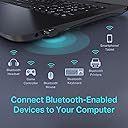
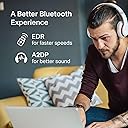
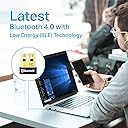
The TP-Link UB400 USB Bluetooth Adapter transforms any Windows PC or laptop into a Bluetooth-enabled powerhouse with Bluetooth 4.0 technology. Its nano-sized design ensures a discreet fit, while delivering a reliable wireless connection up to 65 feet. Plug & play compatibility with Windows 8 and above means effortless setup, supported by free drivers for older systems. Ideal for professionals seeking seamless wireless integration with keyboards, headsets, and more, it combines energy-efficient performance with durable build quality and industry-leading support.


| ASIN | B07V1SZCY6 |
| Best Sellers Rank | #6,924 in Electronics ( See Top 100 in Electronics ) #34 in Wireless Audio Receivers & Adapters |
| Brand | TP-Link |
| Built-In Media | Bluetooth 4. |
| Color | Black |
| Compatible Devices | Desktop |
| Compatible Operating System Family | Windows |
| Customer Reviews | 4.4 out of 5 stars 58,961 Reviews |
| Data Link Protocol | USB |
| Data Transfer Rate | 480 Megabits Per Second |
| Global Trade Identification Number | 00845973099664 |
| Hardware Interface | Bluetooth |
| Item Dimensions L x W x H | 0.74"L x 0.58"W x 0.27"H |
| Item Type Name | bluetooth adapter |
| Item Weight | 10 Grams |
| Manufacturer | TP-Link |
| Mfr Part Number | UB400 |
| Minimum Required Operating System Version | Windows 8 |
| Model Number | UB400 |
| Product Dimensions | 0.74"L x 0.58"W x 0.27"H |
| UPC | 840460604802 845973099664 |
| Unit Count | 1.0 Count |
| Warranty Description | 2-Year Warranty |
E**S
Tiny, Reliable, and Plug-and-Play Bluetooth for Any PC
Tiny, Reliable, and Plug-and-Play Bluetooth for Any PC The TP-Link UB400 Bluetooth 4.0 adapter is a remarkably simple way to add Bluetooth to an older desktop or laptop that lacks it. Itโs about the size of a fingernailโonce plugged in, you can leave it there permanently without blocking adjacent USB ports. Setup is as easy as it gets: on Windows 10 or 11, itโs fully plug-and-play; for Windows 7 or XP, TP-Link provides free drivers. In my experience, installation took seconds and devices paired immediately. Performance is solid for its class. It maintains stable connections for headphones, mice, keyboards, and even game controllers within a reasonable 50- to 60-foot range. Audio quality over A2DP is clean, and latency with Bluetooth 4.0 peripherals is minimal for everyday use. Itโs not built for high-end audio streaming or gaming headsets, but for standard wireless accessories it works seamlessly. I especially appreciate that itโs low-profile, energy-efficient, and doesnโt run hot even after hours of use. The connection is consistent, and it automatically reconnects to previously paired devices after rebootโno fiddling required. Bottom line: A dependable, compact, and truly plug-and-play Bluetooth dongle that delivers excellent value for basic wireless connectivity. Ideal for upgrading desktops or travel laptops, and proof that simple, inexpensive tech can still work perfectly.
J**N
Compact, Reliable, and Long-Lasting Bluetooth Adapter
Product: TP-Link USB Bluetooth Adapter for PC Used for: 3 years and 2 months Key Features: โ Compact size takes up minimal space in a USB port โ Stable connection with no noticeable drop-offs โ Extremely easy to useโjust plug it in and it works Ratings: Quality: Excellent build quality and durability. After over three years of use, it still works flawlessly with no physical or functional issues. Rating: 5/5 Performance: Pairing reliability has been great, with no connection problems in my use. Speeds are fine for general Bluetooth tasks, though I havenโt tested the full range. Rating: 5/5 Value: Slightly pricey compared to some alternatives, but it does its job very well and has proven to be dependable over the long term. Rating: 4/5 Pros: โ Compact design thatโs unobtrusive โ Stable and reliable connection Cons: โ A bit more expensive than similar adapters Summary: The TP-Link USB Bluetooth Adapter for PC is a rock-solid choice for adding Bluetooth functionality. Itโs compact, easy to set up, and has been reliable for over three years of use. While it costs a little more than some options, the long-term dependability makes it worth considering. Overall Rating: 5/5 Disclaimer: This review is based on my personal experience using the product. I'm not an expertโjust sharing my honest thoughts to help others make an informed decision.
S**R
It's a Bluetooth adapter! It works!
This little dongle has been in my PC since acquisition and has worked flawlessly and without as much as a disconnect. It just works without any fuss. You can't go wrong.
B**N
A little disappointing
UPDATE 2 - 7/8/21 So in the time since I originally wrote this review (and it's update) I have found this adapter can work quite well and some of my early experiences with it were probably due to the limitations of Windows 7. One very key discovery I made is that if you just stick this into a USB port on the back of your PC, you will get OK reception if you're close but you'll get very spotty connections from any distance at all (and might even get dropouts from as close as across the room the PC is actually in). What I have done is used a USB extension cable and mounted it high on the wall (not the prettiest thing in the world but it works wonders for the range). Once that was done, I was definitely getting more range and a much more reliable connection throughout my apartment. It's not Bluetooth 5.0 but it's not bad for the price. I was looking to upgrade to Bluetooth 5.0 recently but most of the 5.0 dongles they have on here have mixed reviews so I ordered another one of these as a spare. END Update UPDATE - 7/13/2020 So, I originally found the Windows 7 driver that I downloaded that is supposed to work with this adapter installs and appears to work on Windows 7 but I could not get it to work with anything I tried (This adapter is plug and play with Windows 8.1) Eventually, I uninstalled the driver, went into Device Manager and clicked for it to scan for hardware changes. So it found the adapter and (of course) displayed the error triangle that told me there was no installed driver for it and THEN it went online and found a driver for it and installed it and now it works with Windows 7 as it should. So if you have Windows 7, I recommend you try that BEFORE you bother with the driver they tell you to download for it. It's much simpler and it actually works with my system and doesn't require installing anything extra. END UPDATE -------- Original Review I bought this for my Windows 7 PC on the promise of a driver download that would make it compatible. So I downloaded the driver and found it to be very confusing and barely functional So I tried it on a Windows 8.1 PC and it was plug and play (as it's supposed to be). I guess it's fine for Windows 8 and up. If you have Windows 7, expect to have to fight with it to make it work. I have also had an issue with low volume on Bluetooth devices I'm sending audio to with this adapter but I'm not sure I can blame it entirely on the adapter so I'll leave it at that. For example, I have a stereo that has built-in Bluetooth and I can barely hear some Youtube videos with full volume on my PC and the stereo. That stereo goes plenty loud if you're using the radio or the CD. Turned up all the way it should be louder and just isn't. Maybe it's something I'm doing wrong but if it is, it isn't obvious.
S**S
Works great
This little dongle has saved me a lot of trouble multiple times is different computers. Has worked with absolutely everything I have tried to connect.
S**E
Great and inexpensive
I've had this adapter for about a year on and off. Pros: -I've been able to use this from across the house while working from home. Latency seems to dip after 25 feet but you can hear things, the mic on a headset will get choppy. -It's worked with most mice, keyboards, and headsets that I've thrown at it. I recently upgraded from airpods to airpods too and they've paired flawlessly. -Plug and play on windows 10 was easy, no additional drivers necessary. I've tried it on my parents Windows 7 machine and that needed legacy drivers. -No issues with pairing devices Cons: - audio quality is not great, I'm told I sounded muffled on both computers that I tried this on with airpods, airpods pro, artic headphones, and . Less muffled on airpods pro so I'm not sure if it's the device or both devices. - For some reason it's hard to toggle in between devices if you pair bluetooth peripherals with multiple devices. I use one mouse for 3 computers, and 1 keyboard for 3 computers, and I use my Airpods and headsets in between my computers and phones (work phone, personal, and computers). On this specific adapter if any device is connected to it, I have to turn off the adapter or turn off the affected computer so I can toggle my mouse or airpods in between computers. - It has trouble with controllers. I've tried pairing it with a steam controller and xbox controller and they both require additional drivers. Probably not the adapters fault but FYI.
S**P
Guess it's a hit or miss (purchased for use with laptop experiencing faulty built-in bluetooth)
After spending 6+hrs of my life from receipt to finally deciding to return, I would say I am one of the disappointed purchasers. Unfortunately for me, this was not plug and play as advertised. Not sure if it has something to do with the fact that my laptop already has a built in bluetooth (which was turned off the entire time) that is experiencing issues pairing with my intended device, but I had to manually install the driver. The further unfortunate part is that after installing the driver, the device paired right away, and the sound was GREAT and as expected, but after I unpaired and re-paired, the sound was diminished. I literally did nothing but un-pair and re-pair, and the sound went from HD stereo typical of what I get from the noise cancelling headphones I was using, to sounding like I was listening from some cheap dollar store earbuds. Tried switching the USB ports to see if any improvements, but that didn't help. Then tried uninstalling the driver then re-installing, shutting down the computer and rebooting, and after all that, I started experiencing issues pairing the device. From then on, I could only pair the device after a complete restart of the computer. Very weird, and very annoying. And to make matters worse, my computer no longer found the device or switched to the bluetooth for sound output, so even with a paired headphone, the sound was not channeled through bluetooth. After waiting for about 1/2hr for the customer support (which was helpful), I went through all troubleshooting steps again with the agent, and his final suggesting to simply switch USB ports somehow fixed everything. The device paired right away, the sound quality fixed itself, and the issue was resolved. He couldn't explain to me why it magically worked that time, and I didn't know either. After a couple hours of testing out the connection with continual use, the sound became out of sync with the show I was watching. No warning, just magically in the middle, there was a 3-5sec delay between video and output. I tried restarting the device, switching ports, etc, and all that resulted in was the sound quality diminishing and the sound remaining out of sync. Even trying it with the port that worked earlier did nothing. Strangely, my laptop was lagging when these issues occurred, which it doesn't do at all. Not sure if I am just one of the unlucky folks who won't get to enjoy this cheap bluetooth solution to repair a broken built-in bluetooth, but I honestly would prefer not to have wasted 6hrs being a guinea pig for others looking to purchase this. I will try another brand to see if the issue was with my laptop or the device, and will update once the other device arrives.
B**Y
Easy install, much cheaper than Bluetooth hardware replacement
I have a Lenovo Yoga laptop I bought in 2020 for college that has been nothing but a headache. Recently, the Bluetooth hardware completely failed and it wouldโve required an extensive (and expensive) repair to get the hardware replaced. I use Bluetooth headphones to attend class lectures, and the laptop wouldโve required another adapter to add an aux port to even try to use wired headphones. This little USB gadget fixed my problem for $10. Install was quick, easy, and done in about 5 minutes. I was concerned this would require some 3rd party Bluetooth menu to connect, but my laptop recognizes this adapter as a native Bluetooth drive, with all settings available via the same menu as before. The only small snag I had was that my Bluetooth devices wouldnโt connect until I removed and re-paired them in the settings menu, but they reconnected on the first try and now work flawlessly. Youโll need the model and version number to find the right driver to install. You can find the model number on your product packaging or this product listing under the โProduct Specificationsโ section. The version number is printed on the bottom of the USB adapter itself.
O**D
Worth the price
Good product
C**A
Adaptador
Buena calidad y si funciona.
M**A
ู ูุชุฌ ุฌูุฏ
ุฌูุฏ ุฌุฏุง ูุง ูุญุชุงุฌ ุงูู ุงู ุชูุฒููุงุช ู ุฌุฑุฏ ูุถุนู ูู ุงูุฌูุงุฒ ูุนู ู . ูุนู ู ุนูู ูููุฏูุฒ ูกูก
S**E
As Advertised
Does exactly what it was advertised to do, and worked for what I was using it for. did have to disable my computers built-in Bluetooth card to make it work but other than that no complaints here. :)
F**D
Great Product!
Quick delivery, nice and small unit. Plugged in and worked straight enabling me to pair devices effortlessly.
Trustpilot
2 weeks ago
2 months ago