🎶 Launch your sound, own the stage — anytime, anywhere!
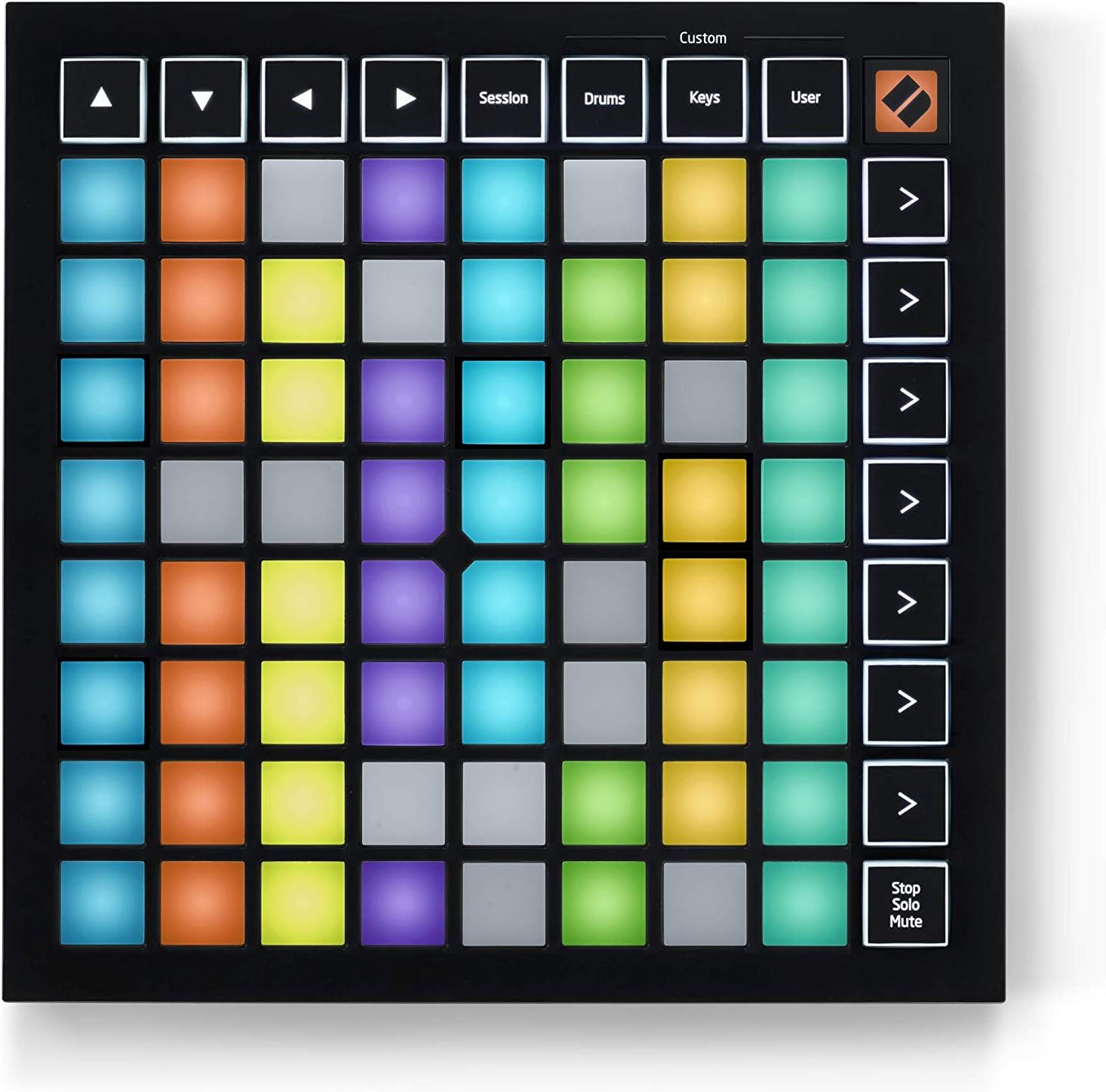
The Novation Launchpad Mini MK3 is a compact, portable 64-pad RGB MIDI controller designed for seamless integration with Ableton Live and Logic Pro. Featuring vibrant RGB pads, USB Type-C bus power, and customizable MIDI modes, it empowers musicians and producers to launch clips, control scenes, and personalize workflows on the go. Lightweight and plug-and-play, it’s the perfect tool for creative professionals seeking tactile, intuitive control in a sleek, travel-friendly package.


| ASIN | B07WNSHR3V |
| Batteries | 1 AAA batteries required. |
| Best Sellers Rank | 1,028 in Musical Instruments & DJ ( See Top 100 in Musical Instruments & DJ ) 7 in MIDI Controller |
| Colour | Black |
| Compatible Devices | Desktop, Laptop, PC |
| Connector | USB |
| Country Produced In | United Kingdom |
| Customer Reviews | 4.6 4.6 out of 5 stars (4,136) |
| Date First Available | 15 Oct. 2019 |
| Hardware Interface | USB Type C |
| Hardware Platform | PC/Mac |
| Instrument Key | Any |
| Item Weight | 399 g |
| Item model number | AMS-LAUNCHPAD-MINI-MK3 |
| Material Type | Plastic |
| Musical Style | Electronic |
| Number of Keyboard Keys | 64 |
| Operating System | Mac OS, Windows OS |
| Product Dimensions | 18.03 x 18.03 x 1.42 cm; 399.16 g |
| Size | One size |
| Supported Software | Ableton Live and Logic Pro |
C**Y
Excellent midi controller
I have used this with the Launchpad apps on iPhone and iPad and also with Ableton 11 and 12. It is configured already so you just plug in and play. It is very useful and makes for a great workflow including for recording in Ableton. There are different layouts such as keyboard and drum pad as well as the main one for launching loops and you can add a custom one as there is free software available for editing the custom configurations. It is very easy to learn how to use and you could get a lot out of it as your sole MIDI controller. It is compact, good build quality. It came bundled with some decent software (Ableton live lite if I recall correctly). You could just use it as a toy with the launchpad app and kids will enjoy it for that alone but you can squeeze a lot of functionality in Ableton from it also. It won’t be much use for finer controlling of software synths and for finger drumming you may want larger pads, and there are no moving parts as such like faders or knobs, but you get what you pay for. Paired with a decent drum pad controller or something like the Midimix it is a great buy.
C**E
Fantastic Music Making Tool
I've had the Mini's big brother the Launchpad MK3 for around 18 months now and use it constantly, in fact I prefer it to a keyboard when creating music. However, it is quite large and so was difficult to take around with me on occasions, especially if I had other bits and pieces with me. Had my eye on the Mini since Christmas and recently took the plunge. I was amazed on delivery at Just how "mini" it actually is. Wasn't expecting something so small. I was disappointed at first. I expected reduced functionality- no chord mode - but wasn't prepared for the keys layout, Chromatic only. When using the bigger Launchpad I don't use a Chromatic keyboard. Its set out as per my pic. Anyway, took a while, but I created my own custom mode in Components and assigned a midi note/octave per pad using the same colour scheme. Happy now. Plug and play, recognised as soon. As I plugged in the supplied USB cable. Anyway, the Mini is terrific. You really should buy one.
T**M
As capable, or more so, than the Mk 2 full size with the form factor of the Mini
I bought this because my Mk2 LP, althogh lovely to look at, is a bit to big for my stage setup and occcasionally fell off the synth I generally put it on. Points to note - Has full RGB, a little fainter than a full size version, but still easily visible under stage lighting. - in clip launch mode the bottom right button is no longer a scene launcher but toggles track arm/mute/solo. I didn't find this change a problem (though I thought i might) - Components is fantastic allowing easy customisation of the user screens, really useful feature. If you configure it for faders it is more sensitive than the older models doing roughly 1.5dB increments rather than 6 if you tap repeatedly. - It's true plug and play with Ableton Live, no need to go into control surfaces to set it up - The session overview (which enables you to scroll 8 rows at a time instead of 1 seems initially to be missing (it used to be accessible on older models by holding down the session button but that now does something else). However the support team helped me out, this is now accessible by double tapping session instead of tap and hold. Obviously it's not as fully featured as the X and the Pro, and the buttons are not velocity sensitive, but if you want a very capable and cheap clip launcher that can be readily customised for other uses this is probaly it. Will also apparently work in Logic Pro X for triggering Apple Loops, there is a setup in Components to do that, but i have not tested it.
D**N
Novation Launchpad X - Nicely built
This launchpad arrives with the minimum of instruction but after plugging it in to a USB port and clicking on the ‘getting started’ link, the walk-through set-up is very good. I have Ableton Live 11 installed and the product configured itself automatically for use after starting the software. If you don't have a copy of Ableton Live, a free 'Lite' version is available to download after product registration. I carry the launchpad in a pocket of my laptop case. The pads are a nice size and are velocity sensitive. I can easily use them to play notes or create drum patterns. They also reflect the colour of the clips loaded into Ableton Live’s session view when not playing (Green when the clip is active). There are 3 modes of operation: Session, Note and Custom with everything well labelled and most of the function pads are nicely backlit. I would say that a working knowledge of Ableton Live is preferred to get the full benefit of the Launchpad. However, the basics are relatively easy to learn. The user guide for this product can be downloaded before purchase so you can see if it’s right for you. This is NOT a stand-alone musical instrument and must be used with some music production software. I like it.
A**R
Excellent controller.
I upgraded to this controller from the Mark 1. Pleasantly surprised. The software for custom layouts is good. The increased range of colours for the pads is really useful. Perfect for making animated displays, if you like messing around with that kind of thing. My only gripe is that FL Studio doesn't support it out of the box like the Mark 1. That's entirely down to Image Line though. There are patches available for it made by the image line community. Works flawlessly. I wish Novation would support android and not just apple. So if you want to use this with an android powered tablet or phone you won't be able to. That being said. Great piece of kit. The price is fantastic for a solid, well built controller. Genuinely feels like it should be more expensive.
M**E
Very nice and is of hig quality 😊👍👍
P**N
I love this controller. Most people are buying this to use in Ableton, but if you're using MPC 2.x as your DAW and want to access more than one pad bank at a time with physical pads, you know there are exceedingly few options out there. This gets the job done almost perfectly (I'll explain the "almost" below). Before that though, to review the controller more generally, outside of APC, I can say that while other people in the reviews seem to have complaints about the velocity pads, I've found them to be fantastic. To be clear, I'm not using the velocity function - I have it set to activate at full level with the lowest trigger threshold (in the controller's velocity settings), and adjust the velocity as necessary in MPC. Compared to the other controllers I own (The Mpk Mini Mk2 and the MPC Touch) though, these are by far the best in terms of fewest double-hits and in terms of missed-hits/consistent response. I can actually get decent finger drumming going on this, whereas with those other controllers, I could only do so for a very loose approximation of what I want to record, and have to adjust the grid after the fact. While there are features designed to work with Ableton exclusively, many of the best features on the LPX are baked into the device itself. First of those is the Scale Mode, a sub-setting in Note Mode, pictured above (Image 1) beside my MPC Touch. You can choose from 1 of 20 scales to enable at a time, decide which key the scale will play in, which key the scale plays in, and whether non-scale notes appear on the pad or not. Purple pads are the root notes, blue are the non-root scale notes, and unlit pads are non-scale notes. In the image above, the Scale Mode is set to display only scale notes, and is in 3-finger Overlap. The Overlap (5) settings decide at which point a given note repeats in the row(s) above it. Simply put, the first setting, Sequential, puts octaves on either side of a row with the scale notes in-between, giving you access to 8 octaves at once. The next 4 modes are a range of 2-Finger to 5-Finger, allowing you to play the scales ascending with 2 to 5 fingers, and allowing access to a range of 2 to 5 octaves at a time. It's not the easiest thing to describe but it's quite intuitive once you get hands-on. Additionally, the first of the factory-installed custom modes (that can be removed/replaced or moved to a different Custom Mode slot) offers a keyboard layout with four octaves at once, pictured above (Image 2). The purple pads are set to C by default, and the L/R Transpose buttons will shift that by a half step at a time. A-G are in-between those in each octave, and the sharps/flats are appropriately placed above those. The Up/Down Octave buttons can be used to shift the octave range displayed. The most important Custom Mode setting for me is the Drum Pad template. You can configure and apply these to correspond to whichever inputs are appropriate in the DAW you're using, and you can use two custom settings so that it essentially works as the controller's Drum Mode designed for Ableton, only on non-Ableton DAWs. Pictured above (Images 3-4) are my two Custom Mode profiles designed to activate pad banks A-D and E-H, respectively. The two groups of 64 pads can be switched between as easily as pressing the corresponding program key on the right side of the controller. At this point, I should mention that if you thought the APC Mini might have some way of working in MPC as a drum pad, I've got bad news for you. It just won't work for four pad banks at a time. It's possible that Akai might update MPC's MIDI Learn function at some point in the future to allow for those mappings, but currently, you can only program the APC Mini (and any other MIDI controller) to access 16 pads (one pad bank) at a time. The Launchkey takes it all out of the DAW's hands with the custom programs, and allows you to bypass all of that noise. You may notice older reviews that mention that there are only 4 custom programs available, but the firmware has been updates since then, and the LPX now allows for 8 custom modes that can be switched between on the fly, regardless of connection. I used one of those modes to map some basic MPC hotkeys, so that I can zoom the grid in and out vertically or horizontally, pan the grid vertically or horizontally, tap tempo, undo/redo, play/playstart, record, over dub, switch tracks forward/back, switch sequences forward/back and switch view modes. It helps a lot to be able to access a lot of those functions without moving over to my computer keyboard or my other controller while recording using the LPX. While I haven't tried it out, you can also apply customer sliders to the pads, and the pads can be set to be sensitive enough that you can run your finger along a row or column like piano keys and activate them all neatly, so I expect they'd actually make for decent slider controls. There are only a couple of minor downsides I can name. For one, it would be nice if it received feedback from non-Ableton DAWs so that corresponding lights on the controller activate when those inputs are being played back in the DAW. If you're particularly interested in Scale Mode, while I love it on the LPX, I noticed the APC Mini had a couple of advantages in that regard, as well as a debatable one. The debatable one is that the scale modes are different between the two devices. It's subjective, and a matter of which scales people find more important to have accessible. If you want the Flamenco Scale, for example, you're out of luck on the LPX. Both devices contain 20 scales though. Where the LPX missed out on an opportunity that the APC Mini takes is that the APC Mini, in the chord settings, allows you to hold down a setting button, activating a marquee across the pads that spell out the function of the setting button being held. With 20 available scales, it's a really huge help to be able to have the labels for all of them within reach. Not just for the Scale Mode, but for any number of the numerous settings on these devices that aren't always easy to recall without a map. The LPX is certainly capable of displaying text. Pictured above (Image 5), you can see that the settings menus use the LEDs to display the name of the menu, and certain settings/mode switches activate marquee-style text. It just can't be used to identify setting buttons though, which means you need to have the manual handy if you want to know what all 20 scales are. It would be nice to be able to alter the colors that display in Note Mode, outside of Custom Mode(s). I'd like to establish a color scheme on it identical to MPC 2/x and my MPC Touch, but that's very minor. It's possible that it can be done in the LPX's Program Mode, but it's a pretty involved process that I don't entirely understand yet, and that doesn't seem to be for the faint of heart. As the name suggests, there is something resembling programming required to use that mode, and most people will find it easier to use the Novation software to customize the LPX for most purposes. A chord mode would be nice as well, seeing as how much of that heavy lifting was already done when the Scale Mode was designed. I can access some chords in MPC, but they won't activate if I play the corresponding notes on the LPX. It's good in its own way, as it allows me to have two modes for two devices - I can play chords with one hand on the Touch and notes with the other in the LPX. Still though, it would nice to be able to use those interchangeably. None of those are enough to knock a star off of my review though. This is a fantastic device, and works better in Akai's software than Akai's own comparable offering, which is frankly beyond me. Even aside from being virtually the only game in town in terms of accessing 4 pad banks at a time in MPC, the LPX is a great little controller for the price., and has greatly enhanced my workflow and general fun in MPC 2.x.
G**A
Well, this is good product. Although the pads are bit small for playing sometimes but great for beginners to learn and even for advance players
塩**環
導入環境はmacOS High Sierraで、Launchpad Xから乗り換えました。 専用のエディターはyoutubeにて瀬戸弘司さんがLaunchpad Xをレビューした動画にて解説されているのでそちらを参照してください。エディターソフトをインストールしてまず初めにドライバーとファームウェアをアップデートしないと後述のチュートリアルとアプリケーションは正常に動作しませんでした。 PCに接続するとUSB記憶容量として認識され、スタートアップマニュアルとwebサイトへのショートカットが格納されているのでwebサイトの方へジャンプして表示される内容に従って進めてください。英語ですが動画付きなので適宜google翻訳しながら進めていけば特に困ることはないと思います。 その後Launchpadと連動したwebアプリが起動しますが、google chrome等WebMIDI対応したブラウザでないと動作しないので注意して下さい。 導入までのステップで幾つかの注意点があるのでこういったデバイスを初めて導入される方はつまづきやすいのかなと感じました。 ・ドライバー ・ファームウェア の2点は特に外付けデバイスを日常的に使われる方以外は見落としがちな部分ですし、開封から接続して音を出すまでのワークフローがあまりスムーズではない上に英語なので慣れている方も注意が必要です。 私はAbleton Liveとcubase10.5を使用していますがAbletonとの連携に関してはなんの問題もありませんでした。ハードウェア側に搭載されているボタンもAbletonユーザーであればすんなりと馴染めると思いますし、扱いやすいと感じました。 cubase等他のDAWソフトウェアに関しては一般的なMIDIコントローラーとして使用する形になりますが、エディターソフトにてCCやノートなど割り当てれば自身のワークフローに沿ってカスタマイズできるので、その点が大きな強みだと言えます。 パッドの質感はPush2とほぼ同等の質感で、むしろ正方形な分こちらの方が使いやすいと感じました。 また、下位機種との差別化としてMIDIシーケンサー機能がありますが、ここは自分の勉強不足でまだ実用に至っていないので言及は控えます。 一点気になった点として、アクティベートした際にNovationのアカウントからバンドルされているソフトウェアを確認できるのですが、XLN Audio Addictive keysのシリアルコードだけ追加されていなかったのでそれ目当てで購入される方は注意が必要です。 (自分が既に他製品をアクティベートして2つシリアルを獲得しているので、それが原因かもしれません)
D**T
Leuke sequencer, piano, drumpad Aangenaam verrast door de RPG toetsen Alles oogt mooi Naar mijn smaak te moeilijk. Niet tegenstaande dat dit product kwalitatief top is. Enig minpuntje: de bijgevoegde gratis download codes. Geen voorstander van Ableton en deze zit bijna bij elk instrument!
Trustpilot
1 week ago
2 months ago