Buy anything from 5,000+ international stores. One checkout price. No surprise fees. Join 2M+ shoppers on Desertcart.
Desertcart purchases this item on your behalf and handles shipping, customs, and support to New Zealand.
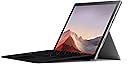
🚀 Surface Pro 7: Power, Portability & Precision — Own Your Workday
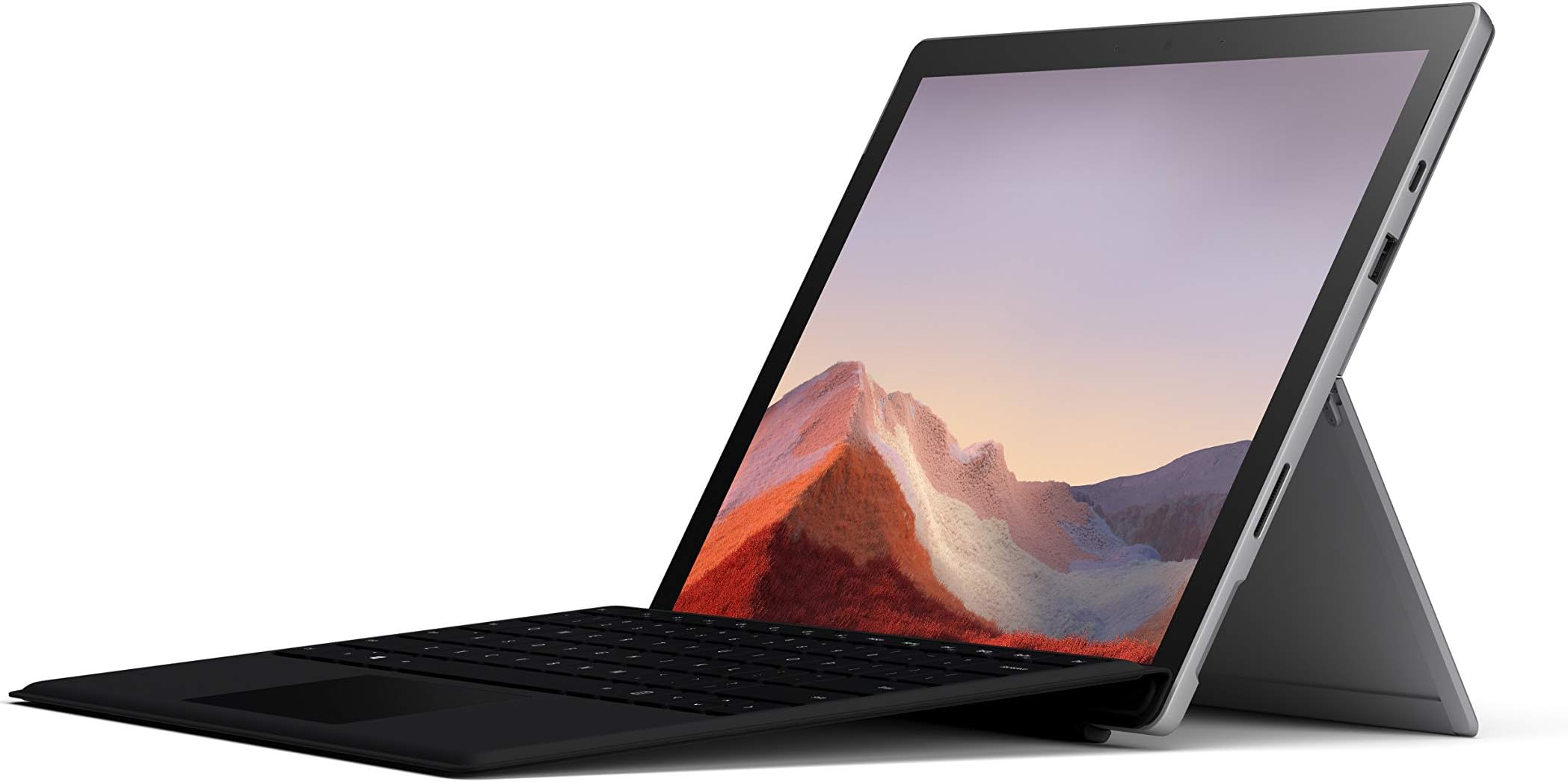
The Microsoft Surface Pro 7 is a versatile 12.3-inch touchscreen laptop-tablet hybrid powered by a 10th Gen Intel Core i5 processor, 8GB RAM, and a 128GB SSD. Weighing just 1.7 pounds, it offers all-day battery life up to 10.5 hours with fast charging, dual USB-C and USB-A ports for flexible connectivity, and a high-resolution PixelSense display. Designed for professionals who demand mobility without sacrificing performance, it supports Windows 10 with a free upgrade to Windows 11, making it ideal for multitasking, creative work, and seamless integration with Microsoft Office and gaming.


| ASIN | B07YNJGMH6 |
| Audio Output Type | Speakers |
| Audio Recording | No |
| Audio features | The product features stereo speakers with Dolby Audio Premium and dual far-field Studio Mics. |
| Available M2 Slot Count | 1 |
| Battery Cell Type | Lithium Ion |
| Battery Life | 10.5 Hours |
| Best Sellers Rank | #148,821 in Electronics ( See Top 100 in Electronics ) #1,972 in Computer Tablets |
| Biometric Security Feature | Face Recognition |
| Bluetooth Version | 5.0 |
| Bluetooth support? | Yes |
| Brand | Microsoft |
| Built-In Media | Tablet, Type Cover, QSG, WACG, Power Supply |
| CPU Codename | Ice Lake |
| CPU Model | Core i5 |
| CPU Model Generation | 10th |
| CPU Model Number | Core i5 |
| Camera Description | Front, Rear |
| Cellular Technology | 4G |
| Chipset Type | Intel Core i5 series |
| Color | Platinum |
| Compatible Devices | Devices with USB-A, USB-C, Surface Connect ports, Bluetooth, Wi-Fi 6, and Surface Dial/Type Cover support |
| Connectivity Technology | USB |
| Control Method | Touch |
| Customer Reviews | 4.6 out of 5 stars 2,999 Reviews |
| Display Resolution Maximum | 2736x1824 |
| Display Technology | LCD |
| Display Type | LCD |
| Form Factor | Laptop |
| Front Photo Sensor Resolution | 5 MP |
| Global Trade Identification Number | 00889842512267 |
| Graphics Card Ram | 8 GB |
| Graphics Coprocessor | Intel Iris Plus |
| Graphics Description | Integrated |
| Graphics Ram Type | Shared |
| Hard Disk Description | SSD |
| Hard Disk Size | 128 GB |
| Hard-Drive Size | 128 GB |
| Hardware Interface | USB, USB Type C |
| Has Color Screen | Yes |
| Human-Interface Input | Touchscreen |
| Item Dimensions L x W x Thickness | 12.8"L x 2.68"W x 9.21"Th |
| Item Type Name | Tablet Bundle |
| Item Weight | 1.1 Pounds |
| Keyboard Description | Type Cover |
| Keyboard Layout | QWERTY |
| Lithium-Battery Energy Content | 44.2 Watt Hours |
| Manufacturer | Microsoft |
| Maximum Display Brightness | 400 Nit |
| Memory Clock Speed | 2400 MHz |
| Memory Slots Available | 1 |
| Microphone Form Factor | Omnidirectional microphone |
| Model Name | Surface Pro |
| Model Number | QWU-00001 |
| Model Year | 2019 |
| Native Resolution | 2736 x 1824 pixels |
| Notebook Pointing Device Description | Built-in touchscreen and compatible touchpad (via Type Cover) |
| Number of Ports | 3 |
| Operating System | Windows 10 Home |
| Power Device | AC adapter |
| Processor Brand | Intel |
| Processor Count | 10 |
| Processor Series | Core i5 |
| RAM Memory Installed | 8 GB |
| RAM Memory Slot Total Count | 1 |
| RAM Type | Unknown |
| Ram Memory Maximum Size | 8 GB |
| Resolution | 2736 x 1824 pixels |
| Screen Finish | Glossy |
| Screen Size | 12.3 Inches |
| Speaker Description | 1.6W stereo speakers with Dolby Audio Premium |
| Specific Uses For Product | Business, Personal, Travel |
| Total Usb Ports | 2 |
| Touch Screen Type | capacitive |
| Touchpad Feature | true |
| UPC | 889842512267 |
| Unit Count | 1.0 Count |
| Video Output | Possibly DisplayPort Alt Mode via USB-C |
| Video Processor | Intel |
| Virtual Reality Ready | No |
| Voltage | 28 Volts |
| Warranty Description | 1 year manufacturer |
| Warranty Type | Limited (with potential for Extended) |
| Webcam Capability | Yes |
| Wi-Fi Generation | Wi-Fi 6 |
| Wireless Compability | Bluetooth |
| Wireless Technology | Bluetooth, Wi-Fi |
A**R
A nice product with some very pleasent surprises and some minor issues.
I will focus in this review on the hardware, there were (and are) quite a few problems on a software level, but that's the fault of Windows, and those issues are probably nothing new to people who regularly use Windows operating systems. I bought it as both a replacement for my old laptop and as a tablet I could use instead of pen and paper in uni. The Good: -light and comfortable as a tablet without needing to compromise on the functionality of a laptop -has good specifications considering the price and form factor -ASTONISHINGLY long battery life -built very well, other than the keyboard cover and a screen protector I'm not going to bother with a case of some kind -built-in kickstand is very sturdy and can handle a wide range of angles -screen looks fantastic in terms of image quality -the screen's aspect ratio makes productivity great -the speakers are better than I expected, nothing that's good enough for high quality audio, but it's more than enough in terms of clarity and volume to view videos where the audio quality isn't as critical as it is for audiophiles listening to FLAC files, so more than adequate for netflix or youtube. -the type cover surprised me with how good it is, granted it's not as good as a mechanical keyboard or a thinkpad keyboard, but for a keyboard cover it's VERY GOOD, feels as good as a typical laptop's keyboard. It also connects very easily without messing about with bluetooth or cables, and even lights up! -I've heard a lot of criticism of the fact it's not very comfortable to use on your lap (like you would a laptop), but I've had no trouble with it, it's obviously not as stable as an orthodox laptop, but I have no complaints. The bad: -very intrusive screen glare, I use it for note taking in uni and when it's lying horizontal on the table it reflects the lights in such a way that it obstructs my view of the screen, I haven't tried using the device outside. -palm rejection works very well with the exception of the very edges of the screen, if I want to write on the very border of the device in such a way that my palm is resting on the bezels, the line I'm trying to draw jumps all over the place. -speaking of bezels, they are gargantuan, making the device uglier. -absolutely not serviceable in any way, shape or form, this might not come as a surprise to anyone, but I'm disappointed I can't open it up in any way other than pulling out the screen a la smartphones, the surface pro x can have it's SSD changed and it's a shame the same isn't true about this device. -the micro SD slot is only capable of UHS-I speeds, so while it's perfectly fine for mass storage of videos or photos, it's no good for running heavy programs off of it, which would have been a huge plus considering how un-upgradeable the surface pro is, so you either pay a lot more for the models with higher SSD volumes or get an external SSD which gets in the way of mobility. -while this is subjective, the keyboard joins the awful trend of making the up and down keys half sized so that together they're as big as the left or right keys. -I wish Microsoft would ditch the proprietary port for an additional USB-C port, granted you can still charge the surface pro with the usb-c port, but it's not as fast. -no flash on the back camera, in a product like the surface pro the camera is meant to take pictures of documents, notes and whiteboards, no flash means lighting up a document you're trying to take a picture of is much more difficult, especially when you consider the fact the surface pro itself is big and blocks out plenty of light. The Neutral: (things that are worth consideration before buying) -the cameras are not great, I didn't write this as a con because it's not meant to be used to take beautiful photos by any stretch of the imagination, but if for whatever reason you were counting on it, that's probably not the product for you. -The passively cooled models feel VERY hot VERY quickly under medium to high loads, to the point where anyone would be alarmed on most laptops, But having monitored the thing with temperature monitoring software the cpu sits on very reasonable temperatures (35-40c on idle and light loads and up to 65c on heavier loads, I've never gotten it to 70c) so this is probably just a side effect of the passive cooling. I'm writing this review in winter, so the warmth is actually fairly pleasant, but I don't know how well it would handle very hot summers like we get here. Despite writing many cons here I'm very pleased with the device, it does what it's meant to and more than I expected and I strongly recommend it to anyone who wants a tablet type device for taking notes and lazy internet browsing but doesn't want to give up the functionality of a proper laptop. That is assuming you don't do anything very demanding on your laptop like high level gaming or running AI training.
P**N
Microsoft did well with this
I have an ipad, android tablet and PC desktop. I wanted to get a Windows based system I could carry around, had a usb port and ran all Microsoft Office/SQL Server products. Plus I wanted to run some heavy graphics video games. I got everything I wanted with this. This did not disappoint! I was first amazed at how easy the keyboard was to type on and how the tablet/keyboard nicely magnetically snapped into place and easily unsnapped. I've used MS Windows since day one and I was a little worried about how it would translate from a tablet to a "laptop". Microsoft got everything right with this. I could easily use the keyboard mouse, a usb mouse and touch the tablet and all moved the mouse. They work pretty nice once you get used to them working together since the USB mouse tends to move around when you balance it on your lap. Fast. It is amazingly fast. I got this with a small hd and then bought a 512 gb sd card (one they recommended). There's a nice little slot behind the back flap that the sd card simply slides into. I could possibly get another sd card if needed and swap them as neeed. I installed some heavy duty games on the sd card and tested out some of the most intensive graphics games. While the tablet got a little warm, it performed like a charm without a glitch. Everything that I installed on the sd card worked without issues so I saved over $500 on a larger hd since the sd card was only $70. I really, really like how Microsoft got the tilt-back flap stand so that it is ideal at almost any angle and stays where you put it. My only (small) gripe would be that if I stand it up straight, it is easy to flip the tablet forward onto the keyboard. Fortunately a simple flip backwards and using the sweet face sensor takes me back to where I was within a second or two. Still, it would have been ideal if they could have somehow prevented it from flipping so easily. A very small gripe. Microsoft also did a nice job on implementing some automatic clean-up routines to keep things running smooth like any other tablet. I of course loaded it with software as soon as I got it. For me, this is more than just a Windows tablet. I can now setup SQL Server databases and design front-ends in vb.net, excel or MSAccess. Setting up an inventory or other tablet based system will be a breeze and I have over 25 years of SQL Server, vb and MSAccess code. Yes. Microsoft did well on the Surface Pro 7. Like the ipad was when I initially got it, it has now become an extension of me. I don't miss the ipad or android tablet since I also have an xbox and tons of Microsoft games. Gamers will love this gem on the road. All the Steam games I tested (Age of Empires, Civilization, C&C, Stronghold, etc.. worked like a charm (these games run heavy with the graphics) You can feel the back warm up but it never gets hot. The i5 doesn't have the fan where the i7 does. I got the i5. I didn't want a fan inside. The charger nicely snaps on which is a nice treat. I haven't tested out battery life because I don't use it much without a nearby power supply. It even has a USB-C! As someone who fully understands Microsoft and their "philosophy," this will be something that will put them on the map into the tablet world. I can't compare it to previous versions. I can only tell you this thing is awesome! Better than any Windows based laptop in my opinion. Hell, even faster than my R-11 Alienware with a 1000 watt water-cooled power supply (although Alienware installed a bunch of junk software that I'm finding difficult to remove). This thing is a must for anyone needing a Windows based system to connect to work seamlessly in Teams, Citrix or RDP. Connect a 2nd monitor easily using the USB and a converter or USB-C. I plan to get the module that snaps into the side.
J**E
Trusty little sidekick
TLDR: It's a great computer, and you should just buy it. As I notice small indications of needing to replace my computer I purchased around six years ago, I think it is time to write out my full review on this computer. This beast of a machine, hidden behind lower-level computer specs, has been my sidekick for the last six years. It was always there for me during my photo editing sessions on Adobe Creative Cloud and Photoshop. It was a pro at handling my online classes for both my bachelor's and master's degrees. Truthfully, this is a pretty darn nice computer. The touch screen and stylus are must-haves for any kind of imagery work you may have. The computer itself is slick, convenient, and worth the price. My complaints, this won't be long. The screen occasionally flickered, which was weird but usually would stop when charging or increasing screen brightness. I have NEVER written out a review after using a product for years on end, but I am gladly doing it for my trusty ol' Surface Pro. I am noticing white specs on my screen now, which a quick Google search indicates as a sign of wear and potential need for replacement in the near future. I am sad to have to be in the market for a new computer and need to let this one go :') but we had a great run.
D**E
Does everything I want to do - how to fix the screen freeze problem
Purchased this Surface Pro-7 about 3 weeks ago. Fast shipping, 2 days. I gave it 4 stars because nobody reads the 5 star or 1 star ratings. I use it about 2-3 hours per day, web surfing, word documents, excel (no gaming, no graphics design). I'm happy, it does everything I need it to do. Intel core i5; 8Gb ram/ 25G drive. I think the battery life is good, but I only use the battery 2-3 hours before I put it back on the charger. Until a couple days ago the screen would freeze for about 6 seconds every 30 seconds. Very annoying and a commonly reported problem. I finally fixed it by: 1) Installing "Intel Graphics Command Center" from the Microsoft store. 2: Click the 4th icon in the left column and then Click the "POWER" tab. 3: turn off "Panel Self Refresh" and turn off "Display Power Savings". 4: Not sure you really need to reboot, but I did and the frequent screen freeze went away. I had a Surface Pro 4 since 2016 until recently - very happy with it. The battery swelled up and bowed the screen. I was afraid it would burn the house down so I decided to replace the battery myself, but after the replacement it wouldn't work anymore. It's possible I overheated it softening the adhesive but more likely it wouldn't work because I broke off the camera and microphone at the very top edge of the screen. If you decide to do this 1) back up your data! 2) don't insert the tools more than 1/8" under the top edge of the screen or you'll tear off circuity that connects the camera and microphone. For some reason the circuity runs ABOVE the microphone and camera so they are much closer to the edge than you think. In the end I wish I had just sent the computer to a repair facility and let someone with battery swap experience do the job. I'm a computer technician and fairly confident in my work but my $50 battery swap ended up costing me about $1000.
J**E
An Amazing Multi-Purpose Product
I was unlucky enough to receive a product with a faulty screen initially. This is upsetting and fear inducing - what with the investment involved - but overall Amazon's amazing support made it essentially painless to replace the product. To clarify, the screen issue is one in which a rare number of Surface Pro units have screen digitizers that are susceptible to even low amounts of heat. Do regular work that may be slightly intensive - like Photoshop - can heat up the device (the i5 model in my experience) just enough that the screen will have very obvious faults; namely, horizontal rows of black or non-activating pixels (typically near the top-most bezel) and a weird flickering and ghosting effect - the flickering being incredibly annoying, the ghosting of images making the device nigh unusable. But it's rare, and it's not worth judging the product I ended up with - or the ecosystem of products that already exists - on these faults. Everything has faults from time to time. iPhones are notorious for them. Dells and HPs have them. So we'll move on to say that the Surface Pro 7 i5 (with 256gb of storage) is an incredible little beast. It's multi-functionality is somehow elegant while not being elegant. A slab is elegant - there are no parts to futz with. A Surface has a detachable keyboard cover, a magnetizing pen, and a built-on kick-stand. But I LOVE futzing with these things. They aren't cumbersome. They aren't annoying to deal with. They do exactly what they're suppose to do with no real effort required. It's great. The keyboard cover is amazingly comfortable to type on, featuring what feels like rubberized key-caps (I don't know if they are or now, but they feel incredible). The pen (The Surface Pen, not the new flat one) is also amazing to work with. I wasn't sure what to make of it's asymetrical barrel shape at first, but it causes no issue is holding or using it for long periods, and writing and drawing with it are intuitive and easy. I love drawing on this things. Almost zero lag from either the Surface Whiteboard software to Adobe's Photoshop. It's great. The Arc Mouse! People don't tend to like it, but I love this things. Impossibly slim when flattened, and just high enough arch support when curved, with a touch sensor mouse button that also acts like the keyboard touch pad with touch gesture commands. It's a little thing, but I use it constantly. Even the built-in digital keyboard is super responsive and easy to use. Whether all the bells and whistles are connected and ready for work, or none of them are, it's a solid product. I wish more manufacturers would use the magnetic features Microsoft has in this thing - it's so convenient. The Surface Pro 7 does not disappoint. In using the device. In how gorgeous the brushed black look is. In overall performance (the i5 can run Halo: The Master Chief Collection at 30 fps on default settings). Even the wifi built in is superb, outperforming every other device is quality and distance (it stays connected to my router even when on the other devices disconnect, and it stays connected. Just quality all around. Love it.
C**S
A wonderful mobile laptop replacement
It is decently powerful, I wouldn't try to go full bore on 4k video editing, or rendering 3d models. But for light photo editing and little work projects/day to day productivity, it is great. The screen is easy to read, crisp and bright, the battery life is marginally decent. It's not overly annoying to me but I am not away from a plug for extended periods of time. I was also pleasantly surprised with the cover keyboard and touch pad...they are both actually really good and "heavy Duty". Overall the ergo on this device is great IMO it fits me very well. and it isn't so large to be obscene but it's so small that is hard to use. It has very little graphics capabilities, I was hoping it would be just powerful enough to play fortnite or some light games while on the road but alas It can only play some RTS and RPG (they are billions and Diablo 3 are great) type games. Shooters are pretty much unplayable especially in a online competitive nature...But this wasn't meant for games. Id suggest a ASUS G14 if you want a compact game capable machine. And I might have purchased that had it been out already especially since I pretty much always use this with the keyboard in a laptop layout. I prefer my Ipad Pro 10.5 for a media consumption device personally. But from a productivity standpoint I really enjoy it a lot and look forward to getting a lot of use out of it...if the G14 comes out and I feel like selling this and blowing some extra cash I might jump up...IDK but so far Im enjoying this wonderful little device.
P**L
Turning life's lemons into lemonade
A few months ago, I had contractors working in my home and during the process someone stole my Lenovo Yoga laptop & an iPhone. After going through the 4 stages of grief I did my research and settled on an HP Laptop. I was happy with it for the 45 days I had it until the cooling fan failed and the device started producing errors and shutting down. HP support assured me they would take care of it but during that period I ended up buying a surface go which was too slow for my preferences and then ultimately settled on this. This tablet is awesome!!! I love it's portability, performance & price. It really is a great value at this price point and even if I sit it on a blanket all day it WILL NOT overheat like my other laptops do under heavy load since there are no vents to block on the surface. Don't hesitate, buy it. HP returned my laptop after 5 business days (Go HP!!!) but I still prefer and use this 80% of the time and it's the only computer I travel with now because of it's portability.
R**N
Great improvement from surface pro 3
I had the surface pro 3 for years prior to this. I decided to upgrade and I'm glad I did. Some of the improvements I like are: -writing is so much smoother plus in one note it is very sensitive to how much pressure I put down with pen and the angle when using pencils -faster for sure and it runs many things at once with no issues. I also installed a lot and got it all done within a hour -the hello face recognition is easy to set up and makes signing in a breeze -battery life at least for now is great. This is biggest reason I updated. I used for 7 hours yesterday and still had 40% -picture is a lot more crisp with better colors and sound had definetly improved Overall, I highly recommend. The fact you can change from a solid laptop to a solid tablet within seconds is incredible. I have had good luck with Microsoft products and so far this is the same.
M**J
Surface pro 7 after 2 months use
Though the screen touch is excellent, the colour in RGB mode feel better than the enhanced mode. While in the continuous WiFi use, battery use is faster and doesn't last for 10 hrs ( lasts for 5-6 hrs). The UI experience with app opening and work out is fluent. {After 1 week of use} Update after 2 months same experience
F**R
Comme un portable
Un portable et une tablette deux en un
Y**R
Worth to buy
Recently I purchased this item. I liked this item. Pros: Attractive look Fast processor Competitive price. It's competitive brands like dell 2 in 1 cost is near to it. Cons: Screen is not as smooth as tablet It doesn't have ms office at this premium price
A**A
Excelente producto
Vale mucho la pena, excelente producto cumplió mis expectativas al 100%, gracias al vendedor, excelente muy recomendado comprar con el .
D**E
cool
très très bon,j aime beaucoup, j adore, je recommande a tous 👍 bonne machine
Trustpilot
1 month ago
1 month ago