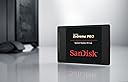
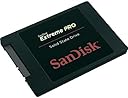
🚀 Upgrade your speed, secure your future with SanDisk Extreme PRO!
The SanDisk Extreme PRO 480GB SATA SSD delivers professional-grade performance with up to 550 MB/s read and 515 MB/s write speeds, enhanced by nCachePro technology and TRIM support. Designed for durability and longevity, it extends laptop life by up to 33% and includes a 10-year warranty. Ideal for gamers and professionals seeking reliable, fast storage with real-time health monitoring and shock resistance.
| ASIN | B00KHRYRLY |
| Additional Features | Background Garbage Collection, Shock Resistant, TRIM Support, Thermal throttling, Tiered Caching Technology, nCache Pro technology |
| Best Sellers Rank | #2,061 in Internal Solid State Drives |
| Brand | Sandisk |
| Built-In Media | Drives, Network Attached Storage, Networked Attached Storage |
| Cache Memory Installed Size | 480 |
| Color | Black |
| Compatible Devices | Desktop |
| Connectivity Technology | SATA |
| Customer Reviews | 4.7 out of 5 stars 2,059 Reviews |
| Data Transfer Rate | 6 gigabits_per_second |
| Digital Storage Capacity | 480 GB |
| Enclosure Material | Nand Flash |
| Form Factor | 2.5-inch |
| Global Trade Identification Number | 00619659119942, 06952987626121 |
| Hard Disk Description | 1x480GB |
| Hard Disk Form Factor | 2.5 inches |
| Hard Disk Interface | Serial ATA-600 |
| Hard-Drive Size | 480 GB |
| Hardware Connectivity | SATA 6.0 Gb/s |
| Hardware Platform | PC |
| Installation Type | Internal Hard Drive |
| Item Type Name | Sandisk Extreme Pro 480GB SATA 6.0GB/S Height Solid State Drive with 10-Year Warranty, 2.5" - SDSSDXPS-480G-G25 |
| Item Weight | 1.92 ounces |
| Manufacturer | Sandisk |
| Media Speed | 515 megabytes_per_second |
| Mfr Part Number | SDSSDXPS-480G-G25 |
| Model Name | Extreme Pro |
| Model Number | SDSSDXPS-480G-G25 |
| Number of Items | 1 |
| Read Speed | 550 megabytes_per_second |
| Special Feature | Background Garbage Collection, Shock Resistant, TRIM Support, Thermal throttling, Tiered Caching Technology, nCache Pro technology Special Feature Background Garbage Collection, Shock Resistant, TRIM Support, Thermal throttling, Tiered Caching Technology, nCache Pro technology See more |
| Specific Uses For Product | Personal |
| UPC | 619659119942 |
| Warranty Description | 10-year |
R**D
Replacing Old HDD's with SDD's has become a No Brainer
I took the plunge and replaced my hdd on my Asus S400C laptop with a Crucial MX100 and it went flawlessly. I then decided to go for broke and replaced the 1 Tb hdd on my Acer TC-605 with the Sandisk Extreme Pro 960 Gb. I love how my computers are no longer clicking away all the time with the poor hard disks seeming to work their little hearts out. I am sure there is a good reason why after a few months, Windows computers just seem to keep working harder and harder and get slower and slower. I know it is because of all the stuff we put into them, but I have always kept my computers cleaned up and it still seems to happen. I am hoping that changing to ssd drives in both my computers will remove some of that issue; right now it seems to be working. I just replaced the hdd on my desktop last night and used Farstone's DriveClone 11 Free Version (http://www.farstone.com/software/drive-clone.php). This software is easier for the non-geek because it does one thing exceeding well--clone your disk. It also has a "fast" mode which I used to back up my ~700 Gb of files in only about an hour. The only thing I had trouble with was getting the computer to recognize the ssd simply because I am not really into this stuff. I did a bit of googling and found how-to sites on how to use disk manager to assign a new drive letter and then I was fine. Another issue I had was in physically installing the ssd in the computer. I went to a computer store and a guy simply gave me a plastic 2.5" to 3.5" chassis. This was helpful but Acer bolts the hdd up against the side of the case and doesn't use the traditional horizontal stacked configuration any more. I ended up installing the ssd on the plastic chassis and then simply using wire ties to hold the whole configuration in the slot where the old "massive" 3.5" hdd had been. As this computer just sits and never moves, I think that will be just fine. If the idea of doing that bothers you, then you may wish to open up your computer and see if you can find the correct 2.5" to 3.5" adapter. I scoured Amazon and could find nothing that had the correct configuration of drilled and tapped holes to mount in my Acer. (I needed to be able to mount to the bottom of the ssd adapter.) If you are contemplating replacing your hdd in either a laptop or desktop, the time has come. Prices have gotten reasonable and the technology is mature. I can sit in my home office in complete silence, no longer listening to that annoying hard drive always working away--it is amazing how nice silence can be. In summary here is what you need: 1. Find a ssd you like. I recommend a name brand with a large installed base so that you can capitalize on others experiences. I have a Crucial in my laptop and a Sandisk in the desktop and am pleased with both. I went a little more budget on the laptop but stepped up on the desktop and got the best: the Sandisk Extreme Pro. You can't beat a 10 year warranty. Computer years are like dog years so a 10 year warranty is like a "lifetime". Also, get the largest capacity you can afford. 2. Get the ssd enclosure. You will need this enclosure because you have to have a way to connect the computer to the new ssd in order to transfer the system from one hard drive to another. In other words, you put the new ssd in the enclosure, transfer all your stuff to the ssd via the usb port on your computer, and then remove your old hdd and replace it with the new ssd. I got a Sabrent and it was fine. I didn't even bother to put the cover on as all you really need is the usb adapter. Search Amazon for "hdd enclosure 2.5 inch". 3. Get the migration software. Again, I used the free Farstone DriveClone 11 and was really pleased. I downloaded others but the Farstone is easiest for non-geeks if all you are doing is cloning. 4. Set aside some time and take the plunge. While pricey, making the change removes a huge annoyance (noise) for those of us who live on our computers and it also speeds up booting and working with large files. My computers are fairly new so if you have older computers, you may want to do more research. I so love the silence. The speed is nice too!
J**A
Very fast SSD, great for OS or software partition!
Pros: Fast out-of-the-box, reliable, warrantied, decent amount of space Cons: Slows under "real" conditions, no cable included I ordered this on January 8, 2016 from Amazon.com LLC after my previous SSD, a Kingston Digital 120GB SSDNow V300 SATA 3 2.5 (7mm height) Solid State Drive (SV300S37A/120G) , started becoming corrupted due to some sort of fault. After installing Windows 10 on this hard drive, I was blown away by the speed. Though I was previously using a SSD, I was surprised to discover how much faster this one was. Since I'm using this in a desktop, installation was as simple as mounting it to my drive brackets, plugging it in, and installing my OS on it. I didn't need the included spacer but am glad they're providing one for users who might need it. The speeds on a fresh install were exactly as advertised, though they've slowed down a bit over time due to installing and running new programs on the drive. I've included a screenshot of the drive's speeds under 30% capacity with a few programs running. Aside from that, the only other con is the lack of an included SATA cable since I like to pair my new drives with new cables. The machine I'm running this drive on is primarily used for gaming, editing and rendering videos, and programming. It's done a great job so far handling all of these tasks with speed. I do keep most of my programs on a separate SSD and my files on a separate SATA storage drive, using this SanDisk drive for my OS and core programs. For reference, here's my system specs: »Rampage IV Black Edition Motherboard »Intel i7 4930k @ 4.5GHz »64GB Dominator Platinum RAM @ 2133MHz »EVGA nVidia GTX 970 SSC ACX 2.0+ @ 1190 MHz Core Clock Overall, my experience with this SanDisk Extreme Pro SSD is positive. I haven't used any of the SanDisk management software and can't comment on that, but the SSD itself works very well. The 10-year warranty offers some great peace-of-mind after having my previous Kingston SSD fail after its warranty ran out. If you have any questions about this SSD, please leave a comment to my review and I'll get back to you.
C**E
Transfer old OS to new Drive...No Problem
I bought this drive to replace an aging Raptor drive which I feared was failing after 10 years of solid use. My Raptor drive was only 74 GB and was so heavily strapped with the excessive Windows 7 64 bit load, that I had to move all of my resource intense programs (Video Games) to a secondary drive. Even after doing this, every time a Windows update popped up, I would have to go through and make space on the drive for the computer to run properly. Out with the old and in with the new. I purchased this drive along with the Corsair 600Q quiet case with the hopes of cutting down on noise as well as improving operation. I had no desire to purchase a new Windows operating system so my plan was to backup the Raptor onto the SanDisk. My original plan was to achieve this by using the method of backing up to an external drive and then rebuild onto the new drive. I actually started down this path until I loaded the Dashboard program onto the drive. This is when I noticed that the drive came with a one time use drive transfer program. Rather than looking a gift horse in the mouth, I took at shot at using what was intended to be a simpler process. I have to admit that I was impressed at the ease of installation of the SanDisk drive with the provided software. I started up the program, answered a few basic questions, and hit execute. Thinking that there would be something else to do at this point, I waited for the next prompt. After a minute I felt pretty safe that the prompt was not coming so I headed off to mow the lawn thinking I had a few hours to kill. After about 30 minutes I came back in to find, much to my surprise, that it was more than 60% complete. Twenty minutes later, before I was done weed eating, the program was done. Power down, disconnect the Raptor, and reboot. My system started up immediately, just like it did before...with one exception, no more 10k RPM whine from the old Raptor drive. To date I am extremely happy with purchase and would strongly recommend the SanDisk Extreme PRO to any of my friends.
S**.
Great Upgrade from an old Spinning Hard Drive!
I was upgrading my 2011 Clevo P170HM 17" Gaming Laptop. It has the SATA connector only. This was the single most obvious and noticeable performance boost hands down! What I'm saying is this, I maxed out the processor to an Intel Core i7 2960XM; Upgraded up to a Nvidia GeForce GTX 680M (the newest this older machine would accept); From 4 GB of RAM up to 32 GB of system RAM, and from Windows 7 up to Windows 10. After upgrading all of this I really couldn't tell any performance increase. Don't get me wrong I'm very sure the performance potential did increase (I never did a before and after bench mark). I'm just saying that the most noticeable and relatively cost effective upgrade (with out the need of a benchmark) was going from a Hard Drive up to a Solid State Drive! If you have a high end gaming rig or an entry level machine one of the best if not the best upgrade is a good SSD! Start up times went from 3 minutes + to less than 30 seconds,... no lie! Programs open so much faster. The system as a whole feels more responsive and snappier. You cant go wrong with this product. The most amazing thing about it all is the fact that SSD technology had improved to even faster drives than this one but this one is light years ahead of an old spinning Hard Drive. Two thumbs up from me!
P**S
Rejuvenated My Old Desktop
I had been contemplating replacing my 6 year old HP desktop. I use this machine primarily for photo editing. I bought it with a AMD Quad Core processor and over the years I had upgraded the RAM from 8GB to 12GB. But with all of the large, resource intensive programs I had on the machine, my start up time had deteriorated to about 4 mins with an additional 15-20 mins where it was unusable due to McAfee running its initial scans. Then I heard on a photography podcast about upgrading my boot drive to an SSD. After doing plenty of research I decided that rather than drop $1200-1500 on a new tower, I'd give the SSD a shot for less than a third of that price. Worse comes to worse, I could always use the SSD in another device if I still needed to replace my machine. So I ordered the SanDisk Extreme Pro 960GB drive since I needed the space. I used Macrium Reflect to clone my boot drive over to the SSD. This did take about 12 hours since I was using an adapter cable and USB 2.0 connection. But once it was done, the installation was fairly simple. Bottom line, wow!!! What a difference. My boot time went from 4 mins to 40 secs and the unit was usable within a couple of mins after that. Now my Lightroom and Photoshop applications start up in less than a minute where it was taking several minutes each previously. I'm thrilled with the results and would recommend this change highly to anyone having similar issues with their computer. I can't say how much better or worse this drive is compared to any other ones, but I can say it has done wonders for my desktop machine and I feel like I can squeeze another few years out of my HP.
A**R
Great disk- just make sure they stay powered.
So everything you've read about this drive is pretty much spot on- it's really fast and it's nearly a TB of storage. Just what I needed to put all my photos & videos on for doing my editing in Lightroom/Photoshop/etc. It's definitely worth going Thunderbolt over USB2/3 if you've got a Mac to eek out the full performance of this drive. That said, there is one problem- SSD's like this do not like being turned off for months at a time. Without power I've noticed some data corruption of some of my files. Luckily nothing major, but it was bad enough that I wasn't able to recover the data and I had a few corrupted image files. Now I keep my two Extreme Pro's in a cheap powered USB enclosure when not in use so they don't have this problem and I've not seen any more corrupted files. This is a general issue with SSD's and not specific to these drives from what I can tell, so it's just a limitation of the technology. This means these drives are NOT good for archival purposes which is too bad.
A**E
Incredible SATA SSD.
There is not a lot new here that I am going to be able to share, that many others have already shared in these reviews. This SanDisk Extreme Pro is currently the Performance favorite at the Tom's Hardware website, and the reviews tell the deeper story. I have the 480 GB version of this drive, and I purchased it to use as my Operating System drive in a new Intel based Z97 Computer, and did not want to go with a PCIe X 4 M.2 Drive quite yet. Having already used the Samsung and Crucial SSD SATA drives in the recent past, I decided to read up and see if there was anything else new to research, and I came upon the reviews for this drive. Yes, the Samsung is a great SSD, and is faster in short data bursts, but if you are doing any heavy duty data transfer or processing, this is the SSD to go with. The SanDisk Extreme Pro will tear through large random data transfers and maintain high speed and not get bogged down. Using this SSD to load Windows 7 Pro for the first time was incredible due to a very short load and set up time. This SSD is a real powerhouse, and the 10 year warranty is pretty nice too. Very glad I purchased this, but I will be looking for a PCIe X 4 M.2 SSD to make things even faster. I want to see SanDisk's entry into that Market, which I believe will explode soon.
R**L
Excellent disk
Small, light, durable, and most of all faaaaast. This hard drive lived up to all expectations and is still kicking after a decade. SanDisk did not disappoint and they will be amongst the top of the list when it is time to upgrade.
M**A
Un SSD top di gamma che fa sfrecciare il mio Mac Pro 3.1 early 2008
Era da un po' che volevo istallare un SSD sul mio Mac Pro 3.1, ma ero orientato su altri brand che a voce di popolo erano tra i migliori... Poi dal lancio di questo Extreme Pro mi sono subito fiondato a leggere le caratteristiche e tenerlo d'occhio tramite le varie recensioni e riconoscimenti dati dalla rete, poi essendo un utilizzatore incallito da oltre 12 anni di supporti di memoria CF ed SD Sandisk senza mai avere un problema mi sono buttato ad occhi chiusi nell'acquisto di questo fantastico SSD Extreme Pro! L'acquisto si è rivelato un enorme successo, grazie anche all'istallazione su una scheda PCIe SEDNA - PCI Express (PCIe) Adattatore per SATA III (6G) SSD con 1 porta SATA III che ha dato un'ulteriore spunto di velocità dato che il mio Mac Pro non era dotato di SATA III. Per il montaggio di questa PCIe è stato necessario prelevare l'alimentazione dal secondo masterizzatore con il seguente cavo sdoppiatore di alimentazione Lindy 33126 Alimentazione per HDD 1 x 5.25 Pollici M/2 x 5.25 Pollici F, 0.25 Metri, Nero , poi collegarlo con un cavo che converte in doppia alimentazione SATA StarTech PYO2LP4SATA Cavo Adattatore LP4 di Alimentazione a Y, 2 x SATA, 30 cm di cui ne ho utilizzato solo una, ma era l'unico cavo di tale lunghezza che era necessaria. Ovviamente va fatta un'istallazione pulita dell'OSX, e va impostato SSD come disco di boot d'avvio, ma nulla di difficile... Nel giro di un'ora ho impiantato cavi, PCIe ed SSD, poi con un'oretta scarsa ho fatto l'istallazione pulita dell'OSX 10.10.4 e ripristinato tutto il Mac Pro tramite Time Machine... Il risultato è stato che nonostante i 4 HDD presenti all'interno nelle slot del Mac, che un po' rallentano l'avvio, ora si avvia in un baleno, mentre prima occorreva almeno 40"!!! Altra cosa da impostare una volta avviato il sistema operativo è di resettare la PRAM ed attivare il TRIM tramite un programma scaricabile come Chameleon SSD Optimizer o Trim Enabler, e fare i vari settaggi che ne allungano la vita dell'SSD e lo rendono più performanti! In conclusione è un prodotto fantastico, garantito 10 anni, e con l'ausilio della PCIe sono riuscito ad avere il massimo delle prestazioni dichiarate!!! 14 agosto 2015 Tutto bene anche con Yosemite 10.10.5
C**N
Se nota la diferencia
Compré este disco duro hace seis meses para un macbook pro de 2012 y estoy muy contenta. Tarda mucho menos en reactivarse cuando está en reposo o se acaba la batería. No hace ruido y el ordenador se calienta mucho menos. La única pega es que a veces se cuelga el Finder cuando eliminas muchos archivos a la vez. También se nota la velocidad al pasar archivos a un disco duro externo o renderizar. Una buena compra.
H**G
Great Product
Very happy so far. Haven't owned it long enough to comment on reliability, but ease of install and overall performance has me pleased. My computer already has an SSD for the operating system, so I replaced the HDD and I'm using the Sandisk SSD as a secondary data drive. I don't know how involved it would be to transfer an operating system from an existing hard drive, but it would be worth the effort if you are looking to increase the performance of a computer that currently boots from a traditional hard drive. A couple of things to note: 1. ships only with SSD, a few mounting screws, and an adapter plate used to adjust the thickness of the drive for installation in certain laptops. There are no cables, software, or mounting brackets included. You will need to determine if you need a 3.5" mounting bracket, SATA cables, etc., for your particular install. 2. Installation was simple. (my install was in a desktop computer) Physically install the drive. Turn on the computer and access the BIOS setup, my computer is fairly new and BIOS automatically recognized the drive, exit and save. Restart computer and go into Windows disk management to mount and format the drive. The 10 year warranty suggests the manufacture has considerable confidence in this SSD. I definitely recommend an SSD upgrade for additional storage or to boost boot performance in computers running traditional HDD.
D**N
Fastest ssd sata III!!!!
Very fast, I have been using it for 5 months, it is blazing fast, I used to have a hdd with cache ssd, the extreme pro boots much more faster and opens heavy applications like photoshop and illustration even maya within 1-3 seconds.
S**I
Amazing drive
First thing first : Drive is very good, i choose this drive over samsung because of Warranty issues. I checked and found that samsung drive is very hard to get warranty. Their customer support is very very bad in India especially. Actually every company except few having very worse service in india. i don't know how they are managing with government law. So choose SanDisk: Heard reviews checked benchmark. They are using marvel controller in PRO drives so it is as fast as other samsung and crucial drives. I had hard time to clone this drive with HDD. I was having issue with dynamic partition. If you have simple C drive Acronis WD authorised software is enough. I tried all ( acronis, AOMEI backupper, Macrium) but no software will help you with dynamic partition. you have to use dynamic disk converter to convert the dynamic disc to basic disk. After that any you tube video can you help you with easy cloning methods of any software. But i really like MACRIUM. it is amazing software and AOMEI dynamic disk converter. I did not run my bench mark. but my PC boot time was 12-15 minutes. right now it is just 20 seconds. can you believe that....ufffffffff. installing software is blazingly fast. In between sometime i got mouse stuck issue. it is not as smooth as samsung drive. But after few boots and making SSD as complete C drive now no problem. But soon i m going to install the fresh OS into it. then check again the speed. i don't trust my 6 years old HDD sectors condition. i make this fresh copy and use other HDD as RAID for backup. BUT believe me SSD is much worth it than HDD as operating system.
Trustpilot
5 days ago
2 weeks ago