🖤 Illuminate your build, dominate your desk.
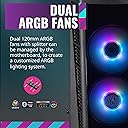
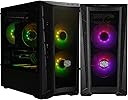
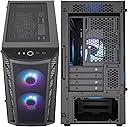
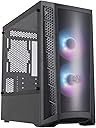
The Cooler Master MasterBox MB320L ARGB is a Micro-ATX PC case designed for both air and liquid cooling enthusiasts. Featuring dual 120mm ARGB fans behind a DarkMirror smoked front panel, it delivers vibrant lighting and superior airflow through large mesh intakes. Its tempered glass side panel showcases your build in style, while the adaptable drive cage and support for up to six fans or radiators provide versatile cooling and storage options. Ideal for first-time builders and professionals alike, it balances aesthetics, performance, and compact design.


| ASIN | B0842T2KWZ |
| Antenna Location | Business |
| Best Sellers Rank | #1,654 in Computer Cases |
| Brand | Cooler Master |
| Case Type | Tower |
| Color | Micro-ATX Tower ARGB |
| Compatible Devices | Micro ATX, Mini ITX |
| Cooling Method | Fan |
| Customer Reviews | 4.6 out of 5 stars 2,793 Reviews |
| Enclosure Material | Tempered Glass |
| Fan Size | 120 Millimeters |
| Global Trade Identification Number | 00884102069604, 00884102069901 |
| Hard Disk Form Factor | 3.5 Inches |
| Internal Bays Quantity | 4 |
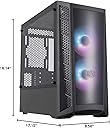
| Item Dimensions D x W x H | 17.15"D x 8.56"W x 16.14"H |
| Item Weight | 6.3 Kilograms |
| Light Color | ARGB |
| Manufacturer | Cooler Master |
| Material | Tempered Glass |
| Mfr Part Number | MCB-B320L-KGNN-S02 |
| Model Name | MasterBox MB320L ARGB |
| Model Number | MCB-B320L-KGNN-S02 |
| Motherboard Compatability | Micro ATX , Mini ITX |
| Number of Fans | 2 |
| Power Supply Mounting Type | Bottom Mount |
| Recommended Uses For Product | Business |
| Supported Motherboard | Micro ATX, Mini ITX |
| Total Expansion Slots Quantity | 4 |
| Total USB 2.0 Ports | 2 |
| Total USB 3.0 Ports | 2 |
| Total Usb Ports | 3 |
| UPC | 884102069604 884102069901 |
| Warranty Description | 1 Year |
E**E
Cooler Master MasterBox MB311L ARGB
The Cooler Master MasterBox MB311L ARGB Airflow Micro-ATX Tower is a compact yet powerful case that offers impressive airflow and stunning aesthetics. Here's a quick review: Performance: Equipped with dual ARGB fans and a fine mesh front panel, the MB311L ensures efficient airflow to keep your components cool, even during intense gaming sessions or heavy workloads. The mesh intake vents further enhance airflow, preventing heat buildup and maintaining optimal system performance. Design: With its sleek and modern design, tempered glass side panel, and ARGB lighting system, the MB311L is a visual standout. The mesh front panel not only adds to the aesthetics but also maximizes airflow, while the tempered glass side panel allows you to showcase your hardware in style. Build Quality: Cooler Master is known for its quality construction, and the MB311L is no exception. The case is sturdy and well-built, with durable materials that ensure long-lasting reliability. The inclusion of a PSU shroud helps to conceal cables and create a clean and organized interior, while the tool-less design makes installation a breeze. Features: The MB311L comes packed with features to enhance your building experience. The ARGB lighting system allows for customizable lighting effects, while the mesh intake vents help to keep dust out of your system. Additionally, the case supports various cooling configurations and motherboard form factors, making it suitable for a wide range of builds. Overall, the Cooler Master MasterBox MB311L ARGB Airflow Micro-ATX Tower is an excellent choice for PC builders looking for a compact case that doesn't compromise on performance or style. With its impressive airflow, stunning aesthetics, and thoughtful design features, it offers everything you need to create a powerful and visually striking gaming or workstation build.
T**R
Nice.
It's a nice , entry level builder's model. No real bells and whistles , just very well-thought out. And it has nothing but airflow. The 2 fans that come with it are cheap as all getout , run of an adapter , not a motherboard hander , and don't have a 3 or 4 pin plug , they'll get you into the argb game , but just enough to immediately look for proper replacements. If you're new to this PC building stuff , the case is fantastic with all rolled edges , no weird arcane steps to be functional. And for anybody that ever had the Darkflash DLM-22 , it's about the same size but with one distinction , it does what a good case should do , flow air and look reasonable doing it. If you're on a budget that's slightly less than what this costs , wait a bit and get it when you can , it's worth it.
J**T
Great Micro-ATX Case Especially For 1st Builds
Listen, I like it. It hasn't failed on me. Pros: Spacious (This things fits my 6900xt reference just fine) Comes with 2 front case fans that aren't too noisy Easy to take apart (tempered glass, front panel, back panel) RGB (because.. lights) Tempered glass so you can look at your bright shiny things Con Cable management is a pain (could be a "me" thing, but it's pretty tight back there) I bought this case for my first build last year (5600g build) and it hasn't failed yet. Through my nervous reopening and upgrading parts (yeah, I still get nervous opening up my built system), it's still running fine. I recommend
J**K
I like the case, but the Fans & some details dissapoint
Build Quality: 3/5 Looks: 4/5 Airflow: 4.5/5 Layout: 4.5/5 Features: 3.5/5 Overall: 3.9/5.0 First off, the case itself is fine, and I'd give it 4 stars for the case. But a good part of the attraction are the included RGB LED front 120mm fans. BOTH of my fans have a very audible 'clicking' noise that changes frequency with fan speed. I check that no wires or obstructions are causing it, but it's coming from the motor housing itself. The fans look great and move air quietly, if it weren't for this annoying clicking. This is for a customer's system, not my own, so I'm hoping they won't care, but it'd drive me up the wall if it were my PC. If your more than 3FT from the PC and don't crank the front fans, you probably won't care. That being said, I've been using Cooler Master fans for years, and many of them have a very quiet clicking when they spin, but not usually enough to be audible more than 6 in away. This is easily 4x to 8x as loud. While we're discussing fans, why is the RGB controller a 3 pin female connection? Most motherboards have a pin layout for RGB control. I still have to figure this out. It even says "Gigabyte" on the connection, and I have a Gigabyte board. I wish RGB standard were more clearly defined,. On to the rest of the case. I like the layout and cooling options. For a Micro ATX case, this has very good airflow and cooling options. There is plenty of space up top for up to a 280mm air cooler, and the dual tower cooler I used also fit fine. It doesn't come with any rear fans, but I knew this going in and don't take off any points at this price point for that. I like that there are 2x 2.5 mounts on the back of the motherboard tray, but there are also 2x 2.5 mounts above the PSU shroud. This is fine, but they only give you hardware for 2x mounts, which is weird since there are 4 areas to mount total. I like the removable 3.5" drive bay, and I like all the space for the size of this case. The layout feels very modern and is easy to work on. However, the bend off expansion slot fillers are annoying. They are hard to get off once a motherboard is in. I know it's a cheap case, but these should be screwed in spacers, not this junk. I expect this on a $40 case, not a $70 case. Cooler Master, charge the extra Twenty Cents and give real expansion slot fillers, please. Overall, if you want a cool looking case with good airflow and a glass side panel on the cheap, this is a good option. So long as you don't mind potentially "clicky" fans and some of the quality shortcuts.
A**S
Just like my old one.
I got this after my old one's glass shattered. It has been a good case to me and I recommend it. It has some good cord/cable management and it has fantastic airflow from the front. It's perfect size to move, not too big or small. Highly rexcomend this as it comes with the ARGB stuff already hooked up. All you need it a MOBO with the right headers.
A**C
The best case in it's size and price class
I've bought multiple of this case for different micro-atx gaming computers, and I've never been disappointed. Box is standard, foam is standard, nothing to complain about regarding the packaging. The included argb fans are good, depending on the day you may get a splitter or a dedicated hub, both are fine. Fans are 3 pin power so nothing too crazy, I'd say if you feel the need to upgrade the fans this case may be worth skipping, as the fans themselves are a big value add. Argb is standard 3 pin motherboard header, and there should be options for daisy chaining more fans or strips if they are the same standard 3-pin ARGB Hard drive cage is removable and easy to mount, power supplies are easy to fit, there is a very generous amount of room to cable manage in the back, and cutouts are placed appropriately for any cables you may need for the motherboard. Hard drive mounts for 2.5" drives on the power supply shroud and in the back are a bit unorthodox but fine, I would not recommend spinning drives in anything but the hard drive cage as there is no hard connection to the case. They are secured via the included screws into the hard drive itself and then wedged into rubber grommets which are wedged into the case holes, so for SSDs this is a non issue. PCIe slot covers are not replaceable, but that's not a deal breaker at this price point. AIO support on the top of the case is limited to a 240mm. 2x 120mm or 140mm fans will fit fine by themselves as there is enough space above the motherboard for either. For front mounting any fans, either 120mm or 140mm will fit, and while 3x 120 will fit, there is not enough extra space on the top or bottom for a 360mm AIO, so don't try it. For bottom routing the tubes of either a 240mm or 280mm on the inside of the case, you may need to remove the hard drive cage to fit the cables, otherwise it should be fine with top routed AIO tubes. Overall at the original price of $65 I'd say this is a no-brainer, at $75 it's still a good option, but at $90 I'd pass as there are much better options within that price class.
R**N
Really good budget case (When it was $60 USD)
This is a great budget case to have. It filters dust in every which way it intakes air. Comes included with 2 front fans and has great support for the upper placement of radiators and decent support for front radiators. Has a pretty good space for large CPU coolers. Can handle almost any GPU size, there are a few that are cutting close and not allowing much airflow at all out of the card. There is space for 4 SSD-specific placements and has a removable hard drive bay that can hold 3 hard drives or another 3 SSD's. The cabling for this case is pretty good but the clearance for a normal power supply is about 3 inches with the hard drives bay installed but this is a smaller case and there is adequate space to put cables around that your not using. Front IO is pretty good having a restart switch starting on the left with a headphone jack and microphone jack, A lit up Coolermaster logo power button and two USB 3.0 ports. A pretty solid case for $60 USD and it only costs 20 dollars to buy another Addressable RGB fan.
K**R
Great Micro ATX Case!
This review is for the Cooler Master MB311L. I bought this case for my first attempt at building a computer. I wanted to build a Micro ATX form factor build and saw this in a video on YouTube. I really liked the Tempered glass side panel, & that the thumb screws used to secure both removable side panels stay attached making it hard to lose them. I found the case easy to build in & there were plenty of cutouts to route cables. I found an adequate amount of room in the backside panel to route cables. The case has a mesh front panel & top panel giving it plenty of ventilation. The fans that come with the case are ARGB & seemed nice, however I could not use them as my motherboard had only 4 pin PWM connectors & these fans were 3 pin. I ended up swapping them out for other Fans. Overall I am very impressed with this case. I would recommend it to anyone thinking about building their own computer.
Trustpilot
2 months ago
1 month ago