Buy anything from 5,000+ international stores. One checkout price. No surprise fees. Join 2M+ shoppers on Desertcart.
Desertcart purchases this item on your behalf and handles shipping, customs, and support to New Zealand.
🎥 Elevate Every Frame — See More, Shoot Smarter!
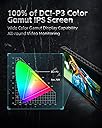
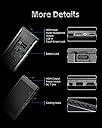
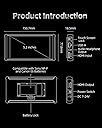
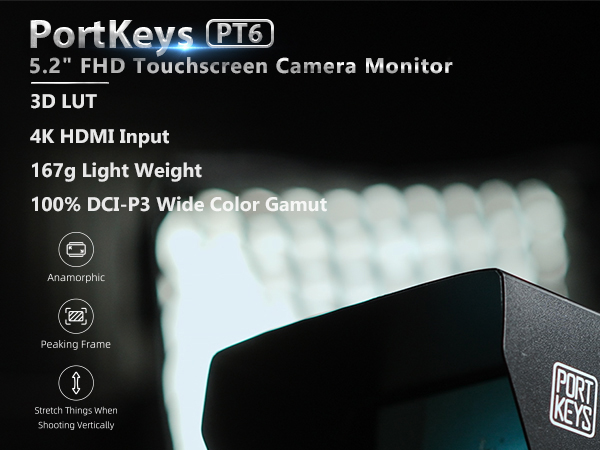
The Portkeys PT6 is a 5.2-inch Full HD touchscreen camera monitor delivering 600 nits brightness and 100% wide color gamut with advanced 3D LUT output. Designed for DSLR and mirrorless shooters, it features Luma and RGB waveform scopes, customizable overlays, and supports Sony NP-F and Canon LP-E6 batteries. Its lightweight, compact design and wide 178° viewing angle make it ideal for on-the-go professionals seeking precise, vibrant monitoring with reliable support.


| ASIN | B083J8RP6J |
| Additional Features | Touchscreen, 3D LUT Output, Anamorphic, Peaking, Zebra, Histogram, RGB Waveform, Luma Waveform, False Color, Image Flip, Zooming, Audio Meters |
| Aspect Ratio | 16:9 |
| Best Sellers Rank | #10 in Video Monitors |
| Brand | Portkeys |
| Brightness | 600 nits |
| Built-In Media | Camera Monitor |
| Color | PT6 |
| Color Gamut | 100 |
| Compatible Devices | Desktop, Laptop |
| Connectivity Technology | USB |
| Contrast Ratio | 1000:1 |
| Customer Reviews | 4.2 out of 5 stars 464 Reviews |
| Display Resolution Maximum | 1920 x 1080 Pixels |
| Display Technology | IPS |
| Display Type | Touchscreen |
| EU Spare Part Availability Duration | 1 Years |
| Hardware Connectivity | HDMI, USB |
| Has Color Screen | Yes |
| Image Contrast Ratio | 1000:1 |
| Item Dimensions D x W x H | 4"D x 1"W x 3"H |
| Item Weight | 0.28 Pounds |
| Manufacturer | Portkeys |
| Model Name | PT6 |
| Model Number | PT5 II |
| Native Resolution | 1920x1080 |
| Number of Component Outputs | 2 |
| Picture Quality Enhancement Technology | Advanced color reproduction, high resolution support, image processing and enhancement features |
| Refresh Rate | 60 Hz |
| Resolution | FHD 1080p |
| Response Time | 5 Milliseconds |
| Screen Finish | Glossy |
| Screen Size | 5.2 Inches |
| Screen Surface Description | Glossy |
| Total Number of HDMI Ports | 2 |
| UPC | 193948046459 |
| Viewing Angle | 178 Degrees |
| Warranty Description | 1 year |
P**Y
Nice monitor for my Canon R6 MK II
I shoot the occasional talking head and solo guitar video and found the rear screen of my Canon R6 MK II too small for self-shooting. I considered a Portkeys model with camera control—touchscreen for auto-focus and other advanced features. But at nearly $400, it was a bit pricey. So the PT6 Camera Field Monitor landed on my doorstep instead. I immediately popped in a spare Canon LP-E6NH battery, jacked in the included HDMI cable, and turned on my camera. Within a few seconds, it was working perfectly in Liveview and video mode without messing around in the TAB menu. Good show! It’s petite—about the size of a smaller smartphone—and very light. It’s mostly plastic, so don’t drop it. The included metal tilt mount is okay—not great—but I have a much nicer one from Smallrig. All the menus, icons, overlays, and AF boxes show up exactly like they do on the R6 MK II’s rear screen, but larger. I have to use the camera’s physical controls to select options or move AF points. The Portkeys touch controls are only for Portkeys functions. I found the image quality of the 5.2" 600nit touchscreen to be excellent. Indeed, better than I expected. I mainly video indoors with LED softboxes, and the 600nit screen proved to be clear, sharp, and plenty bright enough. If you mainly shoot in bright sunlight, you should pay extra for a brighter monitor, but I’m pleased with 600nit for indoor use. All in all, a great little monitor for a Benjamin: easy to use, sharp and clear, petite, and silent (no fan).
W**F
Solid Monitor at a Great Price
So I already owned a BM5II from PortKeys for my Blackmagic Pocket Cinema 4K and I am a huge fan of that monitor. The BM5II is what turned me onto this company originally during my search for a monitor on my first camera rig. Fast forward to present day – I wanted to get another monitor that was affordable and wouldn't break the bank but allow to me semi-permanently mount it to my Ronin-S gimbal. My idea has worked out great so far, the P6 Monitor is super light-weight, it works with my NPF batteries and I'm getting exactly the usage out of it I was hoping to get. and I would consider it great general use monitor. Having this as a dedicated monitor on my gimbal allows for me to switch set-ups with my camera with ease and efficiency. In the future I plan on switching this monitor over to a handheld client monitor rig for viewing purposes or follow-focus rig depending on the shoot and it feels good knowing I can get that kind of versatility out of this screen without breaking the bank. I did mention I use this with my Pocket 4K but just in case you don't know it does not have the capability to control that camera and I knew this going into the purchase and had no expectation of it doing that, hence my BM5II purchase. PortKeys makes some great products, equally as important they have an active support and development community on Facebook that I highly recommend you join. It is cool to see all the user feedback generated on their products in that Facebook group and then typically just weeks later you will often see some of the feedback and suggestions implemented into the new firmware update. All in all I can't say enough good about this company, they are 2 for 2 for me and I highly recommend it. Pros: • Lightweight • Screen Brightness is great and gets the job done. Cons • None to date, will update if any develops but my expectations have been met.
T**A
sharp & lightweight PT6 5.2inch
Pros: -User interface has greatly improved over previous generation and is much more intuitive. -No fans! Nice and quiet. - The false color referencing is nice. Zebras & peaking are easy to dial in. - The screen is significantly sharper than the PT5. - Nice focus grid feature. - Super lightweight and nimble especially running power via usb A. - Finish on material is great! Cons: - not bright enough. - ( EDIT i shot middle of the day in the desert, with the sun hood it’s not that bad. The extra 100 nits over the previous smaller models seems to be just enough but just for the cam op ) - My first unit had a defective usb A port causing no charge no start. Had to return immediately. - The cold shoe swivel head it comes with fits loosely in every single application across multiple PortKey monitors mounts & shoes. I’ve little play wouldn’t be that big of a deal but it’s very obvious when you have a Matt box. A little gaff tape is the remedy or buy a better mount with adjustable tension and precise machining. - You have to disconnect the cables for the sun hood retainers to fit. This restart/reset camera. Note: turn OFF your CAMERA FIRST then power down monitor. Power MONITOR FIRST then power camera. This is to avoid burning your boards typically only a problem with HDMI look it up, after getting a dead board and reading some reviews I’ll be following this procedure religiously
A**R
Promising if they polish the firmware.
I chose this over the Atomos and others because it’s lightweight, thin, fanless, with waveform, and full HD. Strengths: * The luma and RGB waveform scope is fast and smooth. Transparency can be adjusted, large or small, located in any corner. * False color is also smooth, and the color guide can be hidden once you memorize it. * Focus peaking has color, multiple levels of greyscale, and black mode, with options for peaking colors and thickness. * Audio meters can be split on the sides, or both on top or bottom. * Buttons are better than touchscreen because muscle memory learns how to navigate faster with sequences of clicks. * Power switch is either on or off instead of a button you push and hold for seconds. * No apparent screen flicker from poor LED backlight dimming. * Silent with no fan noise and no beeps. * Screen automatically reorients when you flip it upside down. Weaknesses: * When powering on and video signal is lost or changed there is a solid blue color. That might help people in a studio, but when the screen is in your face on a camera the sudden shift to bright blue can disrupt your vision, and cause eye pain. Especially in dim lighting, when you’re intently focused on the subtle colors and focused edges, if you need to change resolution or FPS on the camera, you’ll get hit with a flood of bright blue and your eyes have to adjust again to the darker picture. * When you have a LUT applied, and turn on false color, when you disable false color the LUT is also disabled. You have to reenable it again by either going into the menu or assigning a function button to load the LUT. * The luma waveform can only be in green. It’d be nice to have the choice of color. * The histogram isn’t as smooth as the waveform, and you can only have one shown at a time. * Focus peaking includes the OSD, so even the battery voltage will be outlined as in focus. * It takes around 7 seconds to boot and show the video signal. * When you flip the screen toward the front of the camera you might prefer it to be in a “mirror mode” where your left hand on the screen is on your left. To do that you need to disable auto rotation and manually flip it horizontally and vertically in the menu. But then the text on the menu will be reversed because it flips too, so there’s also a setting to flip the “on screen display” text. These settings can be saved to a separate user profile, but you do have to go into the menu each time you want to flip the screen and use your “mirror mode”. A function button can be used to flip the video, but then the text is reversed, and it requires a separate function button to flip the OSD. The solution is if they apply the manual flip settings to the auto mode, so you can customize how you want it to flip the video and OSD when it detects the physical screen is upside down. * There’s some other quirks in the firmware where it needs to be polished more, and there’s a graphical glitch of the OSD whenever it exits. Overall the P6 seems promising, and might be the best option in January 2020 if you prioritize light weight, silence, compact size, and smooth waveform. Hopefully they can improve the firmware, and it’s upgradable via USB, so it’s probably good enough for now.
C**S
Dead spot on screen… but works.
Touch screen was damaged upon arrival. I ended up getting a replacement thinking it was a fluke accident. The exact same damaged area was on the other screen too! The only reason the monitor has this rating is because aside from the damage in the same spots on two unopened products, the monitor does work and it has helped my workflow. The dead pixels are completely black and do not show up on my image. But if you look closely or at an angle on the monitor, you can see the dead spot.
E**.
Very Pleased with the Portkeys P6!
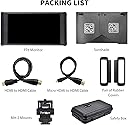
I am very satisfied with this monitor. I placed the order and it arrived very fast. Upon arrival, I was impressed with the size of the P6. It is about the size of a smartphone. As soon as I hooked it up to my camera, I was immediately blown way by the accurate and crisp image quality. The menu is not the most modern looking, but it is very fast and efficient. It is easy to get to all the options and features. Speaking of features, this little guy has all the features you could ever need and for the price it’s a bargain. It has waveform and 3D LUTs which for the this price point is unheard of. The build quality seems solid and it includes a sunhood and a small hard case for protection. The ability to power this monitor with either Sony or Canon batteries is a huge plus. Both type of batteries are affordable and easy to get. I highly recommend this monitor.
J**B
Great monitor for its price.
I bought this monitor after a promo in the portkeys facebook group with a discount! I didn’t really need yet another new 5” monitor. I already have their BM5 2200nits and Atomos Ninja for ProRes Raw recording. I couldn’t pass down a discount! I must say... I am surprised on how well the monitor perform! Pros & Cons: Pros: - Great quality monitor in term of the actual glass, colors are also rich and sharp. - Built quality is not too bad for the price it’s ABS plastic and the monitor is super light for gimbal work! It’s not metal housing so it won’t be taking a beating like their BM5. but it has a rubber contour on the left & right to protect from corner bumps but also to clamp on the sunhood. - The function buttons are ridged and has 4 short cut keys which are quiet handy. - Power is via NPF battery or Canon LP E6 and there is even a DC input. - Very quiet Cons: - Only 500nits, if it was at least 1000nits or above would be ideal. but again for the price... it’s hard to complain. But i doubt I’ll be using it on bright days. - The swivel arm bracket isn’t a great design and the pin broke after I tried tightening it... but am getting a new one. - Sunhood is too reflective for my liking... it should’ve had a velour type inlay to absorb more light. - The 3button menu navigation is not ideal! too many steps to navigate... their other monitor has a 2 bottom(wheel and exit) system which is much faster to make adjustments and more intuitive. Conclusion: Where the monitor really surprised me are the features... it has pretty much what you gona need and more! From peaking, zebra, histogram, waveform, false color with various degree of adjustments and you can even load 3D Luts! Straight out of the box the monitor was too warm compared to my calibrated monitor I used as a comparison but I went in the menu and adjusted the colors and got it super close. The one thing that blew me away which is actually simple... by accident I chose a black and white option in the peaking short key. So when i press it... the image becomes black and white and the peaking red and after also tweaking contrast... BAM! You can actually critically pull focus! If a 7” Version with 2200nits and light weight and not noisy ever get released... am buying it as my wireless focusing monitor rig!
D**D
Amazing for the price, beware of brightness and interesting power input with USB. Solution provided
USB POWER FIX INCLUDED BELOW 👇 Incredible monitor for the price. It has a lot going for it in the spec of the panel and it's software, but it has its downsides as expected. Firstly, it's not especially bright, and can be drown in bright California daylight, even with the included (albeit flimsy) sunshade. Additionally, it can get every hot do don't leave it in the sun either. Secondly, the included case is nice and sturdy but seems to be a standard sized case that's not purpose built to the monitor itslef. This means it's hard to find a configuration to fit the monitor as well as cables in the case without feeling like you'll damage the monitor, and I've resorted to just using the case for only the monitor and sunshade with cables stored separately. Thirdly and most interestingly, there's a quirk with the power input that can be very discouraging until you figure it out. It has DC input (not included), battery input (not included), and USB A input (sorta). I've gone with USB, but don't try to power it with a USB C to A cable by plugging the USB A side of the cable into the USB A input on the monitor and the USB C side of the cable to a power source, it won't work. For some reason I'm unsure of, probably something to do with out of spec USB implementatiom with a quirk in the USB handshake, USB C to A cables somehow become directional with this monitor - they will only work one way, and conveniently it's the way opposite of what you'd expect. I had to plug the USB C side of the cable into the USB A port on the montor made possible with a USB C to A adapter, and then I was able to plug the USB A side of the cable into my power bank. That was the only way I've gotten it to run, and it's annoying to need an adapter to power it, and it does add stress and a weak point to the rig, but it works fine and I've had no real issues so far. I'll post pictures as soon as I can. Perhaps a USB A to A cable will work and not require an adapter, but I found this solution to work especially with the plethora of those and lengths of USB C to A cables I have. I would recommend only buying this monitor if you add a USB C to A adapter to your cart. That all being said however, I will be keeping the montor as it's unbeatable for the price, and fits my needs well enough. Just beware of it's shortcomings before hitting Buy Now.
A**L
Budget field monitor
Very good field monitor on a budget
田**家
シェード付きのモニターは屋外で重宝
商品を説明マニュアルが英語中心なので、しっかり機能を掴んでから現場で使いましょう。シェードが付いているので屋外使用時の遮光に少しは役立ちます。
Z**S
Great Monitor
Great Image and battery life (NP-550) from the monitor. peaking and other features aren't the greatest but overall very pleased
A**ー
【追記】初期不良でも交換出来ないAmazon→portkey社CSで交換してくれました
2023.08.10 期待して購入しましたが、初期不良で起動しない場合でも交換してもらえない商品です。 Amazonでこのportkey社の商品を購入しないことをおすすめます。 2023.9.06 Amazonの購入履歴から交換返品出来ないAmazonの良くない機能が働くので、不具合コメントからCSより交換対応の提案をEMS返送費用自己負担ですが頂きました。 後は、届いた製品が正常動作して、数時間や数日で使えなくならず、皆さんの良いレビューの様に動作する事を祈っています。 2023.9.8 新品の交換品が届きました。csの対応がとても早かったのは好印象です。 少し時間をおいて複数回接続利用した所、問題なく動作しました。 他の方のレビューに数日後使えなくなったとあったので、月内と月末に予定している仕事での撮影に問題なければ、製品品質もcsの対応もとても良かったので、⭐️5つにしたいと思います。 価格帯と作り込みを見ていると、同社の製品は類似品の中でコスパも良く、大変良いメーカーだと思います。 製品保証は1年間あるので、今回のcsの対応から考えてもお買い得だと思います。 望むらくは、Amazonで家電や精密機械を購入した際、不具合があっても購入履歴から返品や修理交換ができない仕組みの改善です。 元々製品に1年間の保証があっても、修理などの申し込み画面から辿れない仕組みは、メーカーにも購入者にも不公平で不親切な状況かと思います。 今回は、メーカーcsの方の機転で解決したことを感謝しています。 ありがとうございました。
C**Y
Portkeys PT5
For the price, you’d be hard-pressed to find a better monitor. It’s compact, lightweight, and portable, yet still packs impressive specs that make it a standout value.
Trustpilot
2 weeks ago
1 week ago