🎬 Elevate your couch command — wireless control that keeps you in the moment!
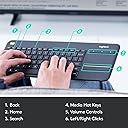
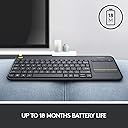
The Logitech K400 Plus is a sleek, wireless keyboard designed for effortless PC-to-TV entertainment control. Featuring a 33-foot wireless range, an 18-month battery life powered by 2 AA batteries, and a built-in large touchpad, it offers seamless navigation and media-friendly functionality. Compatible across Windows, Android, and ChromeOS, this plug-and-play keyboard combines durability with quiet, tactile keys and dedicated media controls, making it the ultimate companion for smart TVs and home theater PCs.


| ASIN | B014EUQOGK |
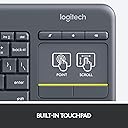
| Additional Features | Built-in touchpad, Customizable controls, Media-friendly design, Wireless freedom |
| Antenna Location | Multimedia |
| Best Sellers Rank | #3 in Computer Keyboards |
| Brand | Logitech |
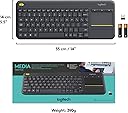
| Built-In Media | 2 AA batteries (pre-installed), USB range extender, Unifying receiver, User documentation, Wireless Touch Keyboard |
| Button Quantity | 84 |
| Color | Black |
| Compatible Devices | Multi OS Device |
| Connectivity Technology | RF , Unifying Receiver |
| Customer Reviews | 4.4 out of 5 stars 39,609 Reviews |
| Enclosure Material | Acrylonitrile Butadiene Styrene |
| Generation | 2nd Generation |
| Global Trade Identification Number | 00097855115300 |
| Hand Orientation | Ambidextrous |
| Is Electric | No |
| Item Dimensions L x W x H | 13.95"L x 5.5"W x 0.93"H |
| Item Weight | 0.86 Pounds |
| Keyboard Description | wireless qwerty |
| Keyboard Layout | QWERTY |
| Manufacturer | Logitech |
| Mechanical Keyboard Switch Model | chiclet |
| Model Name | K400 Plus |
| Model Number | 920-007119 |
| Number of Batteries Required | 2 |
| Number of Keys | 84 |
| Number of Sections | 3 |
| Power Source | Battery Powered |
| Processor Count | 1 |
| Recommended Uses For Product | Multimedia |
| Series Number | 7119 |
| Special Feature | Built-in touchpad, Customizable controls, Media-friendly design, Wireless freedom |
| Style Name | PLUS |
| Switch Type | Linear |
| Theme | Home Entertainment |
| UPC | 097855115300 |
| Unit Count | 1.0 Count |
| Warranty Description | Manufacturer’s warranty can be requested from customer service. |
| Water Resistance Level | Water Resistant |
J**Y
Logitech once again delivers a fantastic product!
So I’ve had my Xbox Series X since it launched November 2020, and have been considering purchasing a wireless keyboard to solely use with it. Here recently more and more developers are including native keyboard and mouse support in their games, so the benefit of having a keyboard to use is growing. Since I did not plan to actually “play” the games with the keyboard, but instead use it for “QOL” enhancements, I didn’t want to spend a substantial amount of money on a wireless keyboard. After doing some research on gaming forums, and multiple Reddit /Subreddits, I continually kept seeing a specific Brand/Model of keyboard a lot of posters were suggesting. The keyboard being suggested was the “Logitech K400 Plus”, so I decided to pull the trigger and give it a shot…. I’m glad I did. The Keyboard arrived my house and I instantly noticed how insanely light weight it was. It’s weight was what shocked me initially, but the bigger shock was how well built and durable it felt, especially considering it’s budget friendly price point. So I removed the included USB-A dongle, and inserted it into my 4-port USB 3.0 hub plugged into my Xbox Series X. I flipped the keyboard switch to “ON” and it instantly connected to my Series X and was flawlessly responsive, and had no sign of lag whatsoever. What I didn’t pay much attention to when I researched and decided to purchase the “K400 Plus” was the functionality it possesses pertaining to “Multimedia”. Logitech designed this keyboard to be the perfect “couch” companion for use with smart tv’s, especially tv’s with native web browser applications. So this keyboard became that much better of an addition to my Series X. All of the playback multimedia buttons work perfectly with my Series X, and since Microsoft manufactures the Xbox systems and this keyboard is geared towards “Windows” based computing, the two handshake together in perfect harmony. Another neat features of this keyboard is the “Left Click (Mouse)” button that is situated in the very top right corner of the keyboard. When I first looked at the Left Click button location I was somewhat confused as to why it would be beneficial in that location. It didn’t take long for me to realize it’s genius though, and I can confirm that it is brilliantly placed in the perfect location. I launched the “Microsoft Edge” browser on my Series X, and instantly realized how perfect it was while scrolling the webpages with my right hand on the touchpad, and being able to use the button to click everything I needed to seamlessly. All in all I love this wireless keyboard, and IMO it’s the hands down best budget wireless keyboard on the market. I’ve attached some photos (they didn’t turn out that great due to room darkness) that will hopefully give you an idea of its size. - PROS: • It’s size is perfect for sitting in your lap, and honestly it’s so light you will forget it is even there. • Logitech designed this keyboard for media consumption, so it excels in it’s functionality with media. • Even though it’s price is very budget friendly, you will be surprised by just how well built it feels. • Button clicks feel very tactile and solid, and IMO have the perfect “Spacing” for ease of use. • It’s manufactured by Logitech, and Logitech has world class customer service if something doesn’t function correctly after your keyboard purchase. • All in all a rock solid wireless keyboard that is rich in features without breaking the bank. - CONS: • In all reality I honestly can’t list anything that I feel is a con, but I will list some things that potentially could of placed multiple cherries on top. • This keyboard used AA batteries (2) for it power source, and I imagine some people would of preferred a rechargeable Li-Po battery, but quite frankly I could care less. I personally like being able to simply change batteries when it dies and instantly go back to using it, versus being unable to use it while it has to charge, but to each his own. • If this keyboard had backlit keys it would be pretty awesome, but I wouldn’t expect it to considering it’s price point. Nonetheless it would enhance it’s appeal that much more. • It would be nice to have bluetooth functionality but at this price point it would be shocking if Logitech had designed it with bluetooth support. In my individual case, the Xbox Series X can only use keyboards via USB-A connection (Wired or Wireless w/ Dongle), so bluetooth wouldn’t benefit my application at all but having the ability to use it with other devices would never hurt.
A**H
Just buy it
I bought this keyboard back in 2019 for my living room media setup, and strictly speaking, this is one of the most useful tools I have ever purchased. Here is why it earns a perfect 5 stars: Insane Battery Life: I am not exaggerating when I say this thing hardly ever uses batteries. In the 5+ years I’ve owned it, I can count on one hand the number of times I've had to swap the AAs. It just keeps going. Reliability: It has never failed. Not once. No connection drops, no lag, no stuck keys. It just works immediately every time I pick it up. Perfect for HTPC/TV: Having the built-in touchpad is a game changer for controlling a PC connected to a TV from the couch. It’s lightweight, comfortable to hold with two hands, and the media keys are exactly where you need them. If you need a keyboard for a home theater PC or smart TV, just buy this. It is the gold standard for a reason. Pros: Unbeatable battery life Extremely durable (survived years of couch use) Plug-and-play reliability Cons: None.
C**7
Good luck to gaming peripheral companies making a better keyboard than this one.
First off this keyboard performs fantastically. I like the touchpad it's responsive. And I like the keys they're a little squishy but they fire and they work. I bought this keyboard to work with my steam deck. It will work with pretty much any handheld that you connect to it. But you're going to need some kind of dock in order for it to work because it includes a IR or whatever we had before Bluetooth connector that you have to plug in. So this means if you are buying this for your steam deck you will not find it in your Bluetooth options. It means that it only works when it's plugged into your deck. Other than that connectivity is a snap it doesn't require any extra downloads. It even works with Linux seamlessly. That being said, given that I live in a dark apartment and I have not been able to purchase extra lighting, a lighted version would probably be a good idea. That being said overall it is a good keyboard and does what it needs to. That being said it is not the type of equipment that I would probably want to trust with my life. So taking it on any ill-fated submarine rides is probably not a good idea. I would probably trust it if I needed to contact emergency services with it though. It's solid enough. And in a society where everything is built to make a profit, I think that's very important to remember. You want things to last you don't want things to break down the moment your warranty runs out. Again in terms of appearance the gray color doesn't really bother me all that much. The fact that it's not very well lighted matters to me. But I think that RGB on a wireless keyboard is pretty silly, Microsoft did it once or twice but I think I had to recharge that keyboard thousands of times because the RGB would just suck up so much power. I think a low-powered lighting that was still bright but required less energy would probably be helpful. Probably ideas for future keyboard designs for companies to mull over. I wish them luck in making a better keyboard then this one. Maybe that in itself is what you needed to hear. Good luck to companies making a better keyboard than this one. Because it's solid.
A**T
Oops. Did Not Realize It NEEDED The USB Dongle
I already owned a small bluetooth keyboard I had bought for use with my Kindle tablets. I have a few 10in tablets that I sometimes use to connect remotely to my main desktop PC. The setup works incredibly well when you pair the tablets with a wireless keyboard and mouse. I bought this additional bluetooth keyboard because there are times I'd like a keyboard, but don't want to have to deal with a separate mouse. Plus there are other times where I need to access a headless PC, or my Raspberry PI, or where I'd love a wireless keyboard for playing Steam games, etc. So I was looking at this keyboard as being great for multi-use. The one thing I hadn't realized was that the small USB dongle (which is in the front flap of the box) is REQUIRED. Since the product description said this keyboard worked with Android, I just assumed it was like my other bluetooth keyboard and didn't need anything additional to plug in. As it turns out, yes, you DO need to use the usb dongle with a tablet or your phone -- and that kinda sucks because obviously those devices don't have a USB-A port. Luckily I had a USB-A to USB-C converter from something else I bought and I tried it out in the Kindle Fire HD10. The keyboard and touchpad worked immediately! Yay! I've ordered a right-angle USB-A to USB-C adapter, so that it's less likely to break if I bump it into something versus the straight USB-A to USB-C adapter that I have now. Then I'll be in-business, regardless if I want to use this keyboard with my tablet, a home theater PC, phone or whatever. The quality seems decent. I haven't had a chance to fully test it out just yet, but if I have any issues I'll update the review. The only other slight gripe is that there's a power switch, so it looks like it has to be powered on or off with the switch versus automatically powering off like my other compact bluetooth keyboard. I tend to forget to shut things off that I normally wouldn't have to (like a wireless mouse). I'd hope that the battery wouldn't drain when the keyboard is not in-use, or it would at least be minimal drain -- but time will tell! It's nice that it uses AA batteries so they're easily replaced. All in all, this keyboard looks like it'll work out well for being a multi-purpose keyboard. It lacks the convenience of a dongle-less keyboard, but having the touch pad built into it makes it VERY convenient when you don't want to have to operate a separate mouse. There have been many times I've worked with a headless PC in the last few years and it's annoying to try to navigate with just the keyboard, or have to setup a mouse on the floor. So this keyboard will solve that problem. And, I'm actually looking forward to trying it out with Steam games to see how it holds up with some games being played while on the couch.
C**N
Tough keyboard
Do not understand any bad reviews. I use it like normal, no issues at all. Works perfect. Good size, just right. Worth every cent but a little expensive. Trackpad works flawlessly. Fast typing. Has taken a lot of falls, no damage.
K**.
Compact & functional but a few major flaws
I have my laptop hooked into the TV, so I wanted a keyboard I could use to control the computer while sitting on the couch. This keyboard fit the bill nicely, so I ordered it. Pros: - integrated touchpad so you don't have to worry about a second bluetooth device - compact and lightweight, unobtrusive - easy to set up - Logitech Options software to manage the keyboard, even though its functionality is incredibly limited for no reason Cons: - You can't change the direction of the scroll on the touchpad. This is honestly SO INFURIATING because it's backwards from every other scrolling function in existence! Almost all apps, touch screens, and sane humans use inverse scrolling (ie, you drag your finger up to pull the page up and the screen scrolls down), but the touchpad on this keyboard uses directional scrolling (ie, you drag your finger up and the screen starts going up). And no, you cannot change this in the Logitech Options software. - the "power" button on the keyboard doesn't turn the laptop on. If you're hoping to use this keyboard to control a device while you're snuggled up on the couch, you better remember to turn it on first. And again, not something you can change in Logitech Options. - the scrolling on the touchpad is very sensitive. I have it turned all the way down to 3%, and I still need to be careful or it'll shoot up or down really quickly. - backlit keys would be great TL;DR: This is a compact and inexpensive keyboard that works well enough. It has the Logitech reliability, but it definitely falls short of its name in terms of functionality. Would I buy it again? I guess so, but I'd try to find something better first.
W**E
Perfect for use with my Samsung Smart TV
I have two 6 Series (MU6290) 40" Samsung 4K Smart TVs that I purchased at Costco, one in my office and the other in my master bedroom. For about $19 I purchased a wireless keyboard and mouse combo on Amazon to use with the TV in my office. They use a single unifying USB reciever and work great, just plug and play. The only thing I found I didn't like was having two devices to keep track of and having to switch between them to point and input data. I saw this keyboard as an Amazon Deal of the Day two days ago and just received it, in fact I'm writing this review with it while sitting on the bed and using my bedroom TV. It turns out to have been a very good purchase because it works great! I merely plugged the unifying USB receiver into the first USB input on the back of the TV, turned the keyboard on and started using it, true plug and play. And boy do I love using the touchpad to cursor around instead of having to switch between the keyboard and mouse like I do in my office. In fact, even though the keyboard and mouse work fine on the TV in the office, I may end up buying another K400+ to use in the office, it's "that nice" not having to use two devices. I know the K400+ is advertised as a device for using with a computer connected to a TV but I read other reviews where it was being used directly with a smart TV without a computer and, even though it works great with my Samsung, I can't speak to whether it works with all smart TVs, though I expect it should work with any of the later Samsung Smart TVs which use Samsung's Tizen OS. I don't know if it works with the other two major Smart TV operating systems, WebOS & Android. It's light, seems well made, has a QWERTY keboard with nice key response and feel and is spaced fine for touch typing. It's great for basic input and I'm finding out more about how it functions with my TV. For instance, I found out holding down the CTRL key while cursoring moves the cursor one word at a time, holding down the SHIFT key while cursoring highlights one letter at a time, holding down the SHIFT + CTRL keys while cursoring highlights one word at a time, etc. These are familiar, however I've discovered by playing around that other keys and key combinations do things but the result may not necessarily be what I expected, but I'm the type who likes to play and learn and will thus get even more use from this keyboard as I learn. For example, just discovered esc key is equivalent to the "back" function when used in your browser. I can mention the media keys, previous chapter, next chapter, pause/play, volume up & down don't work with my TV. I'm sure they do if the keyboard is connected to a computer that's connected to a TV, as advertised. However this keyboard is perfect for anyone who only simply wants to point and input, especially if you only want to use one device! Overall I'm "extremely pleased" with the K400+ and am so glad I decided to give it a try. Of course the only thing I can't comment on is it's longevity but I hope it lasts a good long time because I love this thing!
D**A
With a extra touch screen
This keyboard is very convenient for controlling a TV or media center. The built-in touchpad works smoothly and makes navigation easy without needing a separate mouse. The keys are comfortable enough for casual typing, and the wireless connection is stable. It’s lightweight, simple to set up, and perfect for couch use. A solid choice for a home entertainment setup.
Trustpilot
1 month ago
2 months ago