



PXN USB Flight Simulation Stick PC Flight Joystick Controller, 16 Programmable Buttons, Vibration Function, Throttle Control, Compatible with Windows PC, Black
Product ID: 253484712
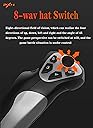
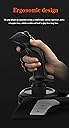
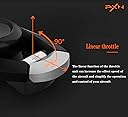
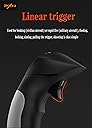
Product description Step 1 Launch the game and click“MENU.FLOWBAR_ OPTIONS",select“MENU.OPTIONS CONTROLS". Step 2 Except the keyboard and mouse mode, also have joystick mode in game. Please click“GENERIC USB JOYSTICK" to map the key. (Note: The joystick should be plugged into PC before this setting). Step 3 For function settings, take “INPUT.KEY_ _SWITCH_ CAMERA"as an example, scroll down to select“Select an input", click No.12 button, finally click“VALIDATE”to save(Can be set freely). Step 4 Here is a set of default keys for player. the customer needs to download the driver, log on to the official website of WWW.e-pxn.com, click on the bottom of the page, support -Tools, and enter the driver download page, Attention to all customers Click PXN Joysitck software driver" to download the driver, the download is complete, the installation is complete, the computer desktop will display the "PXNJoysitck" icon. When you connect the device to fit, the computer will automatically identify the model of the device, you click the PXNJoysitck icon to set the buttons, Perform game control. Note about Vibration Function 1.Vibration Switch is at the bottom of the joystick. If need vibration function,please switch to “ON” position.Please set the vibration strength in the driver to 50% or higher. 2.The game must have vibration function and signal transmission of vibration.If no vibration signal,please try another game with vibration function ,we will check for you soon. 3.You can test the joystick’s vibration function as follows:install the driver in CD via your computer.Please see "Vibration function" in the manual and follow the "Vibration test" to check.For more details, please see the manual. Log in to www.e-pxn.com official website, enter Home / Support / Tools /click PXN JOYSITCK SOFTWARE / Click to download Download download PXN-F16 3D USB Wired Flight Stick Joystick for Windows PC, with Vibration Function, 12 Programmable Buttons, Flight Simulator Joystick Controller, Compatible with Windows XP/VISTA/7/8/10 Compatible with mainstream PC flight games: Microsoft Flight Simulator 2020, DCSword, Thunder War, Microsoft Flight Simulator 10, X-plane1 1, Ace Air Combat Assault Horizon, World of Warplanes, Eagle Strike 2, FSX, Seraph 2, Secret Mission, Defend the Hero Eagle-2 (Note: The vibration switch is located at the bottom of the joystick, please switch to "ON". If the vibration intensity is less than 20%, Features 1. 8-Way joystick,12 Programmable Buttons, 4 Axis controlling 2. Vibration function, Precise Throttle Control 3. 3D direction dimensional control axis 4. Rapid fire trigger,Target and accurate fire 5.Ergonomic design,Feel comfortable, Single hand control full function Specificaiton Model: PXN-F16 Connection Type: USB Wired Working Current: 20mA-100mA Working Temperature: 10-40 Celsius Working Humidity: 20% to 80% Dimension: Apporx. 198x190x220mm Weight: Apporx. 517g Package Included: 1 x PXN-F16 Flight Stick Joystick 1 x Software Driver 1 x Manual Review: Runway 25 L - Great joystick for flight simulators. More sturdy than what I have had in the past so you can fully use it without concern of tipping. Nice features of having programmable buttons makes it even better Review: It doesn't work with most flying games - It doesn't work with most flying games and I have a pc desktop. It calibrates, I did testing in the options but then I go to a game it doesn't operate. I have tried gta 5 flying mechanics, no man sky, and other famous flying games through steam but nothing works. Giving this 1 star for that reason and will be returning the item.


| ASIN | B08P4J599V |
| Additional Features | Ergonomic |
| Best Sellers Rank | #153,166 in Video Games ( See Top 100 in Video Games ) #1,447 in PC Game Joysticks |
| Brand Name | PXN |
| Button Quantity | 12 |
| Color | Black |
| Compatible Devices | PC |
| Connectivity Technology | USB |
| Controller Type | Joystick |
| Customer Reviews | 3.6 3.6 out of 5 stars (78) |
| Hardware Platform | pc |
| Package Quantity | 1 |
| Power Source | Corded Electric |
| UPC | 611864772097 611864772127 |
R**Y
Runway 25 L
Great joystick for flight simulators. More sturdy than what I have had in the past so you can fully use it without concern of tipping. Nice features of having programmable buttons makes it even better
S**N
It doesn't work with most flying games
It doesn't work with most flying games and I have a pc desktop. It calibrates, I did testing in the options but then I go to a game it doesn't operate. I have tried gta 5 flying mechanics, no man sky, and other famous flying games through steam but nothing works. Giving this 1 star for that reason and will be returning the item.
C**R
Works well for price
After a little trial and error for the controls it worked wonders for my flying abilities on my flight simulator couldn't be happier
R**.
Worked for a while
Used this for warthunder, MSFS 2020 and DCS. all of a sudden, the joystick starts spazzing out like the gimbles are going bad right around center stick. I thought calibration would help or changing dead zones... but try flying formation when your joystick suddenly toggles between center and full forward pressure intermittently every few seconds.
,**P
Good Starter Flight Stick
Good starter flight stick. Some side buttons are sometimes slow in responding. Otherwise just OK on material quality and craftsmanship. Does what I need it to do.
K**Y
Works well
Pretty nice flight stick
F**O
La caja llego destapada no venia sellada como siempre envian todo de amazon
La caja llego destapada no venia sellada como siempre envian todo de amazon se esta tratando de prender pero no funciona se ha probado en varios equipos pero no prende
M**L
Useful
i really like this. i use it for x-plane 11 and it’s super helpful.
A**R
works perfectly for war thunder
works perfectly for war thunder on windows 11
D**K
Don’t buy doesn’t work
Useless. The joystick is not compatible the 2 games I have tried those being warthudner and ace combat. However when I tried to set some keybinds again that did not work either. The product is not worth the time or money
Trustpilot
2 days ago
1 month ago