Buy anything from 5,000+ international stores. One checkout price. No surprise fees. Join 2M+ shoppers on Desertcart.
Desertcart purchases this item on your behalf and handles shipping, customs, and support to New Zealand.
⚡ Power your smart workspace with effortless control and speed!
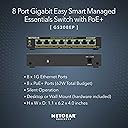
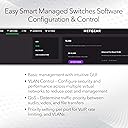
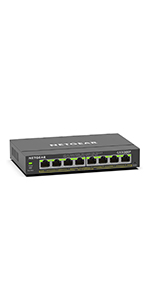
The NETGEAR GS308EP is an 8-port Gigabit Ethernet PoE+ Smart Managed Plus Switch offering a robust 62W power budget to support multiple PoE devices. Designed for easy setup and management via its user-friendly software, it supports flexible desktop or wall mounting and delivers reliable, high-speed network performance backed by a 3-year limited warranty.


| ASIN | B08MBFLMDC |
| Best Sellers Rank | #5 in Computer Networking Switches |
| Brand | NETGEAR |
| Built-In Media | 8-port Gigabit Ethernet PoE+ Smart Managed Plus Switch (GS308EP), 2V, 0. |
| Case Material Type | Plastic |
| Color | Black |
| Compatible Devices | Computers, IP cameras, VoIP phones, network devices |
| Customer Reviews | 4.7 out of 5 stars 943 Reviews |
| Data Transfer Rate | 16 Gigabits Per Second |
| Interface | RJ45 |
| Item Dimensions L x W x H | 10.2"L x 10.2"W x 2.2"H |
| Item Weight | 1.1 Kilograms |
| Manufacturer | NETGEAR |
| Maximum Power | 62 Watts |
| Mfr Part Number | GS308EP-100NAS |
| Model Number | GS308EP-100NAS |
| Number of Layers | 1 |
| Number of Ports | 8 |
| Platform | Not Machine Specific |
| Product Dimensions | 10.2"L x 10.2"W x 2.2"H |
| Switch Type | PoE Managed Desktop/Wall Mount |
| UPC | 606449153026 |
| Unit Count | 1 Count |
| Upper Temperature Rating | 123 Degrees Fahrenheit |
| Voltage | 2 Volts |
| Warranty Description | Limited 3-year |
M**R
Reliable plug-and-play PoE switch, no issues after months of use
I’ve been using this switch for several months now, and it’s been completely reliable. Setup was as simple as it gets. Plug it in, connect devices, and it just works. No configuration needed, which is exactly what I was looking for. I’m using it to power and connect multiple devices over PoE, and it has handled everything without any drops or instability. Once it’s up, you don’t have to think about it, which is what you want from a switch. Build quality feels solid, and it runs without any noticeable issues during normal use. Pros True plug-and-play setup Reliable over several months of continuous use Handles PoE devices without issues Stable connection with no dropouts Cons No advanced management features (expected for this type of switch) Bottom Line If you need a simple, reliable PoE switch that just works without setup, this is a solid choice.
J**.
Reliable Power and Control in One Compact Switch
I’ve been using the NETGEAR GS308EP in my network setup, and it’s been a solid, no-nonsense upgrade. I needed something compact that could handle both connectivity and power for devices like access points and cameras, and this switch delivered exactly that. PoE That Just Works Having 8 PoE+ ports with a 62W budget has been incredibly convenient. I’m able to power multiple devices directly through the switch without needing extra adapters, which keeps my setup cleaner and more efficient. Smart Features Without the Headache What I really appreciate is the “Easy Smart Managed” functionality. It gives me just enough control—like VLANs and traffic prioritization—without being overly complicated. I didn’t have to spend hours configuring it, which is a huge plus. Compact and Flexible Design The size is perfect for a desk or wall mount, and it feels well-built. It runs quietly and doesn’t take up much space, which is ideal for a home lab or small office environment. Perfect for Home Labs and Small Networks Overall, this switch hits a great balance between simplicity and capability. It’s reliable, easy to use, and does exactly what I need without overcomplicating things.
R**T
It’s a good Poe switch
I use with my ip cameras and access point. Hasn’t failed me yet and is easy to configure.
S**N
Exactly what I needed
Works perfectly
M**I
Netgear!
Easy to deploy. Build quality is solid. Helps me take advantage of our 1Gig internet speed. Small enough to fit where my old 5-port switch was.
T**R
Best priced managed PoE switch on the market!
I have bought a few of these for use on our campus and I can say that they are basically a steal for what you get. Not they don't have their issues. Here are my pros and cons: Pros- Price- Bar none this is the cheapest managed PoE switch I have been able to find. At $7.50 a port its basically unbeatable. Most commercial switches I have had quoted come out to about $30 a port. Yes greater functionality at that price, but not worth it if you don't need them. Power- It actually has a decent power budget. 62W over 8 ports which averages out to about 7.75W per port. This is plenty to run low power applications such as security cameras. You can still run things such as wireless access points, but don't expect to fully populate the switch with them. (Edit) If you are in need of a greater power supply per port, the GS316EPP has an astounding budget of 231Watts which works out to about 16W per port. Should be enough to power just about anything but the most power hungry PoE devices. Management- The fact that its actually manageable at this price. The features available are not spectacular by any means, but you probably are not buying this if you need in depth QOS settings. You can fully manage both the power and VLANs on it which is more than sufficient for basic networking. It does have a free management software that you can use, thought it does have some serious limitations. GUI- The web GUI is pretty straight forward with the home screen providing most of the basic device settings at a glance. Switching tab aside, settings are clear and concise. They also have helpful descriptions for those less familiar with networking terminology. Bandwidth- All 8 ports are gigabit capable and the switch does allow port aggregation allowing for a greater outbound bandwidth from the switch if you have a few high volume devices plugged into it. Cons: Management- As previously stated, this certainly isn't a state-of-the-art device. QOS settings are limited to bandwidth controls and only the most basic of Multicast settings are available. The free "central" management software also has a major limitation. It only works if the switches are in the same network as the computer/server hosting the management software. If your computer is in 192.168 and your switch is in 172.16, it will never find it. This isn't an issue if you are operating a flat network or have a management VLAN. GUI- Overall the GUI is great, but the VLAN management is very annoying to work with. For starters, the VLAN modes are not particularly well described, so figuring out which one does what you need is a matter of trial and error. The Advanced VLAN Management is particularly painful to work with, though it does offer the greatest flexibility in settings. This is primarily due to the interdependence of the PVID table and the VLAN port assignments. To change the PVID setting on a port, you must have the VLAN you are changing it to assigned. Or if you want to remove an assigned VLAN, but its the PVID, you must first remove change the PVID before you can remove it. These are on completely separate pages requiring navigation between the two when tweaking the settings. If you are going to be changing these frequently, be prepared to spend a lot of extra time doing so. Though less irritating, having to click edit on each individual VLAN to manage its assignment to ports is unnecessary and could have easily been on the main VLAN management page. CLI- Or lack thereof. For those of you who much prefer Putty to a web browser, that simply isn't an option. (Edit) Mac Table- Zero access to what is one of the most useful features in switching. Figuring out what is plugged into what port without it is basically just unplug the cable and see what goes down. Not great great for high availability devices and end users. TLDR: Best bang for buck for a managed PoE switch that you can find. Great if you need something just above plug-n-play. Just expect a configurable feature set comparable to the price.
O**S
Perfect for Home Use
Does what it's supposed to without issues. I wish developers would put in Ethernet cables to begin with. It's a hassle fishing wires through the walls and popping in old-construction boxes. Wired beats wireless every time - even expensive "gaming" wireless routers.
B**N
Cute Little Baby Switch
I run a Home-Lab that includes 2 of these little PoE switches. Working in an Enterprise IT environment, I would often forget that these smaller residential/hobby switches exist, but gosh to I love them. Not only are they cute, but they provide that enterprise level functionality with PoE. This means it could be used to wire up a PoE security camera system, handling both your network connection and power in one cable! Minus the countless other applications of PoE, this switch provides ample value for what you're paying. The build quality even on a switch this small is great! Feels heavy and sturdy but could honestly be held up by a number of command strips (Please... don't do that though!!!). I haven't noticed any problems with my unit getting too hot or needing anything special to operate as intended. All 8 ports work as expected and the throughput is, in fact, Gigabit as advertised. So no problems there. If you are looking for something consolidated but powerful, this could be for you!
C**E
Switch nach einem Jahr tot
Switch ist nicht mal 1 Jahr alt und schon defekt
E**R
Excelente
Fácil de administrar, interfaz amigable.
M**N
Great product
Work perfectly
I**O
VLAN function work well
I bought this switch to setup VLAN that is part of my home network upgrading. For the VLAN function, it works well. But for POE, I have not yet tested as UniFi AP out of stock. BTW, I does not like the new interface for WebGUI. It has less option. I still prefer the old Web GUI.
ش**ة
ممتاز جدا
ممتاز جدا
Trustpilot
4 days ago
5 days ago