We remain fully operational. Our teams are working around the clock to ensure your deliveries continue safely.

DOWNLOAD THE APP


Copyright © 2025 Desertcart Holdings Limited
DOWNLOAD THE APP


Buy anything from 5,000+ international stores. One checkout price. No surprise fees. Join 2M+ shoppers on Desertcart.
Desertcart purchases this item on your behalf and handles shipping, customs, and support to New Zealand.
⌨️ Light up your Dell, type like a pro! 💡
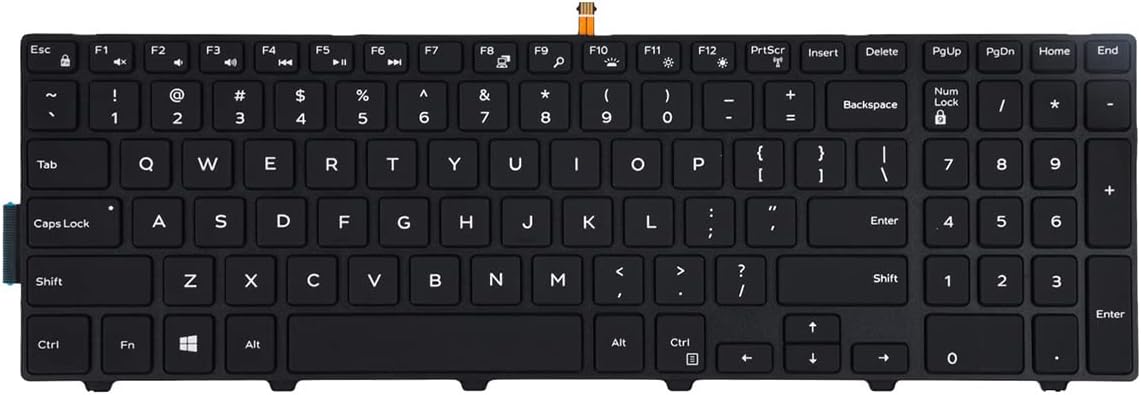
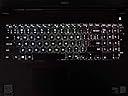
This replacement keyboard is a precision-engineered, backlit US-layout keyboard compatible with a wide range of Dell Inspiron 15 and 17 series laptops. Featuring 78 tactile mechanical keys and a plug-and-play ribbon cable, it offers an easy installation and a premium typing experience. Tested for full functionality, it also provides a stylish backlit upgrade for models lacking this feature, making it the perfect blend of reliability and modern convenience.
| ASIN | B08R8T7LRJ |
| Additional Features | Backlit |
| Antenna Location | Office |
| Best Sellers Rank | #362 in Laptop Computer Replacement Parts |
| Brand | KBR |
| Built-In Media | Replacement Keyboard |
| Button Quantity | 78 |
| Color | With Backlit |
| Compatible Devices | Laptop |
| Connectivity Technology | USB |
| Customer Reviews | 4.3 4.3 out of 5 stars (188) |
| Enclosure Material | Plastic |
| Hand Orientation | Ambidextrous |
| Keyboard Description | Replacement Keyboard with Backlit US Layout |
| Keyboard Layout | QWERTY |
| Manufacturer | KBR |
| Mechanical Keyboard Switch Model | Tactile Mechanical Switch |
| Model Number | 0bcb0c13-8f30-48ec-8798-2fabe7562231 |
| Number of Keys | 17 |
| Number of Sections | 1 |
| Power Source | Wired |
| Series Number | 3000 |
| Style Name | Contemporary |
| Switch Type | Tactile |
| UPC | 762917878959 |
| Unit Count | 1.0 Count |
H**T
Inspiron 3558 keyboard replacement
Bought to replace my keyboard on an Inspiron 15 3558 laptop...works great so far (1 week) and easy to install. Keys are soft and responsive. Fyi, the 3558 model doesn't support the backlight feature but not a big deal for me.
W**W
Works like the original keyboard
I purchased this keyboard to repair a friend’s Latitude 5558. The quality of this keyboard seems to equal the original Dell part. The repair job takes only a few minutes because the keyboard unclips along its top edge. Unclip the old keyboard, open the connector(s), install the new ribbon cables, close the connectors and pop the keyboard into place. That’s it. As as added bonus, this keyboard is backlit which the original from Dell was not. The Latitude already has the connector for the backlight ribbon, so this was a nice easy upgrade.
L**M
Works fine
Easy to install. Works fine.
D**Y
It fits but seems to require a break in period.
Bought it to fix wife's computer because she writes so much content for the internet and she wore out the original keyboard. Fits perfect but wife hated it. It seemed to not work well or the keys maybe not making good contact? Required pressing some keys several times to work. She gave up on it and got another laptop. I got the laptop and kept using it. eventually it seemed the keys gradually worked better. The more I used it the better the key response was. I don't usually use a laptop but at least the computer is fixed now when I want one. Suspect keyboards been stored for so long the switch contacts inside might take some time to break through whatever corrosion inside. Depending on your patience, or luck it hard to say whether to buy this.
J**D
A real bargain
A hand-me-down laptop had a keyboard that no longer registered letters reliably when pressed. This new keyboard came with illuminated keys which looks great. Installation was easy, but I strongly recommend looking at a youtube video showing installation as the clips holding the ribbon cables onto the motherboard can be broken if not careful. When that happens, you're SOL. The price was right on this keyboard.
P**L
Doesn't Always Record Keystroke-Misses a LOT
After about 3 months with this keyboard, I'm fed up and have had enough of the struggle to type. First, the cable for the backlight was longer than the OEM keyboard had, so my installation guy had to fold it. He was not happy with how it affected certain keys. Additionally, I've discovered, that your keystroke only gets picked up, if you push on many of the keys, in exactly the right spot, the spacebar being one of them. If you hit the spacebar outside of a small dead center area, it does not work. This applies to the shift keys, as well. The "n" key, right under that too-long ribbon cable has to usually be hit twice. This is going in the trash as soon as I can find a better quality replacement and therein lies my next problem. There might not be any. Then it's time for a new computer and it will be a Mac this time. No more Dell junk.
R**4
Perfect replacement for my Dell 15 7559 Backlit keyboard
This keyboard took less than 5 minutes to install. Works great...keys feel great. The keyboard IS backlit. Perfect replacement for my malfunctioning keyboard. A+
J**J
Good
Works very well and back light to
H**N
الجوده من احسن مايكون
R**F
comme l'original très satisfait
M**E
It does not fit a dell inspiron 15 inch. It prodtudes out.
M**M
Great price and an easy upgrade to a back-lit keyboard for my Dell Inspiron 15 3542 !!
U**.
Bad and flimsy quality
Trustpilot
1 month ago
3 weeks ago