Buy anything from 5,000+ international stores. One checkout price. No surprise fees. Join 2M+ shoppers on Desertcart.
Desertcart purchases this item on your behalf and handles shipping, customs, and support to New Zealand.
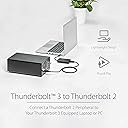
⚡ Future-proof your legacy tech with StarTech’s Thunderbolt adapter!
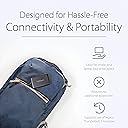
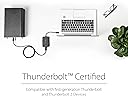
The StarTech.com Thunderbolt 3 to Thunderbolt 2 Adapter enables professionals to connect their latest Thunderbolt 3 laptops to older Thunderbolt 1 and 2 peripherals at speeds up to 20Gbps. Bus-powered and compatible with both Windows and macOS, this adapter preserves the usability of premium legacy devices like Apple Thunderbolt Displays and external storage, ensuring seamless integration without sacrificing performance.


| ASIN | B019FPJDQ2 |
| Best Sellers Rank | #141 in DVI-HDMI Adapters #7,055 in Computer Cables & Interconnects |
| Brand | StarTech.com |
| Built-In Media | 1-Thunderbolt™ 3 to Thunderbolt Adapter |
| Color | Black |
| Compatible Devices | External Hard Drive, Hard Drive, Laptop, MacBook Air, MacBook Pro, Printer, Storage Drive |
| Connector Type | Thunderbolt 2/Thunderbolt 3 |
| Current Rating | 1 Amps |
| Customer Reviews | 4.0 out of 5 stars 852 Reviews |
| External Testing Certification | CE, FCC, Thunderbolt |
| Finish | Black |
| Global Trade Identification Number | 00065030864138 |
| Input Voltage | 5 Volts |
| Item Dimensions | 11 x 2.3 x 0.6 inches |
| Item Type Name | Data Transfer Cable |
| Item Weight | 0.13 Pounds |
| Item dimensions L x W x H | 11 x 2.3 x 0.6 inches |
| Manufacturer | StarTech.com |
| Mfr Part Number | TBT3TBTADAP |
| Model Number | TBT3TBTADAP |
| Number of Items | 1 |
| Number of Ports | 2 |
| Package Quantity | 1 |
| Power Plug Type | No Plug |
| Smart Home Compatibility | Not Smart Home Compatible |
| Specific Uses For Product | personal |
| UPC | 065030864138 |
| Unit Count | 3.0 Count |
| Warranty Description | 2 Year |
J**Z
Apple Thunderbolt Display (Mini Displayport) to a Windows PC using a USB-C connector? This is the App for that. A+
On a new PC build, using this motherboard: Gigabyte LGA1151 Intel Z170 2-Way SLI ATX DDR4 Motherboards GA-Z170X-Gaming 7 , I was itching to use my Thunderbolt display from Apple since about 2 years ago I spent over $1,000 at the Apple store for it (the one like this: Apple MC914LL/B 27-inch Thunderbolt Display ) - and well, it was meant to be more than just a pretty paperweight. Actually the newly-obsolete Apple Thunderbolt display itself is quite good. It's a shame that Apple didn't continue that business (for now). The downside is that it's a Thunderbolt 2 device that's - confusingly - a mini Display port. Even more confusingly, when I bought the motherboard and it came with a USB-C connector on the back. I thought "oh, I just need a cable.." not really. The motherboard is Thunderbolt 3 and the monitor is Thunderbolt 2. Fast forward to the end here: this product works GREAT to connect a PC/Laptop that has a Thunderbolt 3 USB-C connector (Dell, HP, etc) to an Apple Thunderbolt Display. Beyond the basics of it working as a display, I haven't invested time to get the drivers to work for the camera, speakers, etc inside the display, but there are some sites out there that document how to do it by borrowing drivers from bootcamp. As other viewers noted though, an Apple MacBook with a USB-C connector doesn't use Thunderbolt 3 signalling, so for that purpose this adapter is unlikely to do anything. Make no mistake: this adapter is expensive. But to spend about $75-80 to make an already-owned good Apple monitor work on a new Windows PC to me was worth it.
W**R
Don't buy Apple. Apollo Twin to PC works.
I purchased this (StarTech.com Thunderbolt 3 to Thunderbolt 2 Adapter) in 2017 to allow me to attach my Universal Audio Apollo Twin Duo 2 to my Windows 10 based 17" Acer Predator laptop that had a Thunderbolt 3 port. Worked flawlessly. I now need to attach an older Firewire Audio Interface to my new MacBook Pro that only has ONE Thunderbolt 3 port. The firewire to Thunderbolt 3 adapter does not exist and never will (given that its not available by now by anyone). Apple would have you spend $29.00 for a Firewire to Thunderbolt TWO STYLE adapter. (this has a DIFFERENT style plug than a thunderbolt 3 cable) of course! Then you would have to pay an ADDITIONAL $49.00 MORE for another adapter to make this work. I was about to pay another $49.00 Until I REMEMBERED I owned this adapter. . So I only needed to purchase the $29.00 firewire adapter. I then plugged it into my new 2020 apple computer and everything worked. A good part of apples Research and Development goes into making their products incompatible in such a way that you are forced to either 1: upgrade and trash what you are currently using. 2: computers the are incompatible with any device that they do not manufacture and sell. 3: peripherals that can be made to fail in short order and that are a necessary component to operate their devices....all apple cable I have owned have fallen apart at both ends in short order.
B**K
Product didn't work for me
I'm sharing this review with the hope that it can help others. The problem I tried to solve with the StarTech adapter was to connect my Apple thunderbolt display with a new Windows USB-C/Thunderbolt capable laptop. After a great deal of research, based on what is published by StarTech, I purchased this rather expensive adapter. I've tried this with two brand new Windows Laptops, a Lenovo C930 and a Dell XPS 13. The results were the same with both. The laptops recognize the Apple Thunderbolt display and ask for permission to connect. After selecting "Always connect", the laptops fail to recognize the Thunderbolt display and the screen remains dark. Going to display settings, there is no option to extend or mirror the display on the second monitor. As for StarTech support, let me save you some time and frustration. The consistent message is, you have to go back to your manufacturer and update the bios and any drivers, but no specific information is provided. I spent hours and did all of this with both machines and it didn't change the results. Startech's response was that this was still an issue with the laptops, bios or drivers, not their product. Bottom line: I don't agree. It does work with my daughter's new MacBook Air, as does the less expensive Apple USB-C to Thunderbolt adapter. But it is my opinion that the adapter will not work in the application for which I purchased it. Hope this helps others.
W**G
Connected an Apple Thunderbolt Display to a Windows 10 PC!
NOTICE: This review is primarily for those who build their own computers or are looking to build one in the future (it's fun and not that hard!) For anyone wondering if this will let you connect an Apple Thunderbolt 1440p display to your Windows PC, the answer is, well... maybe. It's a complicated process that will take up much more of your time than you would probably like, but after a bit of tinkering I got it to work, so it's definitely possible. When I arrived at my new video editing job, my first task was to build a new video editing rig, since I wasn't too keen on the 2009 quad-core Mac Pro my predecessor had been using. The only thing was, sitting there unused and sad was a very nice 27" Thunderbolt Display. Since this is an excellent panel I wanted to use it on the Windows 10 rig I was about to build, but upon further research I discovered this may be a much more difficult task than plug-and-play. See, Thunderbolt Displays will ONLY work with a thunderbolt port, you cannot simply get a mini Displayport to Displayport adapter like you can with an Apple Cinema Display, which are older and use mini Displayport instead of Thunderbolt (even though they look identical). Your options for buying motherboards with Thunderbolt equipped is very slim, but they do sell PCI cards that let you add Thunderbolt ports to your system. I purchased the Asus X99-Deluxe II motherboard, which comes with the Asus Thunderbolt EX3 card included. I needed this adapter because the EX3's thunderbolt port is the latest standard, which uses the USB-C form factor. If I would have done more research I maybe wouldn't have needed to get this adapter, but no use complaining now and besides, the X99 deluxe II is a glorious beast. However, when I first plugged everything in and fired up my machine, nothing happened. I downloaded the drivers, went through settings, enabled Intel Thunderbolt in my motherboard's BIOS, still nothing! I was ready to return this and give up, but I researched and researched, changed some more BIOS settings, then a day later--WHAMO--it worked! Now I have a beastly dual-1440p panel setup. So, the important things to know if you're looking to purchase this card to connect an Apple Thunderbolt Display: - You will have to tinker with it, possibly for multiple days before it works. - It will require you to mess around in your computer's BIOS settings. This can be intimidating to first-timers. - Do your research! This is an expensive adapter and you don't want to get it then find out you also have to purchase pricey computer components to make it work. My system: Mobo: Asus X99-Deluxe II Expansion Card: Asus Thunderbolt EX3 CPU: Intel i7-5820K 4ghz overclock GPU: EVGA GTX 1070 OC black edition w/thermal pad mod RAM: 64GB G.Skill ripjaws V series DDR4-3200 Storage: OS on 1TB Samsung 850 EVO SSD, several other standard HDDs Display 1: 27-inch 1440p BenQ BL2711U Display 2: 27-inch 1440p Apple Thunderbolt Display
A**R
EDIT: MIGHT not connect Apollo Twin MkII to 2019 Macbook pro
EDIT: after what transpired below, I bought the cheaper apple brand adapter. The apollo didn't work with that either, so I realized that i needed to update the firmware and software to get the apollo twin running properly. Now it works! I'm keeping the apple adapter because its cheaper and smaller than this one, but it may be wrong to say that the star tech adapter would not also serve this purpose. tldr: if you need this for your apollo, buy the apple one because its cheaper and nicer ORIGINAL POST: It worked well with a thunderbolt storage drive that I have, but I'm returning it because it doesn't connect my Universal Audio Apollo Twin MK II to my 2019 Macbook Pro. I bought it because I read a review that said it successfully connected an Apollo Twin to a PC, but it definitely didn't work for my mac. I just read on a forum that UA recommends the official mac adapter for this, so I will be trying that next. Hopefully this helps people in the same boat as me.
F**N
Works Perfectly for MacBook Pros
I got this for my Lacie external hard drive so I could use it with my MacBook Pro that only has usb-c ports and it worked perfectly with no issues.
O**O
Perfect to connect legacy Thunderbolt 2 peripherals to modern Apple Macs
Worked out of the box to connect my M1 Mac Mini (2020) to a Thunderbolt 2 8-bay Hard Disk Drive RAID DAS. Speeds are great and adapter doesn’t seem to get hot with extended use. Wish the price was a bit lower. Otherwise nothing to complain about, the adapter is quite literally plug and play!
E**N
Early Adopter Problems
Well, so far it doesn't work. Got it after pre-ordered a few months ago. Hooked up to custom Gigabyte X99P-SLI Desktop - which is on the Thunderbolt Updates website listed in the quick-start guide. [...] Updated the Bios on my motherboard to the latest version which supposedly adds Thunderbolt 3 support. And installed the Thunderbolt software from Gigabyte's website. Plugging in just the adapter gets the Window's plug-in sound and a message saying USB device not recognized. Then plugging in my G-Technology Thunderbolt 2 hard drive with a Thunderbolt cable does nothing. So assuming it's got nothing to do with the hard drive -> adapter connection. Something to do with either the adapter or software/firmware with my computer. Hard to tell, but they don't seem to be communicating effectively. This is the first device I could find online that supports data over TB3/USB-C from a TB2 hard drive. Pre-ordered it in April. Couldn't believe there weren't more options available. $80 is a lot for unproven technology. Edited to 3 stars. Got it working with additional utility on top of Bios update. This I guess is more with to do the motherboard and updating it to spec. But still a hassle regardless to get everything working.
C**B
Probleme bzgl Nutzbarkeit sind echt nicht die Schuld vom Hersteller.
Der Adapter macht seinen Job hervorragend, allerdings so gut, dass gewisse Einschränkungen und Schutzmechanismen von Windows greifen und man diese nur schwer umgehen kann. Ich verwende ihn beispielsweise um einen Apple Thunderbolt2-Firewire800 Adapter an meinem Thunderbolt 3 Anschluss zu verwenden. Das Problem dabei: es ist ein Apple-Produkt und kein PC-zertifiziertes Produkt und das gibt - obwohl es funktioniert - eine Fehlermeldung. Weiters sträubt sich Windows auch gegen die Nutzung der Treiber von Geräten, die über eine solche Verbindung verwendet werden sollen. Denn - das war ja nie vom Hersteller so vorhergesehen und deswegen sind die Treiber in dieser Art nicht signiert bzw zeritifziert. Erst wenn man diese Prüfung durch Windows deaktiert, kann man diese Geräte auch nutzen. Ein bissl zach aber es klappt und der Adapter funkioniert einwandfrei!
C**N
Fonctionne parfaitement, même en chaînant deux périphériques l'un derrière l'autre
Fonctionne parfaitement, même en chaînant deux périphériques l'un derrière l'autre (dans mon cas deux Pegasus R6) Très satisfait, je recommande!
G**I
Adattatore StarTech.com "Thunderbolt 3" a "Thunderbolt 2"
Indispensabile per collegare schede audio in Windows 10 (64b). Utilizzato con la scheda audio "Antelope Discrete 8 Synergy Core" tramite scheda PCIe ASRock Thunderbolt 3 AIC R2 (tra l'altro introvabile 🤔) e assemblata nella motherboard ASRock X 570 Taichi. Una volta collegato (acquistato anche un cavo thunderbolt sempre di StarTech.com), installare il driver fornito da ASRock , dopodiché verrà chiesto di approvare la connessione. La scheda D8SC viene vista immediatamente dentro la DAW (per il momento utilizzo Studio One v.4.5.5) in modo affidabile e performate. L'unico neo è il costo eccessivo: adattatore e cavo circa 150€. Consigliato. Giancarlo.
M**N
Worked on my XPS13 9360 running on Linux Ubuntu 17.04
Moving away from Apple laptops I was worried that wouldn't be able to continue using my Apple thunderbolt display 27 inch screen. This device worked on my XPS13 9360 running on Linux Ubuntu 17.04. I was able to drive my Apple thunderbolt display 27 inch screen (and integrated audio in it) as a second display. Worked first time, no driver needed, no problem (Linux rocks...). Only caveat was that I was not able to use the USB or the network adaptor at the back of the screen. It seems that the thunderbolt adaptor sees the display as an HDMI device only rather than as a docking station (which is should normally be with a Mac). However it was my main goal to be able to reuse this unusual screen which does not have standard connectors like HDMI or Display Port, etc... This Startech adaptor meant I didn't have had to sell my Apple thunderbolt display 27 inch screen.
C**C
Get this instead of the Apple adapter if you want to connect multiple devices
I have a Dell XPS laptop purchased in 2017 and an Apple Thunderbolt Display purchased in 2014. I wanted to connect the Dell (Thunderbolt 3) to the Diisplay (Thunderbolt 2). So, I bought the Apple TB3-TB2 adapter. And this worked for getting the single display to function with the Dell. Then I added a Dell Thunderbolt docking station, the TB16, to the mix. The Laptop to the Docking station via Thunderbolt 3, and the Docking station to the display via the Apple adapter. The display no longer worked. I think the problem is related to the problem people have when trying to daisychain multiple displays using the Apple adapter. The Display doesn't recognize that it is supposed to wake up, and becomes useless. So, I bought the Star Tech adaptor and started using it instead of the Apple adapter. Display started working again right away. No issues. (Remember though that you need the latest firmware on your system.)
Trustpilot
3 days ago
2 weeks ago