


🚀 Elevate your Mac Mini game with storage and speed that keep you ahead of the curve!
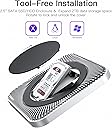
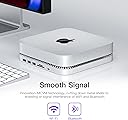
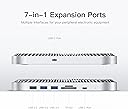
The Elecife USB-C Hub with Hard Drive Enclosure is a 7-in-1 docking station designed for Mac Mini M1 and USB-C laptops, featuring tool-free installation for 2.5-inch SATA SSD/HDD up to 2TB, dual USB 3.0/2.0 ports, TF/SD card readers, and patented MCVM technology to reduce wireless interference. Its innovative ventilation design ensures efficient heat dissipation, making it a sleek, high-performance expansion solution for professionals seeking tidy, powerful setups.



| ASIN | B096R9GV17 |
| Best Sellers Rank | 105,633 in Computers & Accessories ( See Top 100 in Computers & Accessories ) 102 in Hard Drive Docking Stations |
| Compatible devices | Mac Mini M1, MacBook Pro with USB-C, USB-C laptops |
| Data transfer rate | 480 Megabits Per Second |
| Guaranteed software updates until | unknown |
| Hard disk form factor | 2.5 Inches |
| Item weight | 300 Grams |
| Manufacturer | Elecife |
| Material | Acrylonitrile Butadiene Styrene (ABS) |
| Max number of supported devices | 1 |
| Memory storage capacity | 2 TB |
| Product Dimensions | 21 x 21 x 3 cm; 300 g |
W**R
GREAT but cheap feeling
this cleaver little device is a miracle.. up to 2TB extra storage through a ssd, micro SD, SD and usb access.. its perfect for my work flow and i mount it under my desk to keep everything tidy. i will make a note of the folowing observation that everyone states.. it feel cheaper than youd expect BUT equally you or nobody else will be moving or handling it much, i don't touch mine (even before i mounted under my desk) and so i never notice.. as it looks great :D top tip - velcro take if you want to do this :)
J**P
Reasonably priced Dock
The dock I found to be lightweight and I was concerned it may be a bit flimsy as the cover is thin plastic, time will tell. I bought this to add extra ports to my old Mac mini and provide the extra space for the external sata drive, I fitted a 1Tb drive. The purchase was so that I could change to the MI Mac mini later To be fair it works fine and actually looks good under the mac, as mine does not have a usb c port this is connected via a USB A adapter and although the port is slower it has not caused a problem. Time will tell with durability but at this time I am very satisfied.
T**6
Perfect match for the Mac mini
I have seen some reviews expressing disappointment that this device is mostly made of plastic, but there is a very good reason for that. Plastic does not interfere with the WiFi signal generated by the Mac, which is important because the dock is designed to sit intimately beneath the Mac. It LOOKS metallic, provides multiple front facing sockets, and is able to house a SATA SSD disk within it (bought separately - a 2.5" Samsung SSD). So you can backup your data and keep those messy cables out of sight. This is the perfect complement to the Mac mini. Very pleased with my purchase.
A**R
Convenient usb hub
Very professionally packaged item which functions perfectly. My only concern is that it is very light and the Mac mini rather perches on top of it than sits within it as I had hoped. Hence it has a tendency to slide around a little. My recently purchased M1 Mac mini had only 1Tb and I needed to expand it. Nowadays it seems Thunderbolt etc are just as fast as the internal SATA bus so I used this to connect an additional 1Tb drive externally and now have my X-Plane flight simulator mounted on it and it is working perfectly and very fast.
G**H
Excellent for adding storage and extra peripheral device sockets.
I have three of these - one under a Mac Studio and the others under Mac Mini PCs. Excellent devices for adding extra storage and USB sockets for peripheral devices.
N**A
After purchase...
Good solution for mac minis but the seller could be a little more upfront. Its a good product but disconnects regularly. After you receive it the seller sends "tips" that could be disclosed in description. The cable seems to be faulty by nature and some other users mention changing it to have a better performance. Its a good hub but maybe not suitable for large files due to instability.
J**E
Hugely overpriced and quite unreliable
Purchased to go with my M1 Mini as the standard ports are far from sufficient. First impressions are very good - the packaging is truly superb, but that’s where the good news ends. The device itself is plastic, which is a bit cheeky given the price point, but would be just about tolerable if it worked well. Main issue is simply that it is unreliable. Look, this device is basically a USB3 hub and a hard drive enclosure, which you can buy together for about a third the price of this thing. I have *never* had even the cheapest enclosure or hub disconnect on me, but this thing disconnects about every hour. Some reviews have suggested that using a better cable helps, but that’s not the point. This thing is premium priced and fails at the hurdle of actually working reliably. Very disappointing.
C**N
Looks great but hub creates interference with 2.4GHz Wi-Fi
The hub is a good match for the Mac Mini in appearance and size. It could do with some usable ports at the rear and additional USB C ports. Why they all have to be at the front is puzzling. The rigid plastic friction fit method that secures the SSD in the enclosure is cheap and crude. It requires a lot of pressure to insert it completely, creating unnecessary stress for the SSD. The main downfall of this unit is that interferes with the Mac Mini Wi-Fi if you're connected on the 2.4GHz frequency. The seller says that if you switch to 5GHz it will be fine but I suspect that most people do not have that option. The other way is bypass Wi-Fi altogether and use ethernet. That's, in my case, if you don't mind drilling holes in the wall and/or ceiling and going to the expense of buying a 30 metre ethernet cable to connect to the modem/router in another room. There should be a warning in the description that this unit will cause Wi-Fi interference but the seller has chosen not to do so despite being aware of the issue. The only mention of Wi-Fi is this meaningless word salad "built-in MCVM technology, can cut down metal shells to shielding or signal interference of WIFI and Bluetooth". MCVM? Would that be Mine Craft Virtual Machine or Multi Commodity Vending Machine? Answers on a postcard please.... A little honest and transparency with a note saying the unit is unsuitable for 2.4GHz Wi-Fi would be the right thing to do. Or, and this is radical, build a better unit that doesn't cause interference in the first place.
Trustpilot
3 weeks ago
2 months ago