Desertcart purchases this item on your behalf and handles shipping, customs, and support to New Zealand.
🎨 Elevate your creative hustle—shortcut mastery in the palm of your hand!
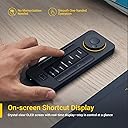
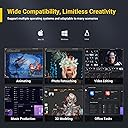
The XENCELABS Quick Keys is a premium, ambidextrous shortcut keypad featuring 40 programmable keys and a multi-function rotary dial with 4 modes. Its built-in OLED display provides instant visual feedback for each shortcut, eliminating guesswork. Compatible with Windows, macOS, and Linux, it supports seamless integration with top creative software like Photoshop, Premiere Pro, and Lightroom. Wireless Bluetooth 5.0 connectivity with a dedicated dongle ensures a fast, reliable connection, while customizable profiles can be synced across devices. Designed for digital artists, video editors, and photographers, it transforms complex workflows into fluid, efficient creative sessions.


| ASIN | B08VNCLDTK |
| Additional Features | Customizable Shortcuts |
| Antenna Location | Game |
| Best Sellers Rank | #2,287 in Computer Keyboards |
| Brand | XENCELABS |
| Built-In Media | Inc |
| Button Quantity | 8 |
| Color | Black |
| Compatible Devices | Tablet |
| Compatible Operating System Family | Linux, Windows |
| Connectivity Technology | Bluetooth |
| Customer Reviews | 4.4 out of 5 stars 1,255 Reviews |
| Enclosure Material | oled |
| External Testing Certification | Não aplicável |
| Generation | 3rd Generation |
| Global Trade Identification Number | 00850013593088 |
| Hand Orientation | Ambidextrous |
| Item Dimensions L x W x H | 6.2"L x 2.46"W x 0.47"H |
| Item Type Name | Quick Keys |
| Item Weight | 142 g |
| Keyboard Backlighting Color Support | RGB |
| Keyboard Description | Multi Functional |
| Keyboard Layout | QWERTY |
| Language | Multiple Languages |
| Manufacturer | XENCELABS |
| Mfr Part Number | K02-A |
| Minimum Required Operating System Version | Mac OS 10.13 High Sierra, Windows 7 |
| Model Name | K02-A |
| Model Number | K02-A |
| Number of Items | 7 |
| Number of Keys | 8 |
| Number of Packs | 1 |
| Power Source | Rechargeable battery |
| Recommended Uses For Product | Game |
| Special Feature | Customizable Shortcuts |
| Style Name | Quick Keys |
| Switch Type | Tactile |
| Theme | Floral |
| UPC | 850013593088 |
| Unit Count | 1 Count |
| Water Resistance Level | Not Water Resistant |
J**S
Awesome!
I love this device! Yes there are other similar devices but this one by far is superior. I had ordered one by Huion and XP- Pen has one as well but the build quality and the functionality of this device exceeds the capabilities of the other brands. The ability to use it in landscape or portrait modes with the dial to the left, right, up or down is very innovative as I'm left-handed. I also use a Logitech MX Master 3S to navigate but I'm not fond of using shortcut keys on the keyboard as I have limited space to work with. The packaging was top notch and included was everything needed to setup flawlessly. After connecting the dongle to my laptop and plugging in the USB cable all I needed to do was to download the driver and the app set me up for use immediately. After trying it out with Gimp, Sketchbook Pro and Clip Studio paint I saw how this can greatly improve my workflow. It is rather comfortable to use and it responds well. The ability to rotate my artwork helps a great deal as I'm working on artwork that I had drawn freehand and scanned. I'm using a Huion Kamvas 12 but I'm planning on purchasing a Xence labs tablet small as I have purchased a monitor to improve my posture as I often have to use my pen display on my lap which puts a strain on my neck. I got this on sale so it was a great value but at it's regular price it is a necessary piece of hardware for serious artists!
F**F
Great build quality, good customer service.
Ordered this, expecting another plastic "toy", but after reading the reviews, decided to give this a chance. I'm glad I did! It's everything it's advertised to be. From the ergonomics, to the included extras, I feel I received real value for my money. There was a minor annoyance during my registration for the warranty. When I went to their customer support page, the answer was right up front, the company owned up to their error, and the solution was clearly presented. I didn't have to go online to forums, etc. like I have had to with other products. So, let's move to the pros and cons, nothing is perfect, though this comes close. Pros: Build quality. The unit is plastic, but it feels solid in the hand, and the rubberized backing really does have a grip to it. Programmability. You aren't going to be stuck with an art app only device, this thing is a full blown macro pad, similar to a stream deck at a much lower price. Ergonomics. I can easily reach all the buttons and the wheel while holding it in my left hand. Versatility of connection. Between the cable, dongle, and included USB adapter, I can connect this to any PC device in my house. The included cable has more than enough length, almost too much. A nice change of pace these days. Charging: It can be charged from any phone charger as well as through the computer itself, or a powered USB hub. The USB adapter will work for charging as well if you have an older charger. Legibility. The LCD screen is easily readable, even in bright light. Extras. The unit I received also included everything I would need to use it, and a very nice carrying case to protect and organize it in my laptop case when traveling. They didn't make me buy even the little things I would want or need to get more money out of me. Cons: (Sort of) No bluetooth. (But I can live with that at this price) The scroll wheel could be a bit stiffer, but at least it's infinite, making it great for controlling brush size, etc without having to jump in steps. It holds it's position, but could be easily nudged unintentionally if you're a bit of a klutz like me. :) The rubberized backing loves to collect lint and debris. As mentioned before, it's really grippy!
C**N
Make sure it fits Your specific need.
Short version: The Fit & Finish of this little yet powerful unit is wicked good! The battery truly lasts a long time And there are tons of options for the buttons & wheel. However it is built for specific people/needs. And isn't a do-it all macro keypad replacement for an Elgato StreamDeck. Long version: with personal thoughts & opinions... To be completely upfront, I didn't actually end-up keeping this little device. After much trial and error it just wasn't for me. However, that said. I can definitely see its usefulness for the right person and compatible software uses. The Unit itself is built extremely well. The fit & finish is absolutely perfect! The fact that it is capable of being cordless is a HUGE desk de-clutter Bonus! And the battery actually lasts for whatever wicked long time (I've forgotten but it does last) they say it will. There are near endless possibilities for setting up macro functions! But it was the ability to have a multi-functional endless wheel that really got me excited to use this! But there was a usability problem from the get-go for me. If you setup a button or action of any kind. You MUST be within (have selected) that specific APP at the time you wish to use "that" action. The simplest example I can give is as follows. Example: Say you wanted to something like change the volume of Spotify that's playing in the background, but you were currently within Fusion360. You would need to select Spotify 1st, then the menu option would change to that APP and then go back to Fusion360, where the button/wheel options would then again switch back to Fusion. There were other things I wanted to do that it couldn't so it's not for me. But the fit & finish is just soo good and I can really see where this is likely a wicked good option for a lot of people. that I would feel bad giving it the 2-3 star rating it was for me/my use case. So I gave it a 4 instead of 5. I'm very use to the Elgato StreamDeck's versatility and this isn't quite there or that, but I really wanted the wheel & the wireless/cordless function! Guess I'll have to try out the StreamDeck Plus after all... Oh and this was $100 cheaper than a StreamDeck heh.
G**N
I Regret Not Buying This When I Got My Xencelabs Tablet!
When I changed over from an old Wacom tablet to a new Xencelabs tablet, I saw the combo kits that came with these quick keys and talked myself out it thinking they would be a waste of money. Fast forward a few months and I started to realize how helpful these could be within some of the photo editing programs that I use extensively, so I ordered it on a whim to give it a shot and was instantly impressed. The first thing I noticed unboxing it is that the build quality feels substantial, much like their tablets. It does not feel like a cheap plastic accessory at all. It was also paired up and working within just a couple minutes since I already use the Xencelabs software with my tablet. Customizing it is also fairly quick and easy to do, there are far more customization options for the buttons available than I will ever need but the way it works, you don't notice that in use so you aren't flipping through tons of modes with empty buttons when they are not in use. For any photographers that use Photo Mechanic or a similar program to do your heavy image culling, setting this up to work for your exact culling process is amazing since it is wireless. I can sit back comfortably at my desk and quickly cull through thousands of images with all the controls I need on those buttons and using the scroll wheel rather than hunched over the desk at the mouse and keyboard. No, it's not necessary; but I will admit it is a nice luxury to have! I will also say that the Xencelabs software also makes it really simple to export all the custom settings from one computer to import on another computer and be able to have all the same settings ready to go on another computer without any of the setup time.
O**L
Reliable, Customizable, and Easy to Set Up
The Xencelabs Quick Keys device is extremely well designed and works seamlessly across my setup. The buttons are responsive, the dial is smooth, and the overall build quality feels premium. It adds a lot of efficiency to my workflow, especially for creative software where shortcuts matter. Setup is simple, installation is quick, and the software is intuitive to customize. Connectivity is stable whether using it wired or wireless, with no lag or dropouts. The device is lightweight but still solid enough to stay in place during use. The display is clear, the customization options are excellent, and the available color themes for the UI are a nice touch. Overall, this is a professional-level shortcut controller that performs reliably and feels great to use.
E**E
Great Addition to my Desk Setup
Uhhh it's really Awesome! The only issue I have with it is that it doesn't always recognize a new application to swap the configuration to that set. Just Alt Tab and it fixes itself. It's great though especially as I've been using it for Zbrush and I can label all the convoluted hotkeys I have. I don't have to dig through menus anymore or write a stupid sticky note will all the hotkeys I mapped and what they do! The LED screen is definitely the best part and it's a fairly nice quality and weight. I really like the feature to swap the orientation. They really thought of everything when making this product
A**A
Pretty goo so far, current driver as of 9/8/24 causes issues
got this before the new driver update and it works pretty well, I haven't used it that extensively yet but its straightforward to set up and use, and has shortcuts for a lot of different programs built in (I was pleasantly surprised to see storyboard pro, the program i intended to use this for pre-included, although I ended up using my own shortcuts for it). The size is nice and its pretty easy to use once you adjust your muscle memory. My issues are currently: for whatever reason when you're setting up your shortcuts, there is no simple option to swap existing shortcuts between buttons or drag and drop them or anything, creating a needlessly annoying task of redoing keybinds again and again on your first setup trying to figure out what button placements are best. I have no idea why this isn't an option when you can copy and paste entire configurations, just not buttons for some reason. Additionally the device worked fine until I set up on my second computer and installed the new drivers, released on 9/5/2024, which made half the buttons completely non functional. Redownloading an old set of drivers made the device work again just fine. EDIT: 10/31/2024 . same issue still persists, on windows 11, downloading the most recent drivers (XencelabsWin_1.3.4-74) causes many of the buttons to not match what is set up in device's application, but reverting to the prior version 1.3.3-68 completely fixes this, no idea why this is happening, but otherwise the product works great and is nice for on the go work, or if you're like me and like having your display tablet really close to the edge of your desk which leaves no room for a keyboard.
C**T
Amazing product. Really well-made.
The unit is really well-made and no part of it feels "cheap". Really solid design and components, from the unit itself, to the USB cable, to the case - and even the box! The concept is great: the dial has 4 modes and the modes have multiple "sets". Setting it up and programming the dial/buttons was quick and easy. I didn't realize until a day later that it is wireless, as well as wired. Even better! The dial is smooth and the buttons are really responsive. I bought this to use on a PC with video editing software as my existing Shuttle died over the past week. Once I had everything set up, it worked really smoothly and was a pleasure to use. No regrets at all buying this. Unfortunately, I am returning this item, but NOT due to any issues or deficiencies with the product itself. It just doesn't fit my work "flow". It has to warrant me moving my hand off the mouse to use it, and it doesn't quite fit that bill for me. I wanted to give it the 5-star rating it deserved and comment about what a great device it is before the return. Very few hardware returns have brought a tear to my eye, but this one does. LOL. I hate seeing it go, but I know it's out there if some other future need arises that this would work perfectly for.
B**N
Başarılı.
macOS işletim sisteminde kullanıyorum. En çok kullandığım programların kısayollarını, çeşitli web sitelerini ve sistem araçlarını kısayol olarak tanımladım. Çalışma mantığını anladığınızda kolaylıkla programlayabiliyorsunuz. Ayrıca bilgisayardan video ya da film izlerken de uzaktan kumanda olarak programladım, ileri, geri, dur ve başla butonları ile ses ayarı ataması yaptım. Hem işte hem de evde vazgeçilmez bir araç oldu. Uzaktan kontrol işlerinin hepsini yapabiliyor. Sunumları oynatma ve durdurma, video oynatma ve durdurma, programları ve web sitelerini açma, ses ayarı ve daha birçok iş için kullanıyorum. Dilerseniz bilgisayarda yazdığınız betik ya da kestirmeleri de çalıştırıyor. Benzer ürünler içinde en iyisi bu, araştırmalarım ve deneyimim bunu gösteriyor. Almayı düşünenler için tavsiye ederim.
A**R
رائع
ممتاز كما في الوصف
G**O
Prático e objetivo.
Excelente produto e bem melhor do que equipamentos da Elgato destinados a streaming deck. Cheguei a esse dispositivo buscando algo em que eu pudesse facilitar a abertura de certas aplicações em meu computador. O suporte ao Linux pesou e muito na decisão e foi determinante. Esse teclado programável vem com o adaptador sem fio e um estojo para transporte. Ponto negativo, que não tira estrela nenhuma, a Microsoft fez o favor de bloquear alguns recursos do Windows, principalmente a abertura do Teams e apps instalados através da loja. Portanto, não é possível add alguns apps como atalho. Outra coisa que me incomodou, mas pode ser contornado, a impossibilidade de controle do volume como atalho no computador usando o lixo do Windows. Em breve estarei migrando para o Linux e será mais fácil realizar certas ações e criação de macros.
D**Y
Good but not very
Overall a good product but I didnt like the buttons. Hard to press and not responsive as I’d like.
熊**助
I LOVE IT! - I wish I knew about this earlier.
This product has changed my life for the better. It easily saves me 40 minutes a day. The initial setup is a little confusing but the product really delivers. I mainly use this with Davinci resolve to supplement the speed editor. This allows me to work without a keyboard. If I were to change anything, I would -Make the screen slightly taller -Add two more buttons -Make the transceiver USB-C The transceiver comes with a USB -C adapter, but I would much rather it come in USB-C with a usb-A adapter. Either that or add bluetooth support. It would be nice to not need it.
Trustpilot
2 weeks ago
1 month ago